iOS App Clips
Mit App Clips können Benutzer eine Aufgabe schnell erledigen, ohne Ihre vollständige App herunterladen zu müssen. Mit Pushwoosh können Sie Push-Benachrichtigungen an App-Clip-Benutzer senden – iOS gewährt automatisch einen 8-stündigen Benachrichtigungszugriff, wenn der App Clip geöffnet wird.
Was Sie benötigen
Anchor link to- Pushwoosh iOS SDK 7.0.33+
- Xcode 15+
- Eine separate Pushwoosh-Anwendung für Ihren App Clip (unterschiedliche Bundle-ID = separate App)
- Ein echtes Gerät zum Testen (Push-Token funktionieren nicht im Simulator)
1. Eine Pushwoosh-Anwendung erstellen
Anchor link toIhr App Clip hat eine andere Bundle-ID (z. B. com.yourapp.Clip), daher benötigt er eine separate Pushwoosh-App mit einem eigenen APNs-Schlüssel.
- Gehen Sie zum Pushwoosh Control Panel
- Erstellen Sie eine neue Anwendung mit der Bundle-ID des App Clips
- Laden Sie Ihren APNs-Authentifizierungsschlüssel hoch
- Kopieren Sie den Application Code und den API Token
2. Ein App-Clip-Ziel erstellen
Anchor link to- In Xcode: File → New → Target → App Clip
- Fügen Sie die Push Notifications-Fähigkeit zum App-Clip-Ziel hinzu
Detaillierte Screenshots zum Hinzufügen von Fähigkeiten finden Sie in der Anleitung zur Basisin-Integration.
3. Pushwoosh-Frameworks hinzufügen
Anchor link toFügen Sie im App-Clip-Ziel unter Build Phases → Link Binary With Libraries Folgendes hinzu:
PushwooshFramework.frameworkPushwooshCore.frameworkPushwooshBridge.framework
4. Info.plist konfigurieren
Anchor link to<!-- Pushwoosh --><key>Pushwoosh_APPID</key><string>XXXXX-XXXXX</string><key>Pushwoosh_API_TOKEN</key><string>YOUR_API_TOKEN</string>
<!-- Ephemeral push (8-hour auto-grant, no dialog) --><key>NSAppClip</key><dict> <key>NSAppClipRequestEphemeralUserNotification</key> <true/> <key>NSAppClipRequestLocationConfirmation</key> <false/></dict>
<key>UIBackgroundModes</key><array> <string>remote-notification</string></array>5. Das SDK initialisieren
Anchor link toimport SwiftUIimport PushwooshFramework
class AppClipDelegate: NSObject, UIApplicationDelegate, PWMessagingDelegate {
func application(_ application: UIApplication, didFinishLaunchingWithOptions launchOptions: [UIApplication.LaunchOptionsKey: Any]? = nil) -> Bool { Pushwoosh.configure.delegate = self Pushwoosh.configure.registerForPushNotifications() return true }
func application(_ application: UIApplication, didRegisterForRemoteNotificationsWithDeviceToken deviceToken: Data) { Pushwoosh.configure.handlePushRegistration(deviceToken) }
func application(_ application: UIApplication, didFailToRegisterForRemoteNotificationsWithError error: Error) { Pushwoosh.configure.handlePushRegistrationFailure(error as NSError) }
func application(_ application: UIApplication, didReceiveRemoteNotification userInfo: [AnyHashable: Any], fetchCompletionHandler completionHandler: @escaping (UIBackgroundFetchResult) -> Void) { Pushwoosh.configure.handlePushReceived(userInfo) completionHandler(.noData) }
func pushwoosh(_ pushwoosh: Pushwoosh, onMessageOpened message: PWMessage) { print("Push opened: \(message.payload ?? [:])") }}
@mainstruct YourAppClip: App { @UIApplicationDelegateAdaptor(AppClipDelegate.self) var appDelegate
var body: some Scene { WindowGroup { ContentView() } }}import UIKitimport PushwooshFramework
@mainclass AppDelegate: UIResponder, UIApplicationDelegate, PWMessagingDelegate {
func application(_ application: UIApplication, didFinishLaunchingWithOptions launchOptions: [UIApplication.LaunchOptionsKey: Any]?) -> Bool { Pushwoosh.configure.delegate = self Pushwoosh.configure.registerForPushNotifications() return true }
func application(_ application: UIApplication, didRegisterForRemoteNotificationsWithDeviceToken deviceToken: Data) { Pushwoosh.configure.handlePushRegistration(deviceToken) }
func application(_ application: UIApplication, didFailToRegisterForRemoteNotificationsWithError error: Error) { Pushwoosh.configure.handlePushRegistrationFailure(error as NSError) }
func application(_ application: UIApplication, didReceiveRemoteNotification userInfo: [AnyHashable: Any], fetchCompletionHandler completionHandler: @escaping (UIBackgroundFetchResult) -> Void) { Pushwoosh.configure.handlePushReceived(userInfo) completionHandler(.noData) }
func pushwoosh(_ pushwoosh: Pushwoosh, onMessageOpened message: PWMessage) { print("Push opened: \(message.payload ?? [:])") }}Mit ephemeren Berechtigungen gewährt iOS automatisch für 8 Stunden Push-Zugriff. Wenn Sie den ephemeren Modus ohne Anzeige eines Berechtigungsdialogs verwenden möchten, rufen Sie UIApplication.shared.registerForRemoteNotifications() direkt anstelle von Pushwoosh.configure.registerForPushNotifications() auf.
Um eine dauerhafte Push-Berechtigung anzufordern (Standarddialog), verwenden Sie Pushwoosh.configure.registerForPushNotifications() wie oben gezeigt.
Ephemere Push-Berechtigungen
Anchor link toWenn ein Benutzer Ihren App Clip öffnet, gewährt iOS für 8 Stunden Zugriff auf Push-Benachrichtigungen, ohne zu fragen. Nach 8 Stunden läuft die Berechtigung ab. Der Benutzer muss den App Clip erneut öffnen, um weitere 8 Stunden zu erhalten.
Um einen Push-Token für 8 Stunden zu erhalten, ohne einen Berechtigungsdialog anzuzeigen:
UIApplication.shared.registerForRemoteNotifications()Um einen dauerhaften Push-Token zu erhalten (zeigt den Standard-Berechtigungsdialog an):
Pushwoosh.configure.registerForPushNotifications()Einschränkungen
Anchor link to| Einschränkung | Details |
|---|---|
| Keine Rich Notifications | App Clips können keine Notification Service Extension enthalten – keine Bilder, keine Communication Notifications |
| Größenbeschränkung | 15 MB (iOS 16) / 50 MB (iOS 17+) |
| 8-Stunden-Push-Fenster | Ephemere Berechtigung läuft nach 8 Stunden ab |
| Keine Hintergrundverarbeitung | Stille Push-Benachrichtigungen (Silent Push) haben eine eingeschränkte Funktionalität |
| Geräte-ID | identifierForVendor gibt Nullen zurück – das SDK behandelt dies automatisch (7.0.33+) |
Wie es aussieht
Anchor link to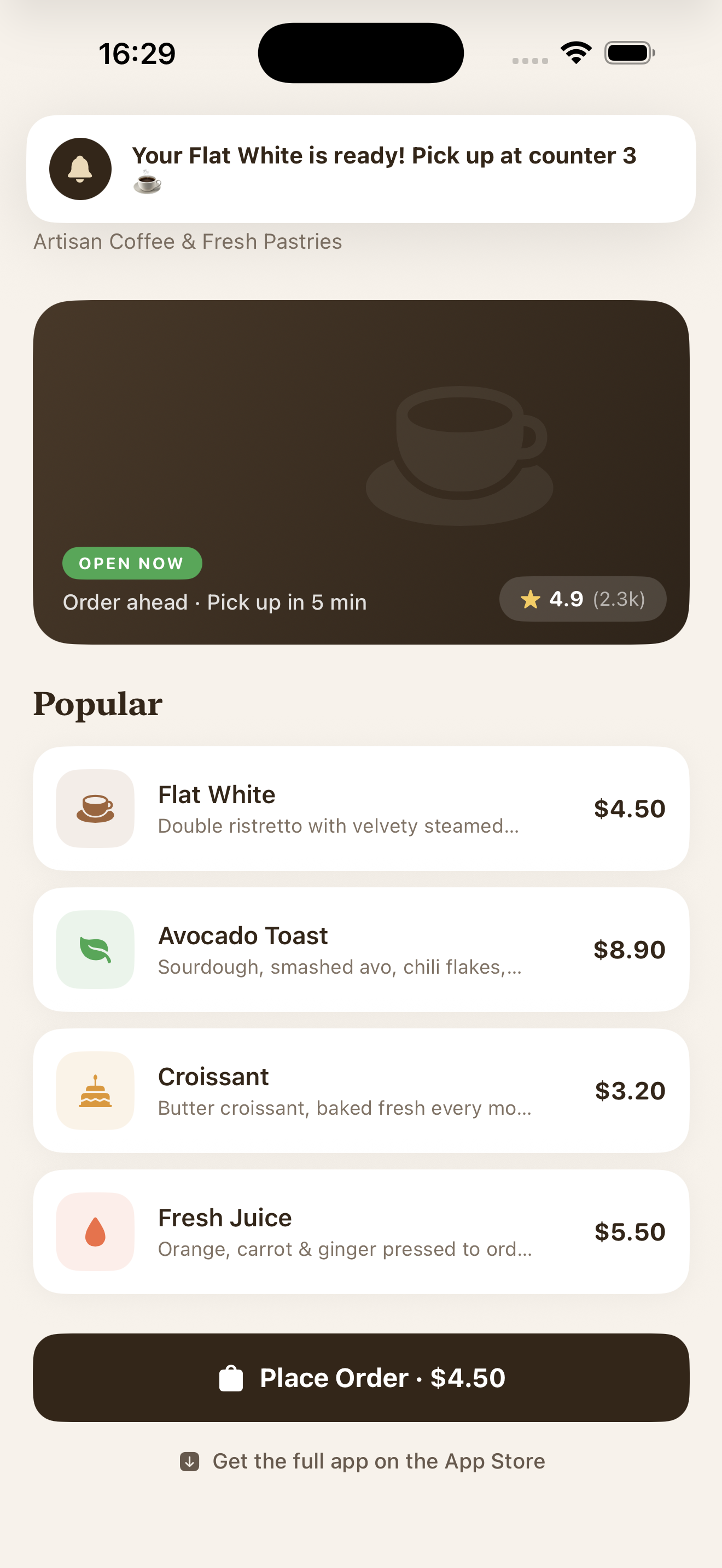
Push-Benachrichtigung, die in einem App Clip mit ephemeren Berechtigungen empfangen wurde