Loyalty and win-back
이 콘텐츠는 아직 귀하의 언어로 제공되지 않습니다.
These recipes cover the shoppers who ordered before: the ones who keep ordering and the ones who stopped. Before you build them, read the best practices for every journey.
Early access for loyal customers
Anchor link to- Use it when: you start a sale or a collection and want your best customers to hear first.
- Starts when: a shopper is in the VIP customers segment or the Repeat buyers segment. Pushwoosh checks the segment on the date you set.
- What it does: sends one push that announces early access, one day before the public announcement.
- Content to prepare: a push preset with the announcement and a deep link to the sale.
- Needs: the
loyalty_tiertag for the VIP segment, or theOrder placedevent for the Repeat buyers segment.
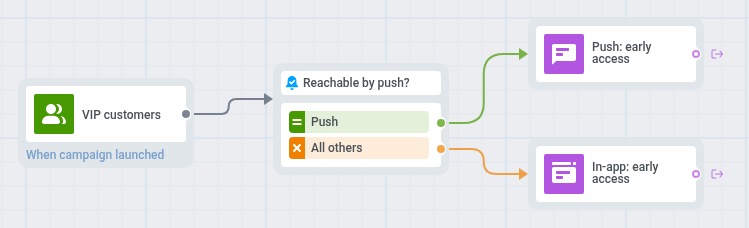
- On the journey canvas, add an Audience-based entry on the segment you chose.
- Set the entry schedule to One-time entry and choose Schedule for a specific day: the day before the public announcement.
- Add a Reachability check. For shoppers reachable by push, add a push with the preset that opens the sale, for example: “Early access: the sale opens for you today.”
- For the others, add an In-app element with the same text and set In-app expiration to 1 day.
- On the canvas, click Settings and select Conversion goals.
- In the goal, choose
Order placedto count the orders that the announcement brings.
Build a copy of this journey for each sale. To announce the same sale to everyone, send a one-time push to a segment.
Win-back for inactive customers
Anchor link to- Use it when: customers who ordered before stopped ordering.
- Starts when: a shopper enters the At-risk customers segment. Pushwoosh checks the segment on a schedule you set, for example weekly, and every shopper in the segment enters at each check.
- What it does: sends a soft reminder first. If the shopper does not order within 7 days, it sends a push with an offer.
- Content to prepare: a push preset with the reminder, a push preset with the offer, and an email for shoppers who turned off notifications.
- Needs: the
Order placedevent, and the shopper’s email address registered in Pushwoosh under their User ID, for shoppers who turned off notifications. See Email. For a message about the shopper’s category, thefavorite_categorytag.

- On the journey canvas, add an Audience-based entry on the At-risk customers segment.
- Set the entry schedule to Recurring entry and choose Periodically, for example weekly.
- On the canvas, click Settings and select Campaign Entry Limit.
- Choose Custom period and set Once in to 3 months, so a shopper who ignores the reminder does not get it every week. A shopper can stay in At-risk customers for up to four months, so one who still has not ordered gets the win-back again after about 3 months.
- Add a Reachability check. For shoppers reachable by push, add a push with a reminder that mentions the category, for example: “New arrivals in your favorite category.” To name the category, add a Dynamic content placeholder for the
favorite_categorytag. - For the others, add an email with the same reminder. The journey takes in only devices with a push token, so this branch reaches shoppers who turned off notifications and have an email address registered in Pushwoosh under the same User ID. Shoppers without one get no reminder.
- After the reminder, add a Wait for Trigger step on
Order placedand set the waiting period to 7 days. Leave its Trigger group 1 branch empty, so shoppers who ordered leave the journey without more messages. - On the Not triggered branch, add a push with the offer, for example: “We saved 10% for your next order.” Only shoppers who can get push receive the offer. To reach the others, add a Reachability check before the offer and an email with the same offer on its All others branch.
- On the canvas, click Settings and select Conversion goals.
- In the goal, choose
Order placedand select End journey after this event.
To win back Lapsed customers, copy the journey, replace the entry segment, and make the offer bigger. These shoppers have been away longer, so a plain reminder is less likely to work.