Покупки
Эти рецепты относятся к этапу покупки: игроки, которые готовы тратить деньги или уже платили. Прежде чем их создавать, прочитайте рекомендации для каждого Journey.
Предложение первой покупки вовлечённым неплатящим игрокам
Anchor link to- Когда использовать: игроки увлечены игрой, но ни разу не платили.
- Когда запускается: игрок попадает в сегмент Вовлечённые неплатящие игроки. Pushwoosh проверяет сегмент по заданному вами расписанию, например раз в неделю.
- Что делает: показывает in-app с предложением стартового набора, а если игрок не купил, через 1 день отправляет push-напоминание. Сегмент требует 10 пройденных уровней за 14 дней, поэтому предложение получают только увлечённые игроки, а не те, кто только что установил игру.
- Какой контент подготовить: шаблон in-app с предложением стартового набора и пресет push с напоминанием.
- Что нужно: настроенное событие
PW_InAppPurchase. Без него в сегмент попадают и игроки, которые платили, а push-напоминание получают и покупатели.
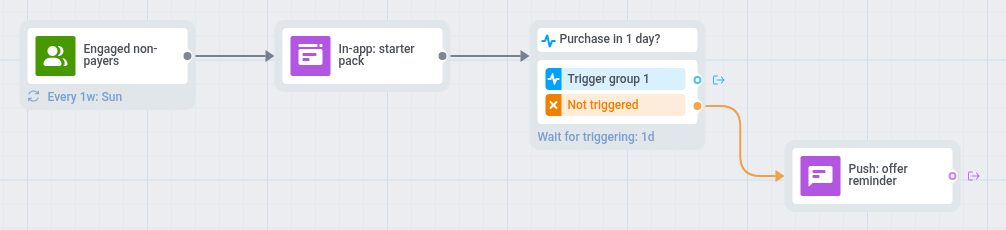
- На холсте Journey добавьте Вход на основе аудитории по сегменту Вовлечённые неплатящие игроки.
- В расписании входа выберите Повторяющийся вход и Периодически, например раз в неделю.
- Откройте Настройки, выберите Ограничение входа в кампанию и задайте раз в месяц, чтобы игрок, который проигнорировал предложение, не получал его каждую неделю.
- Добавьте элемент In-app с предложением стартового набора валюты, например: «Стартовый набор: 500 монет по специальной цене». Сообщение появится, когда игрок откроет игру.
- Добавьте шаг Ожидание триггера по событию
PW_InAppPurchaseи задайте период ожидания 1 день. Ветку Группа триггеров 1 оставьте пустой. - В ветке Не запущено добавьте push, который напоминает о предложении, например: «Ваш стартовый набор всё ещё доступен». Его получат и игроки, которые видели in-app, но не купили, и игроки, которые с тех пор не открывали игру.
- Откройте Настройки, выберите Цели конверсии, выберите
PW_InAppPurchaseи отметьте Завершить путь после этого события.
Игроки без push видят только предложение в in-app, потому что второй in-app просто повторил бы его.
Предложение второй покупки
Anchor link to- Когда использовать: вы хотите, чтобы игроки, заплатившие один раз, купили снова.
- Когда запускается: игрок совершает покупку (
PW_InAppPurchase). - Что делает: проверяет, первая ли это покупка игрока. Впервые заплатившим через несколько минут после покупки показывает in-app с благодарностью, а через 3 дня отправляет push с предложением второй покупки, если игрок не купил снова раньше.
- Какой контент подготовить: шаблон in-app с благодарностью и пресет push с предложением.
- Что нужно: настроенное событие
PW_InAppPurchaseи сегмент Впервые заплатившие.

- На холсте Journey добавьте Вход на основе триггера по событию
PW_InAppPurchase. - Добавьте Временную задержку с фиксированной длительностью 5 минут. Сегменты учитывают новое событие примерно через минуту после его поступления, поэтому без задержки разделение может не заметить первую покупку.
- Добавьте Разделение по условию, выберите Сегмент и укажите сегмент Впервые заплатившие. Ветку Все остальные пользователи оставьте пустой: игрокам, которые платят повторно, сообщение не нужно.
- В ветке Пользователи в сегменте добавьте элемент In-app с благодарностью игроку, например: «Спасибо за поддержку! Вот бонус для следующего забега». Для параметра Срок действия в приложении задайте 1 день.
- Добавьте шаг Ожидание триггера по событию
PW_InAppPurchaseи задайте период ожидания 3 дня. Его ветку Группа триггеров 1 оставьте пустой. - В ветке Не запущено добавьте Проверку доступности, а для игроков, доступных по push, — push с предложением, например: «В магазине вас ждёт особый набор».
- Откройте Настройки, выберите Цели конверсии, выберите
PW_InAppPurchaseи отметьте Завершить путь после этого события.
Напоминание после выхода из магазина
Anchor link to- Когда использовать: игроки открывают игровой магазин и уходят без покупки.
- Когда запускается: игрок открывает магазин (
Store opened). - Что делает: ждёт 1 час после того, как игрок открыл магазин, и, если он ничего не купил, отправляет напоминание через push или in-app. Игроки, совершившие покупку, напоминание не получают.
- Какой контент подготовить: пресет push и шаблон in-app с одинаковым напоминанием.
- Что нужно: настроенное событие
PW_InAppPurchase, потому что Journey проверяет, была ли покупка после посещения магазина.
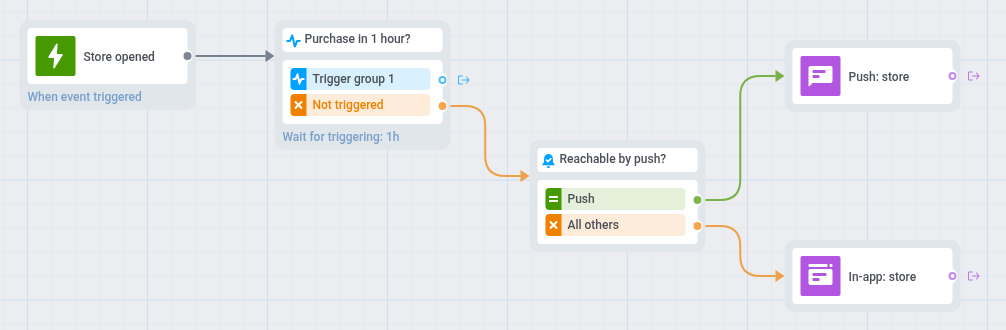
- На холсте Journey добавьте Вход на основе триггера по событию
Store opened. - Добавьте шаг Ожидание триггера по событию
PW_InAppPurchaseи задайте период ожидания 1 час. Ветку Группа триггеров 1 оставьте пустой. - В ветке Не запущено добавьте Проверку доступности.
- Для игроков, доступных по push, добавьте push с диплинком на магазин, например: «Всё ещё думаете? Ваш набор ждёт в магазине».
- Для остальных добавьте элемент In-app с тем же напоминанием и задайте для параметра Срок действия в приложении значение 1 день. Игрок увидит его, когда в следующий раз откроет игру или вернётся в неё.
- Откройте Настройки, выберите Ограничение входа в кампанию и задайте раз в неделю, чтобы игрок, который заглядывает в магазин каждый день, не получал напоминание каждый день.
- Откройте Настройки, выберите Цели конверсии, выберите
PW_InAppPurchaseи отметьте Завершить путь после этого события.