Руководство по базовой интеграции iOS SDK 7.0+
В этом разделе содержится информация о том, как интегрировать Pushwoosh SDK в ваше iOS-приложение.
Предварительные требования
Anchor link toДля интеграции Pushwoosh iOS SDK в ваше приложение вам потребуется следующее:
Шаги интеграции
Anchor link to1. Установка
Anchor link toВы можете интегрировать Pushwoosh SDK в ваше приложение, используя Swift Package Manager или CocoaPods.
Swift Package Manager
Anchor link toВ разделе Package Dependencies добавьте следующий пакет:
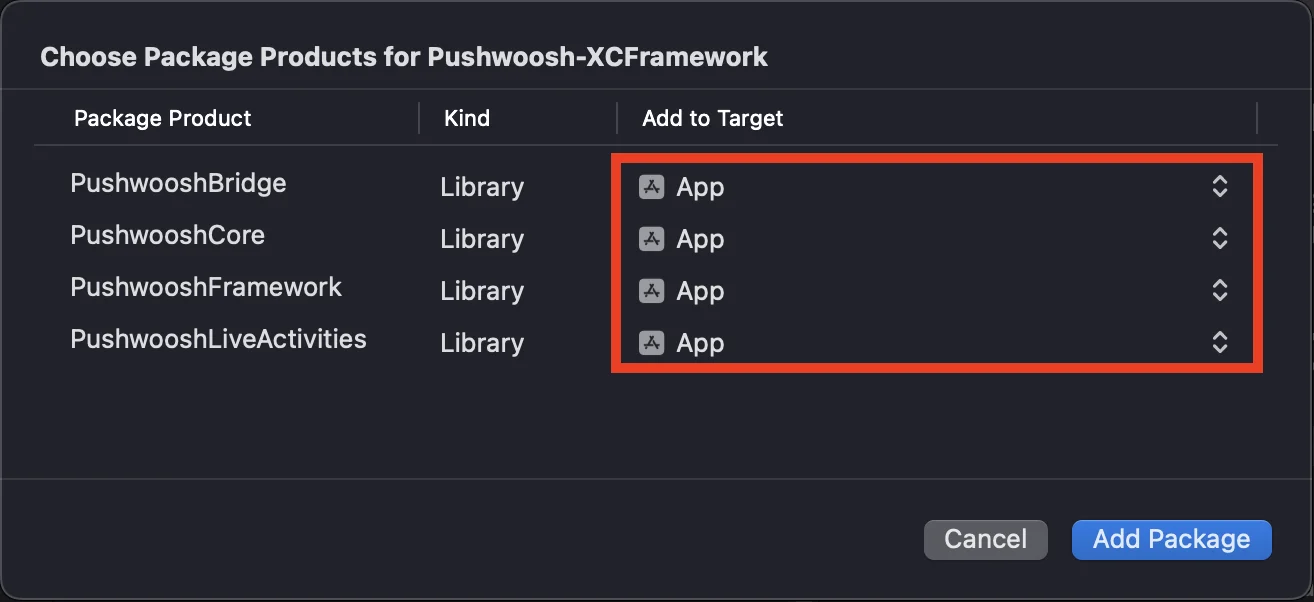
https://github.com/Pushwoosh/Pushwoosh-XCFrameworkЧтобы использовать Pushwoosh iOS SDK, убедитесь, что при интеграции через Swift Package Manager в таргет вашего приложения добавлены следующие три фреймворка:
PushwooshFrameworkPushwooshCorePushwooshBridge
CocoaPods
Anchor link toОткройте ваш Podfile и добавьте зависимость:
# Uncomment the next line to define a global platform for your project# platform :ios, '9.0'
target 'MyApp' do  # Comment the next line if you don't want to use dynamic frameworks  use_frameworks!
  pod 'PushwooshXCFramework'
end
Затем в терминале выполните следующую команду для установки зависимостей:
pod install2. Capabilities
Anchor link toЧтобы включить Push-уведомления в вашем проекте, необходимо добавить определенные capabilities (возможности).
В разделе Signing & Capabilities добавьте следующие capabilities:
Push NotificationsBackground Modes. После добавления этой возможности установите флажокRemote notifications.
Если вы планируете использовать Time Sensitive Notifications (iOS 15+), также добавьте capability Time Sensitive Notifications.
3. Код инициализации
Anchor link toAppDelegate
Anchor link toДобавьте следующий код в ваш класс AppDelegate:
import SwiftUIimport PushwooshFramework
@mainstruct MyApp: App {    // Register AppDelegate as UIApplicationDelegate    @UIApplicationDelegateAdaptor(AppDelegate.self) var appDelegate
    var body: some Scene {        WindowGroup {            ContentView()        }    }}
class AppDelegate: NSObject, UIApplicationDelegate, PWMessagingDelegate {
    func application(_ application: UIApplication, didFinishLaunchingWithOptions launchOptions: [UIApplication.LaunchOptionsKey: Any]?) -> Bool {        // Initialization code        // Set custom delegate for push handling        Pushwoosh.configure.delegate = self
        // Register for push notifications        Pushwoosh.configure.registerForPushNotifications()
        return true    }
    // Handle token received from APNS    func application(_ application: UIApplication, didRegisterForRemoteNotificationsWithDeviceToken deviceToken: Data) {        Pushwoosh.configure.handlePushRegistration(deviceToken)    }
    // Handle token receiving error    func application(_ application: UIApplication, didFailToRegisterForRemoteNotificationsWithError error: Error) {        Pushwoosh.configure.handlePushRegistrationFailure(error)    }
    //for silent push notifications    func application(_ application: UIApplication, didReceiveRemoteNotification userInfo: [AnyHashable: Any], fetchCompletionHandler completionHandler: @escaping (UIBackgroundFetchResult) -> Void) {        Pushwoosh.configure.handlePushReceived(userInfo)        completionHandler(.noData)    }
    // Fired when a push is received    func pushwoosh(_ pushwoosh: Pushwoosh, onMessageReceived message: PWMessage) {        print("onMessageReceived: ", message.payload!.description)    }
    // Fired when a user taps the notification    func pushwoosh(_ pushwoosh: Pushwoosh, onMessageOpened message: PWMessage) {        print("onMessageOpened: ", message.payload!.description)    }}
struct ContentView: View {    var body: some View {        Text("Pushwoosh with SwiftUI")            .padding()    }}
import PushwooshFramework
@UIApplicationMainclass AppDelegate: UIResponder, UIApplicationDelegate, PWMessagingDelegate {
var window: UIWindow?
func application(_ application: UIApplication, didFinishLaunchingWithOptions launchOptions: [UIApplication.LaunchOptionsKey: Any]?) -> Bool { //initialization code //set custom delegate for push handling, in our case AppDelegate Pushwoosh.configure.delegate = self;
//register for push notifications Pushwoosh.configure.registerForPushNotifications()
return true }
//handle token received from APNS func application(_ application: UIApplication, didRegisterForRemoteNotificationsWithDeviceToken deviceToken: Data) { Pushwoosh.configure.handlePushRegistration(deviceToken) }
//handle token receiving error func application(_ application: UIApplication, didFailToRegisterForRemoteNotificationsWithError error: Error) { Pushwoosh.configure.handlePushRegistrationFailure(error); }
//for silent push notifications func application(_ application: UIApplication, didReceiveRemoteNotification userInfo: [AnyHashable : Any], fetchCompletionHandler completionHandler: @escaping (UIBackgroundFetchResult) -> Void) { Pushwoosh.configure.handlePushReceived(userInfo) completionHandler(.noData) }
//this event is fired when the push gets received func pushwoosh(_ pushwoosh: Pushwoosh, onMessageReceived message: PWMessage) { print("onMessageReceived: ", message.payload!.description) }
// Fired when a user taps the notification func pushwoosh(_ pushwoosh: Pushwoosh, onMessageOpened message: PWMessage) { print("onMessageOpened: ", message.payload!.description) }}#import <PushwooshFramework/PushwooshFramework.h>
@interface AppDelegate () <PWMessagingDelegate>
@end
@implementation AppDelegate
- (BOOL)application:(UIApplication *)application didFinishLaunchingWithOptions:(NSDictionary *)launchOptions { //-----------PUSHWOOSH PART-----------
// set custom delegate for push handling, in our case AppDelegate [[Pushwoosh configure] setDelegate:self];
//register for push notifications! [[Pushwoosh configure] registerForPushNotifications];
return YES;}
//handle token received from APNS- (void)application:(UIApplication *)application didRegisterForRemoteNotificationsWithDeviceToken:(NSData *)deviceToken { [[Pushwoosh configure] handlePushRegistration:deviceToken];}
//handle token receiving error- (void)application:(UIApplication *)application didFailToRegisterForRemoteNotificationsWithError:(NSError *)error { [[Pushwoosh configure] handlePushRegistrationFailure:error];}
//for silent push notifications- (void)application:(UIApplication *)application didReceiveRemoteNotification:(NSDictionary *)userInfo fetchCompletionHandler:(void (^)(UIBackgroundFetchResult))completionHandler { [[Pushwoosh configure] handlePushReceived:userInfo]; completionHandler(UIBackgroundFetchResultNoData);}
//this event is fired when the push gets received- (void)pushwoosh:(Pushwoosh *)pushwoosh onMessageReceived:(PWMessage *)message { NSLog(@"onMessageReceived: %@", message.payload);}
//this event is fired when user taps the notification- (void)pushwoosh:(Pushwoosh *)pushwoosh onMessageOpened:(PWMessage *)message { NSLog(@"onMessageOpened: %@", message.payload);}
@endInfo.plist
Anchor link toВ вашем Info.plist:
- установите для ключа
Pushwoosh_APPIDзначение Pushwoosh Application Code. - установите для ключа
Pushwoosh_API_TOKENзначение Pushwoosh Device API Token
4. Отслеживание доставки сообщений
Anchor link toPushwoosh поддерживает отслеживание событий доставки для push-уведомлений через Notification Service Extension
Добавление Notification Service Extension
Anchor link to- В Xcode выберите File > New > Target…
- Выберите Notification Service Extension и нажмите Next.
- Введите имя таргета и нажмите Finish.
- При запросе на активацию нажмите Cancel.
Зависимости для Notification Service Extension (только для CocoaPods)
Anchor link toПримечание: Если вы используете Swift Package Manager для управления зависимостями, вы можете пропустить этот шаг, так как зависимости добавляются автоматически.
Откройте ваш Podfile и добавьте зависимость для таргета:
# Uncomment the next line to define a global platform for your project# platform :ios, '9.0'
target 'MyApp' do  # Comment the next line if you don't want to use dynamic frameworks  use_frameworks!
  pod 'PushwooshXCFramework'
end
target 'MyAppNotificationExtension' do  use_frameworks!
  pod 'PushwooshXCFramework'
end
Выполните следующую команду в терминале, чтобы обновить зависимости:
pod updateДобавление Pushwoosh SDK в Notification Service Extension
Anchor link toЗамените сгенерированный класс NotificationService подклассом PushwooshNotificationServiceExtension. После этого Pushwoosh будет обрабатывать все, что нужно для push-уведомления — отправку события о доставке, подсчет бейджей, загрузку медиавложений и обязательную обработку таймаута serviceExtensionTimeWillExpire. Никакого другого кода не требуется.
import PushwooshFramework
class NotificationService: PushwooshNotificationServiceExtension {}
#import <PushwooshFramework/PushwooshFramework.h>
@interface NotificationService : PushwooshNotificationServiceExtension@end
@implementation NotificationService@endПримечание: вы можете полностью пропустить исходный файл — установите NSExtensionPrincipalClass расширения в его Info.plist на PushwooshNotificationServiceExtension и не пишите никакого кода.
Чтобы изменить уведомление перед его отображением, переопределите didReceive(_:withContentHandler:), вызовите super со своим собственным обработчиком контента, измените контент внутри него, а затем передайте его исходному обработчику. Pushwoosh по-прежнему будет выполнять отправку события о доставке, обработку бейджа, вложения и таймаута.
import UserNotificationsimport PushwooshFramework
class NotificationService: PushwooshNotificationServiceExtension {
    override func didReceive(_ request: UNNotificationRequest,                             withContentHandler contentHandler: @escaping (UNNotificationContent) -> Void) {        super.didReceive(request) { content in            let mutable = (content.mutableCopy() as? UNMutableNotificationContent) ?? content            // Modify the notification content here...            contentHandler(mutable)        }    }
}
#import <PushwooshFramework/PushwooshFramework.h>
@interface NotificationService : PushwooshNotificationServiceExtension@end
@implementation NotificationService
- (void)didReceiveNotificationRequest:(UNNotificationRequest *)request withContentHandler:(void (^)(UNNotificationContent * _Nonnull))contentHandler { [super didReceiveNotificationRequest:request withContentHandler:^(UNNotificationContent *content) { UNMutableNotificationContent *mutable = [content mutableCopy]; // Modify the notification content here... contentHandler(mutable); }];}
@endInfo.plist
Anchor link toРасширение наследует Pushwoosh_APPID (и другие ключи Pushwoosh_*) от основного приложения, поэтому вам не нужно дублировать их в Info.plist расширения. Добавляйте ключ туда только если хотите переопределить значение основного приложения.
Для синхронизации счетчика бейджей и настроек обратного прокси с приложением, используйте общую App Group для приложения и расширения. Добавьте capability App Groups к обоим таргетам, затем установите ID App Group в Info.plist основного приложения:
PW_APP_GROUPS_NAME- идентификатор вашей App Group (например,group.com.example.app).
Расширение наследует это значение от основного приложения, поэтому вам не нужно повторять его в Info.plist расширения — добавляйте его туда только для переопределения. В качестве альтернативы, вы можете указать его в коде, переопределив pushwooshAppGroupsName.
5. Запуск проекта
Anchor link to- Соберите и запустите проект.
- Перейдите в Панель управления Pushwoosh и отправьте push-уведомление.
- Вы должны увидеть уведомление в приложении.
Расширенная интеграция Pushwoosh iOS
Anchor link toНа этом этапе вы уже интегрировали SDK и можете отправлять и получать push-уведомления. Теперь давайте рассмотрим основной функционал
Push-уведомления
Anchor link toВ Pushwoosh SDK есть два колбэка, предназначенных для обработки push-уведомлений:
onMessageReceived: Этот метод вызывается при получении push-уведомления.onMessageOpened: Этот метод вызывается, когда пользователь взаимодействует с уведомлением (открывает его).
Эти колбэки позволяют разработчикам управлять получением push-уведомлений и взаимодействием пользователей с ними в своих приложениях
import PushwooshFramework
class AppDelegate: NSObject, UIApplicationDelegate, PWMessagingDelegate {
    func application(_ application: UIApplication, didFinishLaunchingWithOptions launchOptions: [UIApplication.LaunchOptionsKey : Any]? = nil) -> Bool {        Pushwoosh.configure.delegate = self;    }
    func pushwoosh(_ pushwoosh: Pushwoosh, onMessageOpened message: PWMessage) {        if let payload = message.payload {            print("onMessageOpened: \(payload)")        }    }
    func pushwoosh(_ pushwoosh: Pushwoosh, onMessageReceived message: PWMessage) {        if let payload = message.payload {            print("onMessageReceived: \(payload)")        }    }}
#import <PushwooshFramework/PushwooshFramework.h>
@interface AppDelegate () <PWMessagingDelegate>
@end
@implementation AppDelegate
- (BOOL)application:(UIApplication *)application didFinishLaunchingWithOptions:(NSDictionary *)launchOptions { [[Pushwoosh configure] setDelegate:self]; return YES;}
- (void)pushwoosh:(Pushwoosh *)pushwoosh onMessageOpened:(PWMessage *)message { if (message.payload) { NSLog(@"onMessageOpened: %@", message.payload); }}
- (void)pushwoosh:(Pushwoosh *)pushwoosh onMessageReceived:(PWMessage *)message { if (message.payload) { NSLog(@"onMessageReceived: %@", message.payload); }}@endКонфигурация пользователя
Anchor link toСосредоточившись на поведении и предпочтениях отдельных пользователей, вы можете предоставлять персонализированный контент, что приведет к повышению удовлетворенности и лояльности пользователей.
import PushwooshFramework
class Registration {
    func afterUserLogin(user: User) {        let pushwoosh = Pushwoosh.configure        // set user ID        if let userId = user.userId {            pushwoosh.setUserId(userId)        }
        // set user email        if let userEmail = user.email {            pushwoosh.setEmail(userEmail)        }
        // set user SMS number        if let userSmsNumber = user.SmsNumber {            pushwoosh.registerSmsNumber(userSmsNumber)        }
        // set user WhatsApp number        if let userWhatsAppNumber = user.WhatsAppNumber {            pushwoosh.registerSmsNumber(userWhatsAppNumber)        }
        // setting additional user information as tags for Pushwoosh        if let age = user.userDetails.age,            let name = user.userDetails.userName,            let lastLogin = user.userDetails.lastLoginDate {            pushwoosh.setTags([                "age": age,                "name": name,                "last_login": lastLogin            ])        }    }}
#import <PushwooshFramework/PushwooshFramework.h>
@implementation Registration
- (void)afterUserLogin:(User *)user { Pushwoosh *pushwoosh = [Pushwoosh configure];
// set user ID if (user.userId) { [pushwoosh setUserId:user.userId]; }
// set user email if (user.email) { [pushwoosh setEmail:user.email]; }
// setting additional user information as tags for Pushwoosh if (user.userDetails.age && user.userDetails.userName && user.userDetails.lastLoginDate) { NSDictionary *tags = @{ @"age": user.userDetails.age, @"name": user.userDetails.userName, @"last_login": user.userDetails.lastLoginDate }; [pushwoosh setTags:tags]; }}
@endТеги
Anchor link toТеги (Tags) — это пары «ключ-значение», присваиваемые пользователям или устройствам, которые позволяют сегментировать аудиторию на основе таких атрибутов, как предпочтения или поведение, для целевых сообщений.
import PushwooshFramework
class UpdateUser {    func afterUserUpdateProfile(user: User) {        let pushwoosh = Pushwoosh.configure
        // set list of favorite categories        pushwoosh.setTags(["favorite_categories" : user.getFavoriteCategories()])
        // set payment information        pushwoosh.setTags([            "is_subscribed": user.isSubscribed(),            "payment_status": user.getPaymentStatus(),            "billing_address": user.getBillingAddress()        ])    }}
#import <PushwooshFramework/PushwooshFramework.h>
@implementation UpdateUser
- (void)afterUserUpdateProfile:(User *)user { Pushwoosh *pushwoosh = [Pushwoosh configure];
// set list of favorite categories [pushwoosh setTags:@{@"favorite_categories" : user.getFavoriteCategories}];
// set payment information NSDictionary *tags = @{ @"is_subscribed": @(user.isSubscribed), @"payment_status": user.getPaymentStatus, @"billing_address": user.getBillingAddress }; [pushwoosh setTags:tags];}
@endСобытия
Anchor link toСобытия (Events) — это определенные действия пользователя или происшествия в приложении, которые можно отслеживать для анализа поведения и запуска соответствующих сообщений или действий.
import PushwooshFramework
class Registration {
    func afterUserLogin(user: User) {        if let userName = user.getUserName(), let lastLogin = user.getLastLoginDate() {            PWInAppManager.shared().postEvent("login", withAttributes: [                "name": userName,                "last_login": lastLogin            ])        }    }
    func afterUserPurchase(user: User, product: Product) {        let pushwoosh = Pushwoosh.configure
        // Track purchase event        PWInAppManager.shared().postEvent("purchase", withAttributes: [            "product_id": product.getId(),            "product_name": product.getName(),            "price": product.getPrice(),            "quantity": product.getQuantity()        ])
        // Set user tags        let lastPurchaseDate = Date().timeIntervalSince1970        let lifetimeSpend = getCurrentLifetimeSpend() + product.getPrice()
        pushwoosh.setTags([            "last_purchase_date": lastPurchaseDate,            "lifetime_spend": lifetimeSpend        ])    }}
#import <PushwooshFramework/PushwooshFramework.h>#import <PushwooshFramework/PWInAppManager.h>
@implementation Registration
- (void)afterUserLogin:(User *)user { NSString *userName = [user getUserName]; NSDate *lastLogin = [user getLastLoginDate];
if (userName && lastLogin) { [[PWInAppManager sharedManager] postEvent:@"login" withAttributes:@{ @"name": userName, @"last_login": lastLogin }]; }}
- (void)afterUserPurchase:(User *)user product:(Product *)product { Pushwoosh *pushwoosh = [Pushwoosh configure];
// Track purchase event [[PWInAppManager sharedManager] postEvent:@"purchase" withAttributes:@{ @"product_id": [product getId], @"product_name": [product getName], @"price": @([product getPrice]), @"quantity": @([product getQuantity]) }];
// Set user tags NSTimeInterval lastPurchaseDate = [[NSDate date] timeIntervalSince1970]; double lifetimeSpend = /* fetch current lifetime spend */ + [product getPrice];
NSDictionary *tags = @{ @"last_purchase_date": @(lastPurchaseDate), @"lifetime_spend": @(lifetimeSpend) };
[pushwoosh setTags:tags];}
@endRich Media
Anchor link toRich media — это интерактивный и мультимедийный контент, такой как изображения, видео или HTML, используемый в уведомлениях и In-App сообщениях для повышения вовлеченности пользователей.
import PushwooshFramework
class ViewController: UIViewController, PWRichMediaPresentingDelegate {
    override func viewDidLoad() {        super.viewDidLoad()        let richMediaConfiguration = PWModalWindowConfiguration.shared()
        PWRichMediaManager.shared().delegate = self        richMediaConfiguration.configureModalWindow(with: .PWModalWindowPositionBottom,                                                             present: .PWAnimationPresentFromBottom,                                                             dismiss: .PWAnimationDismissDown)    }
    func richMediaManager(_ richMediaManager: PWRichMediaManager!, shouldPresent richMedia: PWRichMedia!) -> Bool {        print("Rich media will be presented with: \(richMedia.pushPayload!)")        return true    }
    func richMediaManager(_ richMediaManager: PWRichMediaManager!, didPresent richMedia: PWRichMedia!) {        print("Rich media has been presented with: \(richMedia.pushPayload!)")    }
    func richMediaManager(_ richMediaManager: PWRichMediaManager!, didClose richMedia: PWRichMedia!) {        print("Rich media has been closed with: \(richMedia.pushPayload!)")    }
    func richMediaManager(_ richMediaManager: PWRichMediaManager!, presentingDidFailFor richMedia: PWRichMedia!, withError error: (any Error)!) {        print("Failed to present rich media with: \(richMedia.pushPayload!). Error: \(error.localizedDescription)")    }}
#import "ViewController.h"#import <PushwooshFramework/PushwooshFramework.h>#import <PushwooshFramework/PWRichMediaManager.h>#import <PushwooshFramework/PWModalWindowConfiguration.h>
@interface ViewController () <PWRichMediaPresentingDelegate>
@end
@implementation ViewController
- (void)viewDidLoad { [super viewDidLoad];
[[PWRichMediaManager sharedManager] setDelegate:self]; [[PWModalWindowConfiguration shared] configureModalWindowWith:PWModalWindowPositionBottom presentAnimation:PWAnimationPresentFromBottom dismissAnimation:PWAnimationDismissDown];}
- (BOOL)richMediaManager:(PWRichMediaManager *)richMediaManager shouldPresentRichMedia:(PWRichMedia *)richMedia { NSLog(@"Rich media will be presented with: %@", richMedia.pushPayload); return YES;}
- (void)richMediaManager:(PWRichMediaManager *)richMediaManager didPresentRichMedia:(PWRichMedia *)richMedia { NSLog(@"Rich media has been presented with: %@", richMedia.pushPayload);}
- (void)richMediaManager:(PWRichMediaManager *)richMediaManager didCloseRichMedia:(PWRichMedia *)richMedia { NSLog(@"Rich media has been closed with:: %@", richMedia.pushPayload);}
- (void)richMediaManager:(PWRichMediaManager *)richMediaManager presentingDidFailForRichMedia:(PWRichMedia *)richMedia withError:(NSError *)error { NSLog(@"Failed to present rich media with: %@. Error: %@", richMedia.pushPayload, error.localizedDescription);}
@endУстранение неполадок
Anchor link toНе удалось собрать модуль ‘PushwooshFramework’
Anchor link toПри сборке проекта вы можете столкнуться с ошибкой, похожей на эту:
Failed to build module 'PushwooshFramework'; this SDK is not supported by the compiler(the SDK is built with 'Apple Swift version 5.10 (swiftlang-5.10.0.13 clang-1500.3.9.4)',while this compiler is 'Apple Swift version 6.1.2 effective-5.10 (swiftlang-6.1.2.1.2 clang-1700.0.13.5)')Причина: Эта ошибка не связана с несовместимостью версий компилятора Swift. Начиная с версии Pushwoosh iOS SDK 6.8.0, SDK разделен на несколько взаимодействующих компонентов. Ошибка возникает, когда в ваш проект добавлены не все необходимые фреймворки.
Решение: Убедитесь, что при интеграции через Swift Package Manager в таргет вашего приложения добавлены все четыре необходимых фреймворка:
PushwooshFrameworkPushwooshCorePushwooshBridgePushwooshLiveActivities
Чтобы проверить это в Xcode:
- Выберите ваш проект в Project Navigator
- Выберите таргет вашего приложения
- Перейдите в General > Frameworks, Libraries, and Embedded Content
- Убедитесь, что в списке присутствуют все четыре фреймворка
Push отправлен, но не доставлен
Anchor link toЕсли push не доставляется на iOS-устройства, см. Ошибки iOS, Mac OS X, Safari: там перечислены коды ошибок и способы устранения каждой из них.
Если у вас возникнут какие-либо проблемы в процессе интеграции, обратитесь к разделу поддержки и сообщества.