Jogadores novos e ativos
Estas receitas cobrem as etapas Novo e Jogando: jogadores que estão aprendendo o jogo e jogadores que jogam todos os dias. Antes de criá-las, leia as boas práticas para todas as jornadas.
Onboarding para novos jogadores
Anchor link to- Quando usar: novos jogadores instalam o jogo, mas não terminam o tutorial.
- Quando começa: um jogador inicia o tutorial (
Tutorial started). - O que faz: envia um lembrete in-app 15 minutos após o início do tutorial e depois um push após 24 horas, até que o jogador termine o tutorial. O primeiro lembrete é uma mensagem in-app que chega cedo, enquanto o jogador talvez ainda esteja no jogo, porque a maioria dos jogadores ainda não permitiu as notificações.
- Conteúdo a preparar: um modelo de in-app e uma predefinição de push, ambos levando o jogador de volta ao tutorial.
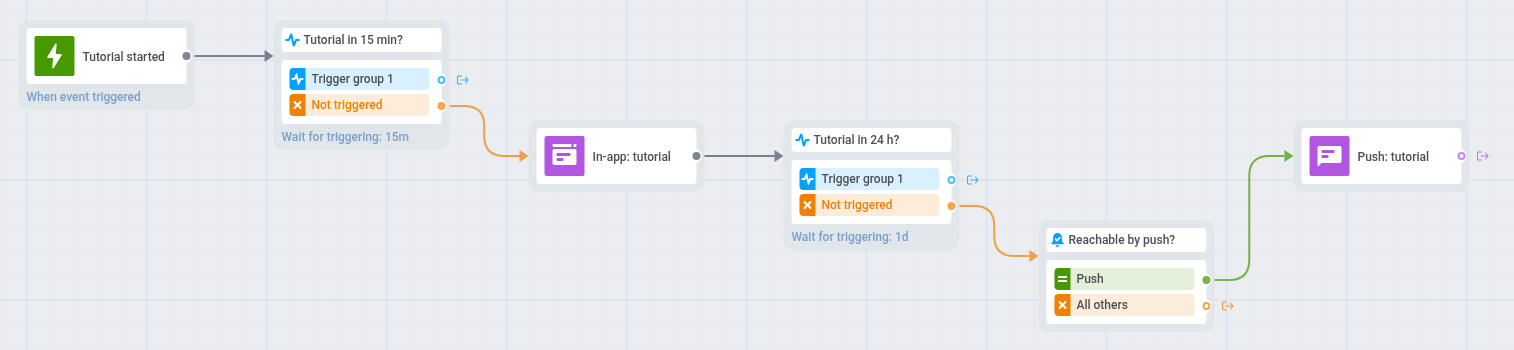
- No canvas da jornada, adicione uma Entrada baseada em gatilho em
Tutorial started. Não usePW_DeviceRegisteredaqui: ele é disparado quando o jogo pede a permissão de push, e este playbook move esse pedido para depois do tutorial. - Adicione uma etapa Aguardar Gatilho em
Tutorial completedcom a condiçãocompletioné true e defina o período de espera como 15 minutos. - Deixe o ramo Grupo de acionamento 1 vazio, porque os jogadores que terminam o tutorial não precisam de mais mensagens.
- No ramo Não acionado, adicione um elemento In-app com uma mensagem que leve de volta ao tutorial, por exemplo: “Sua primeira recompensa está a um passo. Termine o tutorial para resgatá-la.” O jogador a vê na próxima vez que abrir o jogo ou voltar a ele.
- Adicione uma segunda etapa Aguardar Gatilho em
Tutorial completedcom a condiçãocompletioné true e defina o período de espera como 24 horas. Deixe o ramo Grupo de acionamento 1 dela vazio também. - No ramo Não acionado, adicione uma Verificação de alcançabilidade.
- Para os jogadores alcançáveis por push, adicione um push que os leve de volta ao tutorial, por exemplo: “Sua aventura está esperando. Termine o tutorial para desbloquear sua primeira recompensa.”
- Abra Configurações no canvas, selecione Metas de conversão, escolha
Tutorial completedcomcompletioné true e selecione Terminar jornada após este evento. - Abra Configurações, selecione Limite de Entrada na Campanha e escolha uma vez na vida, para que um jogador que reinicie o tutorial não receba os lembretes novamente.
O push da etapa 7 chega apenas aos jogadores cujos dispositivos já permitem notificações. Os demais saem da jornada, porque um segundo in-app repetiria o primeiro.
Esta jornada só começa para os jogadores que iniciarem o tutorial depois que você a lançar. Para alcançar os jogadores que começaram antes, crie uma jornada com uma entrada baseada em público única no segmento Abandono do tutorial. Ela inclui apenas jogadores cujos dispositivos já têm um token de push, que o jogo obtém quando pede a permissão de push.
Para um passo a passo mais completo sobre jornadas de onboarding, consulte Como integrar usuários com a Pushwoosh.
Segunda sessão para novos jogadores
Anchor link to- Quando usar: novos jogadores terminam o tutorial, mas não voltam no dia seguinte.
- Quando começa: um jogador termina o tutorial (
Tutorial completed). - O que faz: espera cerca de um dia após o tutorial e, se o jogador não abriu o jogo de novo, envia um push que dá um motivo para voltar.
- Conteúdo a preparar: uma predefinição de push com um motivo para voltar, como uma recompensa esperando no jogo.
- Requisitos: jogadores que permitiram as notificações durante a primeira sessão. Se o jogo pede a permissão apenas no próximo lançamento, esta jornada alcança poucos jogadores novos.
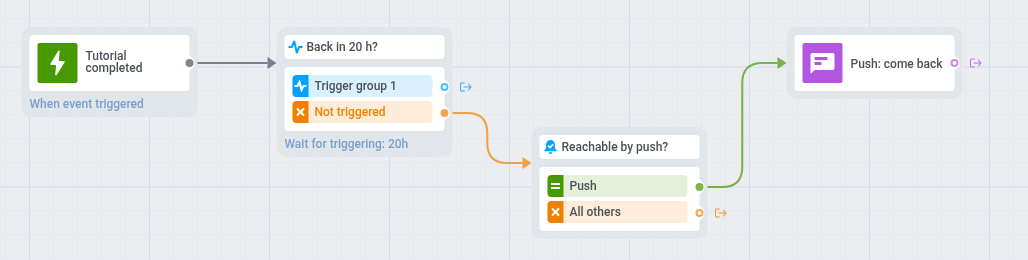
- No canvas da jornada, adicione uma Entrada baseada em gatilho em
Tutorial completedcom a condiçãocompletioné true. - Adicione uma etapa Aguardar Gatilho em
PW_ApplicationOpene defina o período de espera como 20 horas. Deixe o ramo Grupo de acionamento 1 dela vazio, porque os jogadores que voltaram não precisam de mensagem. - No ramo Não acionado, adicione uma Verificação de alcançabilidade.
- Para os jogadores alcançáveis por push, adicione um push, por exemplo: “Seu baú diário está pronto. Volte e abra.”
- Abra Configurações, selecione Metas de conversão, escolha
PW_ApplicationOpene selecione Terminar jornada após este evento. - Abra Configurações, selecione Limite de Entrada na Campanha e escolha uma vez na vida.
Ajuda para jogadores travados
Anchor link to- Quando usar: os jogadores falham repetidamente nos níveis e podem abandonar o jogo.
- Quando começa: um jogador entra no segmento Jogadores travados. A Pushwoosh verifica o segmento conforme a programação que você definir, por exemplo diariamente.
- O que faz: mostra uma dica ou um presente in-app e depois envia um push oferecendo ajuda se o jogador não concluir o nível em 2 dias. A dica chega ao jogador antes que ele desista, e o push é um segundo contato para os jogadores que saíram do jogo.
- Conteúdo a preparar: um modelo de in-app com uma dica ou um presente e uma predefinição de push que ofereça ajuda.
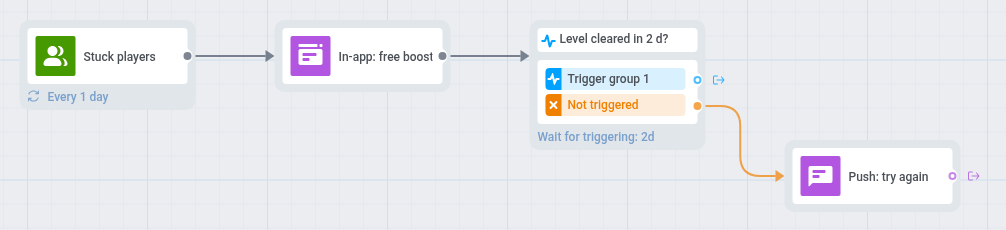
- No canvas da jornada, adicione uma Entrada baseada em público com o segmento Jogadores travados.
- Defina a programação da entrada como Entrada recorrente e escolha Periodicamente, por exemplo diariamente.
- Adicione um elemento In-app com uma dica ou um presente para o nível, por exemplo: “Travou nesta fase? Aqui está um impulso grátis para ajudar você a passar.” O jogador o vê na próxima vez que abrir o jogo ou voltar a ele.
- Adicione um Aguardar Gatilho em
Level completedpor 2 dias. - No ramo Não acionado, adicione um push que ofereça ajuda e defina um deep link para o nível, por exemplo: “Precisa de uma ajuda? Seu impulso está pronto. Toque para tentar o nível de novo.”
- Abra Configurações, selecione Limite de Entrada na Campanha e escolha uma vez por semana.
- Abra Configurações, selecione Metas de conversão, escolha
Level completede selecione Terminar jornada após este evento.
Os jogadores sem push recebem apenas a mensagem in-app, porque um segundo in-app repetiria o mesmo impulso.
Lembrete de recompensa diária
Anchor link to- Quando usar: seu jogo tem uma recompensa diária e você quer que os jogadores a coletem todos os dias.
- Quando começa: um jogador resgata a recompensa (
Daily reward claimed). - O que faz: espera o tempo de recarga da recompensa após cada resgate e depois lembra o jogador de coletar a recompensa, a menos que ele já a tenha resgatado. O lembrete é contado a partir do último resgate.
- Conteúdo a preparar: uma predefinição de push e um modelo de in-app com o mesmo lembrete.
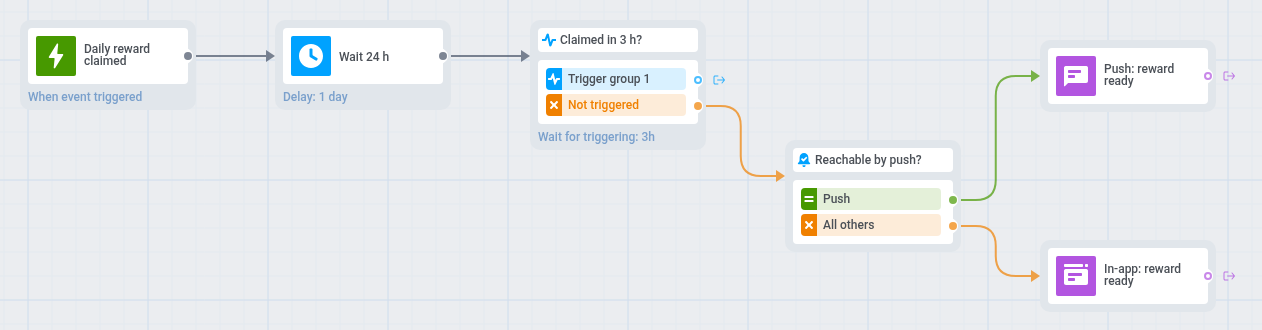
- No canvas da jornada, adicione uma Entrada baseada em gatilho em
Daily reward claimede defina a entrada como Permitir reentrada. Cada resgate reinicia a jornada, então o lembrete é sempre contado a partir do último resgate. - Adicione um Atraso de tempo com duração fixa igual ao tempo de recarga da sua recompensa, por exemplo 24 horas.
- Adicione uma etapa Aguardar Gatilho em
Daily reward claimede defina o período de espera como algumas horas. A recompensa não pode ser resgatada antes do fim do tempo de recarga, então a etapa captura cada resgate após o atraso, e os jogadores que resgatam pulam o lembrete. - No ramo Não acionado, adicione uma Verificação de alcançabilidade.
- Para os jogadores alcançáveis por push, adicione um push que informe ao jogador que a recompensa está pronta, por exemplo: “Sua recompensa diária está esperando por você.” Defina um deep link para que o push abra a tela da recompensa.
- Para os demais, adicione um elemento In-app com o mesmo lembrete e defina Expiração no aplicativo como 1 dia. O jogador o vê na próxima vez que abrir o jogo ou voltar a ele.
- Defina um Período de silêncio para push com a opção de enviar a mensagem após o fim do período.
- Abra Configurações, selecione Metas de conversão e escolha
Daily reward claimed.