iOS 리치 알림 연동
iOS 10부터 푸시 알림에 정적 또는 애니메이션 이미지, 동영상까지 첨부할 수 있습니다. 사용자가 알림을 세게 탭하면 알림에 바로 표시됩니다.
이 기능은 코딩이 거의 필요 없이 매우 간단하게 활성화할 수 있습니다. 함께 해보겠습니다!
1. Notification Service Extension 생성하기
Anchor link to먼저 Notification Service Extension을 생성합니다. 이 extension은 사용자에게 표시될 콘텐츠를 다운로드합니다.
프로젝트에 새 타겟을 추가(File -> New -> Target)하고 _Notification Service Extension_을 생성합니다.

2. Notification Service Extension 코드
Anchor link to이 코드는 첨부 파일을 다운로드하고 알림 콘텐츠 핸들러를 호출합니다. extension에 그대로 복사하여 붙여넣기만 하면 됩니다.
import UserNotificationsimport PushwooshFramework
class NotificationService: UNNotificationServiceExtension {
    var contentHandler: ((UNNotificationContent) -> Void)?    var bestAttemptContent: UNMutableNotificationContent?
    override func didReceive(_ request: UNNotificationRequest, withContentHandler contentHandler: @escaping (UNNotificationContent) -> Void) {        PWNotificationExtensionManager.shared().handle(request, contentHandler: contentHandler)    }}
#import "PWNotificationExtensionManager.h"
@interface NotificationService : UNNotificationServiceExtension
@end
@implementation NotificationService
- (void)didReceiveNotificationRequest:(UNNotificationRequest *)request withContentHandler:(void (^)(UNNotificationContent * _Nonnull))contentHandler { [[PWNotificationExtensionManager sharedManager] handleNotificationRequest:request contentHandler:contentHandler];}
@end3. 안전하지 않은 첨부 파일 URL 허용하기
Anchor link toNotification Service Extension은 별도의 바이너리이며 자체 Info.plist 파일이 있습니다.
extension의 Info.plist 파일에 App Transport Security Settings를 추가하고 Allow Arbitrary Loads 플래그를 true로 설정합니다.
Info.plist:
<key>NSAppTransportSecurity</key><dict> <key>NSAllowsArbitraryLoads</key> <true/></dict>4. 리치 알림 보내기
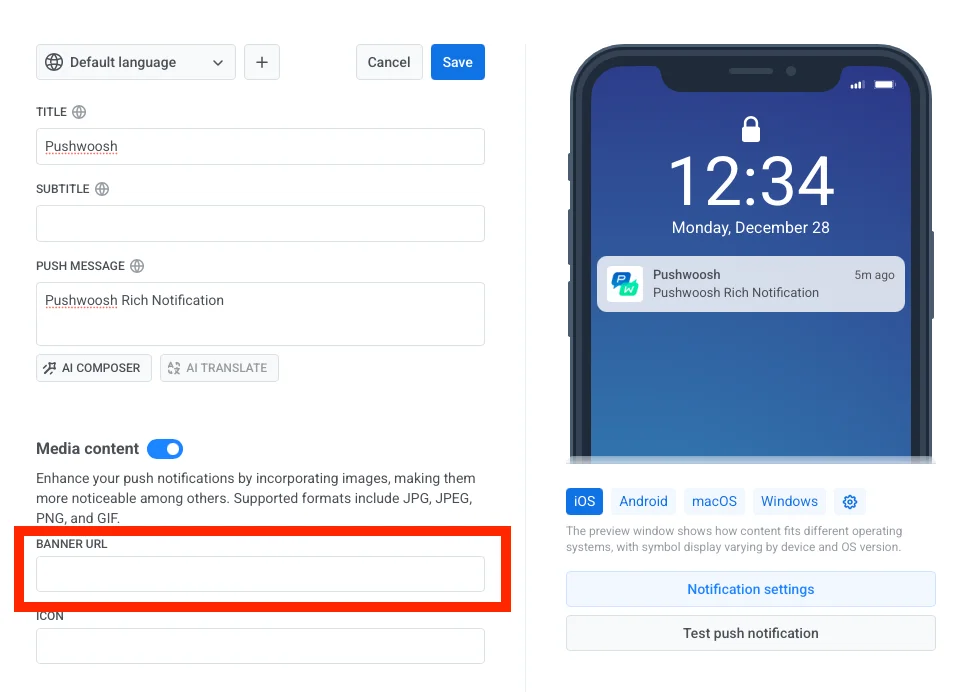
Anchor link to리치 알림을 보내려면 BANNER URL 필드에 파일의 URL을 지정하기만 하면 됩니다.
Woosh! 알림을 세게 탭하면 모든 과정이 완료됩니다!
피드백을 공유해주세요
Anchor link to여러분의 피드백은 더 나은 경험을 만드는 데 도움이 됩니다. SDK 연동 과정에서 문제가 발생하면 언제든지 알려주세요. 어려움이 있으시면 주저하지 마시고 이 양식을 통해 의견을 공유해주시기 바랍니다.