iOS 사용자 지정 포그라운드 푸시 알림
버전 6.10.0부터 PushwooshForegroundPush 모듈을 통합하여 네이티브 iOS 시스템 알림이 비활성화된 경우 포그라운드 푸시 알림을 사용자 지정할 수 있습니다.
1. 네이티브 포그라운드 푸시 알림 비활성화
Anchor link toInfo.plist에 Pushwoosh_SHOW_ALERT = false를 추가합니다.
<key>Pushwoosh_SHOW_ALERT</key><false/>2. PushwooshForegroundPush 모듈 통합하기
Anchor link toSwift Package Manager
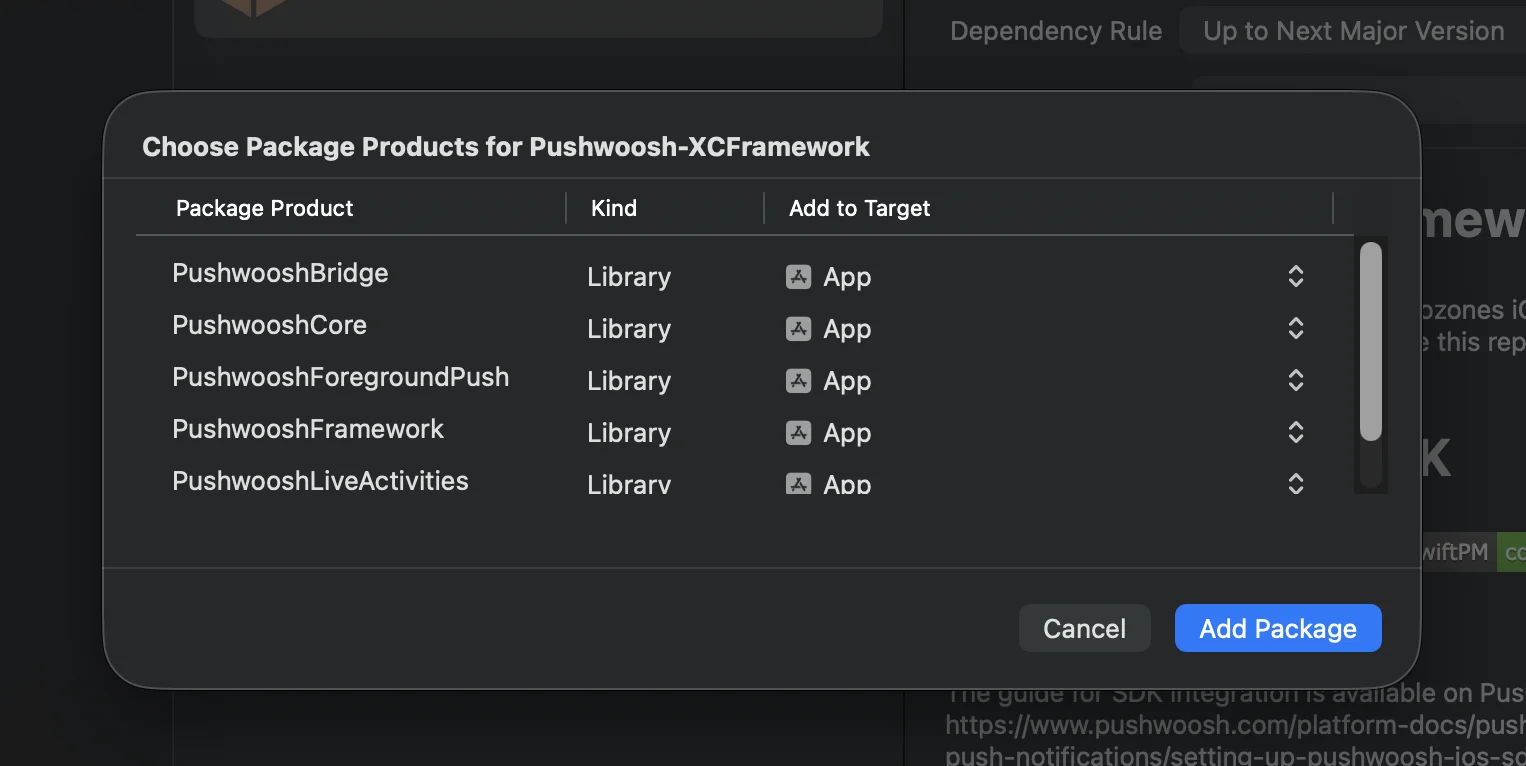
Cocoapods
# Uncomment the next line to define a global platform for your project# platform :ios, '13.0'
target 'MyApp' do  # Comment the next line if you don't want to use dynamic frameworks  use_frameworks!
  pod 'PushwooshXCFramework'  pod 'PushwooshFramework/PushwooshForegroundPush'
end
3. AppDelegate에 PushwooshForegroundPush 구성 추가하기
Anchor link toimport UIKitimport PushwooshFrameworkimport PushwooshForegroundPush
@mainclass AppDelegate: UIResponder, UIApplicationDelegate, PWMessagingDelegate, PWForegroundPushDelegate {
func application(_ application: UIApplication, didFinishLaunchingWithOptions launchOptions: [UIApplication.LaunchOptionsKey: Any]?) -> Bool {
Pushwoosh.ForegroundPush.foregroundNotificationWith(style: .style1, duration: 5, vibration: .notification, disappearedPushAnimation: .balls)
Pushwoosh.ForegroundPush.delegate = self
return true }
func pushwoosh(_ pushwoosh: Pushwoosh, onMessageReceived message: PWMessage) { if let payload = message.payload { // Pushwoosh method Pushwoosh.ForegroundPush.showForegroundPush(userInfo: payload) } }}foregroundNotificationWith 메서드 사용하기
foregroundNotificationWith 메서드를 사용하면 구성 가능한 스타일, 지속 시간 및 햅틱 피드백으로 사용자 지정 포그라운드 푸시 알림을 표시할 수 있습니다.
메서드 시그니처 (Swift / Objective-C):
@objcstatic func foregroundNotificationWith( style: PWForegroundPushStyle, duration: Int, vibration: PWForegroundPushHapticFeedback, disappearedPushAnimation: PWForegroundPushDisappearedAnimation)매개변수:
style(PWForegroundPushStyle)
- 현재
style1만 사용할 수 있습니다.
duration(Int)
- 알림이 사라지기 전에 표시될 시간을 초 단위로 지정합니다.
vibration(PWForegroundPushHapticFeedback)
- 알림이 표시될 때의 햅틱 피드백을 제어합니다. 사용 가능한 옵션:
case none // 진동 없음case light // 가벼운 진동case medium // 중간 진동case heavy // 강한 진동case soft // 부드러운 진동case rigid // 단단한 진동case notification // 표준 알림 진동disappearedPushAnimation(PWForegroundPushDisappearedAnimation)
- 푸시 사라짐 애니메이션
case balls = 0case regularPush4. didTapForegroundPush 델리게이트 메서드 구현하기
Anchor link to사용자 지정 포그라운드 푸시 알림에 대한 사용자 탭을 처리하려면 PWForegroundPushDelegate 프로토콜 메서드를 구현합니다:
// 포그라운드 푸시 탭 처리func didTapForegroundPush(_ userInfo: [AnyHashable : Any]) {    print("Foreground custom push: \(userInfo)")
    // 특정 화면으로 이동하는 등의 작업 수행    // navigateToScreen(for: userInfo)}
참고:
- 이 메서드는 사용자가 사용자 지정 포그라운드 푸시를 탭할 때 호출됩니다.
userInfo에는 알림의 페이로드가 포함됩니다.- 구성 후
Pushwoosh.ForegroundPush.delegate = self를 설정해야 합니다.
5. 포그라운드 푸시 알림 사용자 지정을 위한 선택적 매개변수
Anchor link toPushwooshForegroundPush 모듈은 포그라운드 푸시 알림의 모양과 동작을 사용자 지정하기 위한 여러 선택적 매개변수를 제공합니다. 이러한 매개변수는 정적 속성을 통해 전역적으로 설정할 수 있습니다.
| 속성 | 타입 | 설명 | 기본값 |
|---|---|---|---|
| useLiquidView | Bool | iOS 26에서 Liquid Glass 뷰를 사용합니다. | false |
| gradientColors | [UIColor]? | 그라데이션 배경을 위한 색상 배열(선택 사항). | nil |
| backgroundColor | UIColor? | 푸시의 배경색입니다. nil이고 gradientColors가 설정되지 않은 경우 기본 그라데이션이 사용됩니다. | 기본 시스템 그라데이션 |
| usePushAnimation | Bool | 푸시가 표시될 때 애니메이션을 적용할지 여부입니다. | true |
| titlePushColor | UIColor? | 알림 제목 텍스트의 색상입니다. nil인 경우 시스템 흰색이 기본값입니다. | white |
| messagePushColor | UIColor? | 알림 메시지 텍스트의 색상입니다. nil인 경우 시스템 흰색이 기본값입니다. | white |
| titlePushFont | UIFont? | 알림 제목 텍스트의 글꼴입니다. nil인 경우 시스템 글꼴이 기본값입니다. | 기본 시스템 글꼴 |
| messagePushFont | UIFont? | 알림 메시지 텍스트의 글꼴입니다. nil인 경우 시스템 글꼴이 기본값입니다. | 기본 시스템 글꼴 |
요약:
- Swift 5.13+ + iOS 26 → Liquid Glass
- Swift 5.13+ + iOS < 26 → 표준 UIView
- Swift < 5.13 → 항상 흐릿한 뷰 (Liquid Glass 지원 없음)
사용 예시:
Pushwoosh.ForegroundPush.useLiquidView = truePushwoosh.ForegroundPush.gradientColors = [.red, .orange, .yellow]Pushwoosh.ForegroundPush.titlePushColor = .redPushwoosh.ForegroundPush.messagePushColor = .greenPushwoosh.ForegroundPush.backgroundColor = .blackPushwoosh.ForegroundPush.titlePushFont = .boldSystemFont(ofSize: 22)Pushwoosh.ForegroundPush.messagePushFont = .italicSystemFont(ofSize: 15)Pushwoosh.ForegroundPush.usePushAnimation = false6. 포그라운드 푸시 예시
Anchor link to이 예시는 title, message, cards, GIF 애니메이션을 사용하여 사용자 지정 포그라운드 푸시 알림을 표시하는 방법을 보여줍니다.
이것으로 끝입니다. Pushwoosh를 사용하여 iOS에서 사용자 지정 포그라운드 푸시 알림을 성공적으로 구성했습니다.