iOS 앱 클립
앱 클립을 사용하면 전체 앱을 다운로드하지 않고도 작업을 빠르게 완료할 수 있습니다. Pushwoosh를 사용하면 앱 클립 사용자에게 푸시 알림을 보낼 수 있습니다. iOS는 앱 클립이 열릴 때 자동으로 8시간 동안 알림 액세스 권한을 부여합니다.
필요한 것
Anchor link to- Pushwoosh iOS SDK 7.0.33+
- Xcode 15+
- 앱 클립을 위한 별도의 Pushwoosh 애플리케이션 (다른 번들 ID = 별도의 앱)
- 테스트용 실제 기기 (푸시 토큰은 시뮬레이터에서 작동하지 않음)
1. Pushwoosh 애플리케이션 생성
Anchor link to앱 클립은 다른 번들 ID(예: com.yourapp.Clip)를 가지므로 자체 APNs 키가 있는 별도의 Pushwoosh 앱이 필요합니다.
- Pushwoosh Control Panel로 이동합니다
- 앱 클립 번들 ID로 새 애플리케이션을 생성합니다
- APNs 인증 키를 업로드합니다
- Application Code와 API Token을 복사합니다
2. 앱 클립 타겟 생성
Anchor link to- Xcode에서: File → New → Target → App Clip
- 앱 클립 타겟에 Push Notifications 기능을 추가합니다
기능 추가에 대한 자세한 스크린샷은 기본 통합 가이드를 참조하세요.
3. Pushwoosh 프레임워크 추가
Anchor link to앱 클립 타겟의 Build Phases → Link Binary With Libraries에 다음을 추가합니다:
PushwooshFramework.frameworkPushwooshCore.frameworkPushwooshBridge.framework
4. Info.plist 구성
Anchor link to<!-- Pushwoosh --><key>Pushwoosh_APPID</key><string>XXXXX-XXXXX</string><key>Pushwoosh_API_TOKEN</key><string>YOUR_API_TOKEN</string>
<!-- 임시 푸시 (8시간 자동 부여, 대화 상자 없음) --><key>NSAppClip</key><dict> <key>NSAppClipRequestEphemeralUserNotification</key> <true/> <key>NSAppClipRequestLocationConfirmation</key> <false/></dict>
<key>UIBackgroundModes</key><array> <string>remote-notification</string></array>5. SDK 초기화
Anchor link toimport SwiftUIimport PushwooshFramework
class AppClipDelegate: NSObject, UIApplicationDelegate, PWMessagingDelegate {
func application(_ application: UIApplication, didFinishLaunchingWithOptions launchOptions: [UIApplication.LaunchOptionsKey: Any]? = nil) -> Bool { Pushwoosh.configure.delegate = self Pushwoosh.configure.registerForPushNotifications() return true }
func application(_ application: UIApplication, didRegisterForRemoteNotificationsWithDeviceToken deviceToken: Data) { Pushwoosh.configure.handlePushRegistration(deviceToken) }
func application(_ application: UIApplication, didFailToRegisterForRemoteNotificationsWithError error: Error) { Pushwoosh.configure.handlePushRegistrationFailure(error as NSError) }
func application(_ application: UIApplication, didReceiveRemoteNotification userInfo: [AnyHashable: Any], fetchCompletionHandler completionHandler: @escaping (UIBackgroundFetchResult) -> Void) { Pushwoosh.configure.handlePushReceived(userInfo) completionHandler(.noData) }
func pushwoosh(_ pushwoosh: Pushwoosh, onMessageOpened message: PWMessage) { print("푸시 열림: \(message.payload ?? [:])") }}
@mainstruct YourAppClip: App { @UIApplicationDelegateAdaptor(AppClipDelegate.self) var appDelegate
var body: some Scene { WindowGroup { ContentView() } }}import UIKitimport PushwooshFramework
@mainclass AppDelegate: UIResponder, UIApplicationDelegate, PWMessagingDelegate {
func application(_ application: UIApplication, didFinishLaunchingWithOptions launchOptions: [UIApplication.LaunchOptionsKey: Any]?) -> Bool { Pushwoosh.configure.delegate = self Pushwoosh.configure.registerForPushNotifications() return true }
func application(_ application: UIApplication, didRegisterForRemoteNotificationsWithDeviceToken deviceToken: Data) { Pushwoosh.configure.handlePushRegistration(deviceToken) }
func application(_ application: UIApplication, didFailToRegisterForRemoteNotificationsWithError error: Error) { Pushwoosh.configure.handlePushRegistrationFailure(error as NSError) }
func application(_ application: UIApplication, didReceiveRemoteNotification userInfo: [AnyHashable: Any], fetchCompletionHandler completionHandler: @escaping (UIBackgroundFetchResult) -> Void) { Pushwoosh.configure.handlePushReceived(userInfo) completionHandler(.noData) }
func pushwoosh(_ pushwoosh: Pushwoosh, onMessageOpened message: PWMessage) { print("푸시 열림: \(message.payload ?? [:])") }}임시 권한을 사용하면 iOS는 8시간 동안 자동으로 푸시 액세스 권한을 부여합니다. 권한 대화 상자를 표시하지 않고 임시 모드를 사용하려면 Pushwoosh.configure.registerForPushNotifications() 대신 UIApplication.shared.registerForRemoteNotifications()를 직접 호출하세요.
영구적인 푸시 권한(표준 대화 상자)을 요청하려면 위와 같이 Pushwoosh.configure.registerForPushNotifications()를 사용하세요.
임시 푸시 권한
Anchor link to사용자가 앱 클립을 열면 iOS는 묻지 않고 8시간 동안 푸시 알림 액세스 권한을 부여합니다. 8시간이 지나면 권한이 만료됩니다. 사용자는 다시 8시간의 권한을 얻으려면 앱 클립을 다시 열어야 합니다.
권한 대화 상자를 표시하지 않고 8시간 동안 푸시 토큰을 얻으려면:
UIApplication.shared.registerForRemoteNotifications()영구적인 푸시 토큰(표준 권한 대화 상자 표시)을 얻으려면:
Pushwoosh.configure.registerForPushNotifications()제한 사항
Anchor link to| 제한 사항 | 세부 정보 |
|---|---|
| 리치 알림 없음 | 앱 클립은 Notification Service Extension을 포함할 수 없습니다 — 이미지 없음, 커뮤니케이션 알림 없음 |
| 크기 제한 | 15MB (iOS 16) / 50MB (iOS 17+) |
| 8시간 푸시 창 | 임시 권한은 8시간 후에 만료됩니다 |
| 백그라운드 처리 없음 | 사일런트 푸시는 기능이 제한됩니다 |
| 기기 ID | identifierForVendor가 0을 반환합니다 — SDK가 자동으로 처리합니다 (7.0.33+) |
예시 화면
Anchor link to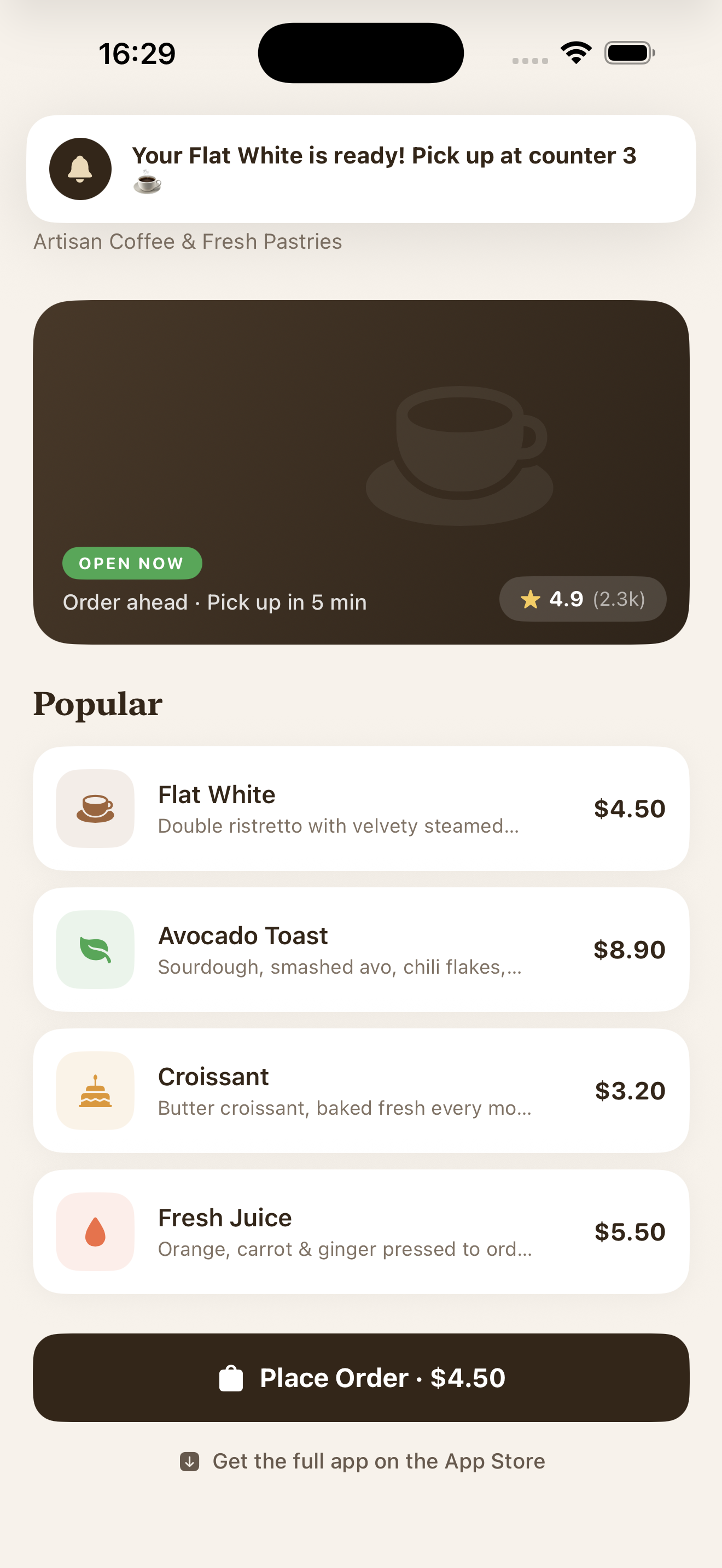
임시 권한이 있는 앱 클립에서 수신된 푸시 알림