Adobe AIR
이 플러그인은 AIR SDK 버전 33.0 이상이 필요합니다.
Anchor link toPushwoosh 푸시 알림을 Adobe Air 애플리케이션에 통합하려면 다음 단계를 따르세요:
PushNotifications.ane을 가져와 프로젝트에 추가합니다.distriqt라이브러리를 프로젝트에 추가합니다:
com.distriqt.playservices.Basecom.google.firebase.coreGoogle Play Services 라이브러리 다운로드
androidx.appcompatcom.google.android.materialandroidx.recyclerviewandroidx.corecom.distriqt.Core3. Firebase Console에서 프로젝트를 구성합니다.
4. google-services.json 파일을 프로젝트의 루트 레벨에 위치시킵니다.
5. 다음 코드를 애플리케이션 시작 루틴에 추가합니다:
// 플러그인에 대한 푸시 알림 콜백을 설정합니다var pushwoosh:PushNotification = PushNotification.getInstance();pushwoosh.addEventListener(PushNotificationEvent.PERMISSION_GIVEN_WITH_TOKEN_EVENT, onToken);pushwoosh.addEventListener(PushNotificationEvent.PERMISSION_REFUSED_EVENT, onError);pushwoosh.addEventListener(PushNotificationEvent.PUSH_NOTIFICATION_RECEIVED_EVENT, onPushReceived);
// 중요! 콜백이 설정되었을 때 이 함수를 호출하세요. 모든 보류 중인 푸시 알림의 전송을 트리거합니다.pushwoosh.onDeviceReady();
// 푸시 등록pushwoosh.registerForPushNotification();
핸들러 함수는 간단합니다:
public function onToken(e:PushNotificationEvent):void{    trace("\n TOKEN: " + e.token + " ");}
public function onError(e:PushNotificationEvent):void{    trace("\n TOKEN: " + e.errorMessage+ " ");}
public function onPushReceived(e:PushNotificationEvent):void{    trace("\n TOKEN: " + JSON.stringify(e.parameters) + " ");}
6. 이제 app.xml을 구성합니다. PUSHWOOSH_APP_ID를 실제 Pushwoosh 앱 ID로 바꾸세요. Android의 경우 FCM_SENDER_ID를 Firebase Sender ID로, PACKAGE_NAME을 Android 패키지 이름으로 바꾸세요.
Android와 iOS 모두에 대해 Pushwoosh Device API 토큰도 추가해야 합니다.
중요: 토큰이 Pushwoosh 제어판에서 올바른 애플리케이션에 접근할 수 있는지 확인하세요. 더 알아보기
<iPhone>    <InfoAdditions>        <![CDATA[            <key>Pushwoosh_APPID</key>            <string>PUSHWOOSH_APP_ID</string>            <key>Pushwoosh_API_TOKEN</key>            <string>__YOUR_DEVICE_TYPE_API_TOKEN__</string>        ]]>    </InfoAdditions>    <Entitlements>        <![CDATA[            <key>aps-environment</key>            <string>development</string>        ]]>    </Entitlements>    <requestedDisplayResolution>high</requestedDisplayResolution></iPhone>
<android>  <manifestAdditions><![CDATA[    <manifest android:installLocation="auto">      <application>
        <!-- Pushwoosh START -->        <meta-data android:name="com.google.android.gms.version" android:value="@integer/google_play_services_version" />        <meta-data android:name="com.pushwoosh.appid" android:value="PUSHWOOSH_APP_ID" />        <meta-data android:name="com.pushwoosh.senderid" android:value="AFCM_SENDER_ID" />        <meta-data android:name="com.pushwoosh.apitoken" android:value="__YOUR_DEVICE_TYPE_API_TOKEN" />        <meta-data android:name="PW_BROADCAST_PUSH" android:value="true" />        <meta-data android:name="com.pushwoosh.notification_icon" android:value="@drawable/notification_small_icon" />        <meta-data android:name="com.pushwoosh.notification_service_extension" android:value="com.pushwoosh.nativeExtensions.PushwooshNotificationServiceExtension"/>        <activity          android:name="com.pushwoosh.inapp.view.RichMediaWebActivity"          android:theme="@android:style/Theme.Translucent.NoTitleBar" />        <activity          android:name="com.pushwoosh.inapp.view.RemoteUrlActivity"          android:theme="@android:style/Theme.Translucent.NoTitleBar" />        <receiver          android:name="com.pushwoosh.BootReceiver"          android:enabled="true"          android:permission="android.permission.RECEIVE_BOOT_COMPLETED">          <intent-filter>            <action android:name="android.intent.action.BOOT_COMPLETED" />            <category android:name="android.intent.category.DEFAULT" />          </intent-filter>        </receiver>        <service          android:name="com.pushwoosh.FcmRegistrationService">          <intent-filter>            <action android:name="com.google.firebase.INSTANCE_ID_EVENT" />          </intent-filter>        </service>        <service          android:name="com.pushwoosh.firebase.PushFcmIntentService">          <intent-filter>            <action android:name="com.google.firebase.MESSAGING_EVENT" />          </intent-filter>        </service>        <activity          android:name="com.pushwoosh.internal.utils.PermissionActivity"          android:theme="@android:style/Theme.Translucent.NoTitleBar" />        <receiver android:name="com.pushwoosh.notification.LocalNotificationReceiver" />        <provider          android:name="com.pushwoosh.PushwooshInitProvider"          android:authorities="PACKAGE_NAME.pushwooshinitprovider"          android:enabled="true"          android:exported="false"          android:initOrder="50" />        <provider          android:initOrder="70"          android:enabled="true"          android:authorities="PACKAGE_NAME.firebasepushwooshinitprovider" android:exported="false"          android:name="com.pushwoosh.firebase.FirebaseInitProvider"/>        <provider          android:name="com.pushwoosh.nativeExtensions.PushwooshFirebaseInitProvider"          android:authorities="PACKAGE_NAME.FirebaseInitProvider"          android:enabled="true"          android:exported="false"          android:initOrder="60" />        <provider          android:name="com.pushwoosh.PushwooshSharedDataProvider"          android:authorities="PACKAGE_NAME.PushwooshSharedDataProvider"          android:enabled="true"          android:exported="true"          android:initOrder="60" />        <activity          android:name="com.pushwoosh.notification.NotificationOpenActivity"          android:noHistory="true"          android:theme="@android:style/Theme.Translucent.NoTitleBar"          android:enabled="true"          android:exported="false" />                          <receiver                        android:name="com.pushwoosh.NotificationUpdateReceiver"                        android:enabled="true"                        android:exported="false" />        <meta-data          android:name="com.pushwoosh.plugin.badge"          android:value="com.pushwoosh.badge.BadgePlugin" />        <meta-data          android:name="com.pushwoosh.internal.plugin_provider"          android:value="com.pushwoosh.nativeExtensions.internal.AdobeAirPluginProvider" />        <meta-data          android:name="com.pushwoosh.plugin.inbox"          android:value="com.pushwoosh.inbox.PushwooshInboxPlugin" />        <activity          android:name="com.pushwoosh.nativeExtensions.AirInboxActivity" />        <activity          android:name="com.pushwoosh.inbox.ui.presentation.view.activity.AttachmentActivity"          android:theme="@style/Theme.AppCompat.Light.NoActionBar" />        <!-- Pushwoosh END -->
        <!-- Firebase START -->        <service          android:name="com.google.firebase.components.ComponentDiscoveryService"          android:exported="false" >          <meta-data            android:name="com.google.firebase.components:com.google.firebase.iid.Registrar"            android:value="com.google.firebase.components.ComponentRegistrar" />          <meta-data            android:name="com.google.firebase.components:com.google.firebase.datatransport.TransportRegistrar"            android:value="com.google.firebase.components.ComponentRegistrar" />          <meta-data            android:name="com.google.firebase.components:com.google.firebase.installations.FirebaseInstallationsRegistrar"            android:value="com.google.firebase.components.ComponentRegistrar" />        </service>        <receiver android:name="com.google.firebase.iid.FirebaseInstanceIdReceiver" android:exported="true" android:permission="com.google.android.c2dm.permission.SEND">          <intent-filter>            <action android:name="com.google.android.c2dm.intent.RECEIVE"/>            <category android:name="PACKAGE_NAME"/>          </intent-filter>        </receiver>        <service          android:name="com.google.firebase.messaging.FirebaseMessagingService"          android:exported="false" >          <intent-filter android:priority="-500" >            <action android:name="com.google.firebase.MESSAGING_EVENT" />          </intent-filter>        </service>        <service android:name="com.google.firebase.iid.FirebaseInstanceIdService" android:exported="true">          <intent-filter android:priority="-500">            <action android:name="com.google.firebase.INSTANCE_ID_EVENT"/>          </intent-filter>        </service>        <provider          android:name="com.google.firebase.provider.FirebaseInitProvider"          android:authorities="PACKAGE_NAME.firebaseinitprovider"          android:exported="false"          android:initOrder="100" />        <!-- Firebase END -->
        <!-- Work-runtime START -->        <provider            android:name="androidx.startup.InitializationProvider"            android:authorities="PACKAGE_NAME.androidx-startup"            android:exported="false">            <!-- This entry makes WorkManagerInitializer discoverable. -->            <meta-data  android:name="androidx.work.WorkManagerInitializer"                  android:value="androidx.startup" />        </provider>        <service          android:name="androidx.work.impl.background.systemalarm.SystemAlarmService"          android:directBootAware="false"          android:enabled="true"          android:exported="false" />        <service          android:name="androidx.work.impl.background.systemjob.SystemJobService"          android:directBootAware="false"          android:enabled="true"          android:exported="true"          android:permission="android.permission.BIND_JOB_SERVICE" />
        <receiver          android:name="androidx.work.impl.utils.ForceStopRunnable$BroadcastReceiver"          android:directBootAware="false"          android:enabled="true"          android:exported="false" />        <receiver          android:name="androidx.work.impl.background.systemalarm.ConstraintProxy$BatteryChargingProxy"          android:directBootAware="false"          android:enabled="false"          android:exported="false" >          <intent-filter>            <action android:name="android.intent.action.ACTION_POWER_CONNECTED" />            <action android:name="android.intent.action.ACTION_POWER_DISCONNECTED" />          </intent-filter>        </receiver>        <receiver          android:name="androidx.work.impl.background.systemalarm.ConstraintProxy$BatteryNotLowProxy"          android:directBootAware="false"          android:enabled="false"          android:exported="false" >          <intent-filter>            <action android:name="android.intent.action.BATTERY_OKAY" />            <action android:name="android.intent.action.BATTERY_LOW" />          </intent-filter>        </receiver>        <receiver          android:name="androidx.work.impl.background.systemalarm.ConstraintProxy$StorageNotLowProxy"          android:directBootAware="false"          android:enabled="false"          android:exported="false" >          <intent-filter>            <action android:name="android.intent.action.DEVICE_STORAGE_LOW" />            <action android:name="android.intent.action.DEVICE_STORAGE_OK" />          </intent-filter>        </receiver>        <receiver          android:name="androidx.work.impl.background.systemalarm.ConstraintProxy$NetworkStateProxy"          android:directBootAware="false"          android:enabled="false"          android:exported="false" >          <intent-filter>            <action android:name="android.net.conn.CONNECTIVITY_CHANGE" />          </intent-filter>        </receiver>        <receiver          android:name="androidx.work.impl.background.systemalarm.RescheduleReceiver"          android:directBootAware="false"          android:enabled="false"          android:exported="false" >          <intent-filter>            <action android:name="android.intent.action.BOOT_COMPLETED" />            <action android:name="android.intent.action.TIME_SET" />            <action android:name="android.intent.action.TIMEZONE_CHANGED" />          </intent-filter>        </receiver>        <receiver          android:name="androidx.work.impl.background.systemalarm.ConstraintProxyUpdateReceiver"          android:directBootAware="false"          android:enabled="true"          android:exported="false" >          <intent-filter>            <action android:name="androidx.work.impl.background.systemalarm.UpdateProxies" />          </intent-filter>        </receiver>        <!-- Work-runtimme END -->      </application>
      <!-- Permissions START -->      <uses-permission android:name="android.permission.WAKE_LOCK" />      <uses-permission android:name="android.permission.ACCESS_NETWORK_STATE" />      <!-- FCM connects to Firebase Services. -->      <uses-permission android:name="android.permission.INTERNET" />      <!-- This app has permission to register and receive data message. -->      <uses-permission android:name="com.google.android.c2dm.permission.RECEIVE" />      <!-- Vibration in push notification -->      <uses-permission android:name="android.permission.VIBRATE" />      <uses-permission android:name="android.permission.RECEIVE_BOOT_COMPLETED" />      <!--BADGES-->      <!--for Samsung-->      <uses-permission android:name="com.sec.android.provider.badge.permission.READ"/>      <uses-permission android:name="com.sec.android.provider.badge.permission.WRITE"/>      <!--for htc-->      <uses-permission android:name="com.htc.launcher.permission.READ_SETTINGS"/>      <uses-permission android:name="com.htc.launcher.permission.UPDATE_SHORTCUT"/>      <!--for sony-->      <uses-permission android:name="com.sonyericsson.home.permission.BROADCAST_BADGE"/>      <uses-permission android:name="com.sonymobile.home.permission.PROVIDER_INSERT_BADGE"/>      <!--for apex-->      <uses-permission android:name="com.anddoes.launcher.permission.UPDATE_COUNT"/>      <!--for solid-->      <uses-permission android:name="com.majeur.launcher.permission.UPDATE_BADGE"/>      <!--for huawei-->      <uses-permission android:name="com.huawei.android.launcher.permission.CHANGE_BADGE"/>      <uses-permission android:name="com.huawei.android.launcher.permission.READ_SETTINGS"/>      <uses-permission android:name="com.huawei.android.launcher.permission.WRITE_SETTINGS"/>      <!--for ZUK-->      <uses-permission android:name="android.permission.READ_APP_BADGE"/>      <!--for OPPO-->      <uses-permission android:name="com.oppo.launcher.permission.READ_SETTINGS"/>      <uses-permission android:name="com.oppo.launcher.permission.WRITE_SETTINGS"/>      <!--for EvMe-->      <uses-permission android:name="me.everything.badger.permission.BADGE_COUNT_READ"/>      <uses-permission android:name="me.everything.badger.permission.BADGE_COUNT_WRITE"/>      <!-- Permissions END -->  </manifest>
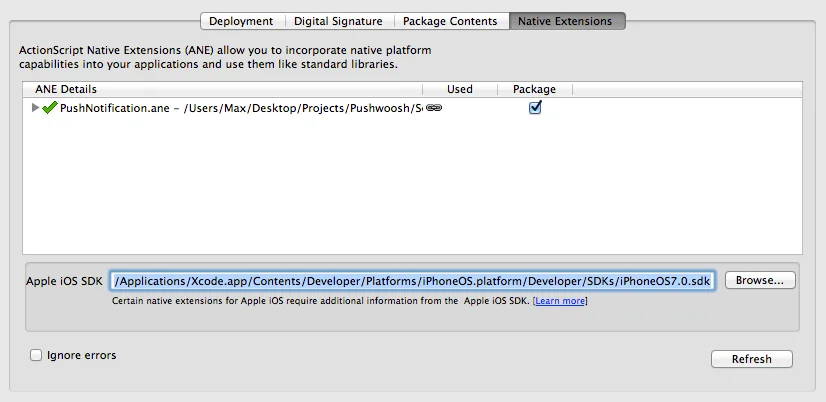
]]> </manifestAdditions> <colorDepth>16bit</colorDepth></android>7. 설정의 “네이티브 확장” 창에서 “패키지” 체크박스를 선택했는지 확인하세요. 또한 iOS용으로 내보낼 때 아래 스크린샷에 따라 최신 iOS SDK 경로를 선택하세요:
피드백을 공유해 주세요
Anchor link to여러분의 피드백은 더 나은 경험을 만드는 데 도움이 됩니다. SDK 통합 과정에서 문제가 발생하면 저희에게 알려주시면 감사하겠습니다. 어려움이 있으시면 주저하지 마시고 이 양식을 통해 의견을 공유해 주세요.