Mac OS X
SDK ডাউনলোড করুন
নমুনা প্রজেক্ট
SDK API ডক্স
Pushwoosh.framework লিঙ্ক করা
Anchor link toআপনার podfile বা cartfile-এ নিম্নলিখিত লাইনগুলি যোগ করে একটি ডিপেন্ডেন্সি ম্যানেজারের মাধ্যমে আপনার প্রজেক্টে Pushwoosh.framework যোগ করুন:
platform :osx, '10.7'
target 'MyApp' do  pod 'Pushwoosh_mac'end
github "Pushwoosh/pushwoosh-mac-sdk"বিকল্পভাবে, আপনি আপনার প্রজেক্টের Build Phases-এ Link Binaries With Libraries-এর মধ্যে ফ্রেমওয়ার্কটি সরাসরি ড্র্যাগ এবং ড্রপ করতে পারেন।
লাইব্রেরি যোগ করা
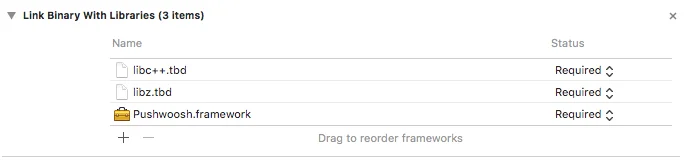
Anchor link toআপনার প্রজেক্টের Build Phases ট্যাবে, Link Binaries With Libraries খুলুন এবং আইটেম যোগ করুন (”+” বোতাম) ক্লিক করুন। আপনার প্রজেক্টে libz.tbd এবং libc++.tbd লাইব্রেরিগুলি অনুসন্ধান করুন এবং যোগ করুন:
Pushwoosh কন্ট্রোল প্যানেলের সাথে অ্যাপ লিঙ্ক করা
Anchor link toআপনার Info.plist-এ, আপনার Pushwoosh অ্যাপ্লিকেশন কোডটিকে ভ্যালু হিসাবে দিয়ে একটি স্ট্রিং টাইপ কী Pushwoosh_APPID যোগ করুন।
AppDelegate পরিবর্তন করা
Anchor link toআপনার AppDelegate-এ নিম্নলিখিত কোডটি যোগ করুন:
import PushKitimport Pushwoosh
func application(_ application: UIApplication, didFinishLaunchingWithOptions launchOptions: [UIApplicationLaunchOptionsKey : Any]? = nil) -> Bool {
//lots of your initialization code
//-----------PUSHWOOSH PART-----------
NSUserNotificationCenter.default.delegate = Pushwoosh.sharedInstance()?.notificationCenterDelegateProxy
// set custom delegate for push handling, in our case - view controllerPushwoosh.sharedInstance().delegate = self
// handling push on app startPushwoosh.sharedInstance().handlePushReceived(aNotification.userInfo)
// register for push notifications!Pushwoosh.sharedInstance().registerForPushNotifications()
#import <Pushwoosh/Pushwoosh.h>
- (void)applicationDidFinishLaunching:(NSNotification *)aNotification{ //lots of your initialization code
//-----------PUSHWOOSH PART-----------
[NSUserNotificationCenter defaultUserNotificationCenter].delegate = [Pushwoosh sharedInstance].notificationCenterDelegateProxy;
// set custom delegate for push handling, in our case - view controller [Pushwoosh sharedInstance].delegate = self;
// handling push on app start [[Pushwoosh sharedInstance] handlePushReceived:[aNotification userInfo]];
// register for push notifications! [[Pushwoosh sharedInstance] registerForPushNotifications]; }আপনার UIApplicationDelegate-এ নিম্নলিখিত কোডটি যোগ করুন (উপরের একই ফাইল)।
// system push notification registration success callback, delegate to PWMessagingDelegatefunc application(_ application: NSApplication, didRegisterForRemoteNotificationsWithDeviceToken deviceToken: Data) {   Pushwoosh.sharedInstance()?.handlePushRegistration(deviceToken)}
// system push notification registration error callback, delegate to PWMessagingDelegatefunc application(_ application: NSApplication, didFailToRegisterForRemoteNotificationsWithError error: Error) {   Pushwoosh.sharedInstance()?.handlePushRegistrationFailure(error)}
// system push notification registration success callback, delegate to pushManager- (void)application:(NSApplication *)application didRegisterForRemoteNotificationsWithDeviceToken:(NSData *)deviceToken { [[Pushwoosh sharedInstance] handlePushRegistration:deviceToken];}
// system push notification registration error callback, delegate to pushManager- (void)application:(NSApplication *)application didFailToRegisterForRemoteNotificationsWithError:(NSError *)error { [[Pushwoosh sharedInstance] handlePushRegistrationFailure:error];}পুশ নোটিফিকেশন হ্যান্ডেল করার জন্য, আপনার UIApplicationDelegate-এ নিম্নলিখিত ফাংশনটি যোগ করুন (তিনটি ধাপ উপরের একই ফাইল):
//this event is fired when the push gets receivedfunc pushwoosh(_ pushwoosh: Pushwoosh!, onMessageReceived message: PWMessage!) {   print("onMessageReceived: \(String(describing: message.payload))")}
//this event is fired when user taps the notificationfunc pushwoosh(_ pushwoosh: Pushwoosh!, onMessageOpened message: PWMessage!) {   print("onMessageOpened: \(String(describing: message.payload))")}
//this event is fired when the push gets received- (void)pushwoosh:(Pushwoosh *)pushwoosh onMessageReceived:(PWMessage *)message { NSLog(@"onMessageReceived: %@", message.payload);}
//this event is fired when user taps the notification- (void)pushwoosh:(Pushwoosh *)pushwoosh onMessageOpened:(PWMessage *)message { NSLog(@"onMessageOpened: %@", message.payload);}পুশ নোটিফিকেশন সক্রিয় করা
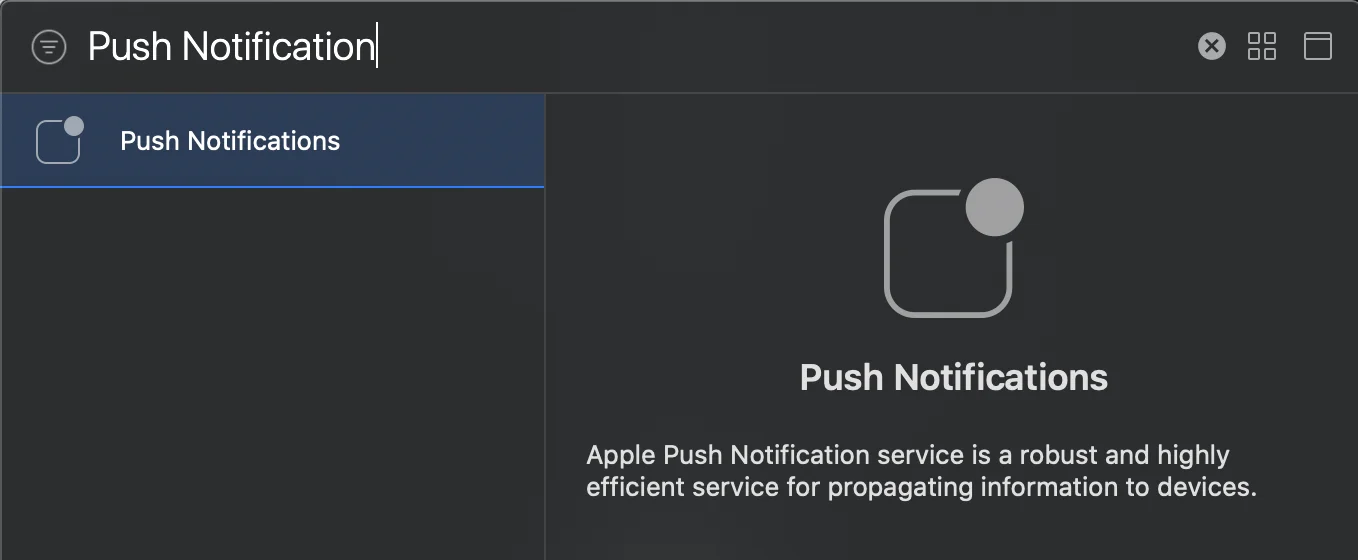
Anchor link toআপনার টার্গেটে Signing and Capabilities-এ যান। + Capability চাপুন এবং Push Notifications যোগ করুন।