iOS কাস্টম ফোরগ্রাউন্ড পুশ নোটিফিকেশন
সংস্করণ 6.10.0 থেকে, আপনি PushwooshForegroundPush মডিউলটি সংহত করতে পারেন যাতে নেটিভ iOS সিস্টেম অ্যালার্ট নিষ্ক্রিয় থাকা অবস্থায় ফোরগ্রাউন্ড পুশ নোটিফিকেশন কাস্টমাইজ করা যায়।
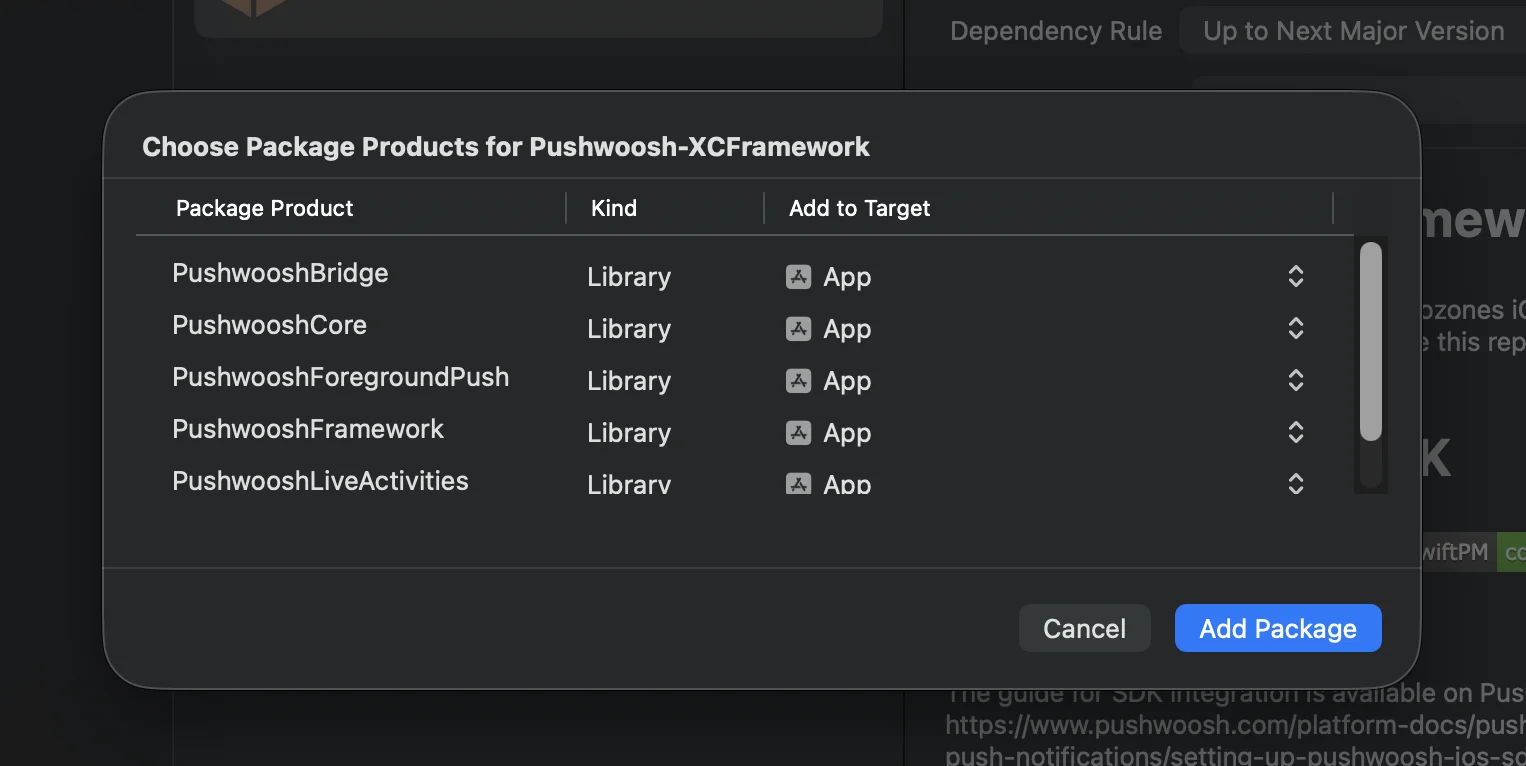
১. নেটিভ ফোরগ্রাউন্ড পুশ অ্যালার্ট নিষ্ক্রিয় করুন
Anchor link toআপনার Info.plist-এ Pushwoosh_SHOW_ALERT = false যোগ করুন।
<key>Pushwoosh_SHOW_ALERT</key><false/>২. PushwooshForegroundPush মডিউল সংহত করা
Anchor link toসুইফট প্যাকেজ ম্যানেজার
কোকোপডস
# Uncomment the next line to define a global platform for your project# platform :ios, '13.0'
target 'MyApp' do  # Comment the next line if you don't want to use dynamic frameworks  use_frameworks!
  pod 'PushwooshXCFramework'  pod 'PushwooshFramework/PushwooshForegroundPush'
end
৩. AppDelegate-এ PushwooshForegroundPush কনফিগারেশন যোগ করুন
Anchor link toimport UIKitimport PushwooshFrameworkimport PushwooshForegroundPush
@mainclass AppDelegate: UIResponder, UIApplicationDelegate, PWMessagingDelegate, PWForegroundPushDelegate {
func application(_ application: UIApplication, didFinishLaunchingWithOptions launchOptions: [UIApplication.LaunchOptionsKey: Any]?) -> Bool {
Pushwoosh.ForegroundPush.foregroundNotificationWith(style: .style1, duration: 5, vibration: .notification, disappearedPushAnimation: .balls)
Pushwoosh.ForegroundPush.delegate = self
return true }
func pushwoosh(_ pushwoosh: Pushwoosh, onMessageReceived message: PWMessage) { if let payload = message.payload { // Pushwoosh method Pushwoosh.ForegroundPush.showForegroundPush(userInfo: payload) } }}foregroundNotificationWith মেথড ব্যবহার করে
foregroundNotificationWith মেথডটি আপনাকে কনফিগারযোগ্য স্টাইল, সময়কাল এবং হ্যাপটিক ফিডব্যাক সহ একটি কাস্টম ফোরগ্রাউন্ড পুশ নোটিফিকেশন প্রদর্শন করতে দেয়।
মেথড সিগনেচার (সুইফট / অবজেক্টিভ-সি):
@objcstatic func foregroundNotificationWith( style: PWForegroundPushStyle, duration: Int, vibration: PWForegroundPushHapticFeedback, disappearedPushAnimation: PWForegroundPushDisappearedAnimation)প্যারামিটার:
style(PWForegroundPushStyle)
- বর্তমানে, শুধুমাত্র
style1উপলব্ধ।
duration(Int)
- নোটিফিকেশনটি অদৃশ্য হওয়ার আগে কতক্ষণ প্রদর্শিত হবে তা নির্দিষ্ট করে (সেকেন্ডে)।
vibration(PWForegroundPushHapticFeedback)
- নোটিফিকেশন প্রদর্শিত হলে হ্যাপটিক ফিডব্যাক নিয়ন্ত্রণ করে। উপলব্ধ বিকল্পগুলি:
case none // কোনো ভাইব্রেশন নেইcase light // হালকা ভাইব্রেশনcase medium // মাঝারি ভাইব্রেশনcase heavy // ভারী ভাইব্রেশনcase soft // নরম ভাইব্রেশনcase rigid // অনমনীয় ভাইব্রেশনcase notification // স্ট্যান্ডার্ড নোটিফিকেশন ভাইব্রেশনdisappearedPushAnimation(PWForegroundPushDisappearedAnimation)
- পুশ অদৃশ্য হওয়ার অ্যানিমেশন
case balls = 0case regularPush৪. didTapForegroundPush ডেলিগেট মেথড প্রয়োগ করা
Anchor link toকাস্টম ফোরগ্রাউন্ড পুশ নোটিফিকেশনে ব্যবহারকারীর ট্যাপ পরিচালনা করতে, PWForegroundPushDelegate প্রোটোকল মেথডটি প্রয়োগ করুন:
// ফোরগ্রাউন্ড পুশে ট্যাপ হ্যান্ডেল করুনfunc didTapForegroundPush(_ userInfo: [AnyHashable : Any]) {    print("Foreground custom push: \(userInfo)")
    // যেকোনো অ্যাকশন সম্পাদন করুন, যেমন, একটি নির্দিষ্ট স্ক্রিনে নেভিগেট করুন    // navigateToScreen(for: userInfo)}
নোট:
- ব্যবহারকারী যখন একটি কাস্টম ফোরগ্রাউন্ড পুশে ট্যাপ করে তখন এই মেথডটি কল করা হয়।
userInfo-তে নোটিফিকেশনের পেলোড থাকে।- কনফিগারেশনের পরে
Pushwoosh.ForegroundPush.delegate = selfসেট করতে ভুলবেন না।
৫. ফোরগ্রাউন্ড পুশ নোটিফিকেশন কাস্টমাইজ করার জন্য ঐচ্ছিক প্যারামিটার
Anchor link toPushwooshForegroundPush মডিউলটি আপনার ফোরগ্রাউন্ড পুশ নোটিফিকেশনের চেহারা এবং আচরণ কাস্টমাইজ করার জন্য বেশ কিছু ঐচ্ছিক প্যারামিটার সরবরাহ করে। এগুলি স্ট্যাটিক প্রপার্টির মাধ্যমে বিশ্বব্যাপী সেট করা যেতে পারে।
| প্রপার্টি | টাইপ | বিবরণ | ডিফল্ট |
|---|---|---|---|
| useLiquidView | Bool | iOS 26-এ লিকুইড গ্লাস ভিউ ব্যবহার করুন। | false |
| gradientColors | [UIColor]? | গ্রেডিয়েন্ট ব্যাকগ্রাউন্ডের জন্য রঙের ঐচ্ছিক অ্যারে। | nil |
| backgroundColor | UIColor? | পুশের জন্য ব্যাকগ্রাউন্ডের রঙ। যদি nil হয় এবং gradientColors সেট করা না থাকে, তাহলে ডিফল্ট গ্রেডিয়েন্ট ব্যবহৃত হয়। | ডিফল্ট সিস্টেম গ্রেডিয়েন্ট |
| usePushAnimation | Bool | পুশ প্রদর্শিত হওয়ার সময় অ্যানিমেট করা হবে কিনা। | true |
| titlePushColor | UIColor? | নোটিফিকেশন শিরোনামের টেক্সটের রঙ। nil হলে ডিফল্ট সিস্টেম সাদা রঙ ব্যবহৃত হয়। | white |
| messagePushColor | UIColor? | নোটিফিকেশন বার্তার টেক্সটের রঙ। nil হলে ডিফল্ট সিস্টেম সাদা রঙ ব্যবহৃত হয়। | white |
| titlePushFont | UIFont? | নোটিফিকেশন শিরোনামের টেক্সটের ফন্ট। nil হলে ডিফল্ট সিস্টেম ফন্ট ব্যবহৃত হয়। | ডিফল্ট সিস্টেম ফন্ট |
| messagePushFont | UIFont? | নোটিফিকেশন বার্তার টেক্সটের ফন্ট। nil হলে ডিফল্ট সিস্টেম ফন্ট ব্যবহৃত হয়। | ডিফল্ট সিস্টেম ফন্ট |
সারসংক্ষেপ:
- সুইফট 5.13+ + iOS 26 → লিকুইড গ্লাস
- সুইফট 5.13+ + iOS < 26 → স্ট্যান্ডার্ড UIView
- সুইফট < 5.13 → সর্বদা ঝাপসা ভিউ (লিকুইড গ্লাস সমর্থন নেই)
উদাহরণ ব্যবহার:
Pushwoosh.ForegroundPush.useLiquidView = truePushwoosh.ForegroundPush.gradientColors = [.red, .orange, .yellow]Pushwoosh.ForegroundPush.titlePushColor = .redPushwoosh.ForegroundPush.messagePushColor = .greenPushwoosh.ForegroundPush.backgroundColor = .blackPushwoosh.ForegroundPush.titlePushFont = .boldSystemFont(ofSize: 22)Pushwoosh.ForegroundPush.messagePushFont = .italicSystemFont(ofSize: 15)Pushwoosh.ForegroundPush.usePushAnimation = false৬. ফোরগ্রাউন্ড পুশের উদাহরণ
Anchor link toএই উদাহরণটি দেখায় কিভাবে শিরোনাম, বার্তা, কার্ড এবং GIF অ্যানিমেশন সহ একটি কাস্টম ফোরগ্রাউন্ড পুশ নোটিফিকেশন প্রদর্শন করা যায়।
এটাই সব। আপনি সফলভাবে Pushwoosh-এর সাথে iOS-এ কাস্টম ফোরগ্রাউন্ড পুশ নোটিফিকেশন কনফিগার করেছেন।