কেনাকাটা
এই রেসিপিগুলো কেনাকাটার পর্যায় কভার করে: যে খেলোয়াড়েরা খরচ করতে প্রস্তুত বা ইতিমধ্যে পেমেন্ট করেছেন। এগুলো তৈরি করার আগে প্রতিটি জার্নির জন্য সেরা অনুশীলন পড়ুন।
এনগেজড নন-পেয়ারদের জন্য প্রথম কেনাকাটার অফার
Anchor link to- কখন ব্যবহার করবেন: খেলোয়াড়েরা গেমে মনোযোগী, কিন্তু কখনো পেমেন্ট করেননি।
- কখন শুরু হয়: কোনো খেলোয়াড় এনগেজড নন-পেয়ার সেগমেন্টে প্রবেশ করলে। Pushwoosh আপনার সেট করা সময়সূচি অনুযায়ী সেগমেন্টটি পরীক্ষা করে, যেমন প্রতি সপ্তাহে।
- এটি কী করে: একটি স্টার্টার প্যাক অফারসহ ইন-অ্যাপ দেখায়, তারপর খেলোয়াড় না কিনলে 1 দিন পরে একটি পুশ রিমাইন্ডার পাঠায়। সেগমেন্টের জন্য 14 দিনে 10টি সম্পন্ন লেভেল দরকার, তাই শুধু মনোযোগী খেলোয়াড়েরাই অফার পান, নতুন ইনস্টল করা খেলোয়াড়েরা পান না।
- যে কনটেন্ট প্রস্তুত করতে হবে: স্টার্টার প্যাক অফারসহ একটি ইন-অ্যাপ টেমপ্লেট এবং রিমাইন্ডারসহ একটি পুশ প্রিসেট।
- যা প্রয়োজন:
PW_InAppPurchaseসেট আপ করা থাকতে হবে। এটি ছাড়া সেগমেন্টে পেমেন্ট করা খেলোয়াড়েরাও মিলে যান, এবং রিমাইন্ডার পুশ ক্রেতাদের কাছেও যায়।
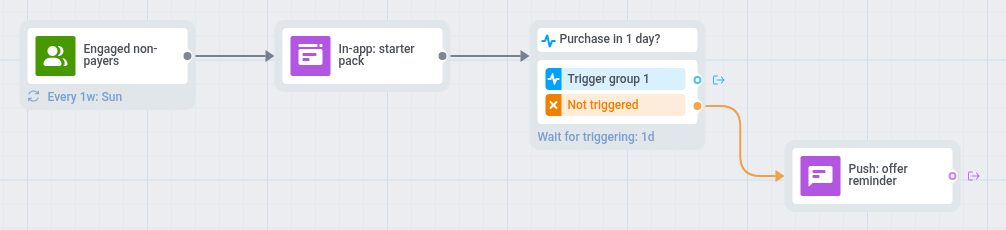
- জার্নি ক্যানভাসে এনগেজড নন-পেয়ার সেগমেন্টের উপর একটি অডিয়েন্স-ভিত্তিক এন্ট্রি যোগ করুন।
- এন্ট্রির সময়সূচি পুনরাবৃত্তিমূলক প্রবেশ-এ সেট করুন এবং পর্যায়বৃত্তভাবে বেছে নিন, যেমন প্রতি সপ্তাহে।
- সেটিংস খুলুন, ক্যাম্পেইনে প্রবেশের সীমা নির্বাচন করুন এবং মাসে একবার বেছে নিন, যাতে অফার উপেক্ষা করা খেলোয়াড় প্রতি সপ্তাহে এটি না পান।
- একটি ইন-অ্যাপ এলিমেন্ট যোগ করুন, যা একটি স্টার্টার কারেন্সি প্যাক অফার করে, যেমন: “স্টার্টার প্যাক: বিশেষ দামে 500 কয়েন।” খেলোয়াড় গেম খুললে বার্তাটি দেখা যায়।
PW_InAppPurchase-এর উপর একটি ট্রিগারের জন্য অপেক্ষা করুন ধাপ যোগ করুন এবং অপেক্ষার সময় 1 দিন সেট করুন। ট্রিগার গ্রুপ 1 শাখাটি খালি রাখুন।- ট্রিগার হয়নি শাখায় অফারটির উল্লেখসহ একটি পুশ যোগ করুন, যেমন: “আপনার স্টার্টার প্যাক এখনও পাওয়া যাচ্ছে।” এটি সেই খেলোয়াড়দের কাছে পৌঁছায় যারা ইন-অ্যাপ দেখেছেন কিন্তু কেনেননি, এবং যারা তারপর থেকে গেম খোলেননি তাদের কাছেও।
- সেটিংস খুলুন, রূপান্তর লক্ষ্য নির্বাচন করুন,
PW_InAppPurchaseবেছে নিন এবং এই ইভেন্টের পর জার্নি শেষ করুন নির্বাচন করুন।
push ছাড়া খেলোয়াড়েরা শুধু ইন-অ্যাপ অফারটি দেখেন, কারণ দ্বিতীয় একটি ইন-অ্যাপ সেটির পুনরাবৃত্তি করত।
দ্বিতীয় কেনাকাটার অফার
Anchor link to- কখন ব্যবহার করবেন: আপনি চান যে একবার পেমেন্ট করা খেলোয়াড়েরা আবার কিনুক।
- কখন শুরু হয়: কোনো খেলোয়াড় কেনাকাটা করলে (
PW_InAppPurchase)। - এটি কী করে: এটি খেলোয়াড়ের প্রথম কেনাকাটা কি না তা পরীক্ষা করে। প্রথমবারের পেয়ারদের কেনাকাটার কয়েক মিনিট পরে একটি ধন্যবাদ ইন-অ্যাপ পাঠায় এবং 3 দিন পরে দ্বিতীয় কেনাকাটার অফারসহ একটি পুশ পাঠায়, যদি না তারা তার আগেই আবার কেনেন।
- যে কনটেন্ট প্রস্তুত করতে হবে: ধন্যবাদসহ একটি ইন-অ্যাপ টেমপ্লেট এবং অফারসহ একটি পুশ প্রিসেট।
- যা প্রয়োজন:
PW_InAppPurchaseসেট আপ করা এবং প্রথমবারের পেয়ার সেগমেন্ট।

- জার্নি ক্যানভাসে
PW_InAppPurchase-এর উপর একটি ট্রিগার-ভিত্তিক এন্ট্রি যোগ করুন। - 5 মিনিটের নির্দিষ্ট সময়কালসহ একটি টাইম ডিলে যোগ করুন। সেগমেন্টগুলো একটি নতুন ইভেন্ট আসার প্রায় এক মিনিট পরেই সেটি গণনা করে, তাই ডিলে ছাড়া স্প্লিট প্রথম কেনাকাটাটি মিস করতে পারে।
- একটি কন্ডিশন স্প্লিট যোগ করুন, সেগমেন্ট বেছে নিন এবং প্রথমবারের পেয়ার সেগমেন্টটি নির্বাচন করুন। অন্যান্য সমস্ত ব্যবহারকারী শাখাটি খালি রাখুন, কারণ বারবার পেমেন্ট করা খেলোয়াড়দের কোনো বার্তার প্রয়োজন নেই।
- একটি সেগমেন্টের ব্যবহারকারীগণ শাখায় খেলোয়াড়কে ধন্যবাদ জানানো একটি ইন-অ্যাপ এলিমেন্ট যোগ করুন, যেমন: “আপনার সমর্থনের জন্য ধন্যবাদ! আপনার পরের রানের জন্য এই নিন একটি বোনাস।” ইন-অ্যাপ মেয়াদ 1 দিনে সেট করুন।
PW_InAppPurchase-এর উপর একটি ট্রিগারের জন্য অপেক্ষা করুন ধাপ যোগ করুন এবং অপেক্ষার সময় 3 দিন সেট করুন। এর ট্রিগার গ্রুপ 1 শাখাটি খালি রাখুন।- ট্রিগার হয়নি শাখায় একটি রিচেবিলিটি চেক যোগ করুন, এবং পুশের মাধ্যমে পৌঁছানো যায় এমন খেলোয়াড়দের জন্য অফারসহ একটি পুশ যোগ করুন, যেমন: “স্টোরে আপনার জন্য একটি বিশেষ প্যাক অপেক্ষা করছে।”
- সেটিংস খুলুন, রূপান্তর লক্ষ্য নির্বাচন করুন,
PW_InAppPurchaseবেছে নিন এবং এই ইভেন্টের পর জার্নি শেষ করুন নির্বাচন করুন।
স্টোর ছেড়ে যাওয়ার রিমাইন্ডার
Anchor link to- কখন ব্যবহার করবেন: খেলোয়াড়েরা ইন-গেম স্টোর খোলেন এবং কিছু না কিনেই চলে যান।
- কখন শুরু হয়: কোনো খেলোয়াড় স্টোর খুললে (
Store opened)। - এটি কী করে: খেলোয়াড় স্টোর খোলার পর 1 ঘণ্টা অপেক্ষা করে, তারপর খেলোয়াড় কিছু না কিনলে একটি পুশ বা ইন-অ্যাপ রিমাইন্ডার পাঠায়। যে খেলোয়াড়েরা কেনেন তারা রিমাইন্ডার পান না।
- যে কনটেন্ট প্রস্তুত করতে হবে: একই রিমাইন্ডারসহ একটি পুশ প্রিসেট এবং একটি ইন-অ্যাপ টেমপ্লেট।
- যা প্রয়োজন:
PW_InAppPurchaseসেট আপ করা থাকতে হবে, কারণ জার্নিটি ভিজিটের পরে কেনাকাটা হয়েছে কি না তা পরীক্ষা করে।
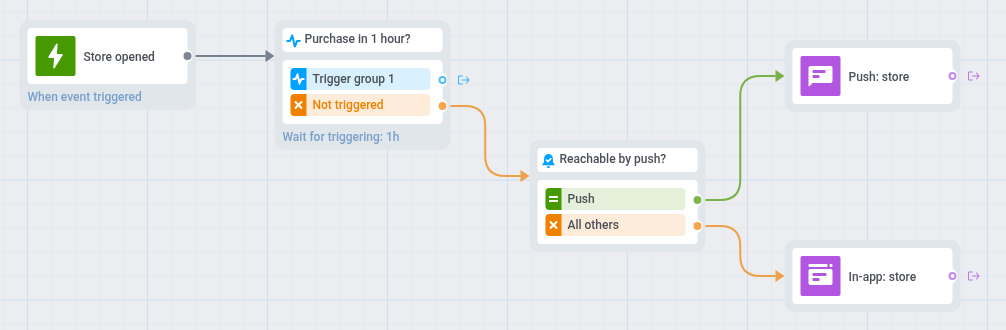
- জার্নি ক্যানভাসে
Store opened-এর উপর একটি ট্রিগার-ভিত্তিক এন্ট্রি যোগ করুন। PW_InAppPurchase-এর উপর একটি ট্রিগারের জন্য অপেক্ষা করুন ধাপ যোগ করুন এবং অপেক্ষার সময় 1 ঘণ্টা সেট করুন। ট্রিগার গ্রুপ 1 শাখাটি খালি রাখুন।- ট্রিগার হয়নি শাখায় একটি রিচেবিলিটি চেক যোগ করুন।
- পুশের মাধ্যমে পৌঁছানো যায় এমন খেলোয়াড়দের জন্য একটি পুশ যোগ করুন, যা স্টোরের একটি ডিপ লিঙ্ক সেট করে, যেমন: “এখনও ভাবছেন? আপনার প্যাক স্টোরে অপেক্ষা করছে।”
- বাকিদের জন্য একই রিমাইন্ডারসহ একটি ইন-অ্যাপ এলিমেন্ট যোগ করুন এবং ইন-অ্যাপ মেয়াদ 1 দিনে সেট করুন। খেলোয়াড় পরের বার গেম খুললে বা গেমে ফিরে এলে এটি দেখেন।
- সেটিংস খুলুন, ক্যাম্পেইনে প্রবেশের সীমা নির্বাচন করুন এবং সপ্তাহে একবার বেছে নিন, যাতে প্রতিদিন স্টোর ঘুরে দেখা খেলোয়াড় প্রতিদিন রিমাইন্ডার না পান।
- সেটিংস খুলুন, রূপান্তর লক্ষ্য নির্বাচন করুন,
PW_InAppPurchaseবেছে নিন এবং এই ইভেন্টের পর জার্নি শেষ করুন নির্বাচন করুন।