Mac OS X
链接 Pushwoosh.framework
Anchor link to通过将以下几行代码放入您的 podfile 或 cartfile 中,使用依赖管理器将 Pushwoosh.framework 添加到您的项目中:
platform :osx, '10.7'
target 'MyApp' do  pod 'Pushwoosh_mac'end
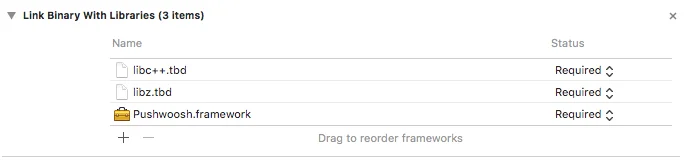
github "Pushwoosh/pushwoosh-mac-sdk"或者,您也可以直接将该框架拖放到项目 Build Phases 中的 Link Binaries With Libraries 部分。
在您项目的 Build Phases 选项卡中,打开 Link Binaries With Libraries,然后点击添加项(“+”按钮)。搜索并将 libz.tbd 和 libc++.tbd 库添加到您的项目中:
将应用与 Pushwoosh 控制面板链接
Anchor link to在您的 Info.plist 文件中,添加一个字符串类型的键 Pushwoosh_APPID,其值为您的 Pushwoosh Application Code。
修改 AppDelegate
Anchor link to将以下代码添加到您的 AppDelegate 中:
import PushKitimport Pushwoosh
func application(_ application: UIApplication, didFinishLaunchingWithOptions launchOptions: [UIApplicationLaunchOptionsKey : Any]? = nil) -> Bool {
// 您的许多初始化代码
//-----------PUSHWOOSH 部分-----------
NSUserNotificationCenter.default.delegate = Pushwoosh.sharedInstance()?.notificationCenterDelegateProxy
// 设置用于处理推送的自定义委托,此处为视图控制器Pushwoosh.sharedInstance().delegate = self
// 处理应用启动时的推送Pushwoosh.sharedInstance().handlePushReceived(aNotification.userInfo)
// 注册推送通知!Pushwoosh.sharedInstance().registerForPushNotifications()
#import <Pushwoosh/Pushwoosh.h>
- (void)applicationDidFinishLaunching:(NSNotification *)aNotification{ // 您的许多初始化代码
//-----------PUSHWOOSH 部分-----------
[NSUserNotificationCenter defaultUserNotificationCenter].delegate = [Pushwoosh sharedInstance].notificationCenterDelegateProxy;
// 设置用于处理推送的自定义委托,此处为视图控制器 [Pushwoosh sharedInstance].delegate = self;
// 处理应用启动时的推送 [[Pushwoosh sharedInstance] handlePushReceived:[aNotification userInfo]];
// 注册推送通知! [[Pushwoosh sharedInstance] registerForPushNotifications]; }将以下代码添加到您的 UIApplicationDelegate 中(与上述文件相同)。
// 系统推送通知注册成功回调,委托给 PWMessagingDelegatefunc application(_ application: NSApplication, didRegisterForRemoteNotificationsWithDeviceToken deviceToken: Data) {   Pushwoosh.sharedInstance()?.handlePushRegistration(deviceToken)}
// 系统推送通知注册错误回调,委托给 PWMessagingDelegatefunc application(_ application: NSApplication, didFailToRegisterForRemoteNotificationsWithError error: Error) {   Pushwoosh.sharedInstance()?.handlePushRegistrationFailure(error)}
// 系统推送通知注册成功回调,委托给 pushManager- (void)application:(NSApplication *)application didRegisterForRemoteNotificationsWithDeviceToken:(NSData *)deviceToken { [[Pushwoosh sharedInstance] handlePushRegistration:deviceToken];}
// 系统推送通知注册错误回调,委托给 pushManager- (void)application:(NSApplication *)application didFailToRegisterForRemoteNotificationsWithError:(NSError *)error { [[Pushwoosh sharedInstance] handlePushRegistrationFailure:error];}要处理推送通知,请将以下函数添加到您的 UIApplicationDelegate 中(与上面三个步骤中的文件相同):
// 当收到推送时会触发此事件func pushwoosh(_ pushwoosh: Pushwoosh!, onMessageReceived message: PWMessage!) {   print("onMessageReceived: \(String(describing: message.payload))")}
// 当用户点击通知时会触发此事件func pushwoosh(_ pushwoosh: Pushwoosh!, onMessageOpened message: PWMessage!) {   print("onMessageOpened: \(String(describing: message.payload))")}
// 当收到推送时会触发此事件- (void)pushwoosh:(Pushwoosh *)pushwoosh onMessageReceived:(PWMessage *)message { NSLog(@"onMessageReceived: %@", message.payload);}
// 当用户点击通知时会触发此事件- (void)pushwoosh:(Pushwoosh *)pushwoosh onMessageOpened:(PWMessage *)message { NSLog(@"onMessageOpened: %@", message.payload);}启用推送通知
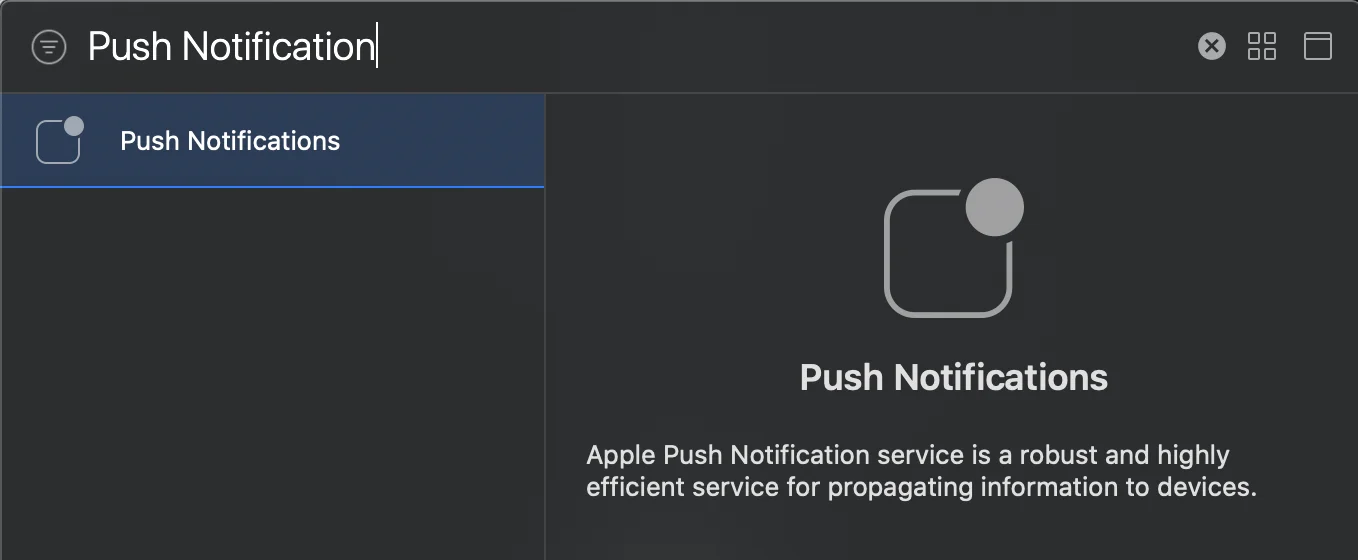
Anchor link to在您的目标中,前往 Signing and Capabilities。点击 + Capability 并添加 Push Notifications。