VoIP 推送
在 iOS 8 中,Apple 推出了 PushKit 和 VoIP 推送——一种新型的推送通知。在标准推送功能的基础上,VoIP 推送允许应用在向用户显示通知之前执行代码。
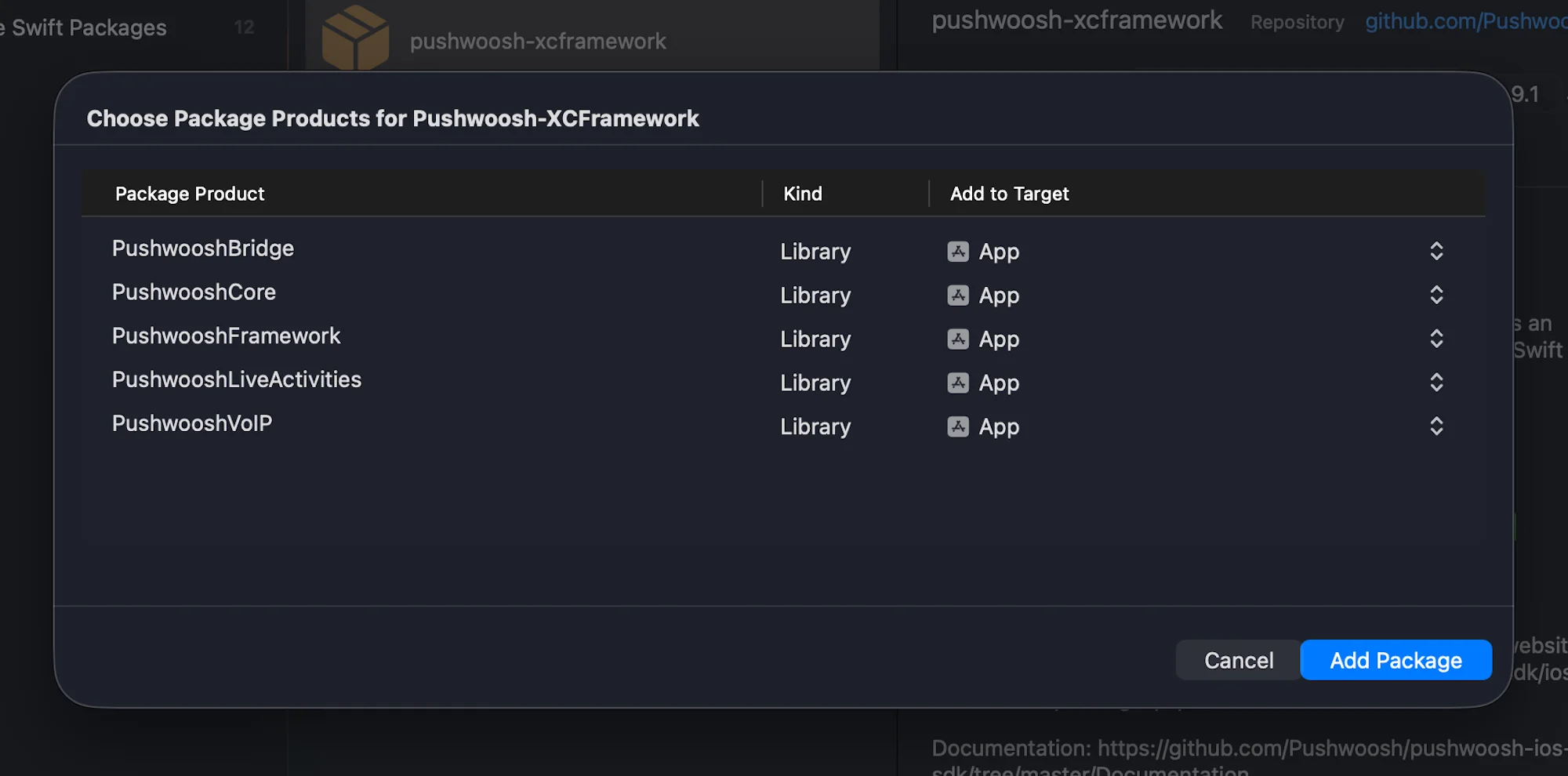
1. 将 PushwooshVoIP 模块添加到您的项目中。
Swift Package Manager
Cocoapods
# Uncomment the next line to define a global platform for your project# platform :ios, '9.0'
target 'MyApp' do  # Comment the next line if you don't want to use dynamic frameworks  use_frameworks!
  pod 'PushwooshXCFramework'  pod 'PushwooshFramework/PushwooshVoIP'
end
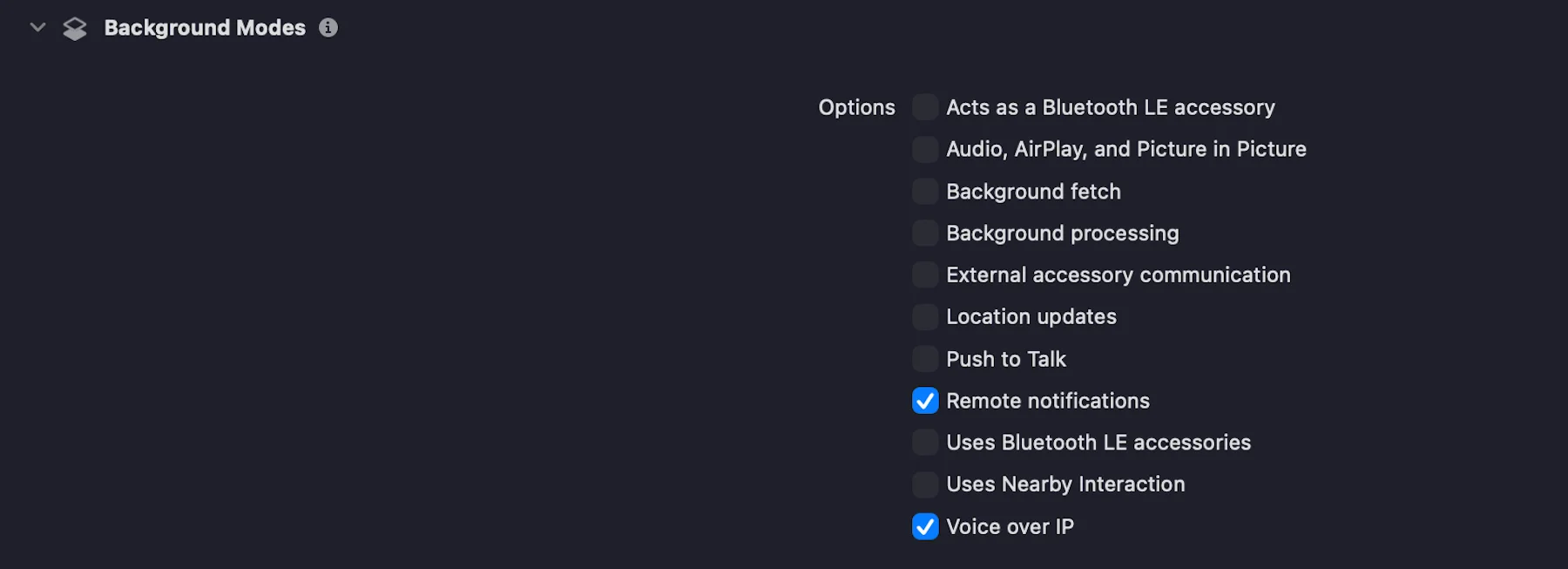
2. 在 Signing & Capabilities 选项卡中,勾选复选框以添加 Voice over IP 功能,如下方截图所示:
3. 按照以下代码所示,初始化 PushwooshVoIP 模块。
import UIKitimport PushwooshFrameworkimport PushwooshVoIPimport CallKitimport PushKit
@mainclass AppDelegate: UIResponder, UIApplicationDelegate, PWVoIPCallDelegate {
    func application(_ application: UIApplication,                     didFinishLaunchingWithOptions launchOptions: [UIApplication.LaunchOptionsKey: Any]?) -> Bool {
        /// Initializes the Pushwoosh VoIP module.        ///        /// - Parameters:        ///   - supportVideo: A Boolean value indicating whether video calls are supported.        ///   - ringtoneSound: The name of the custom ringtone sound file to be used for incoming calls (e.g. `"mySound.caf"`).        ///   - handleTypes: The type of call handle to support. Possible values:        ///     - `1` – Generic        ///     - `2` – Phone number        ///     - `3` – Email address        Pushwoosh.VoIP.initializeVoIP(true, ringtoneSound: "mySound.caf", handleTypes: 1)
        // Set delegate to receive VoIP call events        Pushwoosh.VoIP.delegate = self
        return true    }
    // MARK: - Required PWVoIPCallDelegate Callbacks
    func voipDidReceiveIncomingCall(payload: PushwooshVoIP.PWVoIPMessage) {        // Handle incoming VoIP push    }
    func pwProviderDidReset(_ provider: CXProvider) {        // Handle provider reset    }
    func pwProviderDidBegin(_ provider: CXProvider) {        // Handle provider activation    }}
4. PWVoIPCallDelegate 协议定义了处理 VoIP 通话生命周期和 CallKit 交互所需的必需和可选回调。
@objc public protocol PWVoIPCallDelegate: NSObjectProtocol {
    /// Called when an incoming VoIP push is received.    @objc func voipDidReceiveIncomingCall(payload: PushwooshVoIP.PWVoIPMessage)
    /// Optional: Called when the incoming call was successfully reported to CallKit.    @objc optional func voipDidReportIncomingCallSuccessfully(voipMessage: PushwooshVoIP.PWVoIPMessage)
    /// Optional: Called when reporting the incoming call to CallKit failed.    @objc optional func voipDidFailToReportIncomingCall(error: Error)
    /// Optional: Called when a new outgoing call is started.    @objc optional func startCall(_ provider: CXProvider, perform action: CXStartCallAction)
    /// Optional: Called when an active call is ended.    @objc optional func endCall(_ provider: CXProvider, perform action: CXEndCallAction, voipMessage: PushwooshVoIP.PWVoIPMessage?)
    /// Optional: Called when an incoming call is answered.    @objc optional func answerCall(_ provider: CXProvider, perform action: CXAnswerCallAction, voipMessage: PushwooshVoIP.PWVoIPMessage?)
    /// Optional: Called when the call is muted or unmuted.    @objc optional func mutedCall(_ provider: CXProvider, perform action: CXSetMutedCallAction)
    /// Optional: Called when the call is held or unheld.    @objc optional func heldCall(_ provider: CXProvider, perform action: CXSetHeldCallAction)
    /// Optional: Called when a DTMF tone is played.    @objc optional func playDTMF(_ provider: CXProvider, perform action: CXPlayDTMFCallAction)
    /// Called when the CallKit provider is reset.    @objc func pwProviderDidReset(_ provider: CXProvider)
    /// Called when the CallKit provider begins.    @objc func pwProviderDidBegin(_ provider: CXProvider)
    /// Optional: Provides the CallKit call controller instance.    @objc optional func returnedCallController(_ controller: CXCallController)
    /// Optional: Provides the CallKit provider instance.    @objc optional func returnedProvider(_ provider: CXProvider)
    /// Optional: Called when the audio session is activated.    @objc optional func activatedAudioSession(_ provider: CXProvider, didActivate audioSession: AVAudioSession)
    /// Optional: Called when the audio session is deactivated.    @objc optional func deactivatedAudioSession(_ provider: CXProvider, didDeactivate audioSession: AVAudioSession)}
5. 根据 VoIP 证书配置指南 将您的 VoIP 证书上传到 Pushwoosh Control Panel,并选择 Production 网关。
就是这样!
与我们分享您的反馈
Anchor link to您的反馈有助于我们创造更好的体验,因此如果您在 SDK 集成过程中遇到任何问题,我们非常希望听到您的声音。如果您遇到任何困难,请随时通过此表单与我们分享您的想法。