iOS 自定义前台推送通知
从 6.10.0 版本开始,当原生 iOS 系统提醒被禁用时,您可以集成 PushwooshForegroundPush 模块来自定义前台推送通知。
1. 禁用原生前台推送提醒
Anchor link to将 Pushwoosh_SHOW_ALERT = false 添加到您的 Info.plist 中。
<key>Pushwoosh_SHOW_ALERT</key><false/>2. 集成 PushwooshForegroundPush 模块
Anchor link toSwift Package Manager
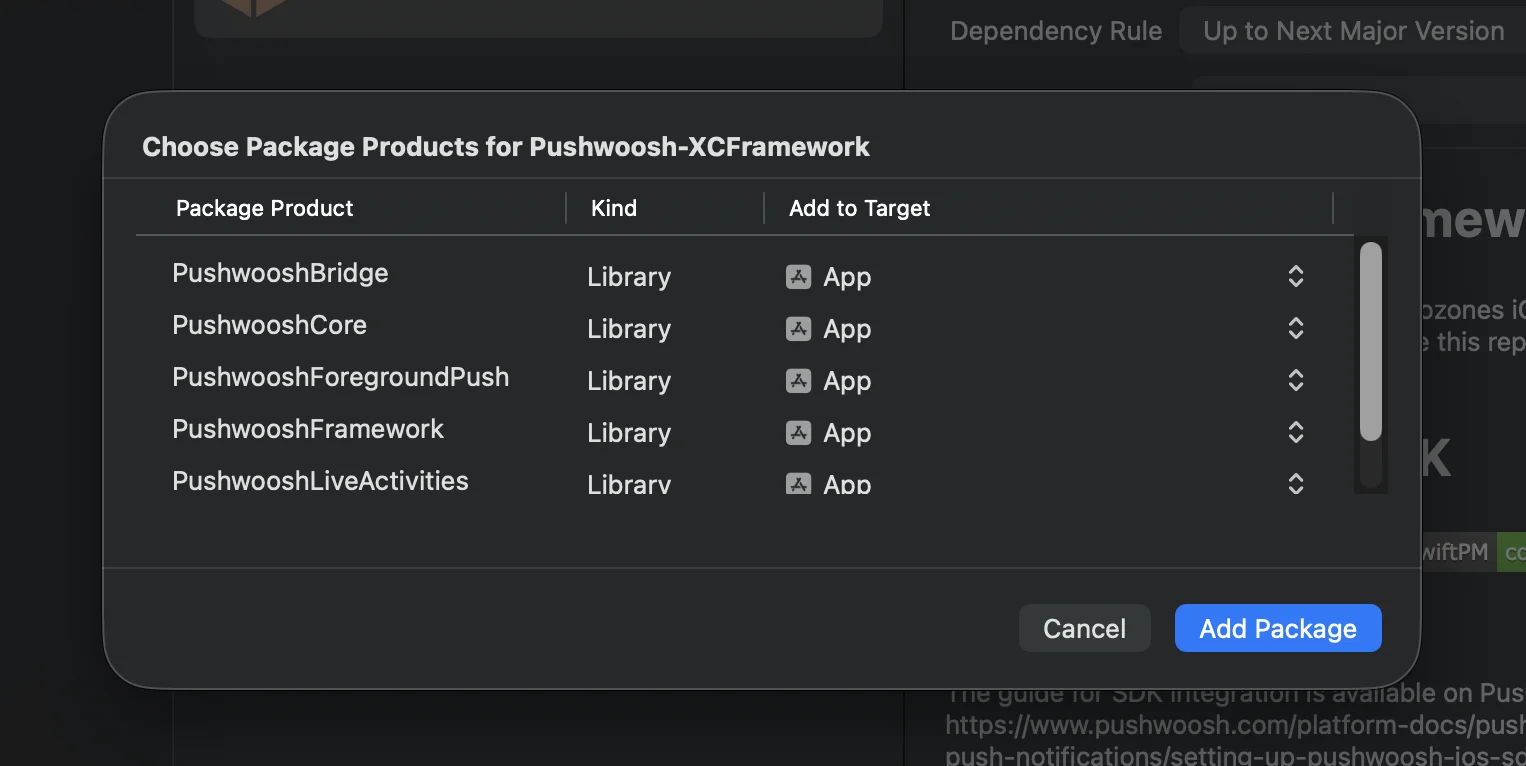
Cocoapods
# Uncomment the next line to define a global platform for your project# platform :ios, '13.0'
target 'MyApp' do  # Comment the next line if you don't want to use dynamic frameworks  use_frameworks!
  pod 'PushwooshXCFramework'  pod 'PushwooshFramework/PushwooshForegroundPush'
end
3. 在 AppDelegate 中添加 PushwooshForegroundPush 配置
Anchor link toimport UIKitimport PushwooshFrameworkimport PushwooshForegroundPush
@mainclass AppDelegate: UIResponder, UIApplicationDelegate, PWMessagingDelegate, PWForegroundPushDelegate {
func application(_ application: UIApplication, didFinishLaunchingWithOptions launchOptions: [UIApplication.LaunchOptionsKey: Any]?) -> Bool {
Pushwoosh.ForegroundPush.foregroundNotificationWith(style: .style1, duration: 5, vibration: .notification, disappearedPushAnimation: .balls)
Pushwoosh.ForegroundPush.delegate = self
return true }
func pushwoosh(_ pushwoosh: Pushwoosh, onMessageReceived message: PWMessage) { if let payload = message.payload { // Pushwoosh method Pushwoosh.ForegroundPush.showForegroundPush(userInfo: payload) } }}使用 foregroundNotificationWith 方法
foregroundNotificationWith 方法允许您显示一个自定义的前台推送通知,其样式、持续时间和触觉反馈均可配置。
方法签名 (Swift / Objective-C):
@objcstatic func foregroundNotificationWith( style: PWForegroundPushStyle, duration: Int, vibration: PWForegroundPushHapticFeedback, disappearedPushAnimation: PWForegroundPushDisappearedAnimation)参数:
style(PWForegroundPushStyle)
- 目前,只有 style1 可用。
duration(Int)
- 指定通知在消失前显示多长时间(以秒为单位)。
vibration(PWForegroundPushHapticFeedback)
- 控制通知显示时的触觉反馈。可用选项:
case none // 无振动case light // 轻微振动case medium // 中等振动case heavy // 强烈振动case soft // 柔和振动case rigid // 清脆振动case notification // 标准通知振动disappearedPushAnimation(PWForegroundPushDisappearedAnimation)
- 推送消失动画
case balls = 0case regularPush4. 实现 didTapForegroundPush 代理方法
Anchor link to要处理用户对自定义前台推送通知的点击操作,请实现 PWForegroundPushDelegate 协议方法:
// 处理前台推送的点击事件func didTapForegroundPush(_ userInfo: [AnyHashable : Any]) {    print("Foreground custom push: \(userInfo)")
    // 执行任何操作,例如,导航到特定屏幕    // navigateToScreen(for: userInfo)}
注意:
- 当用户点击自定义前台推送时,会调用此方法。
- userInfo 包含通知的 payload。
- 确保在配置后设置
Pushwoosh.ForegroundPush.delegate = self。
5. 自定义前台推送通知的可选参数
Anchor link toPushwooshForegroundPush 模块提供了几个可选参数,用于自定义前台推送通知的外观和行为。这些参数可以通过静态属性进行全局设置。
| 属性 | 类型 | 描述 | 默认值 |
|---|---|---|---|
| useLiquidView | Bool | 在 iOS 26 上使用 Liquid Glass 视图。 | false |
| gradientColors | [UIColor]? | 用于渐变背景的可选颜色数组。 | nil |
| backgroundColor | UIColor? | 推送的背景颜色。如果为 nil 且未设置 gradientColors,则使用默认渐变。 | 默认系统渐变 |
| usePushAnimation | Bool | 显示推送时是否使用动画。 | true |
| titlePushColor | UIColor? | 通知标题文本的颜色。如果为 nil,则默认为系统白色。 | 白色 |
| messagePushColor | UIColor? | 通知消息文本的颜色。如果为 nil,则默认为系统白色。 | 白色 |
| titlePushFont | UIFont? | 通知标题文本的字体。如果为 nil,则默认为系统字体。 | 默认系统字体 |
| messagePushFont | UIFont? | 通知消息文本的字体。如果为 nil,则默认为系统字体。 | 默认系统字体 |
总结:
- Swift 5.13+ + iOS 26 → Liquid Glass
- Swift 5.13+ + iOS < 26 → 标准 UIView
- Swift < 5.13 → 始终为模糊视图(不支持 Liquid Glass)
用法示例:
Pushwoosh.ForegroundPush.useLiquidView = truePushwoosh.ForegroundPush.gradientColors = [.red, .orange, .yellow]Pushwoosh.ForegroundPush.titlePushColor = .redPushwoosh.ForegroundPush.messagePushColor = .greenPushwoosh.ForegroundPush.backgroundColor = .blackPushwoosh.ForegroundPush.titlePushFont = .boldSystemFont(ofSize: 22)Pushwoosh.ForegroundPush.messagePushFont = .italicSystemFont(ofSize: 15)Pushwoosh.ForegroundPush.usePushAnimation = false6. 前台推送示例
Anchor link to此示例演示了如何显示带有 title、message、cards 和 GIF 动画 的自定义前台推送通知。
就是这样。您已成功在 iOS 中使用 Pushwoosh 配置了自定义前台推送通知。