iOS App Clips
App Clips (轻应用) 允许用户在不下载完整应用的情况下快速完成任务。通过 Pushwoosh,您可以向 App Clip 用户发送推送通知 — 当 App Clip 打开时,iOS 会自动授予 8 小时的通知访问权限。
您需要什么
Anchor link to- Pushwoosh iOS SDK 7.0.33+
- Xcode 15+
- 为您的 App Clip 提供一个 独立的 Pushwoosh 应用(不同的 bundle ID = 独立的应用)
- 一台用于测试的真实设备(推送令牌在模拟器上不起作用)
1. 创建一个 Pushwoosh 应用
Anchor link to您的 App Clip 有一个不同的 bundle ID(例如 com.yourapp.Clip),因此它需要一个 独立的 Pushwoosh 应用 及其自己的 APNs 密钥。
- 前往 Pushwoosh Control Panel
- 使用 App Clip 的 bundle ID 创建一个新应用
- 上传您的 APNs 身份验证密钥
- 复制 Application Code 和 API Token
2. 创建一个 App Clip target
Anchor link to- 在 Xcode 中:File → New → Target → App Clip
- 将 Push Notifications 功能添加到 App Clip target
有关添加功能的详细截图,请参阅 基本集成指南。
3. 添加 Pushwoosh 框架
Anchor link to在 App Clip target 的 Build Phases → Link Binary With Libraries 中,添加:
PushwooshFramework.frameworkPushwooshCore.frameworkPushwooshBridge.framework
4. 配置 Info.plist
Anchor link to<!-- Pushwoosh --><key>Pushwoosh_APPID</key><string>XXXXX-XXXXX</string><key>Pushwoosh_API_TOKEN</key><string>YOUR_API_TOKEN</string>
<!-- 临时推送(8 小时自动授权,无对话框) --><key>NSAppClip</key><dict> <key>NSAppClipRequestEphemeralUserNotification</key> <true/> <key>NSAppClipRequestLocationConfirmation</key> <false/></dict>
<key>UIBackgroundModes</key><array> <string>remote-notification</string></array>5. 初始化 SDK
Anchor link toimport SwiftUIimport PushwooshFramework
class AppClipDelegate: NSObject, UIApplicationDelegate, PWMessagingDelegate {
func application(_ application: UIApplication, didFinishLaunchingWithOptions launchOptions: [UIApplication.LaunchOptionsKey: Any]? = nil) -> Bool { Pushwoosh.configure.delegate = self Pushwoosh.configure.registerForPushNotifications() return true }
func application(_ application: UIApplication, didRegisterForRemoteNotificationsWithDeviceToken deviceToken: Data) { Pushwoosh.configure.handlePushRegistration(deviceToken) }
func application(_ application: UIApplication, didFailToRegisterForRemoteNotificationsWithError error: Error) { Pushwoosh.configure.handlePushRegistrationFailure(error as NSError) }
func application(_ application: UIApplication, didReceiveRemoteNotification userInfo: [AnyHashable: Any], fetchCompletionHandler completionHandler: @escaping (UIBackgroundFetchResult) -> Void) { Pushwoosh.configure.handlePushReceived(userInfo) completionHandler(.noData) }
func pushwoosh(_ pushwoosh: Pushwoosh, onMessageOpened message: PWMessage) { print("Push opened: \(message.payload ?? [:])") }}
@mainstruct YourAppClip: App { @UIApplicationDelegateAdaptor(AppClipDelegate.self) var appDelegate
var body: some Scene { WindowGroup { ContentView() } }}import UIKitimport PushwooshFramework
@mainclass AppDelegate: UIResponder, UIApplicationDelegate, PWMessagingDelegate {
func application(_ application: UIApplication, didFinishLaunchingWithOptions launchOptions: [UIApplication.LaunchOptionsKey: Any]?) -> Bool { Pushwoosh.configure.delegate = self Pushwoosh.configure.registerForPushNotifications() return true }
func application(_ application: UIApplication, didRegisterForRemoteNotificationsWithDeviceToken deviceToken: Data) { Pushwoosh.configure.handlePushRegistration(deviceToken) }
func application(_ application: UIApplication, didFailToRegisterForRemoteNotificationsWithError error: Error) { Pushwoosh.configure.handlePushRegistrationFailure(error as NSError) }
func application(_ application: UIApplication, didReceiveRemoteNotification userInfo: [AnyHashable: Any], fetchCompletionHandler completionHandler: @escaping (UIBackgroundFetchResult) -> Void) { Pushwoosh.configure.handlePushReceived(userInfo) completionHandler(.noData) }
func pushwoosh(_ pushwoosh: Pushwoosh, onMessageOpened message: PWMessage) { print("Push opened: \(message.payload ?? [:])") }}通过临时权限,iOS 会自动授予 8 小时的推送访问权限。如果您想在 不显示权限对话框 的情况下使用临时模式,请直接调用 UIApplication.shared.registerForRemoteNotifications(),而不是 Pushwoosh.configure.registerForPushNotifications()。
要请求 永久 推送权限(标准对话框),请如上所示使用 Pushwoosh.configure.registerForPushNotifications()。
临时推送权限
Anchor link to当用户打开您的 App Clip 时,iOS 会在不询问的情况下授予 8 小时 的推送通知访问权限。8 小时后,该权限将过期。用户必须重新打开 App Clip 才能再获得 8 小时的权限。
要在 不显示权限对话框 的情况下获取 8 小时的推送令牌:
UIApplication.shared.registerForRemoteNotifications()要获取 永久 推送令牌(显示标准权限对话框):
Pushwoosh.configure.registerForPushNotifications()| 限制 | 详情 |
|---|---|
| 无富媒体通知 | App Clips 无法包含通知服务扩展 — 没有图片,没有通信通知 |
| 大小限制 | 15 MB (iOS 16) / 50 MB (iOS 17+) |
| 8 小时推送窗口 | 临时权限在 8 小时后过期 |
| 无后台处理 | 静默推送功能有限 |
| Device ID | identifierForVendor 返回零 — SDK 会自动处理此问题 (7.0.33+) |
效果展示
Anchor link to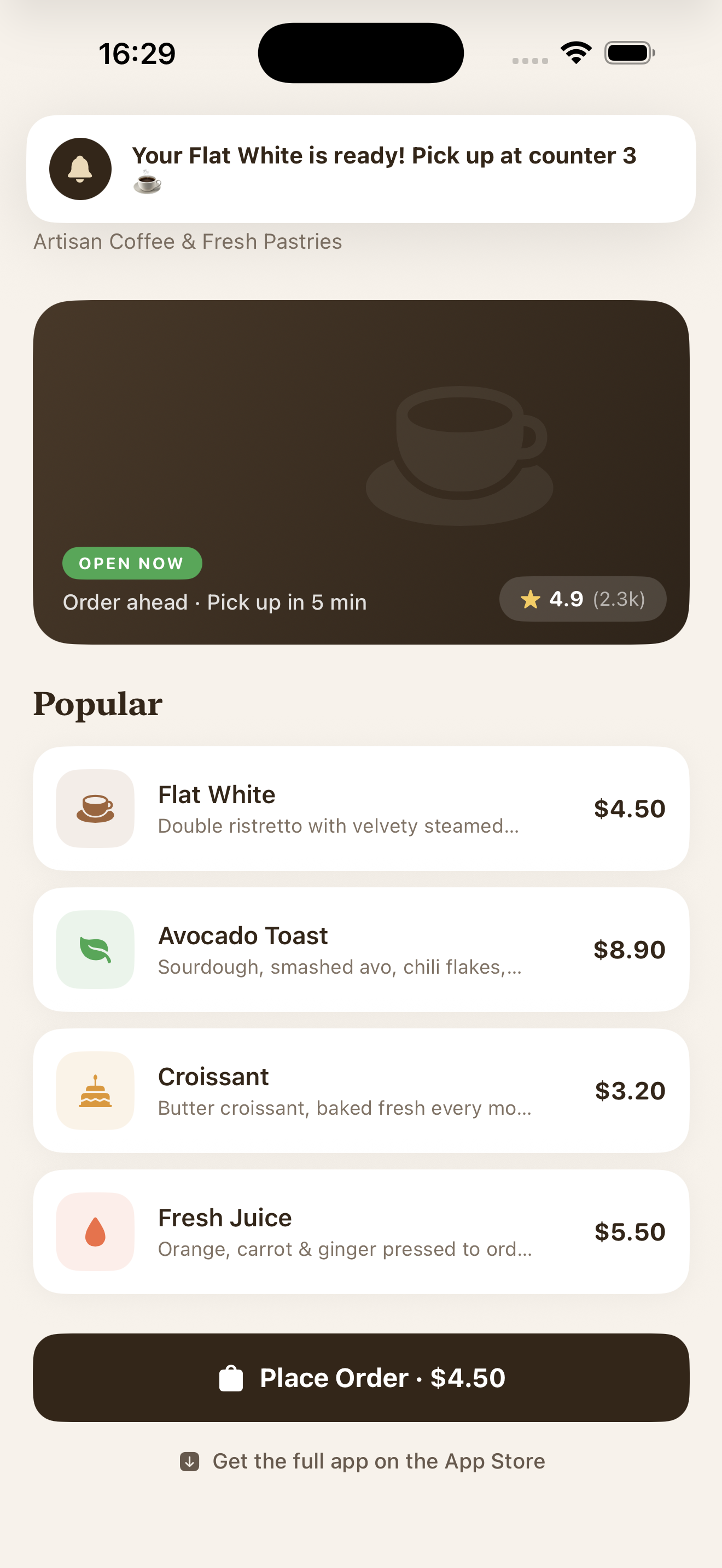
在具有临时权限的 App Clip 中收到的推送通知