自定义富媒体外观
自定义富媒体页面的外观,使其与您的应用风格完美契合。您可以更改应用内消息的背景颜色,添加一些动画,或调整加载视图以适应应用布局。通过让应用内消息看起来像应用的原生组件,从而改善用户体验。
首先,获取 RichMediaStyle 类的一个实例:
PWRichMediaStyle *style = [PWRichMediaManager sharedManager].richMediaStyle;Android
Anchor link toRichMediaStyle style = RichMediaManager.getRichMediaStyle();背景颜色
Anchor link to通过更改向应用用户显示的富媒体页面的背景颜色,让应用内消息看起来像是您应用固有的一部分。
style.backgroundColor = [[UIColor blackColor] colorWithAlphaComponent:0.2f];Android
Anchor link tostyle.setBackgroundColor(ContextCompat.getColor(getApplication(), R.color.black));就是这样!
通过为富媒体外观添加动画,增强应用内消息的效果。
将动画委托设置为以下默认类之一:
PWRichMediaStyleSlideLeftAnimationPWRichMediaStyleSlideRightAnimationPWRichMediaStyleSlideTopAnimationPWRichMediaStyleSlideBottomAnimationPWRichMediaStyleCrossFadeAnimation
style.animationDelegate = [PWRichMediaStyleCrossFadeAnimation new];Android
Anchor link to将动画委托设置为以下默认类之一:
RichMediaAnimationSlideTopRichMediaAnimationSlideBottomRichMediaAnimationSlideRightRichMediaAnimationSlideLeftRichMediaAnimationCrossFade
richMediaStyle.setRichMediaAnimationType(new RichMediaAnimationSlideTop());要设置自定义动画,请按如下方式为 iOS 实现 PWRichMediaStyleAnimationDelegate 方法,或为 Android 实现 RichMediaAnimation:
- 设置动画委托:
style.animationDelegate = self;- 实现
PWRichMediaStyleAnimationDelegate方法(不要忘记调用完成块):
- (void)runPresentingAnimationWithContentView:(UIView *)contentView parentView:(UIView *)parentView completion:(dispatch_block_t)completion {    contentView.transform = CGAffineTransformMakeTranslation(0, parentView.bounds.size.height);
    [UIView animateWithDuration:0.6                          delay:0         usingSpringWithDamping:0.4          initialSpringVelocity:0                        options:0                     animations:^{                         contentView.transform = CGAffineTransformIdentity;                     } completion:^(BOOL finished) {                         completion();                     }];}
- (void)runDismissingAnimationWithContentView:(UIView *)contentView parentView:(UIView *)parentView completion:(dispatch_block_t)completion {    [UIView animateWithDuration:0.3                     animations:^{                         contentView.alpha = 0.0f;                         contentView.transform = CGAffineTransformMakeScale(2, 2);                     } completion:^(BOOL finished) {                         completion();                     }];}
Android
Anchor link to实现 RichMediaAnimation 接口并将其设置为自定义富媒体的关闭和打开动画:
richMediaStyle.setRichMediaAnimation(new RichMediaAnimation() {    //Allows to set rules and behavior for custom Rich Media open animation    @Override    public void openAnimation(View contentView, View parentView) {        AnimationSet fadeInAnimation = new AnimationSet(true);        fadeInAnimation.addAnimation(new TranslateAnimation(0.15f * parentView.getWidth(), 0, parentView.getHeight() / 2.5f, 0));        fadeInAnimation.addAnimation(new AlphaAnimation(0, 1));        fadeInAnimation.addAnimation(new ScaleAnimation(0.7f, 1.0f, 0.7f, 1.0f));        fadeInAnimation.setDuration(2000);        fadeInAnimation.setInterpolator(new DecelerateInterpolator(1f));
        contentView.startAnimation(fadeInAnimation);    }
    //Allows to set rules and behavior for custom Rich Media close animation    @Override    public void closeAnimation(View contentView, View parentView, Animation.AnimationListener endAnimationListener) {        // !IMPORTANT!        // endAnimationListener has to be added to your custom animation to let Pushwoosh SDK handle animation end event        AlphaAnimation alphaAnimation = new AlphaAnimation(1, 0);        alphaAnimation.setDuration(2000);        alphaAnimation.setAnimationListener(endAnimationListener);        alphaAnimation.setFillEnabled(true);        alphaAnimation.setFillAfter(true);
        contentView.animate().translationY(parentView.getHeight() / 5).setDuration(250).start();
        parentView.startAnimation(alphaAnimation);    }});
自定义加载视图
Anchor link to通过自定义加载视图,从一开始就吸引用户的注意力,让他们关注您的应用内消息。
- 按如下方式使用
loadingViewBlock:
style.loadingViewBlock = ^PWLoadingView *{ return [[[NSBundle mainBundle] loadNibNamed:@"LoadingView" owner:self options:nil] lastObject];};- 此处的 “LoadingView” 必须继承自 PWLoadingView(在 PWRichMediaStyle.h 中定义):
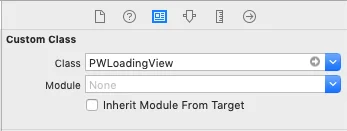
- 设置 outlets:
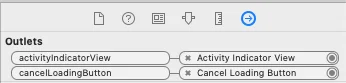
Android
Anchor link toRichMediaStyle.LoadingViewCreatorInterface 实现了一个方法,该方法返回一个用作富媒体加载屏幕的视图:
richMediaStyle.setLoadingViewCreator(() -> { View screenView = createYourScreenView(); return screenView;});延迟启用关闭按钮
Anchor link to通过在富媒体加载完成前禁用关闭按钮,确保应用内消息能够展示给用户。
style.closeButtonPresentingDelay = 3;Android
Anchor link to// set a value in millisecondsrichMediaStyle.setTimeOutBackButtonEnable(3000);