Mac OS X
Descargar SDK
Proyecto de Ejemplo
Documentación de la API del SDK
Vinculando Pushwoosh.framework
Anchor link toAñade Pushwoosh.framework a tu proyecto a través de un gestor de dependencias poniendo las siguientes líneas en tu podfile o cartfile:
platform :osx, '10.7'
target 'MyApp' do  pod 'Pushwoosh_mac'end
github "Pushwoosh/pushwoosh-mac-sdk"Alternativamente, puedes simplemente arrastrar y soltar el framework en Link Binaries With Libraries en las Build Phases de tu proyecto.
Añadiendo librerías
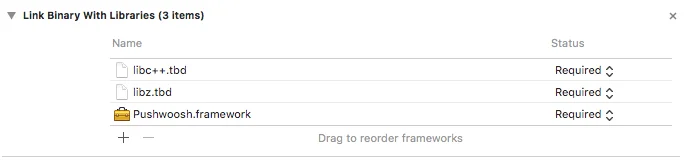
Anchor link toEn la pestaña Build Phases de tu proyecto, abre Link Binaries With Libraries y haz clic en Add items (botón ”+”). Busca y añade las librerías libz.tbd y libc++.tbd a tu proyecto:
Vinculando la aplicación con el Panel de Control de Pushwoosh
Anchor link toEn tu Info.plist, añade una clave de tipo string Pushwoosh_APPID con tu Código de Aplicación de Pushwoosh como valor.
Modificando el AppDelegate
Anchor link toAñade el siguiente código a tu AppDelegate:
import PushKitimport Pushwoosh
func application(_ application: UIApplication, didFinishLaunchingWithOptions launchOptions: [UIApplicationLaunchOptionsKey : Any]? = nil) -> Bool {
//lots of your initialization code
//-----------PUSHWOOSH PART-----------
NSUserNotificationCenter.default.delegate = Pushwoosh.sharedInstance()?.notificationCenterDelegateProxy
// set custom delegate for push handling, in our case - view controllerPushwoosh.sharedInstance().delegate = self
// handling push on app startPushwoosh.sharedInstance().handlePushReceived(aNotification.userInfo)
// register for push notifications!Pushwoosh.sharedInstance().registerForPushNotifications()
#import <Pushwoosh/Pushwoosh.h>
- (void)applicationDidFinishLaunching:(NSNotification *)aNotification{ //lots of your initialization code
//-----------PUSHWOOSH PART-----------
[NSUserNotificationCenter defaultUserNotificationCenter].delegate = [Pushwoosh sharedInstance].notificationCenterDelegateProxy;
// set custom delegate for push handling, in our case - view controller [Pushwoosh sharedInstance].delegate = self;
// handling push on app start [[Pushwoosh sharedInstance] handlePushReceived:[aNotification userInfo]];
// register for push notifications! [[Pushwoosh sharedInstance] registerForPushNotifications]; }Añade el siguiente código a tu UIApplicationDelegate (mismo archivo que el anterior).
// system push notification registration success callback, delegate to PWMessagingDelegatefunc application(_ application: NSApplication, didRegisterForRemoteNotificationsWithDeviceToken deviceToken: Data) {   Pushwoosh.sharedInstance()?.handlePushRegistration(deviceToken)}
// system push notification registration error callback, delegate to PWMessagingDelegatefunc application(_ application: NSApplication, didFailToRegisterForRemoteNotificationsWithError error: Error) {   Pushwoosh.sharedInstance()?.handlePushRegistrationFailure(error)}
// system push notification registration success callback, delegate to pushManager- (void)application:(NSApplication *)application didRegisterForRemoteNotificationsWithDeviceToken:(NSData *)deviceToken { [[Pushwoosh sharedInstance] handlePushRegistration:deviceToken];}
// system push notification registration error callback, delegate to pushManager- (void)application:(NSApplication *)application didFailToRegisterForRemoteNotificationsWithError:(NSError *)error { [[Pushwoosh sharedInstance] handlePushRegistrationFailure:error];}Para gestionar las notificaciones push, añade la siguiente función a tu UIApplicationDelegate (el mismo archivo que en los tres pasos anteriores):
//this event is fired when the push gets receivedfunc pushwoosh(_ pushwoosh: Pushwoosh!, onMessageReceived message: PWMessage!) {   print("onMessageReceived: \(String(describing: message.payload))")}
//this event is fired when user taps the notificationfunc pushwoosh(_ pushwoosh: Pushwoosh!, onMessageOpened message: PWMessage!) {   print("onMessageOpened: \(String(describing: message.payload))")}
//this event is fired when the push gets received- (void)pushwoosh:(Pushwoosh *)pushwoosh onMessageReceived:(PWMessage *)message { NSLog(@"onMessageReceived: %@", message.payload);}
//this event is fired when user taps the notification- (void)pushwoosh:(Pushwoosh *)pushwoosh onMessageOpened:(PWMessage *)message { NSLog(@"onMessageOpened: %@", message.payload);}Habilitando las Notificaciones Push
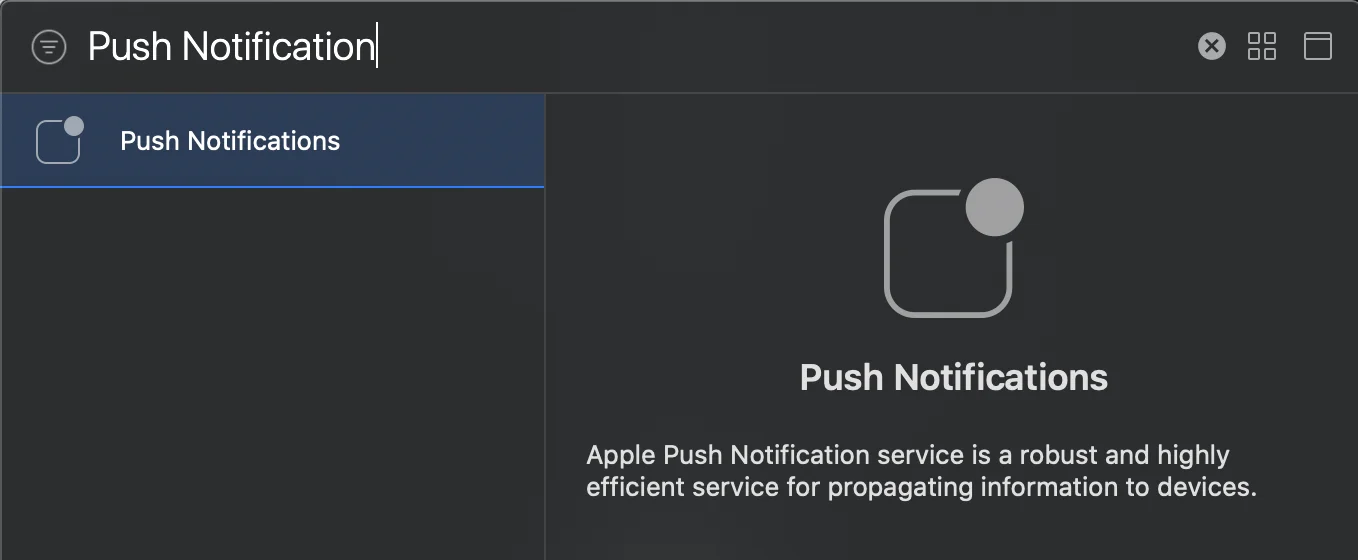
Anchor link toVe a Signing and Capabilities en tu target. Pulsa + Capability y añade Push Notifications.