/createMessage parameters
Here you’ll find the descriptions of the /createMessage API parameters.
-
Required parameters must be included to successfully send a
/createMessageAPI request and broadcast a push notification at the specified time. -
Optional parameters allow you to customize push notification properties.
Required parameters
Anchor link toRequired parameters are obligatory to use in /createMessage requests. Otherwise, the request won’t be submitted.
application
Anchor link toUnique code of an app created in your Pushwoosh account. App code can be found at the top left corner of the Control Panel or in response to a /createApplication request. The app code is a hyphen-separated set of 10 characters (both letters and digits).
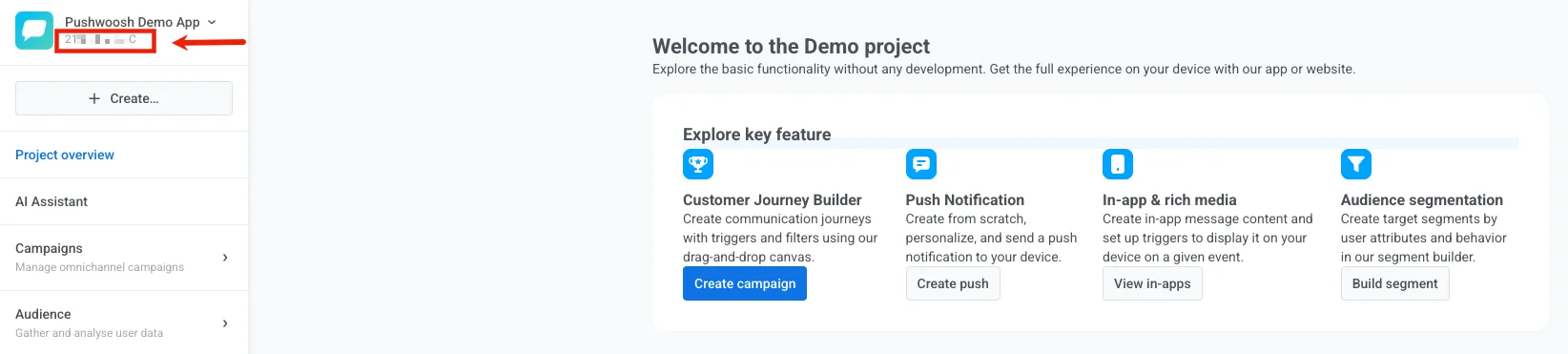
When creating an app via the API, you’ll get an app code in response to your /createApplication request.
To obtain a code of a previously created app via the API, call /getApplications. In response to the /getApplications request, you’ll receive the list of all apps created in your Pushwoosh account with their names and codes.
auth
Anchor link toAPI access token from Pushwoosh Control Panel. Go to Settings → API Access and copy a token you’d like to use or generate a new one.
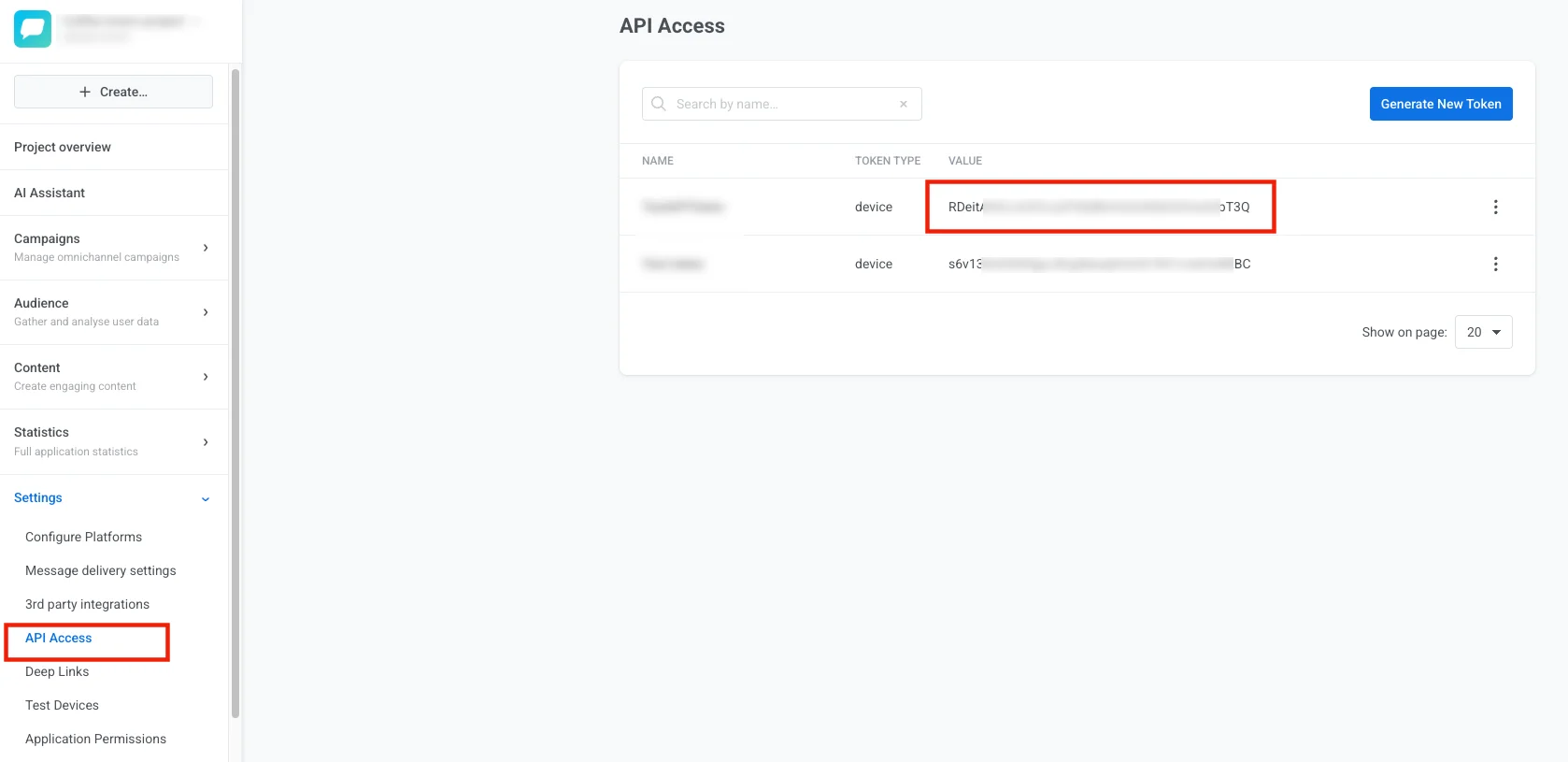
When generating an access token, specify its permissions. Check the checkboxes for those types of activities you’re going to use the API token with. You can create app-specific API tokens by checking the Applications checkboxes.

content
Anchor link toThe string or object that defines the message content. The “content” parameter submitted with a string type value will send the same message for all recipients.
"content": "Hello world!",JSON objects are used for specifying content using Dynamic Content, for example, for multi-language messages.
"content": { "en": "Hello!", "es": "¡Hola!", "de": "Hallo!"},notifications
Anchor link toThe JSON array of push properties. Must include at least the required content and send_date parameters.
Optional parameters to use within the “notifications” array:
- campaign
- capping_days
- capping_count
- conditions
- data
- devices
- dynamic_content
- filter
- ignore_user_timezone
- inbox_date
- inbox_image
- link
- minimize_link
- message_type
- platforms
- preset
- rich_media
- send_rate
- timezone
- template_bindings
- transactionId
- users
send_date
Anchor link toDate and time on which the message is sent. Can be any date and time formatted as YYYY-MM-DD HH:mm or ‘now’. If set to ‘now’, the message will be sent immediately after submitting the request.
Optional parameters
Anchor link tocampaign
Anchor link toThe code of a Campaign. To obtain a Campaign code, go to Statistics → Aggregated statistics and select the Campaign you’re going to use. The campaign code will be visible at the end of the page URL in the format XXXXX-XXXXX.
Example:
URL: https://app.pushwoosh.com/applications/AAAAA-AAAAA/statistics/aggregated-message?campaignCode=XXXXX-XXXXX
Campaign code: XXXXX-XXXXX
To obtain a list of Campaigns with their codes, call /getCampaigns. In response to the /getCampaigns request, you’ll receive the list of all Campaigns created for a particular app in your Pushwoosh account, with their codes, names, and descriptions.
capping_days
Anchor link toPeriod to be applied for frequency capping, in days (max 30 days). See Frequency capping for details.
Frequency capping is not applied to messages with message_type: transactional. In all other cases, frequency capping is applied, including requests where message_type is omitted.
capping_count
Anchor link toThe maximum number of pushes that can be sent from a specific app to a particular device within a “capping_days” period. In case the message created exceeds the “capping_count” limit for a device, it won’t be sent to that device. See Frequency capping for details.
conditions
Anchor link toConditions are arrays like [tagName, operator, operand] used for sending targeted messages based on Tags and their values, where:
- tagName — the name of a tag to apply,
- operator — a value comparison operator (“EQ” | “IN” | “NOTEQ” | “NOTIN” | “LTE” | “GTE” | “BETWEEN” | “NOTSET” | “ANY”),
- operand — Tag values of any of the following types: string | integer | array | date | boolean | list
Operator description
Anchor link to| EQ | tag value is equal to operand. |
| IN | tag value intersects with operand (operand must always be an array). |
| NOTEQ | tag value is not equal to an operand. |
| NOTIN | tag value does not intersect with operand (operand must always be an array). |
| GTE | tag value is greater than or equal to operand. |
| LTE | tag value is less than or equal to operand. |
| BETWEEN | tag value is greater than or equal to min operand value but less than or equal to max operand value (operand must always be an array). |
| NOTSET | tag is not set. Operand is not considered. |
| ANY | tag has any value. Operand is not considered. |
String tags
Anchor link toValid operators: EQ, IN, NOTEQ, NOTIN, NOTSET, ANY
Valid operands:
| EQ, NOTEQ | operand must be a string |
| IN, NOTIN | operand must be an array of strings like ["value 1", "value 2", "value N"] |
| NOTSET | tag is not set. Operand is not considered |
| ANY | tag has any value. Operand is not considered |
Integer tags
Anchor link toValid operators: EQ, IN, NOTEQ, NOTIN, BETWEEN, GTE, LTE, NOTSET, ANY
Valid operands:
| EQ, NOTEQ, GTE, LTE | operand must be an integer |
| IN, NOTIN | operand must be an array of integers like [value 1, value 2, value N] |
| BETWEEN | operand must be an array of integers like [min_value, max_value] |
| NOTSET | tag is not set. Operand is not considered |
| ANY | tag has any value. Operand is not considered |
Date tags
Anchor link toValid operators: EQ, IN, NOTEQ, NOTIN, BETWEEN, GTE, LTE, NOTSET, ANY
Valid operands:
"YYYY-MM-DD 00:00"(string)- unix timestamp
1234567890(integer) "N days ago"(string) for operators EQ, BETWEEN, GTE, LTE
Boolean tags
Anchor link toValid operators: EQ, NOTSET, ANY
Valid operands: 0, 1, true, false
List tags
Anchor link toValid operators: IN, NOTIN, NOTSET, ANY
Valid operands: operand must be an array of strings like ["value 1", "value 2", "value N"].
conditions_operator
Anchor link toLogical operator for conditions arrays. Possible values: AND | OR. AND is default.
If the operator applied is AND (when no operator is specified, or the ‘conditions_operator’ param has the ‘AND’ value), devices simultaneously complying with all the conditions will receive the push notification.
If the operator is OR, devices that comply with any of the specified conditions will receive the message.
data
Anchor link toJSON string or JSON object used to pass any custom data in the push payload; is passed as “u” parameter in the payload (converted to JSON string).
devices
Anchor link toThe array of push tokens or hwids to send targeted push notifications. If set, the message will only be sent to the devices on the list.
dynamic_content
Anchor link toPlaceholders for Dynamic Content to be used instead of device Tag values. The example below will send the “Hello, John!” message to every user you target. If not set, the Dynamic Content values are taken from the device Tags.
"content": "Hello, {firstname|CapitalizeFirst}!","dynamic_content_placeholders": { "firstname": "John", "lastname": "Doe"},filter
Anchor link toThe name of a Segment exactly as it’s created in Pushwoosh Control Panel or via a /createFilter API request. Go to the Audience → Segments section and check the list of Segments created.

To get Segments list via the API, call the /listFilters API method. In response to the /listFilters request, you’ll receive the list of all Segments created in your Pushwoosh account, with Segments’ names, conditions, and expiration dates.
ignore_user_timezone
Anchor link toIf set to ‘true’, sends the message at the time and date specified in the “send_date” parameter according to UTC-0.
If set to ‘false’, users will receive the message at the specified local time according to their device’s settings.
inbox_date
Anchor link toThe date until which the message should be kept in users’ Inbox. If not specified, the message will be removed from Inbox on the next day after the sending date.
inbox_image
Anchor link toThe URL of the custom image to be shown near the message in Inbox.
inbox_days
Anchor link toThe lifetime of an inbox message in days, up to 30 days. After this period, the message will be removed from the inbox. Can be used instead of the inbox_date parameter.
link
Anchor link toThe URL to be opened once a user opens a push notification.
message_type
Anchor link toSpecifies the push message type. Available values are marketing and transactional. See Marketing vs transactional messages for details.
This parameter is optional. If omitted, the message is treated as transactional and delivered to everyone, including the control group. Marketing messages are not delivered to control group members.
minimize_link
Anchor link toShortener to minimize the URL submitted in the “link” parameter. Please note that push notification payload size is limited, so consider creating short URLs not to exceed the limit. Available values: 0 — do not minimize, 2 — bitly. Default = 2. Google URL shortener is disabled since March 30, 2019.
platforms
Anchor link toThe array of platform codes to send the message to specific platforms only.
Available platform codes include: 1 — iOS, 3 — Android, 7 — Mac OS X, 8 — Windows, 9 — Amazon, 10 — Safari, 11 — Chrome, 12 — Firefox, 14 — Email, 17 — Huawei, 18 — SMS, and 21 — WhatsApp.
preset
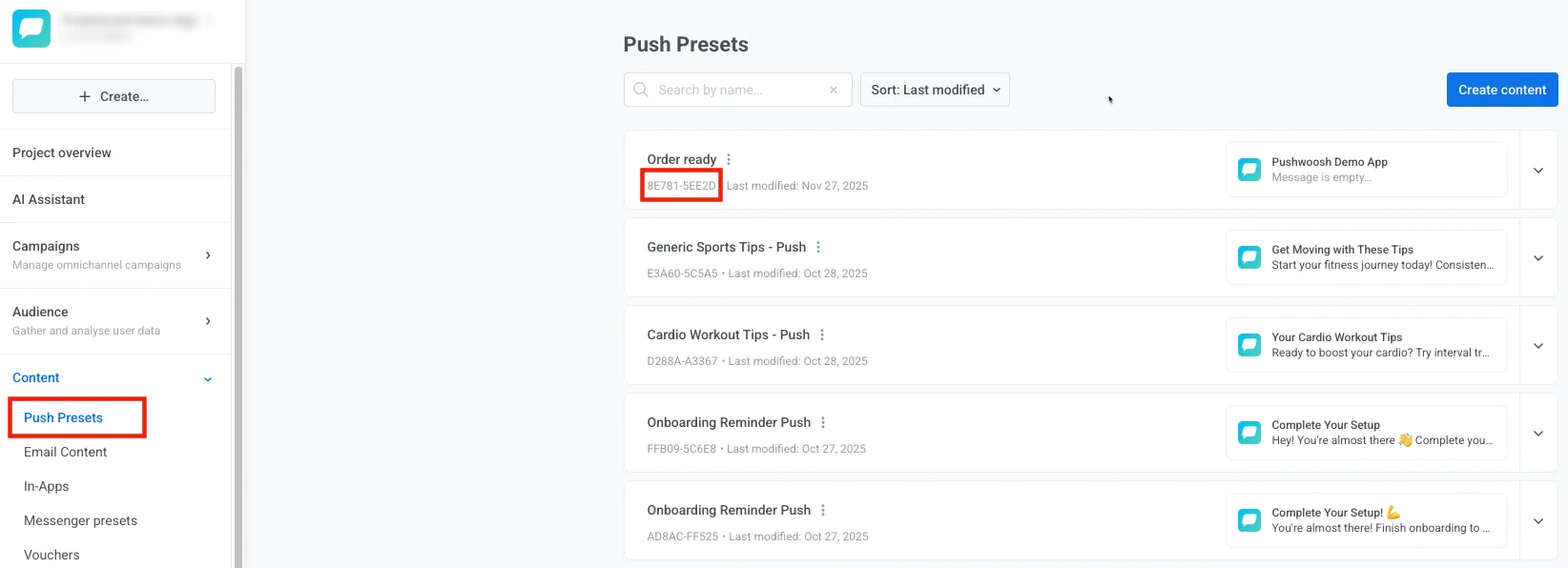
Anchor link toThe code of a Preset created in Pushwoosh Control Panel or via API. To obtain a preset code, go Content → Presets, expand the preset you are going to use, and copy the Preset Code from preset’s details.
rich_media
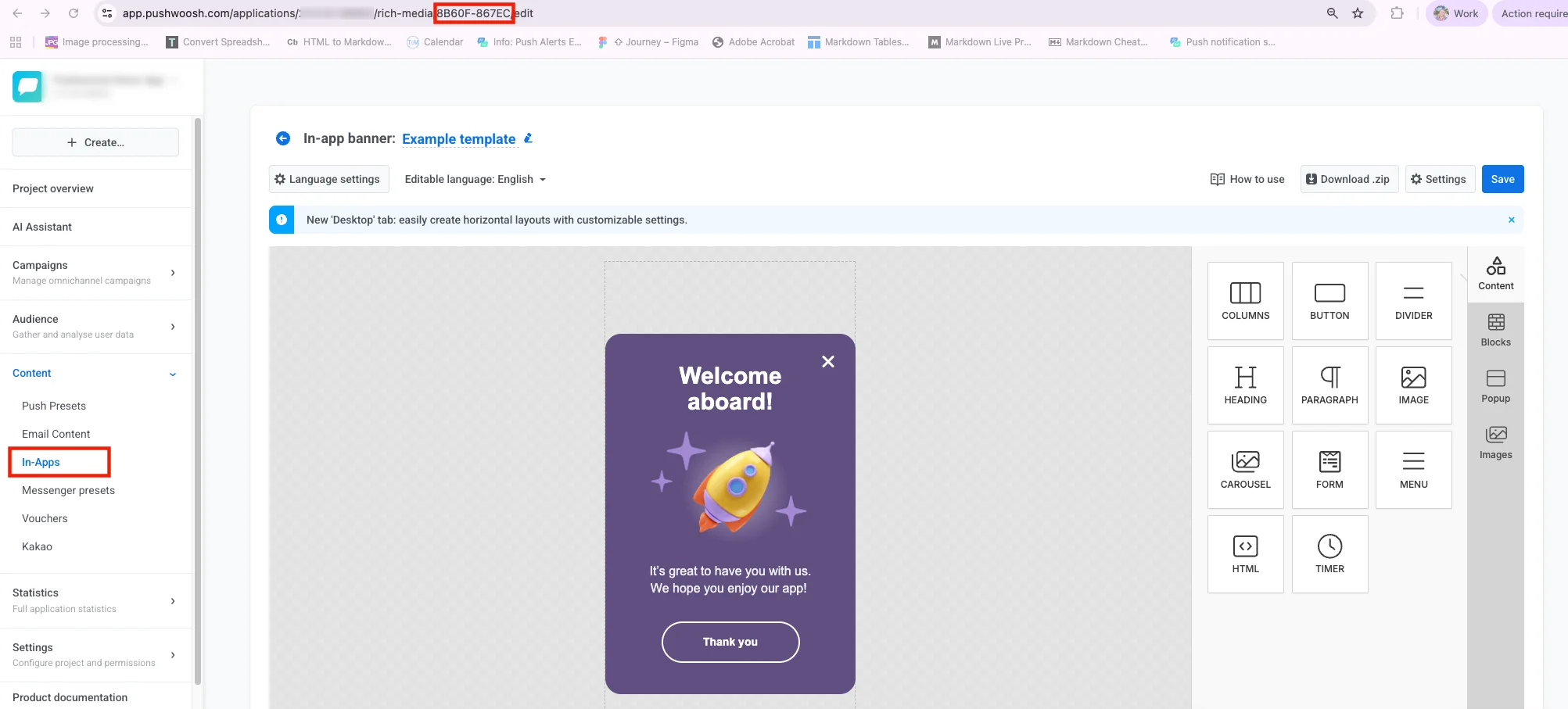
Anchor link toThe code of an In-Apps page you’re going to attach to your message. To obtain a code, go to Content → In-Apps, open the page you are going to use, and copy the code from the URL bar of your browser. The code is a hyphen-separated set of 10 characters (both letters and digits).
send_rate
Anchor link toThrottling to restrain the push sending speed. Valid values are from 100 to 1000 pushes/second.
timezone
Anchor link toTimezone to be taken into account when the message is sent on a particular date and time. If set, the device’s timezone is ignored. If ignored, the message is sent in UTC. See https://php.net/manual/timezones.php for supported timezones.
template_bindings
Anchor link toTemplate placeholders to use in your content template. See the Liquid Templates guide for details.
transactionId
Anchor link toUnique message identifier to prevent duplicating messages in case of network problems. You can assign any ID to a message created via the /createMessage or /createTargetedMessage request. Stored on the side of Pushwoosh for 5 minutes.
use_latest_user_device
Anchor link toIf set to true, delivers one push per user instead of one per device: only the device with the most recent Last Application Open among the platforms in platforms receives it. If none of a user’s devices on those platforms has that data, the first matching device gets it instead, so the send is never dropped. Devices without a user ID are unaffected. Applies regardless of how the audience was targeted — by users, filter, or conditions. Works the same way as use_latest_user_device in Messaging API v2. Defaults to false (send to every device).
users
Anchor link toThe array of userIds. User ID is a unique user identifier set by a /registerUser, /registerDevice, or /registerEmail API request.