إعداد InboxKit باستخدام Swift Package Manager
متوفر منذ iOS SDK 7.0.40.
يتم شحن InboxKit كمنتج مكتبة منفصل داخل حزمة Swift Pushwoosh-XCFramework. يجب أن تكون SDK الرئيسية مدمجة بالفعل؛ إذا كنت تبدأ من الصفر، فاتبع دليل التكامل الأساسي أولاً.
إضافة منتج حزمة InboxKit
Anchor link to-
افتح مشروعك في Xcode وانتقل إلى إعدادات المشروع ← Package Dependencies، ثم اضغط على زر +.
-
أدخل عنوان URL الحزمة التالي:
https://github.com/Pushwoosh/Pushwoosh-XCFramework-
قم بإعداد Dependency Rule إلى Up to Next Major Version مع أحدث إصدار مستقر، ثم انقر فوق Add Package.
-
في شاشة اختيار الحزمة، اختر على الأقل المنتجات التالية وأضفها إلى هدف تطبيقك الرئيسي:
- PushwooshFramework (مطلوب)
- PushwooshCore (مطلوب)
- PushwooshBridge (مطلوب)
- PushwooshInboxKit (الوحدة الجديدة)
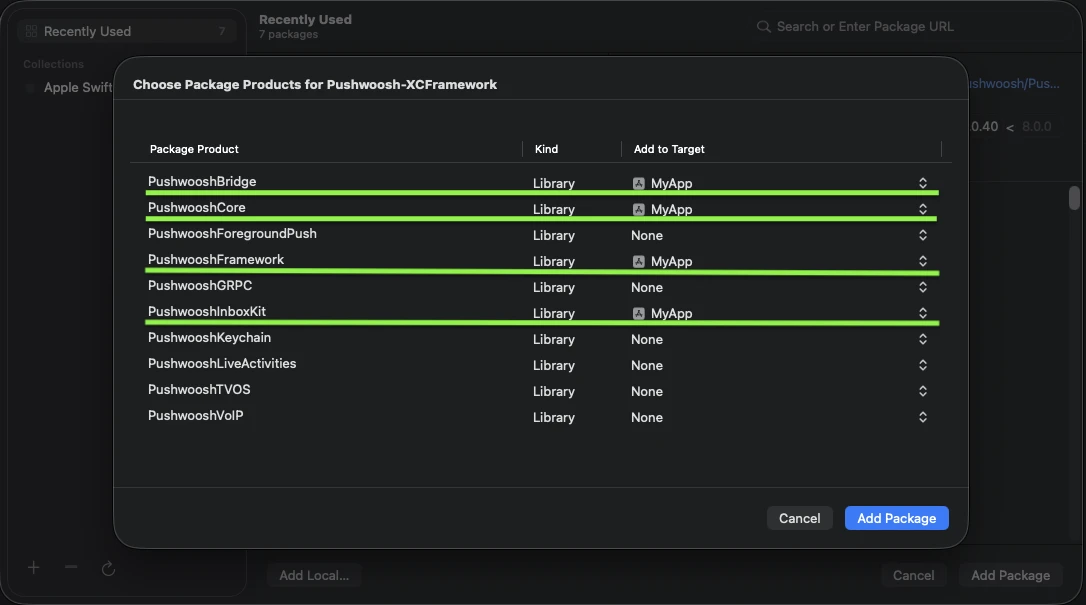
أضف المنتجات الأربعة المظللة إلى هدف تطبيقك الرئيسي.
- افتح هدف تطبيقك الرئيسي وتحت Frameworks, Libraries, and Embedded Content، تأكد من أن
PushwooshInboxKit.xcframeworkمدرج ومدمج.
هذا كل شيء — تم الآن ربط InboxKit جنبًا إلى جنب مع SDK الرئيسية.
عرض صندوق الوارد
Anchor link toأضف وحدة التحكم في صندوق الوارد إلى أي تدفق تنقل. التكوين الافتراضي كافٍ للحصول على صندوق وارد يعمل مع أنواع الخلايا القياسية الثلاثة:
import PushwooshInboxKit
let inboxVC = PushwooshInboxKitViewController()navigationController?.pushViewController(inboxVC, animated: true)
@import PushwooshInboxKit;
PushwooshInboxKitViewController *inboxVC = [PushwooshInboxKitViewController new];[self.navigationController pushViewController:inboxVC animated:YES];تخصيص صندوق الوارد
Anchor link toفي Swift، قم بتكوين وحدة التحكم من خلال نوع القيمة PushwooshInboxKitAttributes. في Objective-C، استخدم المُعيِّنات الصديقة لـ @objc على وحدة التحكم — PushwooshInboxKitAttributes هي بنية Swift ولا يتم ربطها.
var attributes = PushwooshInboxKitAttributes()attributes.pullToRefreshEnabled = trueattributes.swipeToDeleteEnabled = trueattributes.pinningEnabled = trueattributes.style.unreadBadgeColor = .systemBlueattributes.style.titleFont = .systemFont(ofSize: 17, weight: .semibold)
let inboxVC = PushwooshInboxKitViewController(attributes: attributes)
PushwooshInboxKitViewController *inboxVC = [PushwooshInboxKitViewController new];[inboxVC setBackgroundColor:[UIColor systemBackgroundColor]];[inboxVC setEmptyMessage:@"You have no messages yet"];تعرض بنية Style جميع الألوان والخطوط وأنصاف أقطار الزوايا ومنسق التاريخ المستخدم بواسطة الخلايا الافتراضية. كل قيمة هي لون دلالي من Apple بشكل افتراضي، لذا يتفاعل صندوق الوارد مع الوضع المظلم للنظام تلقائيًا.
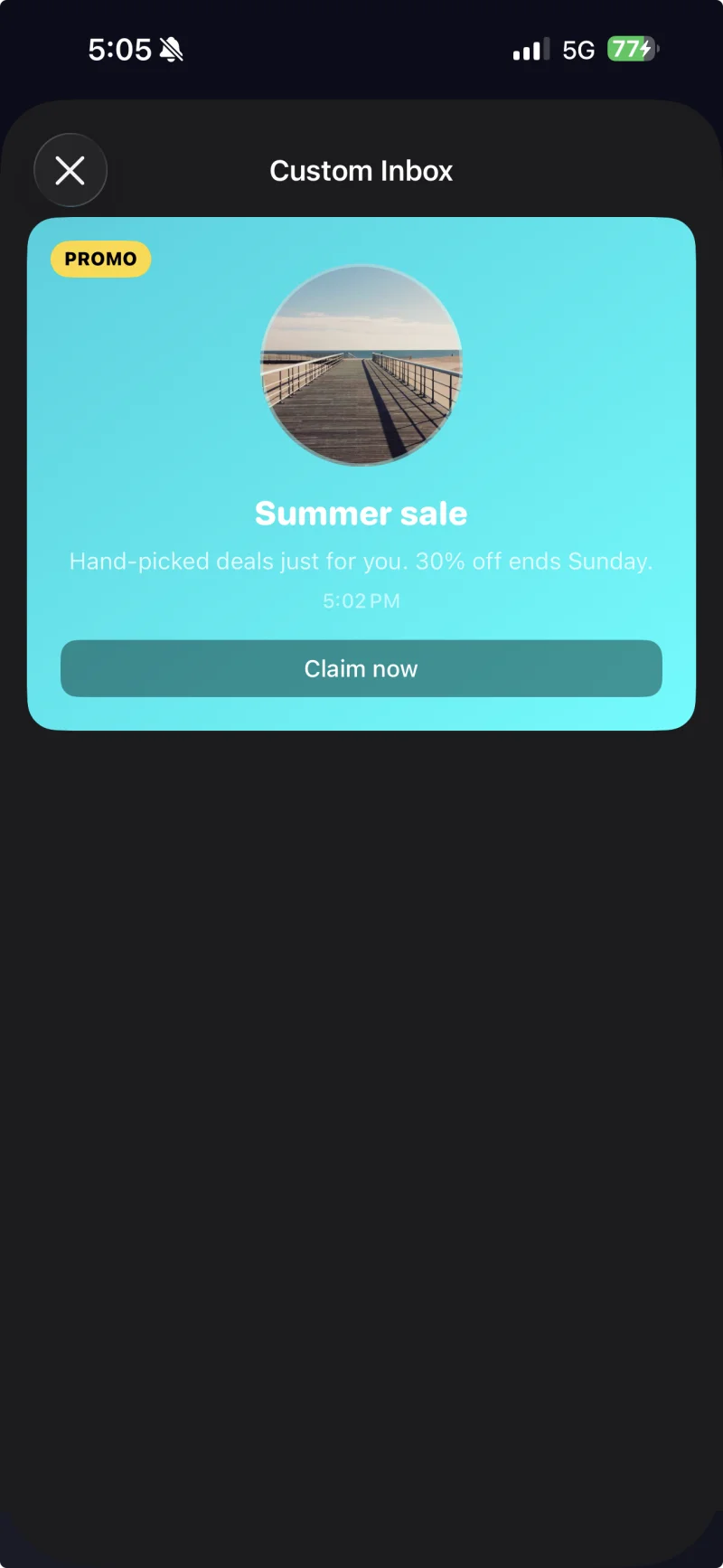
خلية مع تسمية توضيحية مع تطبيق سمة مخصصة من خلال PushwooshInboxKitAttributes.Style.
التعامل مع النقرات والتحديثات
Anchor link toامتثل لـ PushwooshInboxKitDelegate للتفاعل مع إجراءات المستخدم وأحداث التحديث. كل طريقة لها تنفيذ افتراضي، لذا يمكنك فقط تجاوز ما تحتاجه:
final class InboxCoordinator: NSObject, PushwooshInboxKitDelegate {    func inboxKit(_ vc: PushwooshInboxKitViewController,                  didSelect message: PWInboxMessageProtocol) -> Bool {        // Return true to let the SDK open the message URL or richmedia.        // Return false if you handled the tap entirely (e.g. routed to a custom screen).        return true    }
    func inboxKit(_ vc: PushwooshInboxKitViewController,                  didRefreshWith messages: [PWInboxMessageProtocol],                  error: Error?) {        // Show your own empty / error state here if needed.    }}
inboxVC.delegate = inboxCoordinator