إجراءات وحدة Pushwoosh Mendix
تعرض وحدة Pushwoosh لـ Mendix وظائفها في مكانين: ودجة Pushwoosh events، التي تبدأ SDK وتحول الإشعارات الواردة إلى أحداث nanoflow، وإجراءات JavaScript التي تستدعيها من أي nanoflow في ملف تعريف التنقل الأصلي للجوال. هذه الصفحة تسرد كليهما.
خصائص ودجة أحداث Pushwoosh
Anchor link toالودجة لا تعرض أي شيء. ضعها مرة واحدة، على الصفحة التي يتم تحميلها أولاً في ملف تعريف التنقل الأصلي للجوال. تقوم بتهيئة SDK، وتسجيل الجهاز اختياريًا، وتشغيل nanoflow لكل حدث إشعار دفع.
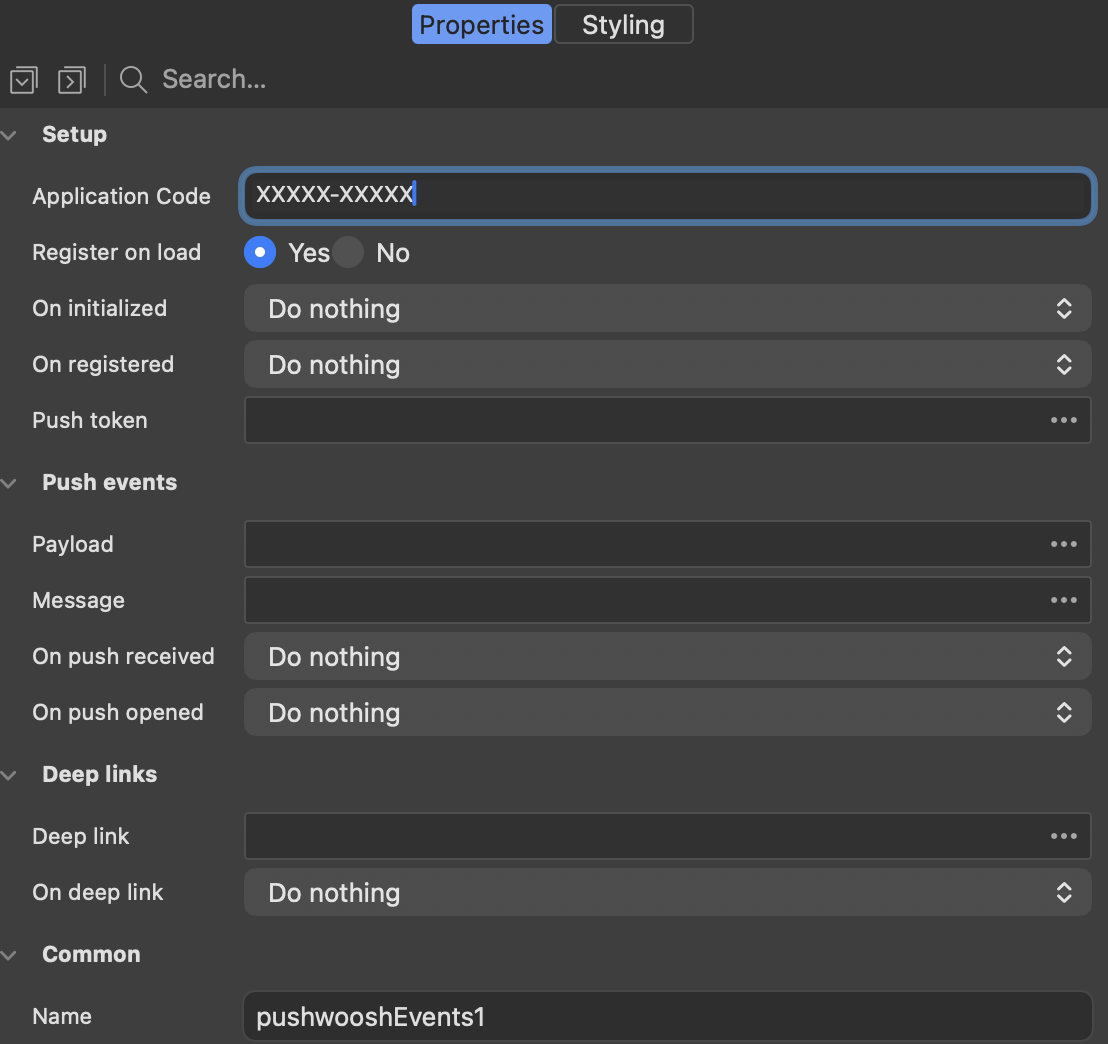
الإعداد
Anchor link toتبدأ هذه الخصائص SDK وتبلغ عندما يكون جاهزًا.
| الخاصية | ماذا تفعل |
|---|---|
| Application Code | كود تطبيق Pushwoosh الخاص بتطبيقك، على سبيل المثال XXXXX-XXXXX. مطلوب. |
| Register on load | يسجل الجهاز بمجرد تحميل الودجة. على iOS، يعرض هذا مطالبة الإذن من النظام، لذا قم بإيقاف تشغيله إذا كنت تفضل السؤال لاحقًا باستخدام إجراء RegisterForPushNotifications. |
| On initialized | nanoflow يعمل مرة واحدة بعد بدء SDK. |
| On registered | nanoflow يعمل عندما يكون للجهاز رمز دفع (push token). |
| Push token | سمة السلسلة النصية التي يُكتب فيها رمز الدفع قبل تشغيل On registered. |
أحداث الدفع
Anchor link toتقوم هذه الخصائص بتسليم إشعار وارد إلى نموذجك وتشغيل nanoflow.
| الخاصية | ماذا تفعل |
|---|---|
| Payload | سمة السلسلة النصية التي تستقبل حمولة الإشعار الكاملة كـ JSON. |
| Message | سمة السلسلة النصية التي تستقبل نص الإشعار. |
| On push received | nanoflow يعمل عند وصول إشعار بينما يكون التطبيق في المقدمة. |
| On push opened | nanoflow يعمل عندما ينقر المستخدم على إشعار. |
الروابط العميقة
Anchor link toتتعامل هذه الخصائص مع إشعار يحمل رابطًا إلى صفحة معينة في التطبيق.
| الخاصية | ماذا تفعل |
|---|---|
| Deep link | سمة السلسلة النصية التي تستقبل عنوان URL للرابط العميق من الإشعار. |
| On deep link | nanoflow يعمل عندما يحمل إشعار مفتوح رابطًا. يعمل بالإضافة إلى On push opened. |
يتم ملء السمات قبل تشغيل nanoflow، لذا يمكن لـ nanoflow قراءتها على الفور.
إجراءات الإعداد
Anchor link toاستخدم هذه الإجراءات عندما تبدأ SDK بنفسك بدلاً من استخدام الودجة.
Initialize
Anchor link toيقوم بتهيئة Pushwoosh SDK. استدعه مرة واحدة، قبل أي إجراء Pushwoosh آخر، عادةً من nanoflow التحميل للصفحة الرئيسية. لا تحتاجه عندما تكون ودجة Pushwoosh events على الصفحة، لأن الودجة تقوم بتهيئة SDK بنفسها.
على Android، يأتي FCM Sender ID من google-services.json، الذي يلتقطه البناء الأصلي. لا يتم تمريره إلى هذا الإجراء.
| المعلمة | النوع | الوصف |
|---|---|---|
applicationCode | String | كود تطبيق Pushwoosh، على سبيل المثال XXXXX-XXXXX. مطلوب. |
notificationHandling | String | اختياري. default أو manual. اتركه فارغًا للسلوك الافتراضي. |
يعيد قيمة منطقية (Boolean) تكون true عند بدء SDK.
إجراءات التسجيل
Anchor link toتتحكم هذه الإجراءات في ما إذا كان هذا الجهاز يتلقى إشعارات، وتعرض المعرفات التي تخاطبه.
RegisterForPushNotifications
Anchor link toيسجل الجهاز لتلقي إشعارات الدفع ويعيد رمز الدفع. على iOS، يؤدي هذا إلى ظهور مطالبة الإذن من النظام، لذا استدعه في نقطة في التدفق يكون فيها الطلب منطقيًا للمستخدم.
يعيد سلسلة نصية (String) مع رمز الدفع.
UnregisterForPushNotifications
Anchor link toيلغي تسجيل الجهاز. يتوقف عن تلقي الإشعارات حتى يتم استدعاء RegisterForPushNotifications مرة أخرى.
يعيد سلسلة نصية (String) مع الرمز الذي تم إلغاء تسجيل الجهاز به.
GetPushToken
Anchor link toيعيد رمز الدفع الحالي، أو سلسلة فارغة إذا لم يتم تسجيل الجهاز بعد.
يعيد سلسلة نصية (String).
GetHwid
Anchor link toيعيد HWID للجهاز، وهو المعرف الذي يخاطبه به Pushwoosh. استخدمه لاستهداف جهاز واحد من لوحة تحكم Pushwoosh أو واجهة برمجة تطبيقات الخادم.
يعيد سلسلة نصية (String).
إجراءات هوية المستخدم
Anchor link toتربط هذه الإجراءات جهازًا بشخص، بحيث تصل رسالة واحدة إلى كل جهاز يستخدمه ذلك الشخص.
SetUserId
Anchor link toيربط الجهاز بمستخدم. استدعه بعد تسجيل الدخول.
| المعلمة | النوع | الوصف |
|---|---|---|
userId | String | المعرف الخاص بك للمستخدم. مطلوب. |
يعيد قيمة منطقية (Boolean).
GetUserId
Anchor link toيعيد معرف المستخدم المرتبط حاليًا بالجهاز، أو سلسلة فارغة إذا لم يتم تعيين أي معرف.
يعيد سلسلة نصية (String).
SetEmails
Anchor link toيسجل عناوين البريد الإلكتروني للمستخدم مع Pushwoosh، بحيث يمكن الوصول إليهم عبر البريد الإلكتروني وكذلك عبر الدفع.
| المعلمة | النوع | الوصف |
|---|---|---|
emails | String | عنوان واحد، أو عدة عناوين مفصولة بفواصل. مطلوب. |
يعيد قيمة منطقية (Boolean).
إجراءات الوسوم (Tags)
Anchor link toالوسوم هي خصائص الجهاز التي تُبنى عليها الشرائح في لوحة تحكم Pushwoosh.
SetTags
Anchor link toيضبط الوسوم على الجهاز.
| المعلمة | النوع | الوصف |
|---|---|---|
tagsJson | String | كائن JSON، على سبيل المثال {"Language":"en","Level":7,"Premium":true}. مطلوب. |
يعيد قيمة منطقية (Boolean).
GetTags
Anchor link toيعيد الوسوم المضبوطة حاليًا على الجهاز، كسلسلة JSON.
يعيد سلسلة نصية (String).
إجراءات الأحداث
Anchor link toالأحداث هي ما تبدأ منه الحملات التي يتم تشغيلها والرسائل داخل التطبيق.
PostEvent
Anchor link toينشر حدثًا إلى Pushwoosh.
| المعلمة | النوع | الوصف |
|---|---|---|
eventName | String | اسم الحدث كما هو مكون في لوحة التحكم. مطلوب. |
attributesJson | String | اختياري. كائن JSON لسمات الحدث. |
يعيد قيمة منطقية (Boolean).
لا يبلغ استدعاء SDK الأساسي عن النجاح أو الفشل، لذا يعيد الإجراء true بمجرد تسليم الاستدعاء إلى SDK.
إجراءات الإشعارات المحلية
Anchor link toيتم إنتاج الإشعارات المحلية بواسطة التطبيق نفسه ولا تحتاج إلى شبكة، مما يجعلها مناسبة للتذكيرات.
ScheduleLocalNotification
Anchor link toيجدول إشعارًا محليًا على الجهاز.
| المعلمة | النوع | الوصف |
|---|---|---|
message | String | نص الإشعار. مطلوب. |
afterSeconds | Integer/Long | مدة الانتظار قبل عرضه، بالثواني. مطلوب، وصفر أو أكبر. |
customDataJson | String | اختياري. كائن JSON يتم تسليمه مرة أخرى مع الإشعار. |
يعيد قيمة منطقية (Boolean) بمجرد تسليم الاستدعاء إلى SDK. لا يبلغ SDK مرة أخرى عما إذا كان الإشعار قد تم جدولته بالفعل.
ClearLocalNotifications
Anchor link toيلغي الإشعارات المحلية التي تم جدولتها ولكن لم يتم إطلاقها بعد.
يعيد قيمة منطقية (Boolean) بمجرد تسليم الاستدعاء إلى SDK.
ClearNotificationCenter
Anchor link toيزيل إشعارات التطبيق التي تم تسليمها بالفعل من مركز الإشعارات.
يعيد قيمة منطقية (Boolean) بمجرد تسليم الاستدعاء إلى SDK.
إجراءات الخصوصية
Anchor link toتدعم هذه الإجراءات مفتاح تبديل الموافقة في تطبيقك، وتقوم بتشغيل أو إيقاف جميع رسائل Pushwoosh للجهاز.
IsCommunicationEnabled
Anchor link toيخبر ما إذا كان الجهاز مسموحًا له حاليًا بتلقي الاتصالات من Pushwoosh. استخدمه لعرض حالة مفتاح تبديل الخصوصية.
يعيد قيمة منطقية (Boolean).
SetCommunicationEnabled
Anchor link toيقوم بتشغيل أو إيقاف الاتصال مع Pushwoosh للجهاز. يؤدي إيقاف تشغيله إلى إيقاف جميع الرسائل، مما يجعله الإجراء المناسب لربطه بمفتاح تبديل “لا تتصل بي”.
| المعلمة | النوع | الوصف |
|---|---|---|
enabled | Boolean | True للسماح بالرسائل، false لإيقافها. مطلوب. |
يعيد قيمة منطقية (Boolean).
إجراءات الإعدادات
Anchor link toتغير هذه الإجراءات كيفية تصرف SDK لهذا الجهاز.
SetLanguage
Anchor link toيتجاوز اللغة التي يستخدمها Pushwoosh لترجمة الرسائل للجهاز. بشكل افتراضي، يتم استخدام لغة الجهاز.
| المعلمة | النوع | الوصف |
|---|---|---|
language | String | رمز من حرفين مثل en، de، nl. مطلوب. |
يعيد قيمة منطقية (Boolean) بمجرد تسليم الاستدعاء إلى SDK.
SetReverseProxy
Anchor link toيوجه كل حركة مرور Pushwoosh عبر نقطة النهاية الخاصة بك. استدعه قبل Initialize، وإلا فإن الطلبات المبكرة ستذهب مباشرة إلى Pushwoosh.
| المعلمة | النوع | الوصف |
|---|---|---|
url | String | عنوان URL الأساسي للبروكسي. مطلوب. |
headersJson | String | اختياري. كائن JSON لترويسات HTTP إضافية. |
يعيد قيمة منطقية (Boolean) بمجرد تسليم الاستدعاء إلى SDK.
SetShowForegroundAlert
Anchor link toيتحكم في ما إذا كان الإشعار الذي يصل أثناء فتح التطبيق يتم عرضه كتنبيه من النظام. الإعداد الافتراضي هو التشغيل، لذا قم بإيقاف تشغيله للتعامل مع إشعارات المقدمة بنفسك من خلال حدث On push received للودجة.
| المعلمة | النوع | الوصف |
|---|---|---|
showAlert | Boolean | True لعرض تنبيه النظام. مطلوب. |
يعيد قيمة منطقية (Boolean) بمجرد تسليم الاستدعاء إلى SDK.
GetShowForegroundAlert
Anchor link toيخبر ما إذا كان الإشعار الذي يصل أثناء فتح التطبيق سيتم عرضه كتنبيه من النظام. يكون قيد التشغيل بشكل افتراضي.
يعيد قيمة منطقية (Boolean).
إجراءات القنوات الأخرى
Anchor link toتسجل هذه الإجراءات المستخدم في قنوات المراسلة التي يدعمها Pushwoosh بخلاف الدفع.
RegisterSmsNumber
Anchor link toيسجل رقم هاتف المستخدم حتى يتمكن Pushwoosh من الوصول إليهم عبر الرسائل القصيرة (SMS).
| المعلمة | النوع | الوصف |
|---|---|---|
phoneNumber | String | بالتنسيق الدولي، على سبيل المثال +31201234567. مطلوب. |
يعيد قيمة منطقية (Boolean) بمجرد تسليم الاستدعاء إلى SDK.
RegisterWhatsappNumber
Anchor link toيسجل رقم هاتف المستخدم حتى يتمكن Pushwoosh من الوصول إليهم عبر WhatsApp.
| المعلمة | النوع | الوصف |
|---|---|---|
phoneNumber | String | بالتنسيق الدولي، على سبيل المثال +31201234567. مطلوب. |
يعيد قيمة منطقية (Boolean) بمجرد تسليم الاستدعاء إلى SDK.