คู่มือการผสานการทำงานพื้นฐานของ iOS SDK 7.0+
ส่วนนี้มีข้อมูลเกี่ยวกับวิธีการผสานการทำงาน Pushwoosh SDK เข้ากับแอปพลิเคชัน iOS ของคุณ
ข้อกำหนดเบื้องต้น
Anchor link toในการผสานการทำงาน Pushwoosh iOS SDK เข้ากับแอปของคุณ คุณจะต้องมีสิ่งต่อไปนี้:
ขั้นตอนการผสานการทำงาน
Anchor link to1. การติดตั้ง
Anchor link toคุณสามารถผสานการทำงาน Pushwoosh SDK เข้ากับแอปพลิเคชันของคุณได้โดยใช้ Swift Package Manager หรือ CocoaPods
Swift Package Manager
Anchor link toในส่วน Package Dependencies ให้เพิ่มแพ็คเกจต่อไปนี้:
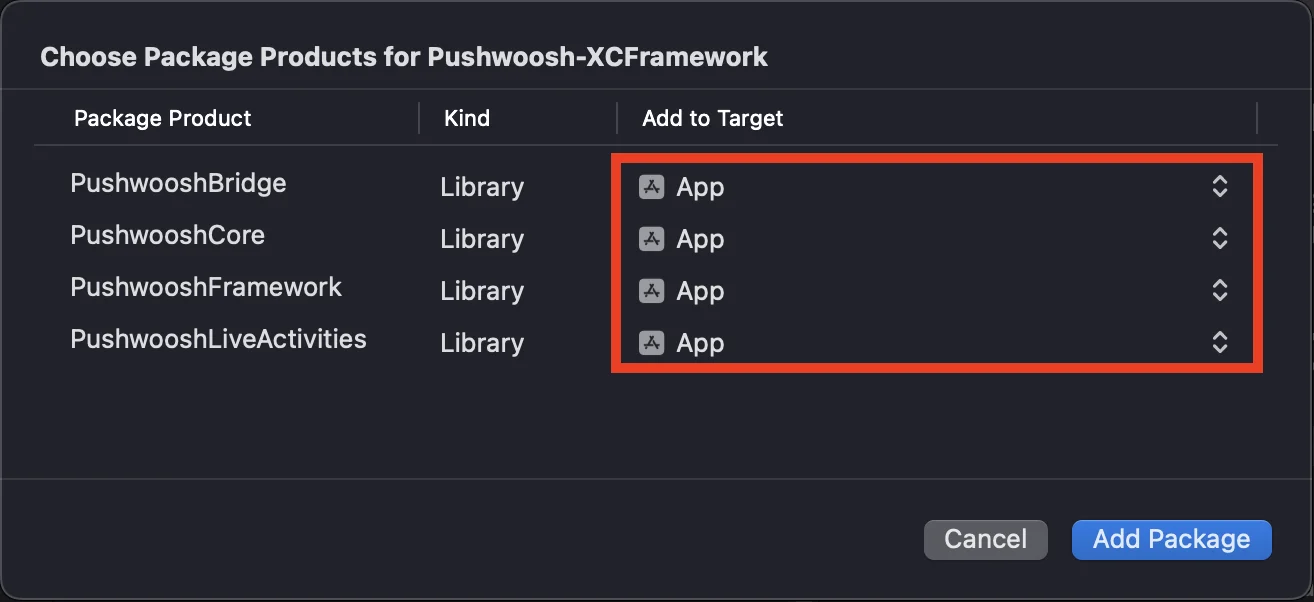
https://github.com/Pushwoosh/Pushwoosh-XCFrameworkในการใช้ Pushwoosh iOS SDK ตรวจสอบให้แน่ใจว่าได้เพิ่มเฟรมเวิร์กสามตัวต่อไปนี้ไปยัง target ของแอปของคุณเมื่อทำการผสานการทำงานผ่าน Swift Package Manager:
PushwooshFrameworkPushwooshCorePushwooshBridge
CocoaPods
Anchor link toเปิด Podfile ของคุณและเพิ่ม dependency:
# Uncomment the next line to define a global platform for your project# platform :ios, '9.0'
target 'MyApp' do  # Comment the next line if you don't want to use dynamic frameworks  use_frameworks!
  pod 'PushwooshXCFramework'
end
จากนั้นใน terminal ให้รันคำสั่งต่อไปนี้เพื่อติดตั้ง dependency:
pod install2. Capabilities
Anchor link toเพื่อเปิดใช้งาน Push Notifications ในโปรเจกต์ของคุณ คุณต้องเพิ่ม capabilities บางอย่าง
ในส่วน Signing & Capabilities ให้เพิ่ม capabilities ต่อไปนี้:
Push NotificationsBackground Modesหลังจากเพิ่ม capability นี้แล้ว ให้เลือกช่องสำหรับRemote notifications
หากคุณต้องการใช้ Time Sensitive Notifications (iOS 15+) ให้เพิ่ม capability Time Sensitive Notifications ด้วย
3. โค้ดสำหรับ Initialization
Anchor link toAppDelegate
Anchor link toเพิ่มโค้ดต่อไปนี้ลงในคลาส AppDelegate ของคุณ:
import SwiftUIimport PushwooshFramework
@mainstruct MyApp: App {    // ลงทะเบียน AppDelegate เป็น UIApplicationDelegate    @UIApplicationDelegateAdaptor(AppDelegate.self) var appDelegate
    var body: some Scene {        WindowGroup {            ContentView()        }    }}
class AppDelegate: NSObject, UIApplicationDelegate, PWMessagingDelegate {
    func application(_ application: UIApplication, didFinishLaunchingWithOptions launchOptions: [UIApplication.LaunchOptionsKey: Any]?) -> Bool {        // โค้ดสำหรับ Initialization        // ตั้งค่า delegate แบบกำหนดเองสำหรับการจัดการ push        Pushwoosh.configure.delegate = self
        // ลงทะเบียนสำหรับ push notification        Pushwoosh.configure.registerForPushNotifications()
        return true    }
    // จัดการ token ที่ได้รับจาก APNS    func application(_ application: UIApplication, didRegisterForRemoteNotificationsWithDeviceToken deviceToken: Data) {        Pushwoosh.configure.handlePushRegistration(deviceToken)    }
    // จัดการข้อผิดพลาดในการรับ token    func application(_ application: UIApplication, didFailToRegisterForRemoteNotificationsWithError error: Error) {        Pushwoosh.configure.handlePushRegistrationFailure(error)    }
    //สำหรับ silent push notification    func application(_ application: UIApplication, didReceiveRemoteNotification userInfo: [AnyHashable: Any], fetchCompletionHandler completionHandler: @escaping (UIBackgroundFetchResult) -> Void) {        Pushwoosh.configure.handlePushReceived(userInfo)        completionHandler(.noData)    }
    // ทำงานเมื่อได้รับ push    func pushwoosh(_ pushwoosh: Pushwoosh, onMessageReceived message: PWMessage) {        print("onMessageReceived: ", message.payload!.description)    }
    // ทำงานเมื่อผู้ใช้แตะที่การแจ้งเตือน    func pushwoosh(_ pushwoosh: Pushwoosh, onMessageOpened message: PWMessage) {        print("onMessageOpened: ", message.payload!.description)    }}
struct ContentView: View {    var body: some View {        Text("Pushwoosh with SwiftUI")            .padding()    }}
import PushwooshFramework
@UIApplicationMainclass AppDelegate: UIResponder, UIApplicationDelegate, PWMessagingDelegate {
var window: UIWindow?
func application(_ application: UIApplication, didFinishLaunchingWithOptions launchOptions: [UIApplication.LaunchOptionsKey: Any]?) -> Bool { //โค้ดสำหรับ initialization //ตั้งค่า delegate แบบกำหนดเองสำหรับการจัดการ push ในกรณีของเราคือ AppDelegate Pushwoosh.configure.delegate = self;
//ลงทะเบียนสำหรับ push notification Pushwoosh.configure.registerForPushNotifications()
return true }
//จัดการ token ที่ได้รับจาก APNS func application(_ application: UIApplication, didRegisterForRemoteNotificationsWithDeviceToken deviceToken: Data) { Pushwoosh.configure.handlePushRegistration(deviceToken) }
//จัดการข้อผิดพลาดในการรับ token func application(_ application: UIApplication, didFailToRegisterForRemoteNotificationsWithError error: Error) { Pushwoosh.configure.handlePushRegistrationFailure(error); }
//สำหรับ silent push notification func application(_ application: UIApplication, didReceiveRemoteNotification userInfo: [AnyHashable : Any], fetchCompletionHandler completionHandler: @escaping (UIBackgroundFetchResult) -> Void) { Pushwoosh.configure.handlePushReceived(userInfo) completionHandler(.noData) }
//event นี้จะทำงานเมื่อได้รับ push func pushwoosh(_ pushwoosh: Pushwoosh, onMessageReceived message: PWMessage) { print("onMessageReceived: ", message.payload!.description) }
// ทำงานเมื่อผู้ใช้แตะที่การแจ้งเตือน func pushwoosh(_ pushwoosh: Pushwoosh, onMessageOpened message: PWMessage) { print("onMessageOpened: ", message.payload!.description) }}#import <PushwooshFramework/PushwooshFramework.h>
@implementation AppDelegate
- (BOOL)application:(UIApplication *)application didFinishLaunchingWithOptions:(NSDictionary *)launchOptions { //-----------PUSHWOOSH PART-----------
// ตั้งค่า delegate แบบกำหนดเองสำหรับการจัดการ push ในกรณีของเราคือ AppDelegate [Pushwoosh configure].delegate = self;
//ลงทะเบียนสำหรับ push notification! [[Pushwoosh configure] registerForPushNotifications];
return YES;}
//จัดการ token ที่ได้รับจาก APNS- (void)application:(UIApplication *)application didRegisterForRemoteNotificationsWithDeviceToken:(NSData *)deviceToken { [[Pushwoosh configure] handlePushRegistration:deviceToken];}
//จัดการข้อผิดพลาดในการรับ token- (void)application:(UIApplication *)application didFailToRegisterForRemoteNotificationsWithError:(NSError *)error { [[Pushwoosh configure] handlePushRegistrationFailure:error];}
//สำหรับ silent push notification- (void)application:(UIApplication *)application didReceiveRemoteNotification:(NSDictionary *)userInfo fetchCompletionHandler:(void (^)(UIBackgroundFetchResult))completionHandler { [[Pushwoosh configure] handlePushReceived:userInfo]; completionHandler(UIBackgroundFetchResultNoData);}
//event นี้จะทำงานเมื่อได้รับ push- (void)pushwoosh:(Pushwoosh *)pushwoosh onMessageReceived:(PWMessage *)message { NSLog(@"onMessageReceived: %@", message.payload);}
//event นี้จะทำงานเมื่อผู้ใช้แตะที่การแจ้งเตือน- (void)pushwoosh:(Pushwoosh *)pushwoosh onMessageOpened:(PWMessage *)message { NSLog(@"onMessageOpened: %@", message.payload);}
@endInfo.plist
Anchor link toใน Info.plist ของคุณ:
- ตั้งค่าคีย์
Pushwoosh_APPIDเป็น Pushwoosh Application Code - ตั้งค่าคีย์
Pushwoosh_API_TOKENเป็น Pushwoosh Device API Token
4. การติดตามการส่งข้อความ
Anchor link toPushwoosh รองรับการติดตาม event การส่งสำหรับ push notification ผ่าน Notification Service Extension
เพิ่ม Notification Service Extension
Anchor link to- ใน Xcode เลือก File > New > Target…
- เลือก Notification Service Extension และกด Next
- ป้อนชื่อ target และกด Finish
- เมื่อได้รับแจ้งให้เปิดใช้งาน ให้กด Cancel
Dependencies สำหรับ Notification Service Extension (สำหรับ CocoaPods เท่านั้น)
Anchor link toหมายเหตุ: หากคุณใช้ Swift Package Manager เพื่อจัดการ dependency คุณสามารถข้ามขั้นตอนนี้ได้ เนื่องจาก dependency จะถูกเพิ่มโดยอัตโนมัติ
เปิด Podfile ของคุณและเพิ่ม dependency สำหรับ target:
# Uncomment the next line to define a global platform for your project# platform :ios, '9.0'
target 'MyApp' do  # Comment the next line if you don't want to use dynamic frameworks  use_frameworks!
  pod 'PushwooshXCFramework'
end
target 'MyAppNotificationExtension' do  use_frameworks!
  pod 'PushwooshXCFramework'
end
รันคำสั่งต่อไปนี้ใน terminal เพื่ออัปเดต dependency:
pod updateเพิ่ม Pushwoosh SDK ไปยัง Notification Service Extension
Anchor link toโค้ดนี้ช่วยให้คุณสามารถดักจับและประมวลผลการแจ้งเตือนภายใน notification extension ของคุณได้
import UserNotificationsimport PushwooshFramework
class NotificationService: UNNotificationServiceExtension {
    var contentHandler: ((UNNotificationContent) -> Void)?    var bestAttemptContent: UNMutableNotificationContent?
    override func didReceive(_ request: UNNotificationRequest, withContentHandler contentHandler: @escaping (UNNotificationContent) -> Void) {        // Pushwoosh **********        PWNotificationExtensionManager.shared().handle(request, contentHandler: contentHandler)        // ********************
        self.contentHandler = contentHandler        bestAttemptContent = (request.content.mutableCopy() as? UNMutableNotificationContent)
        if let bestAttemptContent = bestAttemptContent {            // แก้ไขเนื้อหาการแจ้งเตือนที่นี่...            contentHandler(bestAttemptContent)        }    }
    override func serviceExtensionTimeWillExpire() {        // ถูกเรียกก่อนที่ extension จะถูกยกเลิกโดยระบบ        // ใช้โอกาสนี้ในการส่งเนื้อหาที่แก้ไข "ดีที่สุด" ของคุณ มิฉะนั้น payload ของ push ดั้งเดิมจะถูกใช้        if let contentHandler = contentHandler, let bestAttemptContent =  bestAttemptContent {            contentHandler(bestAttemptContent)        }    }
}
#import "PWNotificationExtensionManager.h"
@interface NotificationService : UNNotificationServiceExtension
@end
@implementation NotificationService
- (void)didReceiveNotificationRequest:(UNNotificationRequest *)request withContentHandler:(void (^)(UNNotificationContent * _Nonnull))contentHandler { // Pushwoosh ********** [[PWNotificationExtensionManager sharedManager] handleNotificationRequest:request contentHandler:contentHandler]; //*********************}
@endInfo.plist
Anchor link toใน Info.plist ของ Notification Service Extension ของคุณ ให้เพิ่ม:
Pushwoosh_APPID- Application Code ของคุณ
5. รันโปรเจกต์
Anchor link to- Build และรันโปรเจกต์
- ไปที่ Pushwoosh Control Panel และ ส่ง push notification
- คุณควรจะเห็นการแจ้งเตือนในแอป
การผสานการทำงาน Pushwoosh iOS แบบขยาย
Anchor link toในขั้นตอนนี้ คุณได้ผสานการทำงาน SDK และสามารถส่งและรับ push notification ได้แล้ว ตอนนี้เรามาสำรวจฟังก์ชันการทำงานหลักกัน
Push notifications
Anchor link toใน Pushwoosh SDK มี callback สองตัวที่ออกแบบมาเพื่อจัดการ push notification:
onMessageReceived: เมธอดนี้จะถูกเรียกเมื่อได้รับ push notificationonMessageOpened: เมธอดนี้จะถูกเรียกเมื่อผู้ใช้โต้ตอบกับ (เปิด) การแจ้งเตือน
callback เหล่านี้ช่วยให้นักพัฒนาสามารถจัดการการรับและการโต้ตอบของผู้ใช้กับ push notification ภายในแอปพลิเคชันของตนได้
import PushwooshFramework
class AppDelegate: NSObject, UIApplicationDelegate, PWMessagingDelegate {
    func application(_ application: UIApplication, didFinishLaunchingWithOptions launchOptions: [UIApplication.LaunchOptionsKey : Any]? = nil) -> Bool {        Pushwoosh.configure.delegate = self;    }
    func pushwoosh(_ pushwoosh: Pushwoosh, onMessageOpened message: PWMessage) {        if let payload = message.payload {            print("onMessageOpened: \(payload)")        }    }
    func pushwoosh(_ pushwoosh: Pushwoosh, onMessageReceived message: PWMessage) {        if let payload = message.payload {            print("onMessageReceived: \(payload)")        }    }}
#import <PushwooshFramework/PushwooshFramework.h>
@interface AppDelegate () <PWMessagingDelegate>
@end
@implementation AppDelegate
- (BOOL)application:(UIApplication *)application didFinishLaunchingWithOptions:(NSDictionary *)launchOptions { [[Pushwoosh configure] setDelegate:self]; return YES;}
- (void)pushwoosh:(Pushwoosh *)pushwoosh onMessageOpened:(PWMessage *)message { if (message.payload) { NSLog(@"onMessageOpened: %@", message.payload); }}
- (void)pushwoosh:(Pushwoosh *)pushwoosh onMessageReceived:(PWMessage *)message { if (message.payload) { NSLog(@"onMessageReceived: %@", message.payload); }}@endการกำหนดค่าผู้ใช้
Anchor link toด้วยการมุ่งเน้นไปที่พฤติกรรมและความชอบของผู้ใช้แต่ละคน คุณสามารถส่งมอบเนื้อหาที่ปรับให้เหมาะกับแต่ละบุคคล ซึ่งนำไปสู่ความพึงพอใจและความภักดีของผู้ใช้ที่เพิ่มขึ้น
import PushwooshFramework
class Registration {
    func afterUserLogin(user: User) {        let pushwoosh = Pushwoosh.configure        // ตั้งค่า user ID        if let userId = user.userId {            pushwoosh.setUserId(userId)        }
        // ตั้งค่าอีเมลผู้ใช้        if let userEmail = user.email {            pushwoosh.setEmail(userEmail)        }
        // ตั้งค่าหมายเลข SMS ของผู้ใช้        if let userSmsNumber = user.SmsNumber {            pushwoosh.registerSmsNumber(userSmsNumber)        }
        // ตั้งค่าหมายเลข WhatsApp ของผู้ใช้        if let userWhatsAppNumber = user.WhatsAppNumber {            pushwoosh.registerSmsNumber(userWhatsAppNumber)        }
        // การตั้งค่าข้อมูลผู้ใช้เพิ่มเติมเป็น tag สำหรับ Pushwoosh        if let age = user.userDetails.age,            let name = user.userDetails.userName,            let lastLogin = user.userDetails.lastLoginDate {            pushwoosh.setTags([                "age": age,                "name": name,                "last_login": lastLogin            ])        }    }}
#import <PushwooshFramework/PushwooshFramework.h>
@implementation Registration
- (void)afterUserLogin:(User *)user { Pushwoosh *pushwoosh = [Pushwoosh configure];
// ตั้งค่า user ID if (user.userId) { [pushwoosh setUserId:user.userId]; }
// ตั้งค่าอีเมลผู้ใช้ if (user.email) { [pushwoosh setEmail:user.email]; }
// การตั้งค่าข้อมูลผู้ใช้เพิ่มเติมเป็น tag สำหรับ Pushwoosh if (user.userDetails.age && user.userDetails.userName && user.userDetails.lastLoginDate) { NSDictionary *tags = @{ @"age": user.userDetails.age, @"name": user.userDetails.userName, @"last_login": user.userDetails.lastLoginDate }; [pushwoosh setTags:tags]; }}
@endTags
Anchor link toTags คือคู่ของ key-value ที่กำหนดให้กับผู้ใช้หรืออุปกรณ์ ช่วยให้สามารถแบ่งกลุ่มตามคุณลักษณะต่างๆ เช่น ความชอบหรือพฤติกรรม ทำให้สามารถส่งข้อความแบบกำหนดเป้าหมายได้
import PushwooshFramework
class UpdateUser {    func afterUserUpdateProfile(user: User) {        let pushwoosh = Pushwoosh.configure
        // ตั้งค่ารายการหมวดหมู่โปรด        pushwoosh.setTags(["favorite_categories" : user.getFavoriteCategories()])
        // ตั้งค่าข้อมูลการชำระเงิน        pushwoosh.setTags([            "is_subscribed": user.isSubscribed(),            "payment_status": user.getPaymentStatus(),            "billing_address": user.getBillingAddress()        ])    }}
#import <PushwooshFramework/PushwooshFramework.h>
@implementation UpdateUser
- (void)afterUserUpdateProfile:(User *)user { Pushwoosh *pushwoosh = [Pushwoosh configure];
// ตั้งค่ารายการหมวดหมู่โปรด [pushwoosh setTags:@{@"favorite_categories" : user.getFavoriteCategories}];
// ตั้งค่าข้อมูลการชำระเงิน NSDictionary *tags = @{ @"is_subscribed": @(user.isSubscribed), @"payment_status": user.getPaymentStatus, @"billing_address": user.getBillingAddress }; [pushwoosh setTags:tags];}
@endEvents
Anchor link toEvents คือการกระทำหรือเหตุการณ์ที่เกิดขึ้นของผู้ใช้ภายในแอป ซึ่งสามารถติดตามเพื่อวิเคราะห์พฤติกรรมและกระตุ้นให้เกิดข้อความหรือการกระทำที่สอดคล้องกัน
import PushwooshFramework
class Registration {
    func afterUserLogin(user: User) {        if let userName = user.getUserName(), let lastLogin = user.getLastLoginDate() {            PWInAppManager.shared().postEvent("login", withAttributes: [                "name": userName,                "last_login": lastLogin            ])        }    }
    func afterUserPurchase(user: User, product: Product) {        let pushwoosh = Pushwoosh.configure
        // ติดตาม event การซื้อ        PWInAppManager.shared().postEvent("purchase", withAttributes: [            "product_id": product.getId(),            "product_name": product.getName(),            "price": product.getPrice(),            "quantity": product.getQuantity()        ])
        // ตั้งค่า tag ของผู้ใช้        let lastPurchaseDate = Date().timeIntervalSince1970        let lifetimeSpend = getCurrentLifetimeSpend() + product.getPrice()
        pushwoosh.setTags([            "last_purchase_date": lastPurchaseDate,            "lifetime_spend": lifetimeSpend        ])    }}
#import <PushwooshFramework/PushwooshFramework.h>#import <PushwooshFramework/PWInAppManager.h>
@implementation Registration
- (void)afterUserLogin:(User *)user { NSString *userName = [user getUserName]; NSDate *lastLogin = [user getLastLoginDate];
if (userName && lastLogin) { [[PWInAppManager sharedManager] postEvent:@"login" withAttributes:@{ @"name": userName, @"last_login": lastLogin }]; }}
- (void)afterUserPurchase:(User *)user product:(Product *)product { Pushwoosh *pushwoosh = [Pushwoosh configure];
// ติดตาม event การซื้อ [[PWInAppManager sharedManager] postEvent:@"purchase" withAttributes:@{ @"product_id": [product getId], @"product_name": [product getName], @"price": @([product getPrice]), @"quantity": @([product getQuantity]) }];
// ตั้งค่า tag ของผู้ใช้ NSTimeInterval lastPurchaseDate = [[NSDate date] timeIntervalSince1970]; double lifetimeSpend = /* fetch current lifetime spend */ + [product getPrice];
NSDictionary *tags = @{ @"last_purchase_date": @(lastPurchaseDate), @"lifetime_spend": @(lifetimeSpend) };
[pushwoosh setTags:tags];}
@endRich Media
Anchor link toRich media หมายถึงเนื้อหาเชิงโต้ตอบและมัลติมีเดีย เช่น รูปภาพ วิดีโอ หรือ HTML ที่ใช้ในการแจ้งเตือนและข้อความในแอปเพื่อเพิ่มการมีส่วนร่วมของผู้ใช้
import PushwooshFramework
class ViewController: UIViewController, PWRichMediaPresentingDelegate {
    override func viewDidLoad() {        super.viewDidLoad()        let richMediaConfiguration = PWModalWindowConfiguration.shared()
        PWRichMediaManager.shared().delegate = self        richMediaConfiguration.configureModalWindow(with: .PWModalWindowPositionBottom,                                                             present: .PWAnimationPresentFromBottom,                                                             dismiss: .PWAnimationDismissDown)    }
    func richMediaManager(_ richMediaManager: PWRichMediaManager!, shouldPresent richMedia: PWRichMedia!) -> Bool {        print("Rich media will be presented with: \(richMedia.pushPayload!)")        return true    }
    func richMediaManager(_ richMediaManager: PWRichMediaManager!, didPresent richMedia: PWRichMedia!) {        print("Rich media has been presented with: \(richMedia.pushPayload!)")    }
    func richMediaManager(_ richMediaManager: PWRichMediaManager!, didClose richMedia: PWRichMedia!) {        print("Rich media has been closed with: \(richMedia.pushPayload!)")    }
    func richMediaManager(_ richMediaManager: PWRichMediaManager!, presentingDidFailFor richMedia: PWRichMedia!, withError error: (any Error)!) {        print("Failed to present rich media with: \(richMedia.pushPayload!). Error: \(error.localizedDescription)")    }}
#import "ViewController.h"#import <PushwooshFramework/PushwooshFramework.h>#import <PushwooshFramework/PWRichMediaManager.h>#import <PushwooshFramework/PWModalWindowConfiguration.h>
@interface ViewController () <PWRichMediaPresentingDelegate>
@end
@implementation ViewController
- (void)viewDidLoad { [super viewDidLoad];
[[PWRichMediaManager sharedManager] setDelegate:self]; [[PWModalWindowConfiguration shared] configureModalWindowWith:PWModalWindowPositionBottom presentAnimation:PWAnimationPresentFromBottom dismissAnimation:PWAnimationDismissDown];}
- (BOOL)richMediaManager:(PWRichMediaManager *)richMediaManager shouldPresentRichMedia:(PWRichMedia *)richMedia { NSLog(@"Rich media will be presented with: %@", richMedia.pushPayload); return YES;}
- (void)richMediaManager:(PWRichMediaManager *)richMediaManager didPresentRichMedia:(PWRichMedia *)richMedia { NSLog(@"Rich media has been presented with: %@", richMedia.pushPayload);}
- (void)richMediaManager:(PWRichMediaManager *)richMediaManager didCloseRichMedia:(PWRichMedia *)richMedia { NSLog(@"Rich media has been closed with:: %@", richMedia.pushPayload);}
- (void)richMediaManager:(PWRichMediaManager *)richMediaManager presentingDidFailForRichMedia:(PWRichMedia *)richMedia withError:(NSError *)error { NSLog(@"Failed to present rich media with: %@. Error: %@", richMedia.pushPayload, error.localizedDescription);}
@endการแก้ไขปัญหา
Anchor link toFailed to build module ‘PushwooshFramework’
Anchor link toเมื่อ build โปรเจกต์ของคุณ คุณอาจพบข้อผิดพลาดที่คล้ายกับ:
Failed to build module 'PushwooshFramework'; this SDK is not supported by the compiler(the SDK is built with 'Apple Swift version 5.10 (swiftlang-5.10.0.13 clang-1500.3.9.4)',while this compiler is 'Apple Swift version 6.1.2 effective-5.10 (swiftlang-6.1.2.1.2 clang-1700.0.13.5)')สาเหตุ: ข้อผิดพลาดนี้ไม่เกี่ยวข้องกับความไม่เข้ากันของเวอร์ชันคอมไพเลอร์ Swift ตั้งแต่ Pushwoosh iOS SDK เวอร์ชัน 6.8.0 เป็นต้นไป SDK จะถูกแบ่งออกเป็นส่วนประกอบหลายส่วนที่โต้ตอบกัน ข้อผิดพลาดเกิดขึ้นเมื่อไม่ได้เพิ่มเฟรมเวิร์กที่จำเป็นทั้งหมดลงในโปรเจกต์ของคุณ
วิธีแก้ไข: ตรวจสอบให้แน่ใจว่าได้เพิ่มเฟรมเวิร์กที่จำเป็นทั้งสี่ตัวไปยัง target ของแอปของคุณเมื่อทำการผสานการทำงานผ่าน Swift Package Manager:
PushwooshFrameworkPushwooshCorePushwooshBridgePushwooshLiveActivities
เพื่อตรวจสอบสิ่งนี้ใน Xcode:
- เลือกโปรเจกต์ของคุณใน Project Navigator
- เลือก target ของแอปของคุณ
- ไปที่ General > Frameworks, Libraries, and Embedded Content
- ยืนยันว่ามีเฟรมเวิร์กทั้งสี่รายการอยู่
หากคุณพบปัญหาใดๆ ในระหว่างกระบวนการผสานการทำงาน โปรดดูที่ส่วน การสนับสนุนและชุมชน