Adobe AIR
Le plugin nécessite la version 33.0 ou supérieure du SDK AIR.
Anchor link toTélécharger le SDK
Projet d’exemple
Documentation de l’API du SDK
Pour intégrer les notifications push Pushwoosh dans votre application Adobe Air, suivez ces étapes :
- Prenez PushNotifications.ane et ajoutez-le à votre projet.
- Ajoutez les bibliothèques
distriqtà votre projet :
com.distriqt.playservices.Basecom.google.firebase.coreTélécharger les bibliothèques Google Play Services
androidx.appcompatcom.google.android.materialandroidx.recyclerviewandroidx.coreTélécharger les bibliothèques de support Android
com.distriqt.CoreTélécharger la bibliothèque Distriqt Core
3. Configurez votre projet dans la console Firebase.
4. Placez le fichier google-services.json à la racine de votre projet.
5. Ajoutez le code suivant à la routine de démarrage de votre application :
// set push notification callbacks for the pluginvar pushwoosh:PushNotification = PushNotification.getInstance();pushwoosh.addEventListener(PushNotificationEvent.PERMISSION_GIVEN_WITH_TOKEN_EVENT, onToken);pushwoosh.addEventListener(PushNotificationEvent.PERMISSION_REFUSED_EVENT, onError);pushwoosh.addEventListener(PushNotificationEvent.PUSH_NOTIFICATION_RECEIVED_EVENT, onPushReceived);
// important! Call this function when callbacks have been set. It triggers delivery of all pending push notifications.pushwoosh.onDeviceReady();
// register for pushpushwoosh.registerForPushNotification();
Les fonctions de gestionnaire sont simples :
public function onToken(e:PushNotificationEvent):void{    trace("\n TOKEN: " + e.token + " ");}
public function onError(e:PushNotificationEvent):void{    trace("\n TOKEN: " + e.errorMessage+ " ");}
public function onPushReceived(e:PushNotificationEvent):void{    trace("\n TOKEN: " + JSON.stringify(e.parameters) + " ");}
6. Maintenant, configurez votre fichier app.xml. Remplacez PUSHWOOSH_APP_ID par votre véritable App ID Pushwoosh. Pour Android, remplacez FCM_SENDER_ID par votre ID d’expéditeur Firebase et PACKAGE_NAME par le nom de votre package Android.
Pour Android et iOS, assurez-vous d’ajouter également votre jeton d’API de l’appareil Pushwoosh.
Important : Assurez-vous que le jeton a accès à la bonne application dans votre panneau de contrôle Pushwoosh. En savoir plus
<iPhone>    <InfoAdditions>        <![CDATA[            <key>Pushwoosh_APPID</key>            <string>PUSHWOOSH_APP_ID</string>            <key>Pushwoosh_API_TOKEN</key>            <string>__YOUR_DEVICE_TYPE_API_TOKEN__</string>        ]]>    </InfoAdditions>    <Entitlements>        <![CDATA[            <key>aps-environment</key>            <string>development</string>        ]]>    </Entitlements>    <requestedDisplayResolution>high</requestedDisplayResolution></iPhone>
<android>  <manifestAdditions><![CDATA[    <manifest android:installLocation="auto">      <application>
        <!-- Pushwoosh START -->        <meta-data android:name="com.google.android.gms.version" android:value="@integer/google_play_services_version" />        <meta-data android:name="com.pushwoosh.appid" android:value="PUSHWOOSH_APP_ID" />        <meta-data android:name="com.pushwoosh.senderid" android:value="AFCM_SENDER_ID" />        <meta-data android:name="com.pushwoosh.apitoken" android:value="__YOUR_DEVICE_TYPE_API_TOKEN" />        <meta-data android:name="PW_BROADCAST_PUSH" android:value="true" />        <meta-data android:name="com.pushwoosh.notification_icon" android:value="@drawable/notification_small_icon" />        <meta-data android:name="com.pushwoosh.notification_service_extension" android:value="com.pushwoosh.nativeExtensions.PushwooshNotificationServiceExtension"/>        <activity          android:name="com.pushwoosh.inapp.view.RichMediaWebActivity"          android:theme="@android:style/Theme.Translucent.NoTitleBar" />        <activity          android:name="com.pushwoosh.inapp.view.RemoteUrlActivity"          android:theme="@android:style/Theme.Translucent.NoTitleBar" />        <receiver          android:name="com.pushwoosh.BootReceiver"          android:enabled="true"          android:permission="android.permission.RECEIVE_BOOT_COMPLETED">          <intent-filter>            <action android:name="android.intent.action.BOOT_COMPLETED" />            <category android:name="android.intent.category.DEFAULT" />          </intent-filter>        </receiver>        <service          android:name="com.pushwoosh.FcmRegistrationService">          <intent-filter>            <action android:name="com.google.firebase.INSTANCE_ID_EVENT" />          </intent-filter>        </service>        <service          android:name="com.pushwoosh.firebase.PushFcmIntentService">          <intent-filter>            <action android:name="com.google.firebase.MESSAGING_EVENT" />          </intent-filter>        </service>        <activity          android:name="com.pushwoosh.internal.utils.PermissionActivity"          android:theme="@android:style/Theme.Translucent.NoTitleBar" />        <receiver android:name="com.pushwoosh.notification.LocalNotificationReceiver" />        <provider          android:name="com.pushwoosh.PushwooshInitProvider"          android:authorities="PACKAGE_NAME.pushwooshinitprovider"          android:enabled="true"          android:exported="false"          android:initOrder="50" />        <provider          android:initOrder="70"          android:enabled="true"          android:authorities="PACKAGE_NAME.firebasepushwooshinitprovider" android:exported="false"          android:name="com.pushwoosh.firebase.FirebaseInitProvider"/>        <provider          android:name="com.pushwoosh.nativeExtensions.PushwooshFirebaseInitProvider"          android:authorities="PACKAGE_NAME.FirebaseInitProvider"          android:enabled="true"          android:exported="false"          android:initOrder="60" />        <provider          android:name="com.pushwoosh.PushwooshSharedDataProvider"          android:authorities="PACKAGE_NAME.PushwooshSharedDataProvider"          android:enabled="true"          android:exported="true"          android:initOrder="60" />        <activity          android:name="com.pushwoosh.notification.NotificationOpenActivity"          android:noHistory="true"          android:theme="@android:style/Theme.Translucent.NoTitleBar"          android:enabled="true"          android:exported="false" />                          <receiver                        android:name="com.pushwoosh.NotificationUpdateReceiver"                        android:enabled="true"                        android:exported="false" />        <meta-data          android:name="com.pushwoosh.plugin.badge"          android:value="com.pushwoosh.badge.BadgePlugin" />        <meta-data          android:name="com.pushwoosh.internal.plugin_provider"          android:value="com.pushwoosh.nativeExtensions.internal.AdobeAirPluginProvider" />        <meta-data          android:name="com.pushwoosh.plugin.inbox"          android:value="com.pushwoosh.inbox.PushwooshInboxPlugin" />        <activity          android:name="com.pushwoosh.nativeExtensions.AirInboxActivity" />        <activity          android:name="com.pushwoosh.inbox.ui.presentation.view.activity.AttachmentActivity"          android:theme="@style/Theme.AppCompat.Light.NoActionBar" />        <!-- Pushwoosh END -->
        <!-- Firebase START -->        <service          android:name="com.google.firebase.components.ComponentDiscoveryService"          android:exported="false" >          <meta-data            android:name="com.google.firebase.components:com.google.firebase.iid.Registrar"            android:value="com.google.firebase.components.ComponentRegistrar" />          <meta-data            android:name="com.google.firebase.components:com.google.firebase.datatransport.TransportRegistrar"            android:value="com.google.firebase.components.ComponentRegistrar" />          <meta-data            android:name="com.google.firebase.components:com.google.firebase.installations.FirebaseInstallationsRegistrar"            android:value="com.google.firebase.components.ComponentRegistrar" />        </service>        <receiver android:name="com.google.firebase.iid.FirebaseInstanceIdReceiver" android:exported="true" android:permission="com.google.android.c2dm.permission.SEND">          <intent-filter>            <action android:name="com.google.android.c2dm.intent.RECEIVE"/>            <category android:name="PACKAGE_NAME"/>          </intent-filter>        </receiver>        <service          android:name="com.google.firebase.messaging.FirebaseMessagingService"          android:exported="false" >          <intent-filter android:priority="-500" >            <action android:name="com.google.firebase.MESSAGING_EVENT" />          </intent-filter>        </service>        <service android:name="com.google.firebase.iid.FirebaseInstanceIdService" android:exported="true">          <intent-filter android:priority="-500">            <action android:name="com.google.firebase.INSTANCE_ID_EVENT"/>          </intent-filter>        </service>        <provider          android:name="com.google.firebase.provider.FirebaseInitProvider"          android:authorities="PACKAGE_NAME.firebaseinitprovider"          android:exported="false"          android:initOrder="100" />        <!-- Firebase END -->
        <!-- Work-runtime START -->        <provider            android:name="androidx.startup.InitializationProvider"            android:authorities="PACKAGE_NAME.androidx-startup"            android:exported="false">            <!-- This entry makes WorkManagerInitializer discoverable. -->            <meta-data  android:name="androidx.work.WorkManagerInitializer"                  android:value="androidx.startup" />        </provider>        <service          android:name="androidx.work.impl.background.systemalarm.SystemAlarmService"          android:directBootAware="false"          android:enabled="true"          android:exported="false" />        <service          android:name="androidx.work.impl.background.systemjob.SystemJobService"          android:directBootAware="false"          android:enabled="true"          android:exported="true"          android:permission="android.permission.BIND_JOB_SERVICE" />
        <receiver          android:name="androidx.work.impl.utils.ForceStopRunnable$BroadcastReceiver"          android:directBootAware="false"          android:enabled="true"          android:exported="false" />        <receiver          android:name="androidx.work.impl.background.systemalarm.ConstraintProxy$BatteryChargingProxy"          android:directBootAware="false"          android:enabled="false"          android:exported="false" >          <intent-filter>            <action android:name="android.intent.action.ACTION_POWER_CONNECTED" />            <action android:name="android.intent.action.ACTION_POWER_DISCONNECTED" />          </intent-filter>        </receiver>        <receiver          android:name="androidx.work.impl.background.systemalarm.ConstraintProxy$BatteryNotLowProxy"          android:directBootAware="false"          android:enabled="false"          android:exported="false" >          <intent-filter>            <action android:name="android.intent.action.BATTERY_OKAY" />            <action android:name="android.intent.action.BATTERY_LOW" />          </intent-filter>        </receiver>        <receiver          android:name="androidx.work.impl.background.systemalarm.ConstraintProxy$StorageNotLowProxy"          android:directBootAware="false"          android:enabled="false"          android:exported="false" >          <intent-filter>            <action android:name="android.intent.action.DEVICE_STORAGE_LOW" />            <action android:name="android.intent.action.DEVICE_STORAGE_OK" />          </intent-filter>        </receiver>        <receiver          android:name="androidx.work.impl.background.systemalarm.ConstraintProxy$NetworkStateProxy"          android:directBootAware="false"          android:enabled="false"          android:exported="false" >          <intent-filter>            <action android:name="android.net.conn.CONNECTIVITY_CHANGE" />          </intent-filter>        </receiver>        <receiver          android:name="androidx.work.impl.background.systemalarm.RescheduleReceiver"          android:directBootAware="false"          android:enabled="false"          android:exported="false" >          <intent-filter>            <action android:name="android.intent.action.BOOT_COMPLETED" />            <action android:name="android.intent.action.TIME_SET" />            <action android:name="android.intent.action.TIMEZONE_CHANGED" />          </intent-filter>        </receiver>        <receiver          android:name="androidx.work.impl.background.systemalarm.ConstraintProxyUpdateReceiver"          android:directBootAware="false"          android:enabled="true"          android:exported="false" >          <intent-filter>            <action android:name="androidx.work.impl.background.systemalarm.UpdateProxies" />          </intent-filter>        </receiver>        <!-- Work-runtimme END -->      </application>
      <!-- Permissions START -->      <uses-permission android:name="android.permission.WAKE_LOCK" />      <uses-permission android:name="android.permission.ACCESS_NETWORK_STATE" />      <!-- FCM connects to Firebase Services. -->      <uses-permission android:name="android.permission.INTERNET" />      <!-- This app has permission to register and receive data message. -->      <uses-permission android:name="com.google.android.c2dm.permission.RECEIVE" />      <!-- Vibration in push notification -->      <uses-permission android:name="android.permission.VIBRATE" />      <uses-permission android:name="android.permission.RECEIVE_BOOT_COMPLETED" />      <!--BADGES-->      <!--for Samsung-->      <uses-permission android:name="com.sec.android.provider.badge.permission.READ"/>      <uses-permission android:name="com.sec.android.provider.badge.permission.WRITE"/>      <!--for htc-->      <uses-permission android:name="com.htc.launcher.permission.READ_SETTINGS"/>      <uses-permission android:name="com.htc.launcher.permission.UPDATE_SHORTCUT"/>      <!--for sony-->      <uses-permission android:name="com.sonyericsson.home.permission.BROADCAST_BADGE"/>      <uses-permission android:name="com.sonymobile.home.permission.PROVIDER_INSERT_BADGE"/>      <!--for apex-->      <uses-permission android:name="com.anddoes.launcher.permission.UPDATE_COUNT"/>      <!--for solid-->      <uses-permission android:name="com.majeur.launcher.permission.UPDATE_BADGE"/>      <!--for huawei-->      <uses-permission android:name="com.huawei.android.launcher.permission.CHANGE_BADGE"/>      <uses-permission android:name="com.huawei.android.launcher.permission.READ_SETTINGS"/>      <uses-permission android:name="com.huawei.android.launcher.permission.WRITE_SETTINGS"/>      <!--for ZUK-->      <uses-permission android:name="android.permission.READ_APP_BADGE"/>      <!--for OPPO-->      <uses-permission android:name="com.oppo.launcher.permission.READ_SETTINGS"/>      <uses-permission android:name="com.oppo.launcher.permission.WRITE_SETTINGS"/>      <!--for EvMe-->      <uses-permission android:name="me.everything.badger.permission.BADGE_COUNT_READ"/>      <uses-permission android:name="me.everything.badger.permission.BADGE_COUNT_WRITE"/>      <!-- Permissions END -->  </manifest>
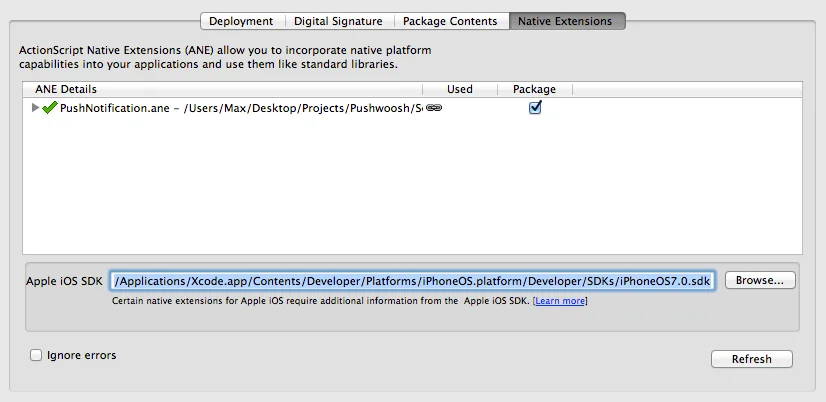
]]> </manifestAdditions> <colorDepth>16bit</colorDepth></android>7. Assurez-vous de cocher la case « Package » dans le volet « Native Extensions » des paramètres. Sélectionnez également le chemin vers le dernier SDK iOS comme indiqué dans la capture d’écran ci-dessous lors de l’exportation pour iOS :
Partagez vos commentaires avec nous
Anchor link toVos commentaires nous aident à créer une meilleure expérience, nous serions donc ravis de vous entendre si vous rencontrez des problèmes lors du processus d’intégration du SDK. Si vous rencontrez des difficultés, n’hésitez pas à nous faire part de vos réflexions via ce formulaire.