การกำหนดค่า Amazon Device Messaging
ในการส่ง push notifications ไปยังอุปกรณ์ Amazon ให้กำหนดค่าแพลตฟอร์ม Amazon ใน Pushwoosh ด้วยข้อมูลประจำตัว ADM OAuth ของคุณ
รับ Client ID และ Client Secret จาก Amazon
Anchor link to- ลงชื่อเข้าใช้ Amazon Developer Console และเปิด My Apps
- เลือกแอปของคุณ (หรือสร้างใหม่) และไปที่ App Services
- ใต้ Device Messaging เลือกโปรไฟล์ความปลอดภัยของคุณหรือสร้างใหม่
- คลิก View Security Profile จากนั้นเปิดแท็บ Web Settings
- คัดลอก Client ID และคลิก Show Secret เพื่อแสดง Client Secret
สำหรับรายละเอียดเกี่ยวกับโปรไฟล์ความปลอดภัยและคีย์ API สำหรับแอปของคุณ โปรดดูที่ Obtain credentials (Amazon Device Messaging)
กำหนดค่า Amazon ในโปรเจกต์ Pushwoosh ของคุณ
Anchor link to- ในโปรเจกต์ Pushwoosh ของคุณ ไปที่ Configure Platforms และคลิก Connect ถัดจาก Amazon
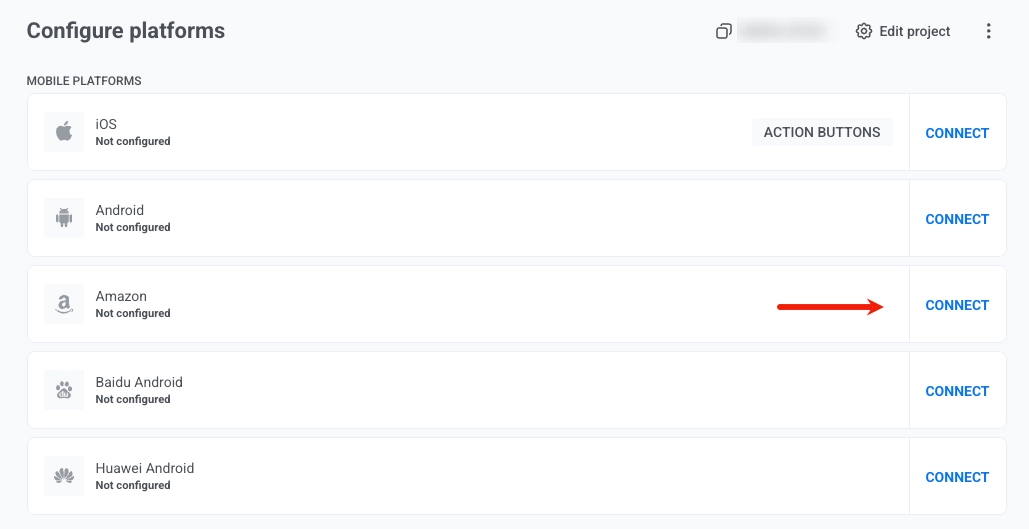
- ในแบบฟอร์ม Amazon Device Messaging ให้ป้อนข้อมูลประจำตัวของคุณ:
- CLIENT ID: วาง Client ID จาก Amazon Developer Console
- CLIENT SECRET: วาง Client Secret จาก Amazon Developer Console
- FRAMEWORK: เลือก None, Native, Unity, Adobe AIR หรือ React Native ขึ้นอยู่กับว่าคุณผสานรวม SDK อย่างไร
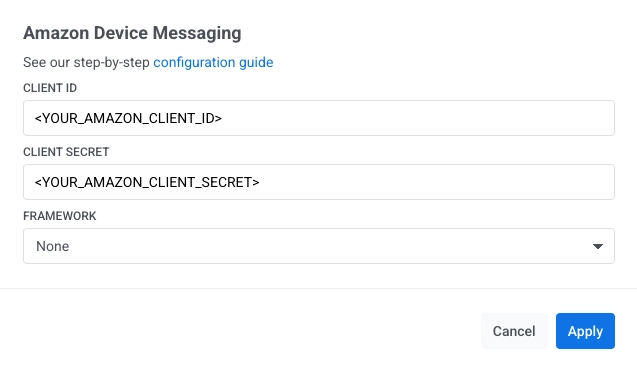
- คลิก Apply
ในการผสานรวม Pushwoosh SDK เข้ากับแอป Amazon ของคุณ: