Mac OS X
SDK डाउनलोड करें
सैंपल प्रोजेक्ट
SDK API डॉक्स
Pushwoosh.framework को लिंक करना
Anchor link toअपनी podfile या cartfile में निम्नलिखित पंक्तियाँ डालकर एक डिपेंडेंसी मैनेजर के माध्यम से अपने प्रोजेक्ट में Pushwoosh.framework जोड़ें:
platform :osx, '10.7'
target 'MyApp' do  pod 'Pushwoosh_mac'end
github "Pushwoosh/pushwoosh-mac-sdk"वैकल्पिक रूप से, आप बस फ्रेमवर्क को अपने प्रोजेक्ट के Build Phases में Link Binaries With Libraries में ड्रैग और ड्रॉप कर सकते हैं।
लाइब्रेरीज़ जोड़ना
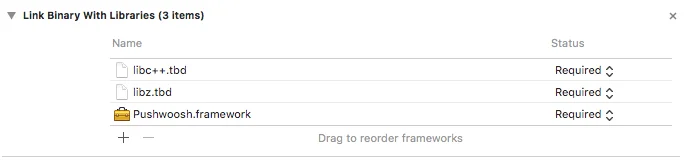
Anchor link toअपने प्रोजेक्ट के Build Phases टैब में, Link Binaries With Libraries खोलें और आइटम जोड़ें (”+” बटन) पर क्लिक करें। अपने प्रोजेक्ट में libz.tbd और libc++.tbd लाइब्रेरीज़ खोजें और जोड़ें:
ऐप को Pushwoosh कंट्रोल पैनल से लिंक करना
Anchor link toअपने Info.plist में, एक स्ट्रिंग टाइप की Pushwoosh_APPID जोड़ें, जिसका मान आपका Pushwoosh एप्लीकेशन कोड हो।
AppDelegate को संशोधित करना
Anchor link toअपने AppDelegate में निम्नलिखित कोड जोड़ें:
import PushKitimport Pushwoosh
func application(_ application: UIApplication, didFinishLaunchingWithOptions launchOptions: [UIApplicationLaunchOptionsKey : Any]? = nil) -> Bool {
//lots of your initialization code
//-----------PUSHWOOSH PART-----------
NSUserNotificationCenter.default.delegate = Pushwoosh.sharedInstance()?.notificationCenterDelegateProxy
// set custom delegate for push handling, in our case - view controllerPushwoosh.sharedInstance().delegate = self
// handling push on app startPushwoosh.sharedInstance().handlePushReceived(aNotification.userInfo)
// register for push notifications!Pushwoosh.sharedInstance().registerForPushNotifications()
#import <Pushwoosh/Pushwoosh.h>
- (void)applicationDidFinishLaunching:(NSNotification *)aNotification{ //lots of your initialization code
//-----------PUSHWOOSH PART-----------
[NSUserNotificationCenter defaultUserNotificationCenter].delegate = [Pushwoosh sharedInstance].notificationCenterDelegateProxy;
// set custom delegate for push handling, in our case - view controller [Pushwoosh sharedInstance].delegate = self;
// handling push on app start [[Pushwoosh sharedInstance] handlePushReceived:[aNotification userInfo]];
// register for push notifications! [[Pushwoosh sharedInstance] registerForPushNotifications]; }अपने UIApplicationDelegate (ऊपर दी गई फ़ाइल के समान) में निम्नलिखित कोड जोड़ें।
// system push notification registration success callback, delegate to PWMessagingDelegatefunc application(_ application: NSApplication, didRegisterForRemoteNotificationsWithDeviceToken deviceToken: Data) {   Pushwoosh.sharedInstance()?.handlePushRegistration(deviceToken)}
// system push notification registration error callback, delegate to PWMessagingDelegatefunc application(_ application: NSApplication, didFailToRegisterForRemoteNotificationsWithError error: Error) {   Pushwoosh.sharedInstance()?.handlePushRegistrationFailure(error)}
// system push notification registration success callback, delegate to pushManager- (void)application:(NSApplication *)application didRegisterForRemoteNotificationsWithDeviceToken:(NSData *)deviceToken { [[Pushwoosh sharedInstance] handlePushRegistration:deviceToken];}
// system push notification registration error callback, delegate to pushManager- (void)application:(NSApplication *)application didFailToRegisterForRemoteNotificationsWithError:(NSError *)error { [[Pushwoosh sharedInstance] handlePushRegistrationFailure:error];}पुश नोटिफिकेशन को संभालने के लिए, अपने UIApplicationDelegate (तीन स्टेप्स ऊपर दी गई फ़ाइल के समान) में निम्नलिखित फ़ंक्शन जोड़ें:
//this event is fired when the push gets receivedfunc pushwoosh(_ pushwoosh: Pushwoosh!, onMessageReceived message: PWMessage!) {   print("onMessageReceived: \(String(describing: message.payload))")}
//this event is fired when user taps the notificationfunc pushwoosh(_ pushwoosh: Pushwoosh!, onMessageOpened message: PWMessage!) {   print("onMessageOpened: \(String(describing: message.payload))")}
//this event is fired when the push gets received- (void)pushwoosh:(Pushwoosh *)pushwoosh onMessageReceived:(PWMessage *)message { NSLog(@"onMessageReceived: %@", message.payload);}
//this event is fired when user taps the notification- (void)pushwoosh:(Pushwoosh *)pushwoosh onMessageOpened:(PWMessage *)message { NSLog(@"onMessageOpened: %@", message.payload);}पुश नोटिफिकेशन सक्षम करना
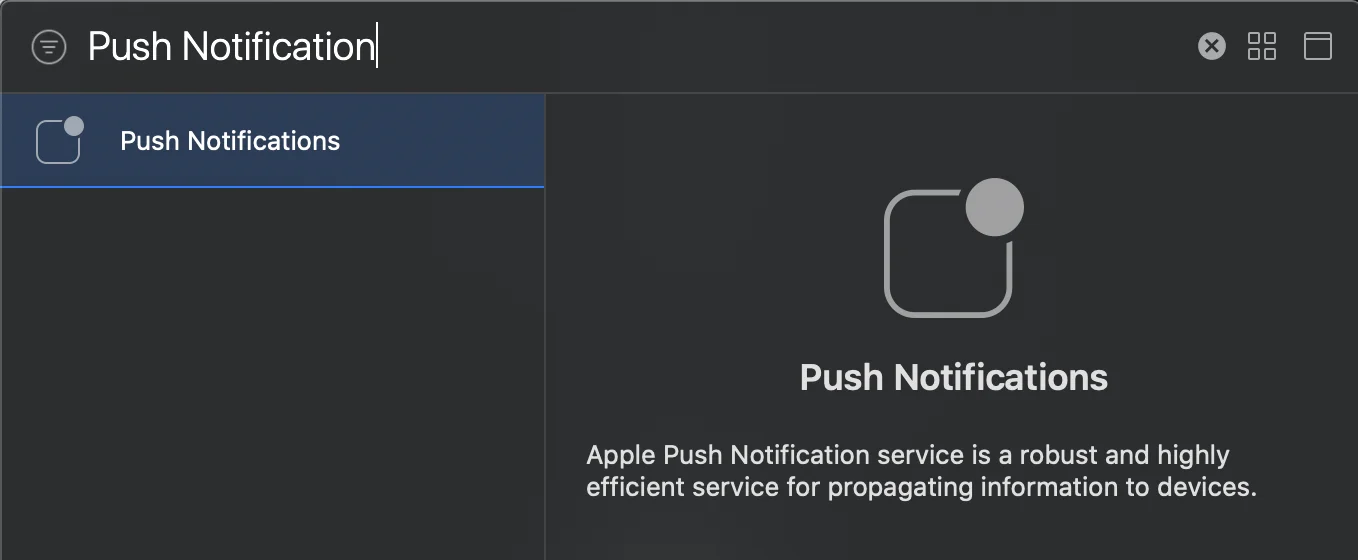
Anchor link toअपने टारगेट में Signing and Capabilities पर जाएं। + Capability दबाएं और Push Notifications जोड़ें।