iOS कस्टम फोरग्राउंड पुश नोटिफिकेशन
संस्करण 6.10.0 से, आप PushwooshForegroundPush मॉड्यूल को एकीकृत कर सकते हैं ताकि नेटिव iOS सिस्टम अलर्ट अक्षम होने पर फोरग्राउंड पुश नोटिफिकेशन को कस्टमाइज़ किया जा सके।
1. नेटिव फोरग्राउंड पुश अलर्ट अक्षम करें
Anchor link toअपने Info.plist में Pushwoosh_SHOW_ALERT = false जोड़ना।
<key>Pushwoosh_SHOW_ALERT</key><false/>2. PushwooshForegroundPush मॉड्यूल को एकीकृत करना
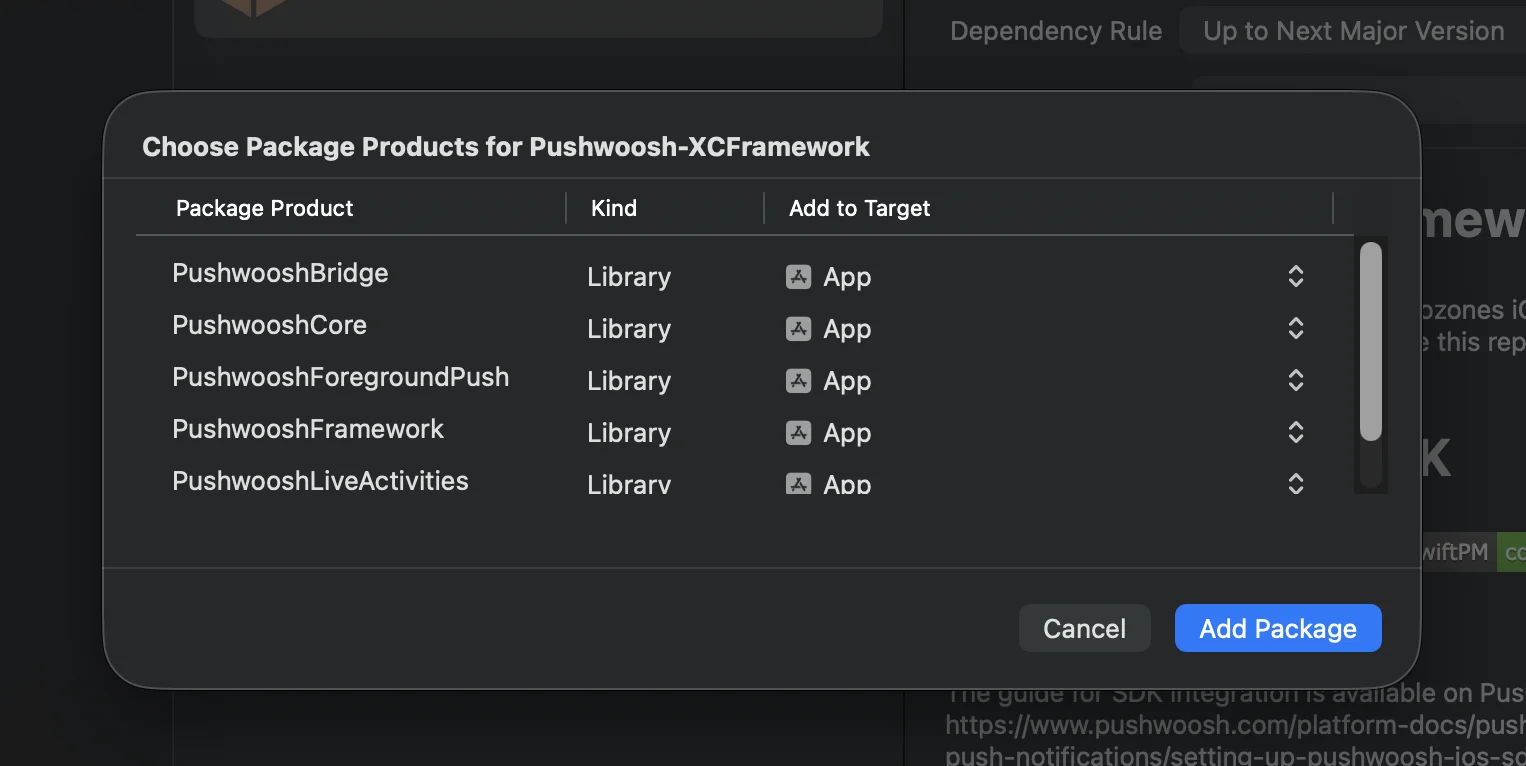
Anchor link toस्विफ्ट पैकेज मैनेजर
कोकोपोड्स
# Uncomment the next line to define a global platform for your project# platform :ios, '13.0'
target 'MyApp' do  # Comment the next line if you don't want to use dynamic frameworks  use_frameworks!
  pod 'PushwooshXCFramework'  pod 'PushwooshFramework/PushwooshForegroundPush'
end
3. AppDelegate में PushwooshForegroundPush कॉन्फ़िगरेशन जोड़ें
Anchor link toimport UIKitimport PushwooshFrameworkimport PushwooshForegroundPush
@mainclass AppDelegate: UIResponder, UIApplicationDelegate, PWMessagingDelegate, PWForegroundPushDelegate {
func application(_ application: UIApplication, didFinishLaunchingWithOptions launchOptions: [UIApplication.LaunchOptionsKey: Any]?) -> Bool {
Pushwoosh.ForegroundPush.foregroundNotificationWith(style: .style1, duration: 5, vibration: .notification, disappearedPushAnimation: .balls)
Pushwoosh.ForegroundPush.delegate = self
return true }
func pushwoosh(_ pushwoosh: Pushwoosh, onMessageReceived message: PWMessage) { if let payload = message.payload { // Pushwoosh method Pushwoosh.ForegroundPush.showForegroundPush(userInfo: payload) } }}foregroundNotificationWith मेथड का उपयोग करना
foregroundNotificationWith मेथड आपको कॉन्फ़िगर करने योग्य स्टाइल, अवधि और हैप्टिक फीडबैक के साथ एक कस्टम फोरग्राउंड पुश नोटिफिकेशन प्रदर्शित करने की अनुमति देता है।
मेथड सिग्नेचर (स्विफ्ट / ऑब्जेक्टिव-सी):
@objcstatic func foregroundNotificationWith( style: PWForegroundPushStyle, duration: Int, vibration: PWForegroundPushHapticFeedback, disappearedPushAnimation: PWForegroundPushDisappearedAnimation)पैरामीटर्स:
style(PWForegroundPushStyle)
- वर्तमान में, केवल style1 उपलब्ध है।
duration(Int)
- यह निर्दिष्ट करता है कि नोटिफिकेशन गायब होने से पहले कितने समय तक (सेकंड में) प्रदर्शित किया जाएगा।
vibration(PWForegroundPushHapticFeedback)
- जब नोटिफिकेशन दिखाया जाता है तो यह हैप्टिक फीडबैक को नियंत्रित करता है। उपलब्ध विकल्प:
case none // कोई वाइब्रेशन नहींcase light // हल्का वाइब्रेशनcase medium // मध्यम वाइब्रेशनcase heavy // भारी वाइब्रेशनcase soft // नरम वाइब्रेशनcase rigid // कठोर वाइब्रेशनcase notification // मानक नोटिफिकेशन वाइब्रेशनdisappearedPushAnimation(PWForegroundPushDisappearedAnimation)
- पुश गायब होने का एनिमेशन
case balls = 0case regularPush4. didTapForegroundPush डेलीगेट मेथड को लागू करना
Anchor link toकस्टम फोरग्राउंड पुश नोटिफिकेशन पर उपयोगकर्ता के टैप को संभालने के लिए, PWForegroundPushDelegate प्रोटोकॉल मेथड को लागू करें:
// Handle tap on foreground pushfunc didTapForegroundPush(_ userInfo: [AnyHashable : Any]) {    print("Foreground custom push: \(userInfo)")
    // Perform any action, e.g., navigate to a specific screen    // navigateToScreen(for: userInfo)}
नोट्स:
- यह मेथड तब कॉल किया जाता है जब उपयोगकर्ता कस्टम फोरग्राउंड पुश पर टैप करता है।
userInfoमें नोटिफिकेशन का पेलोड होता है।- कॉन्फ़िगरेशन के बाद
Pushwoosh.ForegroundPush.delegate = selfसेट करना सुनिश्चित करें।
5. फोरग्राउंड पुश नोटिफिकेशन को कस्टमाइज़ करने के लिए वैकल्पिक पैरामीटर्स
Anchor link toPushwooshForegroundPush मॉड्यूल आपके फोरग्राउंड पुश नोटिफिकेशन की उपस्थिति और व्यवहार को कस्टमाइज़ करने के लिए कई वैकल्पिक पैरामीटर प्रदान करता है। इन्हें स्टैटिक प्रॉपर्टीज के माध्यम से विश्व स्तर पर सेट किया जा सकता है।
| प्रॉपर्टी | टाइप | विवरण | डिफ़ॉल्ट |
|---|---|---|---|
| useLiquidView | Bool | iOS 26 पर लिक्विड ग्लास व्यू का उपयोग करें। | false |
| gradientColors | [UIColor]? | ग्रेडिएंट बैकग्राउंड के लिए रंगों का वैकल्पिक ऐरे। | nil |
| backgroundColor | UIColor? | पुश के लिए बैकग्राउंड का रंग। यदि nil है और gradientColors सेट नहीं है, तो डिफ़ॉल्ट ग्रेडिएंट का उपयोग किया जाता है। | डिफ़ॉल्ट सिस्टम ग्रेडिएंट |
| usePushAnimation | Bool | क्या पुश दिखाए जाने पर उसे एनिमेट करना है। | true |
| titlePushColor | UIColor? | नोटिफिकेशन शीर्षक टेक्स्ट का रंग। यदि nil है तो सिस्टम व्हाइट पर डिफ़ॉल्ट होता है। | white |
| messagePushColor | UIColor? | नोटिफिकेशन संदेश टेक्स्ट का रंग। यदि nil है तो सिस्टम व्हाइट पर डिफ़ॉल्ट होता है। | white |
| titlePushFont | UIFont? | नोटिफिकेशन शीर्षक टेक्स्ट का फ़ॉन्ट। यदि nil है तो सिस्टम फ़ॉन्ट पर डिफ़ॉल्ट होता है। | डिफ़ॉल्ट सिस्टम फ़ॉन्ट |
| messagePushFont | UIFont? | नोटिफिकेशन संदेश टेक्स्ट का फ़ॉन्ट। यदि nil है तो सिस्टम फ़ॉन्ट पर डिफ़ॉल्ट होता है। | डिफ़ॉल्ट सिस्टम फ़ॉन्ट |
सारांश:
- Swift 5.13+ + iOS 26 → लिक्विड ग्लास
- Swift 5.13+ + iOS < 26 → मानक UIView
- Swift < 5.13 → हमेशा धुंधला व्यू (कोई लिक्विड ग्लास समर्थन नहीं)
उदाहरण उपयोग:
Pushwoosh.ForegroundPush.useLiquidView = truePushwoosh.ForegroundPush.gradientColors = [.red, .orange, .yellow]Pushwoosh.ForegroundPush.titlePushColor = .redPushwoosh.ForegroundPush.messagePushColor = .greenPushwoosh.ForegroundPush.backgroundColor = .blackPushwoosh.ForegroundPush.titlePushFont = .boldSystemFont(ofSize: 22)Pushwoosh.ForegroundPush.messagePushFont = .italicSystemFont(ofSize: 15)Pushwoosh.ForegroundPush.usePushAnimation = false6. फोरग्राउंड पुश का उदाहरण
Anchor link toयह उदाहरण title, message, cards, और GIF animation के साथ एक कस्टम फोरग्राउंड पुश नोटिफिकेशन प्रदर्शित करने का तरीका दिखाता है।
बस इतना ही। आपने पुशवूश के साथ iOS में कस्टम फोरग्राउंड पुश नोटिफिकेशन को सफलतापूर्वक कॉन्फ़िगर कर लिया है।