Mac OS X
Baixar SDK
Projeto de Exemplo
Documentação da API do SDK
Vinculando o Pushwoosh.framework
Anchor link toAdicione o Pushwoosh.framework ao seu projeto através de um gerenciador de dependências, inserindo as seguintes linhas no seu podfile ou cartfile:
platform :osx, '10.7'
target 'MyApp' do  pod 'Pushwoosh_mac'end
github "Pushwoosh/pushwoosh-mac-sdk"Alternativamente, você pode simplesmente arrastar e soltar o framework em Link Binaries With Libraries nas Build Phases do seu projeto.
Adicionando bibliotecas
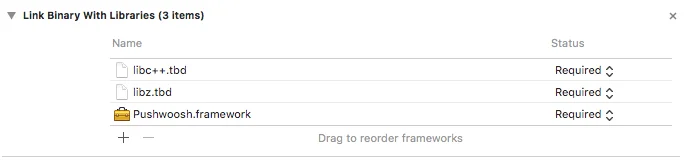
Anchor link toNa aba Build Phases do seu projeto, abra Link Binaries With Libraries e clique em Adicionar itens (botão ”+”). Procure e adicione as bibliotecas libz.tbd e libc++.tbd ao seu projeto:
Vinculando o aplicativo com o Painel de Controle da Pushwoosh
Anchor link toNo seu Info.plist, adicione uma chave do tipo string Pushwoosh_APPID com o seu Código de Aplicação Pushwoosh como valor.
Modificando o AppDelegate
Anchor link toAdicione o seguinte código ao seu AppDelegate:
import PushKitimport Pushwoosh
func application(_ application: UIApplication, didFinishLaunchingWithOptions launchOptions: [UIApplicationLaunchOptionsKey : Any]? = nil) -> Bool {
//lots of your initialization code
//-----------PUSHWOOSH PART-----------
NSUserNotificationCenter.default.delegate = Pushwoosh.sharedInstance()?.notificationCenterDelegateProxy
// set custom delegate for push handling, in our case - view controllerPushwoosh.sharedInstance().delegate = self
// handling push on app startPushwoosh.sharedInstance().handlePushReceived(aNotification.userInfo)
// register for push notifications!Pushwoosh.sharedInstance().registerForPushNotifications()
#import <Pushwoosh/Pushwoosh.h>
- (void)applicationDidFinishLaunching:(NSNotification *)aNotification{ //lots of your initialization code
//-----------PUSHWOOSH PART-----------
[NSUserNotificationCenter defaultUserNotificationCenter].delegate = [Pushwoosh sharedInstance].notificationCenterDelegateProxy;
// set custom delegate for push handling, in our case - view controller [Pushwoosh sharedInstance].delegate = self;
// handling push on app start [[Pushwoosh sharedInstance] handlePushReceived:[aNotification userInfo]];
// register for push notifications! [[Pushwoosh sharedInstance] registerForPushNotifications]; }Adicione o seguinte código ao seu UIApplicationDelegate (no mesmo arquivo acima).
// system push notification registration success callback, delegate to PWMessagingDelegatefunc application(_ application: NSApplication, didRegisterForRemoteNotificationsWithDeviceToken deviceToken: Data) {   Pushwoosh.sharedInstance()?.handlePushRegistration(deviceToken)}
// system push notification registration error callback, delegate to PWMessagingDelegatefunc application(_ application: NSApplication, didFailToRegisterForRemoteNotificationsWithError error: Error) {   Pushwoosh.sharedInstance()?.handlePushRegistrationFailure(error)}
// system push notification registration success callback, delegate to pushManager- (void)application:(NSApplication *)application didRegisterForRemoteNotificationsWithDeviceToken:(NSData *)deviceToken { [[Pushwoosh sharedInstance] handlePushRegistration:deviceToken];}
// system push notification registration error callback, delegate to pushManager- (void)application:(NSApplication *)application didFailToRegisterForRemoteNotificationsWithError:(NSError *)error { [[Pushwoosh sharedInstance] handlePushRegistrationFailure:error];}Para lidar com as notificações push, adicione a seguinte função ao seu UIApplicationDelegate (no mesmo arquivo dos três passos anteriores):
//this event is fired when the push gets receivedfunc pushwoosh(_ pushwoosh: Pushwoosh!, onMessageReceived message: PWMessage!) {   print("onMessageReceived: \(String(describing: message.payload))")}
//this event is fired when user taps the notificationfunc pushwoosh(_ pushwoosh: Pushwoosh!, onMessageOpened message: PWMessage!) {   print("onMessageOpened: \(String(describing: message.payload))")}
//this event is fired when the push gets received- (void)pushwoosh:(Pushwoosh *)pushwoosh onMessageReceived:(PWMessage *)message { NSLog(@"onMessageReceived: %@", message.payload);}
//this event is fired when user taps the notification- (void)pushwoosh:(Pushwoosh *)pushwoosh onMessageOpened:(PWMessage *)message { NSLog(@"onMessageOpened: %@", message.payload);}Habilitando Notificações Push
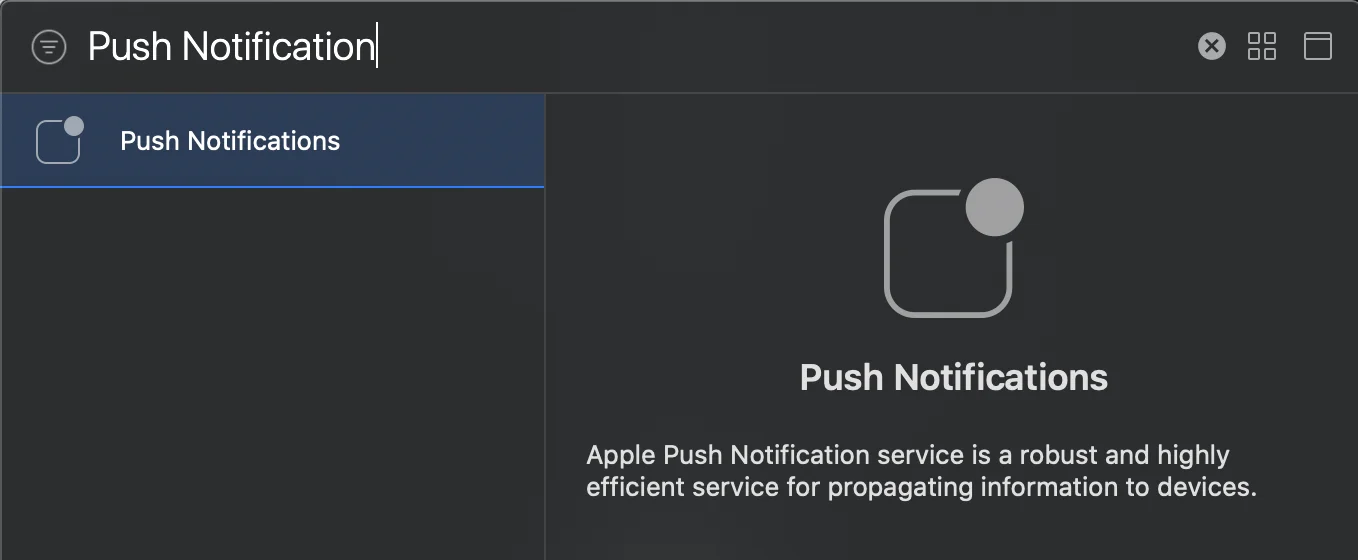
Anchor link toVá para Signing and Capabilities no seu target. Pressione + Capability e adicione Push Notifications.