Adobe AIR
O plugin requer o AIR SDK versão 33.0 ou superior.
Anchor link toBaixar SDK
Projeto de Exemplo
Documentação da API do SDK
Para integrar as notificações push da Pushwoosh em seu aplicativo Adobe Air, siga estes passos:
- Obtenha o PushNotifications.ane e adicione-o ao seu projeto.
- Adicione as bibliotecas
distriqtao seu projeto:
com.distriqt.playservices.Basecom.google.firebase.coreBaixar bibliotecas do Google Play Services
androidx.appcompatcom.google.android.materialandroidx.recyclerviewandroidx.coreBaixar bibliotecas de Suporte do Android
com.distriqt.CoreBaixar biblioteca Distriqt Core
3. Configure seu projeto no Firebase Console.
4. Localize o arquivo google-services.json no nível raiz do seu projeto.
5. Adicione o seguinte código à rotina de inicialização do seu aplicativo:
// define os callbacks de notificação push para o pluginvar pushwoosh:PushNotification = PushNotification.getInstance();pushwoosh.addEventListener(PushNotificationEvent.PERMISSION_GIVEN_WITH_TOKEN_EVENT, onToken);pushwoosh.addEventListener(PushNotificationEvent.PERMISSION_REFUSED_EVENT, onError);pushwoosh.addEventListener(PushNotificationEvent.PUSH_NOTIFICATION_RECEIVED_EVENT, onPushReceived);
// importante! Chame esta função quando os callbacks tiverem sido definidos. Ela aciona a entrega de todas as notificações push pendentes.pushwoosh.onDeviceReady();
// registrar para pushpushwoosh.registerForPushNotification();
As funções de manipulador (handler) são diretas:
public function onToken(e:PushNotificationEvent):void{    trace("\n TOKEN: " + e.token + " ");}
public function onError(e:PushNotificationEvent):void{    trace("\n TOKEN: " + e.errorMessage+ " ");}
public function onPushReceived(e:PushNotificationEvent):void{    trace("\n TOKEN: " + JSON.stringify(e.parameters) + " ");}
6. Agora configure seu app.xml. Substitua PUSHWOOSH_APP_ID pelo seu ID de Aplicativo Pushwoosh real. Para Android, substitua FCM_SENDER_ID pelo seu ID de Remetente do Firebase e PACKAGE_NAME pelo nome do seu pacote Android.
Tanto para Android quanto para iOS, certifique-se de adicionar também o seu Token de API de Dispositivo Pushwoosh.
Importante: Certifique-se de que o token tenha acesso ao aplicativo correto em seu Painel de Controle Pushwoosh. Saiba mais
<iPhone>    <InfoAdditions>        <![CDATA[            <key>Pushwoosh_APPID</key>            <string>PUSHWOOSH_APP_ID</string>            <key>Pushwoosh_API_TOKEN</key>            <string>__YOUR_DEVICE_TYPE_API_TOKEN__</string>        ]]>    </InfoAdditions>    <Entitlements>        <![CDATA[            <key>aps-environment</key>            <string>development</string>        ]]>    </Entitlements>    <requestedDisplayResolution>high</requestedDisplayResolution></iPhone>
<android>  <manifestAdditions><![CDATA[    <manifest android:installLocation="auto">      <application>
        <!-- Pushwoosh START -->        <meta-data android:name="com.google.android.gms.version" android:value="@integer/google_play_services_version" />        <meta-data android:name="com.pushwoosh.appid" android:value="PUSHWOOSH_APP_ID" />        <meta-data android:name="com.pushwoosh.senderid" android:value="AFCM_SENDER_ID" />        <meta-data android:name="com.pushwoosh.apitoken" android:value="__YOUR_DEVICE_TYPE_API_TOKEN" />        <meta-data android:name="PW_BROADCAST_PUSH" android:value="true" />        <meta-data android:name="com.pushwoosh.notification_icon" android:value="@drawable/notification_small_icon" />        <meta-data android:name="com.pushwoosh.notification_service_extension" android:value="com.pushwoosh.nativeExtensions.PushwooshNotificationServiceExtension"/>        <activity          android:name="com.pushwoosh.inapp.view.RichMediaWebActivity"          android:theme="@android:style/Theme.Translucent.NoTitleBar" />        <activity          android:name="com.pushwoosh.inapp.view.RemoteUrlActivity"          android:theme="@android:style/Theme.Translucent.NoTitleBar" />        <receiver          android:name="com.pushwoosh.BootReceiver"          android:enabled="true"          android:permission="android.permission.RECEIVE_BOOT_COMPLETED">          <intent-filter>            <action android:name="android.intent.action.BOOT_COMPLETED" />            <category android:name="android.intent.category.DEFAULT" />          </intent-filter>        </receiver>        <service          android:name="com.pushwoosh.FcmRegistrationService">          <intent-filter>            <action android:name="com.google.firebase.INSTANCE_ID_EVENT" />          </intent-filter>        </service>        <service          android:name="com.pushwoosh.firebase.PushFcmIntentService">          <intent-filter>            <action android:name="com.google.firebase.MESSAGING_EVENT" />          </intent-filter>        </service>        <activity          android:name="com.pushwoosh.internal.utils.PermissionActivity"          android:theme="@android:style/Theme.Translucent.NoTitleBar" />        <receiver android:name="com.pushwoosh.notification.LocalNotificationReceiver" />        <provider          android:name="com.pushwoosh.PushwooshInitProvider"          android:authorities="PACKAGE_NAME.pushwooshinitprovider"          android:enabled="true"          android:exported="false"          android:initOrder="50" />        <provider          android:initOrder="70"          android:enabled="true"          android:authorities="PACKAGE_NAME.firebasepushwooshinitprovider" android:exported="false"          android:name="com.pushwoosh.firebase.FirebaseInitProvider"/>        <provider          android:name="com.pushwoosh.nativeExtensions.PushwooshFirebaseInitProvider"          android:authorities="PACKAGE_NAME.FirebaseInitProvider"          android:enabled="true"          android:exported="false"          android:initOrder="60" />        <provider          android:name="com.pushwoosh.PushwooshSharedDataProvider"          android:authorities="PACKAGE_NAME.PushwooshSharedDataProvider"          android:enabled="true"          android:exported="true"          android:initOrder="60" />        <activity          android:name="com.pushwoosh.notification.NotificationOpenActivity"          android:noHistory="true"          android:theme="@android:style/Theme.Translucent.NoTitleBar"          android:enabled="true"          android:exported="false" />                          <receiver                        android:name="com.pushwoosh.NotificationUpdateReceiver"                        android:enabled="true"                        android:exported="false" />        <meta-data          android:name="com.pushwoosh.plugin.badge"          android:value="com.pushwoosh.badge.BadgePlugin" />        <meta-data          android:name="com.pushwoosh.internal.plugin_provider"          android:value="com.pushwoosh.nativeExtensions.internal.AdobeAirPluginProvider" />        <meta-data          android:name="com.pushwoosh.plugin.inbox"          android:value="com.pushwoosh.inbox.PushwooshInboxPlugin" />        <activity          android:name="com.pushwoosh.nativeExtensions.AirInboxActivity" />        <activity          android:name="com.pushwoosh.inbox.ui.presentation.view.activity.AttachmentActivity"          android:theme="@style/Theme.AppCompat.Light.NoActionBar" />        <!-- Pushwoosh END -->
        <!-- Firebase START -->        <service          android:name="com.google.firebase.components.ComponentDiscoveryService"          android:exported="false" >          <meta-data            android:name="com.google.firebase.components:com.google.firebase.iid.Registrar"            android:value="com.google.firebase.components.ComponentRegistrar" />          <meta-data            android:name="com.google.firebase.components:com.google.firebase.datatransport.TransportRegistrar"            android:value="com.google.firebase.components.ComponentRegistrar" />          <meta-data            android:name="com.google.firebase.components:com.google.firebase.installations.FirebaseInstallationsRegistrar"            android:value="com.google.firebase.components.ComponentRegistrar" />        </service>        <receiver android:name="com.google.firebase.iid.FirebaseInstanceIdReceiver" android:exported="true" android:permission="com.google.android.c2dm.permission.SEND">          <intent-filter>            <action android:name="com.google.android.c2dm.intent.RECEIVE"/>            <category android:name="PACKAGE_NAME"/>          </intent-filter>        </receiver>        <service          android:name="com.google.firebase.messaging.FirebaseMessagingService"          android:exported="false" >          <intent-filter android:priority="-500" >            <action android:name="com.google.firebase.MESSAGING_EVENT" />          </intent-filter>        </service>        <service android:name="com.google.firebase.iid.FirebaseInstanceIdService" android:exported="true">          <intent-filter android:priority="-500">            <action android:name="com.google.firebase.INSTANCE_ID_EVENT"/>          </intent-filter>        </service>        <provider          android:name="com.google.firebase.provider.FirebaseInitProvider"          android:authorities="PACKAGE_NAME.firebaseinitprovider"          android:exported="false"          android:initOrder="100" />        <!-- Firebase END -->
        <!-- Work-runtime START -->        <provider            android:name="androidx.startup.InitializationProvider"            android:authorities="PACKAGE_NAME.androidx-startup"            android:exported="false">            <!-- This entry makes WorkManagerInitializer discoverable. -->            <meta-data  android:name="androidx.work.WorkManagerInitializer"                  android:value="androidx.startup" />        </provider>        <service          android:name="androidx.work.impl.background.systemalarm.SystemAlarmService"          android:directBootAware="false"          android:enabled="true"          android:exported="false" />        <service          android:name="androidx.work.impl.background.systemjob.SystemJobService"          android:directBootAware="false"          android:enabled="true"          android:exported="true"          android:permission="android.permission.BIND_JOB_SERVICE" />
        <receiver          android:name="androidx.work.impl.utils.ForceStopRunnable$BroadcastReceiver"          android:directBootAware="false"          android:enabled="true"          android:exported="false" />        <receiver          android:name="androidx.work.impl.background.systemalarm.ConstraintProxy$BatteryChargingProxy"          android:directBootAware="false"          android:enabled="false"          android:exported="false" >          <intent-filter>            <action android:name="android.intent.action.ACTION_POWER_CONNECTED" />            <action android:name="android.intent.action.ACTION_POWER_DISCONNECTED" />          </intent-filter>        </receiver>        <receiver          android:name="androidx.work.impl.background.systemalarm.ConstraintProxy$BatteryNotLowProxy"          android:directBootAware="false"          android:enabled="false"          android:exported="false" >          <intent-filter>            <action android:name="android.intent.action.BATTERY_OKAY" />            <action android:name="android.intent.action.BATTERY_LOW" />          </intent-filter>        </receiver>        <receiver          android:name="androidx.work.impl.background.systemalarm.ConstraintProxy$StorageNotLowProxy"          android:directBootAware="false"          android:enabled="false"          android:exported="false" >          <intent-filter>            <action android:name="android.intent.action.DEVICE_STORAGE_LOW" />            <action android:name="android.intent.action.DEVICE_STORAGE_OK" />          </intent-filter>        </receiver>        <receiver          android:name="androidx.work.impl.background.systemalarm.ConstraintProxy$NetworkStateProxy"          android:directBootAware="false"          android:enabled="false"          android:exported="false" >          <intent-filter>            <action android:name="android.net.conn.CONNECTIVITY_CHANGE" />          </intent-filter>        </receiver>        <receiver          android:name="androidx.work.impl.background.systemalarm.RescheduleReceiver"          android:directBootAware="false"          android:enabled="false"          android:exported="false" >          <intent-filter>            <action android:name="android.intent.action.BOOT_COMPLETED" />            <action android:name="android.intent.action.TIME_SET" />            <action android:name="android.intent.action.TIMEZONE_CHANGED" />          </intent-filter>        </receiver>        <receiver          android:name="androidx.work.impl.background.systemalarm.ConstraintProxyUpdateReceiver"          android:directBootAware="false"          android:enabled="true"          android:exported="false" >          <intent-filter>            <action android:name="androidx.work.impl.background.systemalarm.UpdateProxies" />          </intent-filter>        </receiver>        <!-- Work-runtimme END -->      </application>
      <!-- Permissions START -->      <uses-permission android:name="android.permission.WAKE_LOCK" />      <uses-permission android:name="android.permission.ACCESS_NETWORK_STATE" />      <!-- FCM connects to Firebase Services. -->      <uses-permission android:name="android.permission.INTERNET" />      <!-- This app has permission to register and receive data message. -->      <uses-permission android:name="com.google.android.c2dm.permission.RECEIVE" />      <!-- Vibration in push notification -->      <uses-permission android:name="android.permission.VIBRATE" />      <uses-permission android:name="android.permission.RECEIVE_BOOT_COMPLETED" />      <!--BADGES-->      <!--for Samsung-->      <uses-permission android:name="com.sec.android.provider.badge.permission.READ"/>      <uses-permission android:name="com.sec.android.provider.badge.permission.WRITE"/>      <!--for htc-->      <uses-permission android:name="com.htc.launcher.permission.READ_SETTINGS"/>      <uses-permission android:name="com.htc.launcher.permission.UPDATE_SHORTCUT"/>      <!--for sony-->      <uses-permission android:name="com.sonyericsson.home.permission.BROADCAST_BADGE"/>      <uses-permission android:name="com.sonymobile.home.permission.PROVIDER_INSERT_BADGE"/>      <!--for apex-->      <uses-permission android:name="com.anddoes.launcher.permission.UPDATE_COUNT"/>      <!--for solid-->      <uses-permission android:name="com.majeur.launcher.permission.UPDATE_BADGE"/>      <!--for huawei-->      <uses-permission android:name="com.huawei.android.launcher.permission.CHANGE_BADGE"/>      <uses-permission android:name="com.huawei.android.launcher.permission.READ_SETTINGS"/>      <uses-permission android:name="com.huawei.android.launcher.permission.WRITE_SETTINGS"/>      <!--for ZUK-->      <uses-permission android:name="android.permission.READ_APP_BADGE"/>      <!--for OPPO-->      <uses-permission android:name="com.oppo.launcher.permission.READ_SETTINGS"/>      <uses-permission android:name="com.oppo.launcher.permission.WRITE_SETTINGS"/>      <!--for EvMe-->      <uses-permission android:name="me.everything.badger.permission.BADGE_COUNT_READ"/>      <uses-permission android:name="me.everything.badger.permission.BADGE_COUNT_WRITE"/>      <!-- Permissions END -->  </manifest>
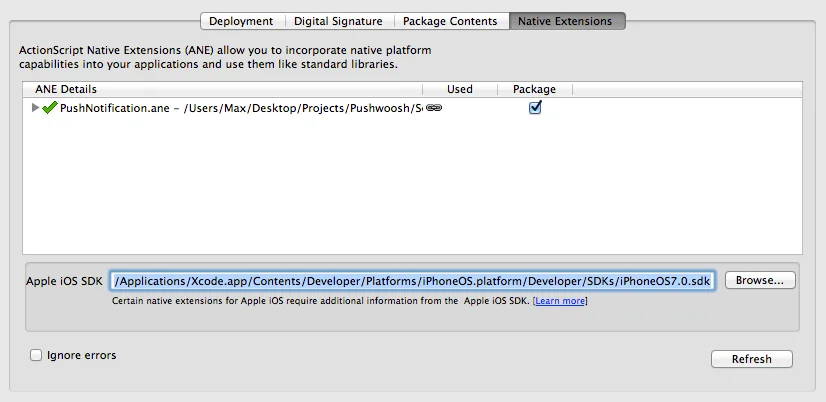
]]> </manifestAdditions> <colorDepth>16bit</colorDepth></android>7. Certifique-se de marcar a caixa de seleção “Package” no painel “Native Extensions” nas configurações. Selecione também o caminho para o SDK do iOS mais recente, conforme a captura de tela abaixo, ao exportar para iOS:
Compartilhe seu feedback conosco
Anchor link toSeu feedback nos ajuda a criar uma experiência melhor, então adoraríamos ouvir de você se tiver algum problema durante o processo de integração do SDK. Se você enfrentar alguma dificuldade, não hesite em compartilhar suas opiniões conosco através deste formulário.