Mac OS X
تنزيل SDK
مشروع نموذجي
وثائق SDK API
ربط Pushwoosh.framework
Anchor link toأضف Pushwoosh.framework إلى مشروعك عبر مدير التبعيات عن طريق وضع الأسطر التالية في podfile أو cartfile الخاص بك:
platform :osx, '10.7'
target 'MyApp' do  pod 'Pushwoosh_mac'end
github "Pushwoosh/pushwoosh-mac-sdk"بدلاً من ذلك، يمكنك ببساطة سحب وإفلات الإطار في Link Binaries With Libraries في Build Phases لمشروعك.
إضافة المكتبات
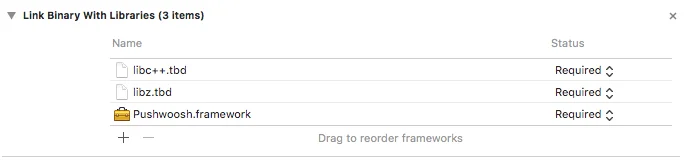
Anchor link toفي علامة التبويب Build Phases لمشروعك، افتح Link Binaries With Libraries وانقر على إضافة عناصر (زر ”+”). ابحث عن مكتبتي libz.tbd و libc++.tbd وأضفهما إلى مشروعك:
ربط التطبيق بـ Pushwoosh Control Panel
Anchor link toفي ملف Info.plist الخاص بك، أضف مفتاحًا من نوع string باسم Pushwoosh_APPID مع Pushwoosh Application Code الخاص بك كقيمة.
تعديل AppDelegate
Anchor link toأضف الكود التالي إلى AppDelegate الخاص بك:
import PushKitimport Pushwoosh
func application(_ application: UIApplication, didFinishLaunchingWithOptions launchOptions: [UIApplicationLaunchOptionsKey : Any]? = nil) -> Bool {
// الكثير من كود التهيئة الخاص بك
//-----------جزء PUSHWOOSH-----------
NSUserNotificationCenter.default.delegate = Pushwoosh.sharedInstance()?.notificationCenterDelegateProxy
// تعيين مندوب مخصص للتعامل مع الإشعارات، في حالتنا - view controllerPushwoosh.sharedInstance().delegate = self
// التعامل مع الإشعارات عند بدء تشغيل التطبيقPushwoosh.sharedInstance().handlePushReceived(aNotification.userInfo)
// التسجيل لتلقي الإشعارات!Pushwoosh.sharedInstance().registerForPushNotifications()
#import <Pushwoosh/Pushwoosh.h>
- (void)applicationDidFinishLaunching:(NSNotification *)aNotification{ // الكثير من كود التهيئة الخاص بك
//-----------جزء PUSHWOOSH-----------
[NSUserNotificationCenter defaultUserNotificationCenter].delegate = [Pushwoosh sharedInstance].notificationCenterDelegateProxy;
// تعيين مندوب مخصص للتعامل مع الإشعارات، في حالتنا - view controller [Pushwoosh sharedInstance].delegate = self;
// التعامل مع الإشعارات عند بدء تشغيل التطبيق [[Pushwoosh sharedInstance] handlePushReceived:[aNotification userInfo]];
// التسجيل لتلقي الإشعارات! [[Pushwoosh sharedInstance] registerForPushNotifications]; }أضف الكود التالي إلى UIApplicationDelegate الخاص بك (نفس الملف أعلاه).
// رد نداء نجاح تسجيل الإشعارات من النظام، يتم تفويضه إلى PWMessagingDelegatefunc application(_ application: NSApplication, didRegisterForRemoteNotificationsWithDeviceToken deviceToken: Data) {   Pushwoosh.sharedInstance()?.handlePushRegistration(deviceToken)}
// رد نداء خطأ تسجيل الإشعارات من النظام، يتم تفويضه إلى PWMessagingDelegatefunc application(_ application: NSApplication, didFailToRegisterForRemoteNotificationsWithError error: Error) {   Pushwoosh.sharedInstance()?.handlePushRegistrationFailure(error)}
// رد نداء نجاح تسجيل الإشعارات من النظام، يتم تفويضه إلى pushManager- (void)application:(NSApplication *)application didRegisterForRemoteNotificationsWithDeviceToken:(NSData *)deviceToken { [[Pushwoosh sharedInstance] handlePushRegistration:deviceToken];}
// رد نداء خطأ تسجيل الإشعارات من النظام، يتم تفويضه إلى pushManager- (void)application:(NSApplication *)application didFailToRegisterForRemoteNotificationsWithError:(NSError *)error { [[Pushwoosh sharedInstance] handlePushRegistrationFailure:error];}للتعامل مع الإشعارات، أضف الدالة التالية إلى UIApplicationDelegate الخاص بك (نفس الملف المذكور قبل ثلاث خطوات):
// يتم إطلاق هذا الحدث عند استلام الإشعارfunc pushwoosh(_ pushwoosh: Pushwoosh!, onMessageReceived message: PWMessage!) {   print("onMessageReceived: \(String(describing: message.payload))")}
// يتم إطلاق هذا الحدث عندما ينقر المستخدم على الإشعارfunc pushwoosh(_ pushwoosh: Pushwoosh!, onMessageOpened message: PWMessage!) {   print("onMessageOpened: \(String(describing: message.payload))")}
// يتم إطلاق هذا الحدث عند استلام الإشعار- (void)pushwoosh:(Pushwoosh *)pushwoosh onMessageReceived:(PWMessage *)message { NSLog(@"onMessageReceived: %@", message.payload);}
// يتم إطلاق هذا الحدث عندما ينقر المستخدم على الإشعار- (void)pushwoosh:(Pushwoosh *)pushwoosh onMessageOpened:(PWMessage *)message { NSLog(@"onMessageOpened: %@", message.payload);}تمكين الإشعارات
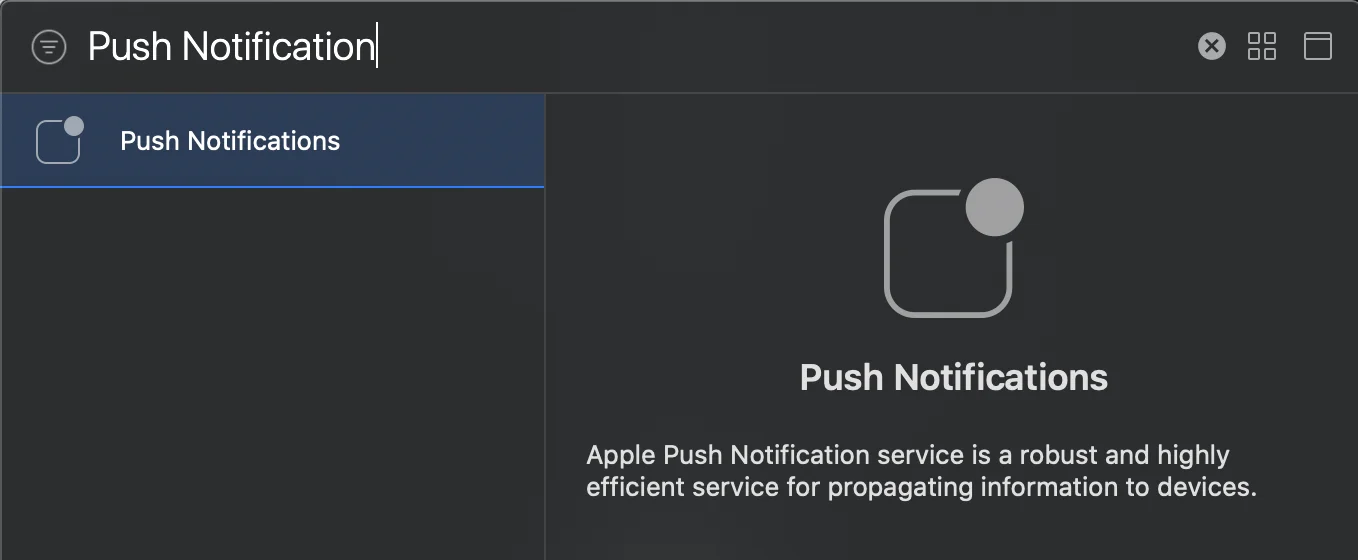
Anchor link toاذهب إلى Signing and Capabilities في هدفك. اضغط على + Capability وأضف Push Notifications.