إشعارات VoIP
في iOS 8، قدمت Apple PushKit، وإشعارات VoIP - وهي نوع جديد من الإشعارات الفورية. بالإضافة إلى وظائف الإشعارات الفورية القياسية، يسمح إشعار VoIP للتطبيق بتنفيذ كود قبل عرض الإشعار للمستخدم.
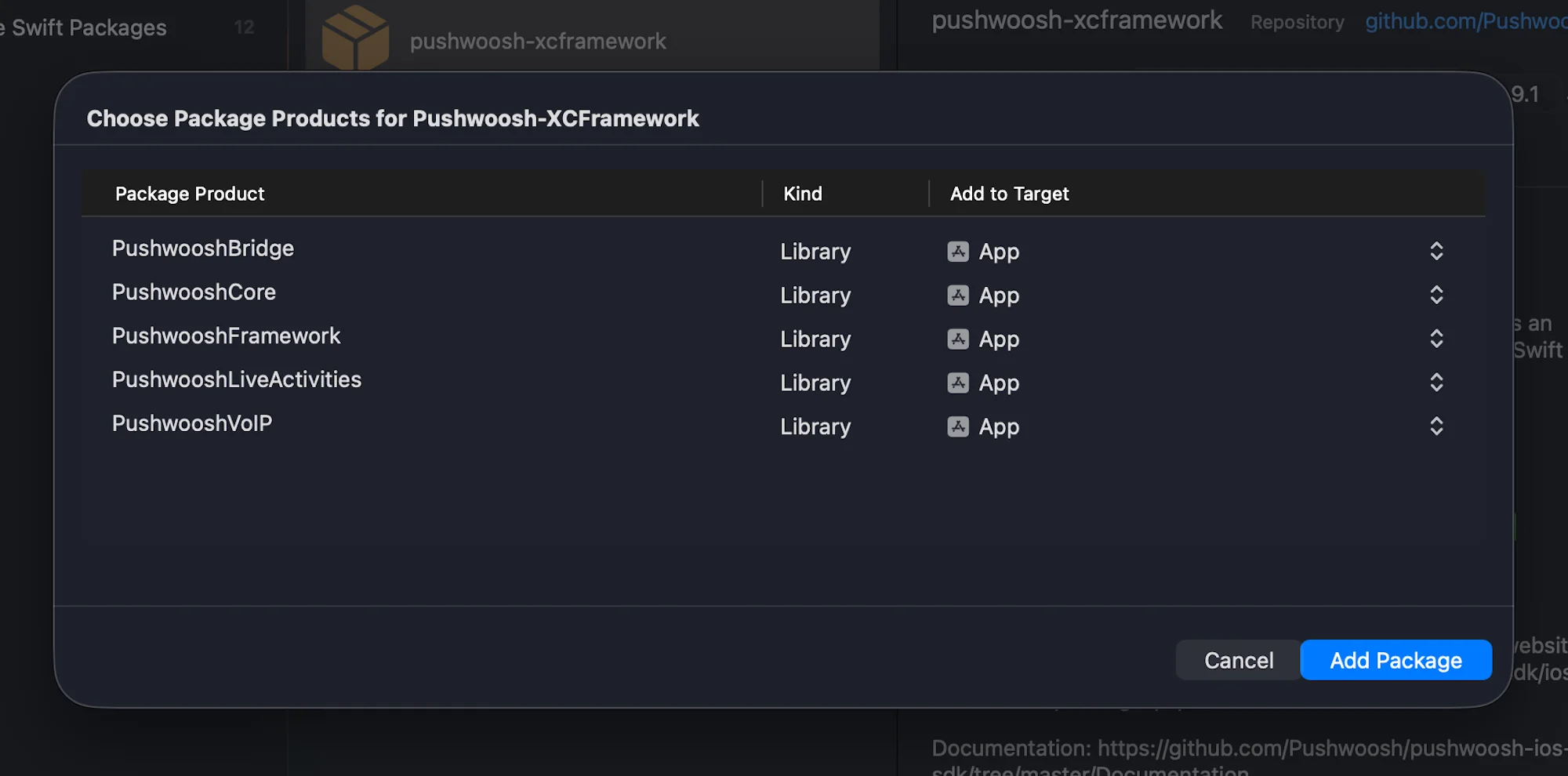
1. أضف وحدة PushwooshVoIP إلى مشروعك.
مدير حزم Swift
Cocoapods
# Uncomment the next line to define a global platform for your project# platform :ios, '9.0'
target 'MyApp' do  # Comment the next line if you don't want to use dynamic frameworks  use_frameworks!
  pod 'PushwooshXCFramework'  pod 'PushwooshFramework/PushwooshVoIP'
end
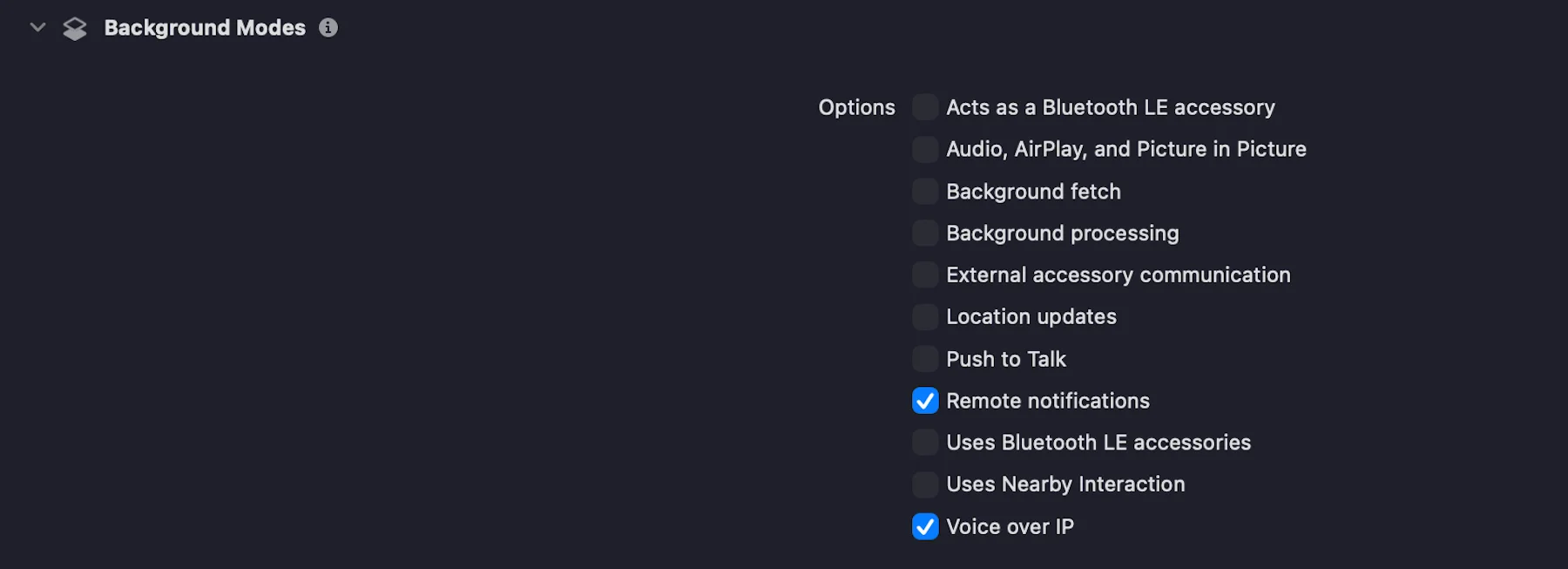
2. في علامة التبويب Signing & Capabilities، أضف صلاحية Voice over IP عن طريق تحديد مربع الاختيار، كما هو موضح في لقطة الشاشة أدناه:
3. قم بتهيئة وحدة PushwooshVoIP كما هو موضح في الكود أدناه.
import UIKitimport PushwooshFrameworkimport PushwooshVoIPimport CallKitimport PushKit
@mainclass AppDelegate: UIResponder, UIApplicationDelegate, PWVoIPCallDelegate {
    func application(_ application: UIApplication,                     didFinishLaunchingWithOptions launchOptions: [UIApplication.LaunchOptionsKey: Any]?) -> Bool {
        /// Initializes the Pushwoosh VoIP module.        ///        /// - Parameters:        ///   - supportVideo: A Boolean value indicating whether video calls are supported.        ///   - ringtoneSound: The name of the custom ringtone sound file to be used for incoming calls (e.g. `"mySound.caf"`).        ///   - handleTypes: The type of call handle to support. Possible values:        ///     - `1` – Generic        ///     - `2` – Phone number        ///     - `3` – Email address        Pushwoosh.VoIP.initializeVoIP(true, ringtoneSound: "mySound.caf", handleTypes: 1)
        // Set delegate to receive VoIP call events        Pushwoosh.VoIP.delegate = self
        return true    }
    // MARK: - Required PWVoIPCallDelegate Callbacks
    func voipDidReceiveIncomingCall(payload: PushwooshVoIP.PWVoIPMessage) {        // Handle incoming VoIP push    }
    func pwProviderDidReset(_ provider: CXProvider) {        // Handle provider reset    }
    func pwProviderDidBegin(_ provider: CXProvider) {        // Handle provider activation    }}
4. يحدد بروتوكول PWVoIPCallDelegate عمليات الاستدعاء (callbacks) المطلوبة والاختيارية للتعامل مع دورة حياة مكالمة VoIP وتفاعلات CallKit.
@objc public protocol PWVoIPCallDelegate: NSObjectProtocol {
    /// Called when an incoming VoIP push is received.    @objc func voipDidReceiveIncomingCall(payload: PushwooshVoIP.PWVoIPMessage)
    /// Optional: Called when the incoming call was successfully reported to CallKit.    @objc optional func voipDidReportIncomingCallSuccessfully(voipMessage: PushwooshVoIP.PWVoIPMessage)
    /// Optional: Called when reporting the incoming call to CallKit failed.    @objc optional func voipDidFailToReportIncomingCall(error: Error)
    /// Optional: Called when a new outgoing call is started.    @objc optional func startCall(_ provider: CXProvider, perform action: CXStartCallAction)
    /// Optional: Called when an active call is ended.    @objc optional func endCall(_ provider: CXProvider, perform action: CXEndCallAction, voipMessage: PushwooshVoIP.PWVoIPMessage?)
    /// Optional: Called when an incoming call is answered.    @objc optional func answerCall(_ provider: CXProvider, perform action: CXAnswerCallAction, voipMessage: PushwooshVoIP.PWVoIPMessage?)
    /// Optional: Called when the call is muted or unmuted.    @objc optional func mutedCall(_ provider: CXProvider, perform action: CXSetMutedCallAction)
    /// Optional: Called when the call is held or unheld.    @objc optional func heldCall(_ provider: CXProvider, perform action: CXSetHeldCallAction)
    /// Optional: Called when a DTMF tone is played.    @objc optional func playDTMF(_ provider: CXProvider, perform action: CXPlayDTMFCallAction)
    /// Called when the CallKit provider is reset.    @objc func pwProviderDidReset(_ provider: CXProvider)
    /// Called when the CallKit provider begins.    @objc func pwProviderDidBegin(_ provider: CXProvider)
    /// Optional: Provides the CallKit call controller instance.    @objc optional func returnedCallController(_ controller: CXCallController)
    /// Optional: Provides the CallKit provider instance.    @objc optional func returnedProvider(_ provider: CXProvider)
    /// Optional: Called when the audio session is activated.    @objc optional func activatedAudioSession(_ provider: CXProvider, didActivate audioSession: AVAudioSession)
    /// Optional: Called when the audio session is deactivated.    @objc optional func deactivatedAudioSession(_ provider: CXProvider, didDeactivate audioSession: AVAudioSession)}
5. قم برفع شهادة VoIP الخاصة بك إلى لوحة تحكم Pushwoosh وفقًا لـ دليل الإعداد، واختر بوابة الإنتاج (Production).
هذا كل شيء!
شاركنا ملاحظاتك
Anchor link toتساعدنا ملاحظاتك في إنشاء تجربة أفضل، لذلك نود أن نسمع منك إذا واجهت أي مشاكل أثناء عملية دمج SDK. إذا واجهت أي صعوبات، فلا تتردد في مشاركة أفكارك معنا عبر هذا النموذج.