إشعار الدفع المخصص في المقدمة لنظام iOS
بدءًا من الإصدار 6.10.0، يمكنك دمج وحدة PushwooshForegroundPush لتخصيص إشعارات الدفع في المقدمة عند تعطيل تنبيهات نظام iOS الأصلية.
1. تعطيل تنبيهات الدفع الأصلية في المقدمة
Anchor link toأضف Pushwoosh_SHOW_ALERT = false إلى ملف Info.plist الخاص بك.
<key>Pushwoosh_SHOW_ALERT</key><false/>2. دمج وحدة PushwooshForegroundPush
Anchor link toSwift Package Manager
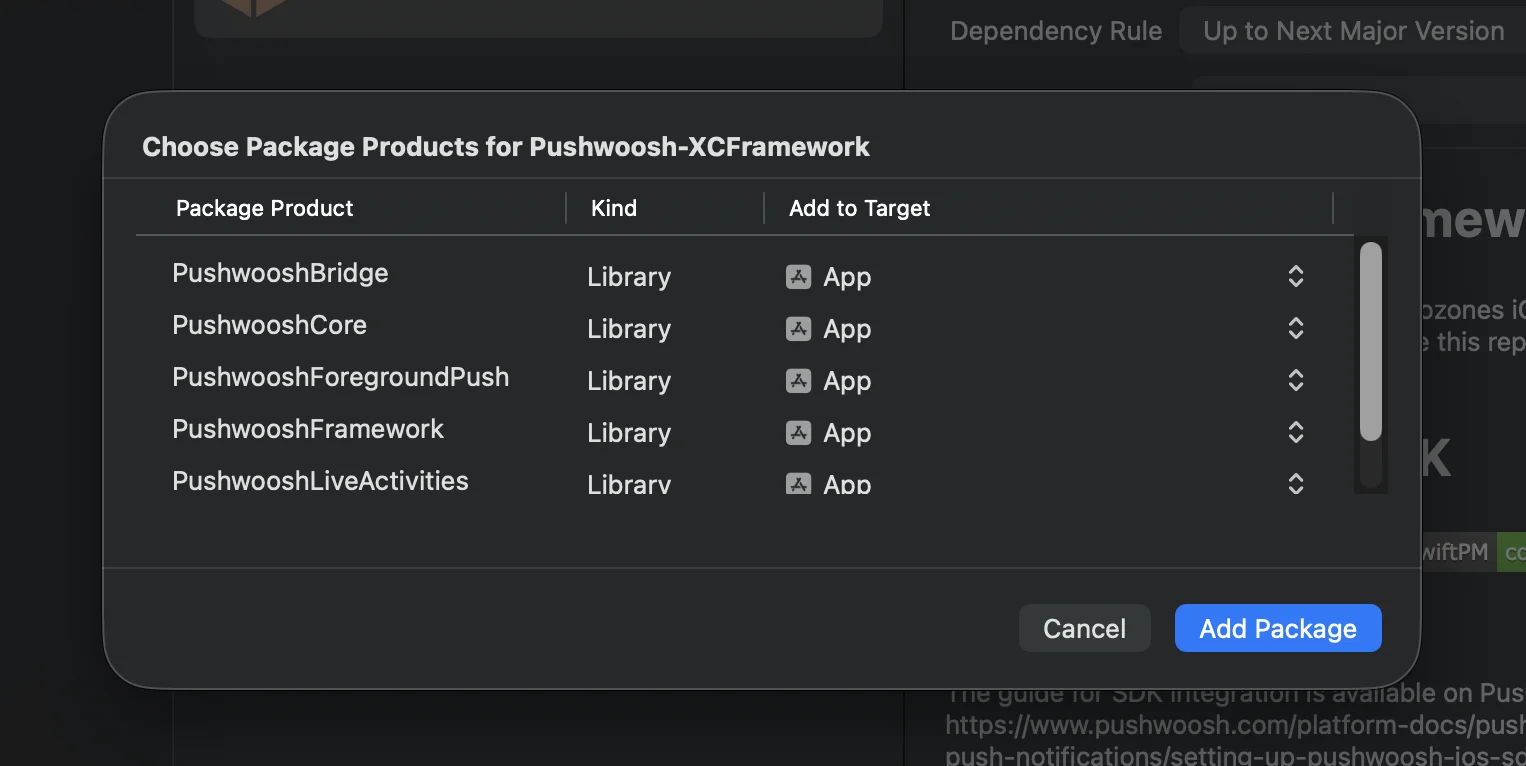
Cocoapods
# Uncomment the next line to define a global platform for your project# platform :ios, '13.0'
target 'MyApp' do  # Comment the next line if you don't want to use dynamic frameworks  use_frameworks!
  pod 'PushwooshXCFramework'  pod 'PushwooshFramework/PushwooshForegroundPush'
end
3. إضافة تكوين PushwooshForegroundPush في AppDelegate
Anchor link toimport UIKitimport PushwooshFrameworkimport PushwooshForegroundPush
@mainclass AppDelegate: UIResponder, UIApplicationDelegate, PWMessagingDelegate, PWForegroundPushDelegate {
func application(_ application: UIApplication, didFinishLaunchingWithOptions launchOptions: [UIApplication.LaunchOptionsKey: Any]?) -> Bool {
Pushwoosh.ForegroundPush.foregroundNotificationWith(style: .style1, duration: 5, vibration: .notification, disappearedPushAnimation: .balls)
Pushwoosh.ForegroundPush.delegate = self
return true }
func pushwoosh(_ pushwoosh: Pushwoosh, onMessageReceived message: PWMessage) { if let payload = message.payload { // Pushwoosh method Pushwoosh.ForegroundPush.showForegroundPush(userInfo: payload) } }}استخدام دالة foregroundNotificationWith
تسمح لك دالة foregroundNotificationWith بعرض إشعار دفع مخصص في المقدمة بنمط ومدة وردود فعل لمسية قابلة للتكوين.
توقيع الدالة (Swift / Objective-C):
@objcstatic func foregroundNotificationWith( style: PWForegroundPushStyle, duration: Int, vibration: PWForegroundPushHapticFeedback, disappearedPushAnimation: PWForegroundPushDisappearedAnimation)المعلمات:
style(PWForegroundPushStyle)
- حاليًا، يتوفر
style1فقط.
duration(Int)
- تحدد مدة عرض الإشعار قبل اختفائه (بالثواني).
vibration(PWForegroundPushHapticFeedback)
- تتحكم في ردود الفعل اللمسية عند عرض الإشعار. الخيارات المتاحة:
case none // لا يوجد اهتزازcase light // اهتزاز خفيفcase medium // اهتزاز متوسطcase heavy // اهتزاز قويcase soft // اهتزاز ناعمcase rigid // اهتزاز صلبcase notification // اهتزاز الإشعار القياسيdisappearedPushAnimation(PWForegroundPushDisappearedAnimation)
- الرسوم المتحركة لاختفاء الإشعار
case balls = 0case regularPush4. تنفيذ دالة المفوّض didTapForegroundPush
Anchor link toلمعالجة نقرات المستخدم على إشعارات الدفع المخصصة في المقدمة، قم بتنفيذ دالة بروتوكول PWForegroundPushDelegate:
// معالجة النقر على إشعار الدفع في المقدمةfunc didTapForegroundPush(_ userInfo: [AnyHashable : Any]) {    print("Foreground custom push: \(userInfo)")
    // قم بأي إجراء، على سبيل المثال، الانتقال إلى شاشة معينة    // navigateToScreen(for: userInfo)}
ملاحظات:
- تُستدعى هذه الدالة عندما ينقر المستخدم على إشعار دفع مخصص في المقدمة.
- يحتوي
userInfoعلى حمولة (payload) الإشعار. - تأكد من تعيين
Pushwoosh.ForegroundPush.delegate = selfبعد التكوين.
5. معلمات اختيارية لتخصيص إشعارات الدفع في المقدمة
Anchor link toتوفر وحدة PushwooshForegroundPush العديد من المعلمات الاختيارية لتخصيص مظهر وسلوك إشعارات الدفع في المقدمة. يمكن تعيينها بشكل عام عبر الخصائص الثابتة (static properties).
| الخاصية | النوع | الوصف | الافتراضي |
|---|---|---|---|
| useLiquidView | Bool | استخدام عرض Liquid Glass على نظام iOS 26. | false |
| gradientColors | [UIColor]? | مصفوفة اختيارية من الألوان لخلفية متدرجة. | nil |
| backgroundColor | UIColor? | لون خلفية الإشعار. إذا كانت nil ولم يتم تعيين gradientColors، فسيتم استخدام التدرج الافتراضي. | تدرج النظام الافتراضي |
| usePushAnimation | Bool | ما إذا كان سيتم تحريك الإشعار عند عرضه. | true |
| titlePushColor | UIColor? | لون نص عنوان الإشعار. الافتراضي هو اللون الأبيض للنظام إذا كانت nil. | white |
| messagePushColor | UIColor? | لون نص رسالة الإشعار. الافتراضي هو اللون الأبيض للنظام إذا كانت nil. | white |
| titlePushFont | UIFont? | خط نص عنوان الإشعار. الافتراضي هو خط النظام إذا كانت nil. | خط النظام الافتراضي |
| messagePushFont | UIFont? | خط نص رسالة الإشعار. الافتراضي هو خط النظام إذا كانت nil. | خط النظام الافتراضي |
ملخص:
- Swift 5.13+ + iOS 26 ← Liquid Glass
- Swift 5.13+ + iOS < 26 ← UIView قياسي
- Swift < 5.13 ← عرض ضبابي دائمًا (لا يوجد دعم لـ Liquid Glass)
مثال على الاستخدام:
Pushwoosh.ForegroundPush.useLiquidView = truePushwoosh.ForegroundPush.gradientColors = [.red, .orange, .yellow]Pushwoosh.ForegroundPush.titlePushColor = .redPushwoosh.ForegroundPush.messagePushColor = .greenPushwoosh.ForegroundPush.backgroundColor = .blackPushwoosh.ForegroundPush.titlePushFont = .boldSystemFont(ofSize: 22)Pushwoosh.ForegroundPush.messagePushFont = .italicSystemFont(ofSize: 15)Pushwoosh.ForegroundPush.usePushAnimation = false6. مثال على إشعار الدفع في المقدمة
Anchor link toيوضح هذا المثال كيفية عرض إشعار دفع مخصص في المقدمة مع title و message و cards ورسوم متحركة GIF.
هذا كل شيء. لقد قمت بتكوين إشعارات الدفع المخصصة في المقدمة بنجاح في نظام iOS باستخدام Pushwoosh.