# 配置平台
为了让 Pushwoosh 能够向您的用户发送消息,配置您计划使用的平台至关重要。
要开始配置平台,请前往 **设置 → 配置平台**,然后点击所需平台旁边的 **连接**:
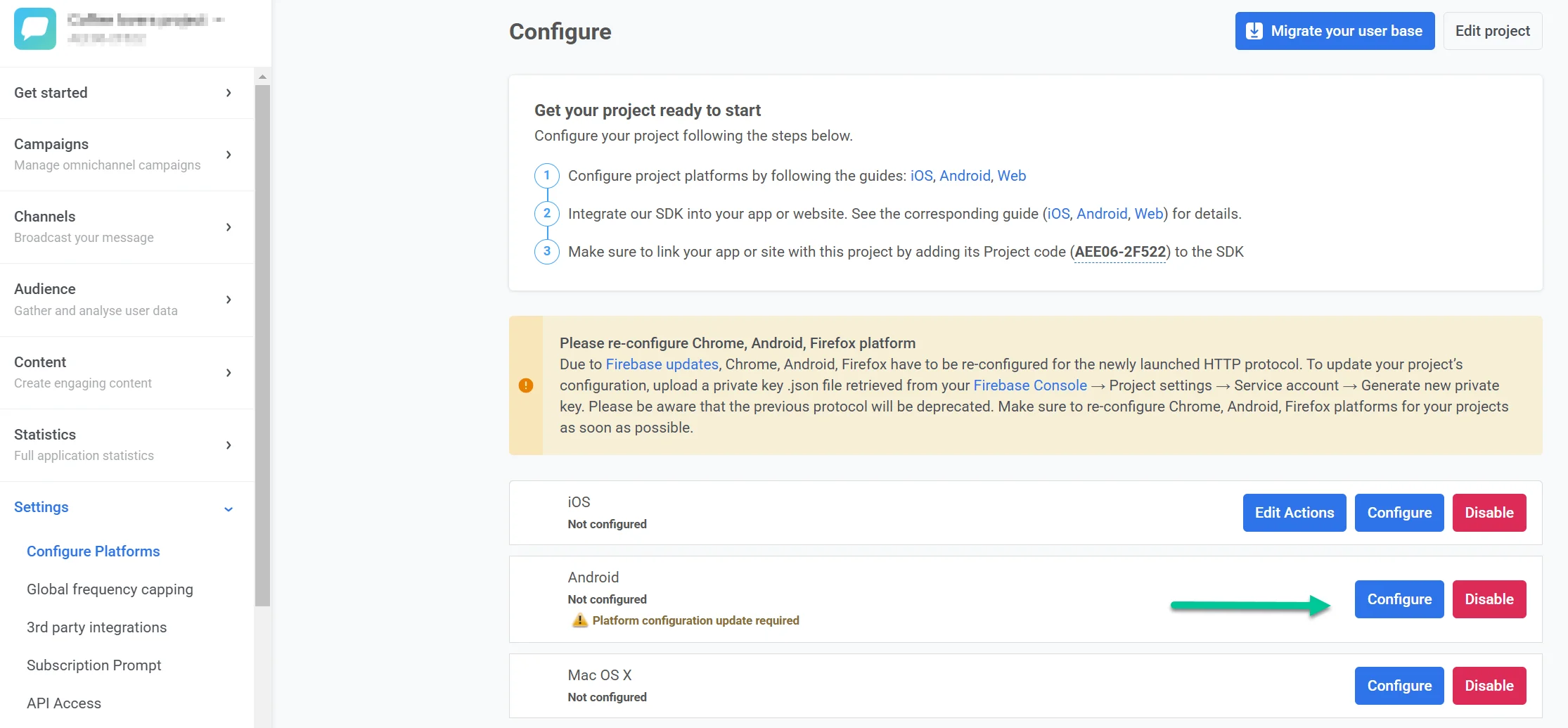 ## 移动端
### iOS 配置
* [基于证书的 iOS 配置](/zh/developer/first-steps/connect-messaging-services/ios-configuration/ios-platform-configuration)
* [基于令牌的 iOS 配置](/zh/developer/first-steps/connect-messaging-services/ios-configuration/ios-token-based-configuration)
* [适用于 iOS 的 Apple Wallet 通行证配置](/zh/developer/first-steps/connect-messaging-services/ios-configuration/ios-wallet-pass-configuration/)
### Android Firebase 配置
* [Android Firebase 配置](/zh/developer/first-steps/connect-messaging-services/android-configuration/android-firebase-configuration)
* [适用于 Android 的 Google Wallet 通行证配置](/zh/developer/first-steps/connect-messaging-services/android-configuration/android-google-wallet-configuration/)
### Amazon 配置
* [Amazon 设备消息传递配置](/zh/developer/first-steps/connect-messaging-services/amazon-configuration/)
### 华为配置
* [华为配置](/zh/developer/first-steps/connect-messaging-services/huawei-configuration)
## 网页端
* [网页推送配置](/zh/developer/first-steps/connect-messaging-services/web-push-configuration/)
## 桌面平台
* [Windows 配置](/zh/developer/first-steps/connect-messaging-services/windows-configuration)
* **macOS**
## 电子邮件
[电子邮件配置](/zh/product/first-steps/start-with-your-project/configure-platforms/email-verification)
## WhatsApp
直接在 Control Panel 中添加您的 WhatsApp Business Account 凭据以启用 WhatsApp 消息功能。
- [WhatsApp 配置](/zh/product/first-steps/start-with-your-project/configure-platforms/whatsapp-configuration)
## LINE
通过将您的 LINE 帐户连接到 Pushwoosh,触达最受欢迎的消息受众之一。配置完成后,您可以发送个性化的 LINE 消息。使用 Customer Journey 或 API 来扩展您的沟通策略并提高用户参与度。
- [LINE 配置](/zh/developer/first-steps/connect-messaging-services/line-configuration/)
## Kakao
将您的 KakaoTalk 帐户连接到 Pushwoosh,以向韩国及其他地区的用户发送消息。在 Customer Journey 中或通过 API 使用经批准的模板。
- [KakaoTalk 平台配置](/zh/product/first-steps/start-with-your-project/configure-platforms/kakao-configuration)
## Telegram
将 Telegram 机器人连接到您的 Pushwoosh 项目,以便在 Customer Journey 中发送 Telegram 消息。
- [Telegram 平台配置](/zh/product/first-steps/start-with-your-project/configure-platforms/telegram-configuration)
## Viber
将您的 Viber 帐户连接到 Pushwoosh,以便在 Customer Journey 中使用 Rakuten 批准的模板或自由格式文本发送 Viber 消息。
- [Viber 平台配置](/zh/product/first-steps/start-with-your-project/configure-platforms/viber-configuration)
## 短信 (SMS)
直接在 Control Panel 中连接您自己的短信服务提供商以启用短信消息功能。配置完成后,您可以在一次性营销活动和 Customer Journey 中发送短信。
- [短信 (SMS) 配置](/zh/product/first-steps/start-with-your-project/configure-platforms/sms-configuration)
- [短信 (SMS) 提供商 Webhook](/zh/developer/first-steps/connect-messaging-services/sms-configuration/sms-provider-webhooks/)(开发者文档:提供商回调 URL)
## 编辑项目
点击 **配置平台** 页面右上角的 **编辑项目** 以打开项目设置。在这里,您可以更改项目标题和图标,连接您的 bit.ly 帐户以缩短推送通知中的链接,以及管理电子邮件通知偏好。
[了解有关编辑项目的更多信息](/zh/product/account-management-and-security/managing-projects/#editing-projects)
## 隐藏未配置的平台
在 **配置平台** 页面底部,使用 **隐藏未配置的平台** 仅显示您已设置的平台。当您只使用部分渠道时,这可以使列表保持简短。
## 删除项目
要删除项目,请前往 **设置 → 配置平台**,打开页面右上角(**编辑项目** 旁边)的三点菜单,然后选择 **删除项目**。
有关项目管理的更多信息,请参阅[管理项目](/zh/product/account-management-and-security/managing-projects)。
## 移动端
### iOS 配置
* [基于证书的 iOS 配置](/zh/developer/first-steps/connect-messaging-services/ios-configuration/ios-platform-configuration)
* [基于令牌的 iOS 配置](/zh/developer/first-steps/connect-messaging-services/ios-configuration/ios-token-based-configuration)
* [适用于 iOS 的 Apple Wallet 通行证配置](/zh/developer/first-steps/connect-messaging-services/ios-configuration/ios-wallet-pass-configuration/)
### Android Firebase 配置
* [Android Firebase 配置](/zh/developer/first-steps/connect-messaging-services/android-configuration/android-firebase-configuration)
* [适用于 Android 的 Google Wallet 通行证配置](/zh/developer/first-steps/connect-messaging-services/android-configuration/android-google-wallet-configuration/)
### Amazon 配置
* [Amazon 设备消息传递配置](/zh/developer/first-steps/connect-messaging-services/amazon-configuration/)
### 华为配置
* [华为配置](/zh/developer/first-steps/connect-messaging-services/huawei-configuration)
## 网页端
* [网页推送配置](/zh/developer/first-steps/connect-messaging-services/web-push-configuration/)
## 桌面平台
* [Windows 配置](/zh/developer/first-steps/connect-messaging-services/windows-configuration)
* **macOS**
## 电子邮件
[电子邮件配置](/zh/product/first-steps/start-with-your-project/configure-platforms/email-verification)
## WhatsApp
直接在 Control Panel 中添加您的 WhatsApp Business Account 凭据以启用 WhatsApp 消息功能。
- [WhatsApp 配置](/zh/product/first-steps/start-with-your-project/configure-platforms/whatsapp-configuration)
## LINE
通过将您的 LINE 帐户连接到 Pushwoosh,触达最受欢迎的消息受众之一。配置完成后,您可以发送个性化的 LINE 消息。使用 Customer Journey 或 API 来扩展您的沟通策略并提高用户参与度。
- [LINE 配置](/zh/developer/first-steps/connect-messaging-services/line-configuration/)
## Kakao
将您的 KakaoTalk 帐户连接到 Pushwoosh,以向韩国及其他地区的用户发送消息。在 Customer Journey 中或通过 API 使用经批准的模板。
- [KakaoTalk 平台配置](/zh/product/first-steps/start-with-your-project/configure-platforms/kakao-configuration)
## Telegram
将 Telegram 机器人连接到您的 Pushwoosh 项目,以便在 Customer Journey 中发送 Telegram 消息。
- [Telegram 平台配置](/zh/product/first-steps/start-with-your-project/configure-platforms/telegram-configuration)
## Viber
将您的 Viber 帐户连接到 Pushwoosh,以便在 Customer Journey 中使用 Rakuten 批准的模板或自由格式文本发送 Viber 消息。
- [Viber 平台配置](/zh/product/first-steps/start-with-your-project/configure-platforms/viber-configuration)
## 短信 (SMS)
直接在 Control Panel 中连接您自己的短信服务提供商以启用短信消息功能。配置完成后,您可以在一次性营销活动和 Customer Journey 中发送短信。
- [短信 (SMS) 配置](/zh/product/first-steps/start-with-your-project/configure-platforms/sms-configuration)
- [短信 (SMS) 提供商 Webhook](/zh/developer/first-steps/connect-messaging-services/sms-configuration/sms-provider-webhooks/)(开发者文档:提供商回调 URL)
## 编辑项目
点击 **配置平台** 页面右上角的 **编辑项目** 以打开项目设置。在这里,您可以更改项目标题和图标,连接您的 bit.ly 帐户以缩短推送通知中的链接,以及管理电子邮件通知偏好。
[了解有关编辑项目的更多信息](/zh/product/account-management-and-security/managing-projects/#editing-projects)
## 隐藏未配置的平台
在 **配置平台** 页面底部,使用 **隐藏未配置的平台** 仅显示您已设置的平台。当您只使用部分渠道时,这可以使列表保持简短。
## 删除项目
要删除项目,请前往 **设置 → 配置平台**,打开页面右上角(**编辑项目** 旁边)的三点菜单,然后选择 **删除项目**。
有关项目管理的更多信息,请参阅[管理项目](/zh/product/account-management-and-security/managing-projects)。