# 在 Journey 中使用 Webhook 响应数据
## 概述
当您[映射 Webhook 响应中的值](/zh/product/customer-journey/journey-elements/channels/webhook/#map-webhook-response-data-to-variables)时,Pushwoosh 会将它们存储为变量,您可以在 Journey 的后续步骤中使用这些变量,就像使用[Event 属性](/zh/product/audience-data-and-segmentation/events/#2-set-attributes)一样。
## 使用“更新用户资料”将 Webhook 值保存为 Tag
[**Webhook**](/zh/product/customer-journey/journey-elements/channels/webhook/#map-webhook-response-data-to-variables) 可以从外部系统(例如 CRM 用户 ID 或订阅状态)返回数据,而这些数据 Pushwoosh 尚未存储在用户资料中。[**更新用户资料**](/zh/product/customer-journey/journey-elements/flow-controls/update-user-profile/#use-a-value-from-a-webhook-response) 会将映射的值保存为 [Tags](/zh/product/audience-data-and-segmentation/user-data-tags/tags/),以便您可以在[细分](/zh/product/audience-data-and-segmentation/segmentation/)、[动态内容](/zh/product/personalization/dynamic-content/)和后续的 Journey 步骤中使用它们。
### 示例:将 CRM 用户 ID 保存为 Tag
新用户在您的应用中注册后,Journey 会在您的 CRM 中创建一个匹配的记录。将返回的 CRM 用户 ID 保存为 Tag,可以让您稍后(例如从另一个 Journey 或后续的 Webhook 调用中)引用或更新同一个 CRM 记录,而不是在用户每次重新进入 Journey 时都创建一个重复的记录。
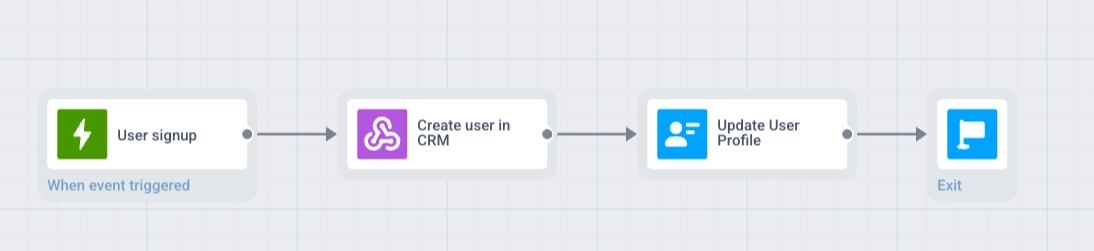
**Journey 流程:** 基于触发器进入 → Webhook → 更新用户资料 → 退出
1. 创建一个 Journey,在 `SignUp` 事件上使用**基于触发器进入**。
2. 在进入步骤后添加一个 **Webhook** 元素。为其命名(例如 `Create user in CRM`),并将请求 URL 设置为您的 CRM 创建用户端点。
3. 在**响应映射**中,将**路径**设置为响应中的 ID 字段(例如 `data.user.id`),并将**属性**设置为 `crm_user_id`。
 4. 在 **Webhook** 步骤后添加一个**更新用户资料**元素。
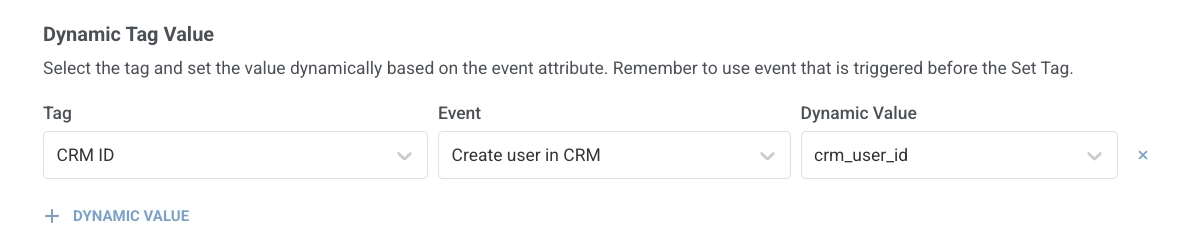
5. 在**动态 Tag 值**中,点击 **+ 动态值**。在 **Tag** 中,选择存储 CRM ID 的 Tag(如果需要,请提前创建)。在 **Event** 中,通过您给定的名称(`Create user in CRM`)选择 Webhook 步骤。在**动态值**中,选择 `crm_user_id`。
4. 在 **Webhook** 步骤后添加一个**更新用户资料**元素。
5. 在**动态 Tag 值**中,点击 **+ 动态值**。在 **Tag** 中,选择存储 CRM ID 的 Tag(如果需要,请提前创建)。在 **Event** 中,通过您给定的名称(`Create user in CRM`)选择 Webhook 步骤。在**动态值**中,选择 `crm_user_id`。
 6. 在分支的末尾添加**退出**。
 ## 使用“时间延迟”根据 Webhook 值安排延迟
访问日期、续订截止日期和交付窗口通常存在于外部预订或计费系统中。在 [**Webhook**](/zh/product/customer-journey/journey-elements/channels/webhook/#map-webhook-response-data-to-variables) 从 API 响应中映射日期后,[**时间延迟**](/zh/product/customer-journey/journey-elements/flow-controls/time-delay/#use-a-date-from-a-webhook-response) 可以暂停 Journey 直到那一刻,例如在预约前 2 天,以便下一条消息能准时发出。
### 示例:根据响应中的日期安排提醒
用户在您的应用中预约。Journey 从您的预订系统中获取访问日期,并在访问前 2 天发送推送提醒。
1. 创建一个 Journey,在 `AppointmentBooked` 事件上使用**基于触发器进入**。
2. 在进入步骤后添加一个 **Webhook** 元素。为其命名(例如 `Get appointment details`),并将请求 URL 设置为您的预订系统 API。
3. 在**响应映射**中,将**路径**设置为响应中的日期字段(例如 `appointment.date`),并将**属性**设置为 `visit_date`。
## 使用“时间延迟”根据 Webhook 值安排延迟
访问日期、续订截止日期和交付窗口通常存在于外部预订或计费系统中。在 [**Webhook**](/zh/product/customer-journey/journey-elements/channels/webhook/#map-webhook-response-data-to-variables) 从 API 响应中映射日期后,[**时间延迟**](/zh/product/customer-journey/journey-elements/flow-controls/time-delay/#use-a-date-from-a-webhook-response) 可以暂停 Journey 直到那一刻,例如在预约前 2 天,以便下一条消息能准时发出。
### 示例:根据响应中的日期安排提醒
用户在您的应用中预约。Journey 从您的预订系统中获取访问日期,并在访问前 2 天发送推送提醒。
1. 创建一个 Journey,在 `AppointmentBooked` 事件上使用**基于触发器进入**。
2. 在进入步骤后添加一个 **Webhook** 元素。为其命名(例如 `Get appointment details`),并将请求 URL 设置为您的预订系统 API。
3. 在**响应映射**中,将**路径**设置为响应中的日期字段(例如 `appointment.date`),并将**属性**设置为 `visit_date`。
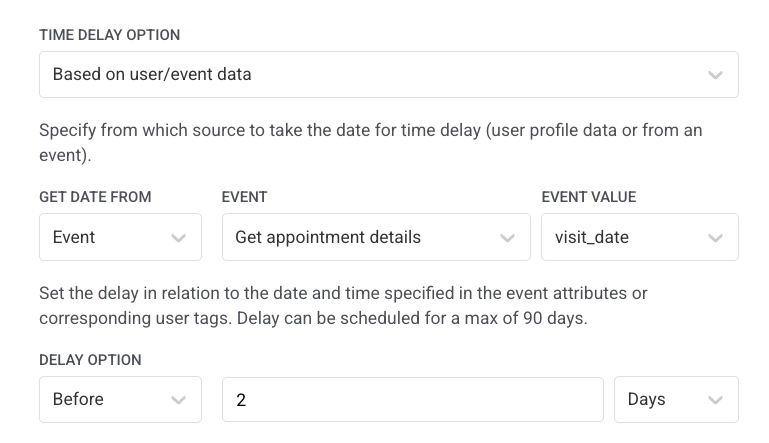
 4. 在 **Webhook** 步骤后添加一个**时间延迟**元素。选择**基于用户/事件数据**,将**从...获取日期**设置为 **Event**,将 **Event** 设置为您给定的名称(`Get appointment details`)的 Webhook 步骤,将**事件值**设置为 `visit_date`,并将延迟设置为**之前** `2` **天**。
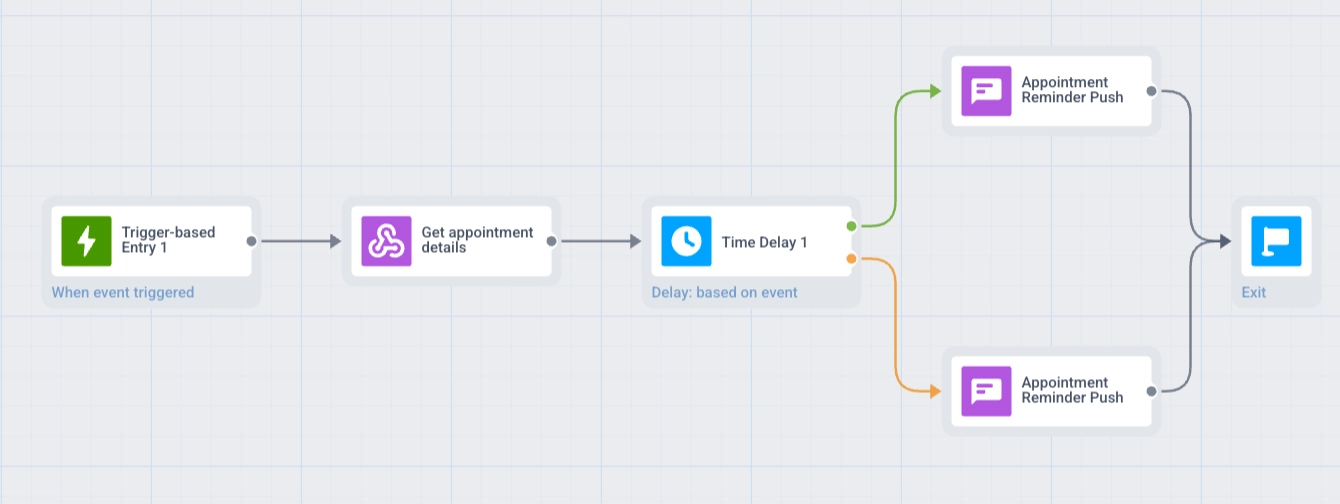
 5. 如果用户可以在访问前不到 2 天预订,请在**时间延迟**元素上启用**如果日期在过去或日期为空则拆分为分支**。这将创建两个分支,**过去**和**将来**。请参阅[当日期在过去或为空时拆分分支](/zh/product/customer-journey/journey-elements/flow-controls/time-delay/#split-branches-when-the-date-is-in-the-past-or-empty)。
6. 添加一个包含您的提醒消息的 **Push** 步骤。如果启用了拆分,请在两个分支中都添加此 **Push**:**过去**(立即发送)和**将来**(在**时间延迟**之后)。
7. 在每个分支的末尾添加**退出**。
5. 如果用户可以在访问前不到 2 天预订,请在**时间延迟**元素上启用**如果日期在过去或日期为空则拆分为分支**。这将创建两个分支,**过去**和**将来**。请参阅[当日期在过去或为空时拆分分支](/zh/product/customer-journey/journey-elements/flow-controls/time-delay/#split-branches-when-the-date-is-in-the-past-or-empty)。
6. 添加一个包含您的提醒消息的 **Push** 步骤。如果启用了拆分,请在两个分支中都添加此 **Push**:**过去**(立即发送)和**将来**(在**时间延迟**之后)。
7. 在每个分支的末尾添加**退出**。
 ## 注意事项
* **路径语法:** 使用点分隔的路径(例如 `data.user.id`)。不支持通配符和筛选器。有关详细信息,请参阅 [Webhook 响应映射](/zh/product/customer-journey/journey-elements/channels/webhook/#map-webhook-response-data-to-variables)。
* **响应大小:** 大于 64 KB 的响应不会被处理以进行映射。
* **测试:** 在实时 Journey 中使用映射值之前,请在 **Webhook** 元素中运行[**测试 Webhook**](/zh/product/customer-journey/journey-elements/channels/webhook/#test-the-webhook)。
## 注意事项
* **路径语法:** 使用点分隔的路径(例如 `data.user.id`)。不支持通配符和筛选器。有关详细信息,请参阅 [Webhook 响应映射](/zh/product/customer-journey/journey-elements/channels/webhook/#map-webhook-response-data-to-variables)。
* **响应大小:** 大于 64 KB 的响应不会被处理以进行映射。
* **测试:** 在实时 Journey 中使用映射值之前,请在 **Webhook** 元素中运行[**测试 Webhook**](/zh/product/customer-journey/journey-elements/channels/webhook/#test-the-webhook)。