# 在 Pushwoosh 中创建和组织内容

Pushwoosh 提供了您创建、管理和优化营销活动消息内容所需的工具和见解。无论您是制作推送通知、设计电子邮件、创建网页弹窗内容、设置富媒体，还是构建短信消息，Pushwoosh 都能帮助您跨多个渠道传递相关且引人入胜的通信。


## 可用的内容类型

Pushwoosh 允许您创建内容以跨不同渠道发送消息，例如：
### 核心消息渠道的内容
<CardGrid>
  <IconLinkCard
      href="/product/content/push-presets/"
      icon="push"
      title="推送预设"
      description=""
  />
  <IconLinkCard
      href="/product/content/email-content/"
      icon="email"
      title="电子邮件内容"
      description=""
  />
  <IconLinkCard
      href="/product/content/in-apps/"
      icon="inapp"
      title="应用内模板"
      description=""
  />
  <IconLinkCard
      href="/product/content/web-popups-content/"
      icon="document"
      title="网页弹窗内容"
      description=""
  />
  <IconLinkCard
      href="/product/content/cloud-pages/"
      icon="document"
      title="云页面"
      description=""
  />
</CardGrid>

对于静默推送、保存到收件箱或特定于平台的设置（声音、角标、过期时间），请使用[推送预设（旧版表单）](/zh/product/content/push-presets/push-preset-legacy-form/)。

### 即时通讯聊天及相关渠道的内容

<CardGrid>
      <IconLinkCard
      href="/product/content/sms-presets/"
      icon="sms"
      title="短信预设"
      description=""
  />
  <IconLinkCard
    href="/product/content/line-presets/"
    icon="line"
    title="LINE 预设"
    description=""
  />
</CardGrid>

### 促销内容（优惠券）
<CardGrid>
    <IconLinkCard
      href="/product/content/vouchers/"
      icon="heart"
      title="优惠券"
      description="为带有促销代码的消息创建优惠券池"
  />
</CardGrid>

### 媒体库
<CardGrid>
    <IconLinkCard
      href="/product/content/media-store/"
      icon="document"
      title="媒体商店"
      description="上传和托管图片，然后通过稳定的 URL 在不同内容中重复使用它们"
  />
</CardGrid>

## 使用 Push AI 编辑器和翻译器

为了简化内容创作流程，Pushwoosh 提供了 AI 内容编辑器 (AI Content Composer)，这是一款由 AI 驱动的助手，可自动为推送通知生成高质量、引人入胜的文案。只需提供关键词，AI 就会推荐适合您受众的引人注目的消息。这有助于您节省时间、优化消息传递并提高所有内容类型的参与度。
<LinkCard title="了解更多" href="/product/content/push-presets/push-ai-composer/" />

## 使用 AI 工具增强电子邮件内容

Pushwoosh 的拖放式电子邮件编辑器 (Drag & Drop Email Editor) 包含内置的 AI 工具，可帮助您更快地创建高质量、个性化的电子邮件内容。

## 内容类别

**内容类别**可帮助您在一个项目中组织所有类型的内容。这些类别允许您高效地构建和管理内容。这使得定位和重用特定的消息素材变得更加容易。
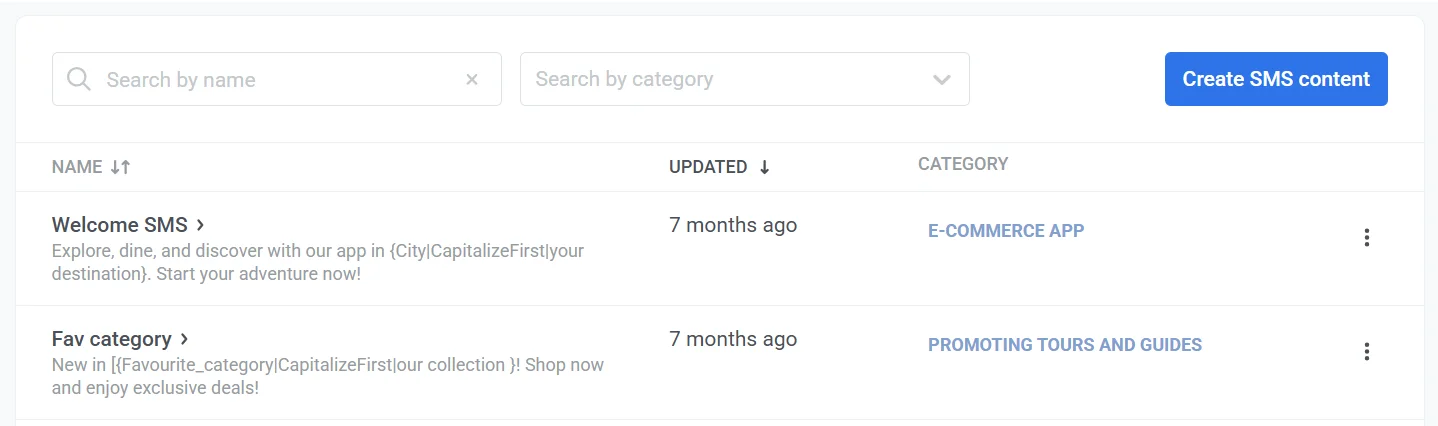
![内容类别](/contentcategories.webp)

<Aside>内容类别适用于一个项目中的所有内容类型（推送除外），有助于组织跨不同渠道的消息。</Aside>

要设置类别，请在**类别**列中点击**无类别**，然后选择或添加一个类别。

![设置类别](/contentcategories-1.webp)
