# Windows SDK 集成
[**下载 SDK**](https://github.com/Pushwoosh/pushwoosh-windows-sdk)\
[**下载示例**](https://github.com/Pushwoosh/pushwoosh-windows-sdk/tree/master/Samples/UniversalWin8.1)\
[**SDK API 文档**](https://github.com/Pushwoosh/pushwoosh-windows-sdk/tree/master/Documentation-WNS)
## SDK 集成
要将 Pushwoosh 集成到您的应用程序中,请按照以下步骤操作。
**1.** 下载我们的 SDK 包。
**2.** 将对 **PushSDK/Project-Win8.1-WNS/PushSDK.winmd** 的引用添加到您的项目中\
或者,如果您是为 Windows 10 开发,则添加 **PushSDK/Project-Win10-WNS/PushSDK.winmd**
**3.** 在代码中添加 PushSDK 命名空间:`using PushSDK;`
**4.** 使用以下代码初始化推送服务:
```csharp
NotificationService service = PushSDK.NotificationService.GetCurrent("YOUR_PUSHWOOSH_APP_ID");
service.OnPushAccepted += (sender, pushNotification) => {
//code to handle push notification
string pushString = pushNotification.ToString(); //will return json push payload
};
service.OnPushTokenReceived += (sender, pushToken) => {
//code to handle push token
};
service.OnPushTokenFailed += (sender, errorMessage) => {
//code to handle push subscription failure
};
service.SubscribeToPushService();
```
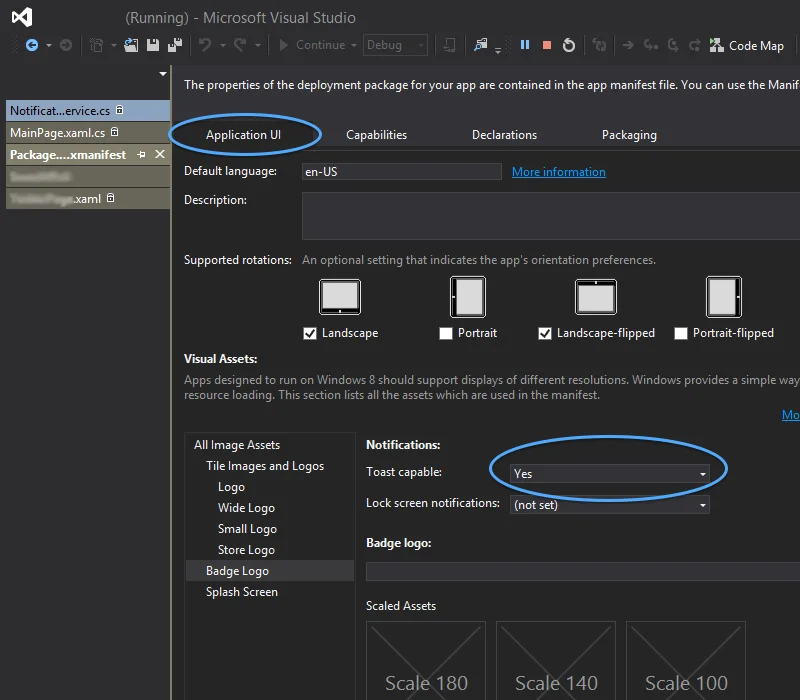
**5.** 在您的 **App.xaml.cs** 文件的 **OnLaunched** 函数中添加:
```csharp
protected override void OnLaunched(LaunchActivatedEventArgs args)
{
NotificationService.HandleStartPush(args.Arguments);
//other code
}
```
 ### Windows 8.1 的已知问题
将 Pushwoosh SDK 集成到您的 Windows 8.1 中时,您可能会遇到以下错误:
```
The underlying connection was closed: An unexpected error occurred on a send
```
如果遇到该错误,请将以下代码添加到您的项目中:
```
// Default is 'false'
NotificationService.IsWin81(true);
```
### Windows 8.1 的已知问题
将 Pushwoosh SDK 集成到您的 Windows 8.1 中时,您可能会遇到以下错误:
```
The underlying connection was closed: An unexpected error occurred on a send
```
如果遇到该错误,请将以下代码添加到您的项目中:
```
// Default is 'false'
NotificationService.IsWin81(true);
```