# VoIP 推送
在 iOS 8 中,Apple 推出了 [PushKit](https://developer.apple.com/library/prerelease/ios/documentation/NetworkingInternet/Reference/PushKit_Framework/index.html) 和 VoIP 推送——一种新型的推送通知。在标准推送功能的基础上,VoIP 推送允许应用在向用户显示通知之前执行代码。
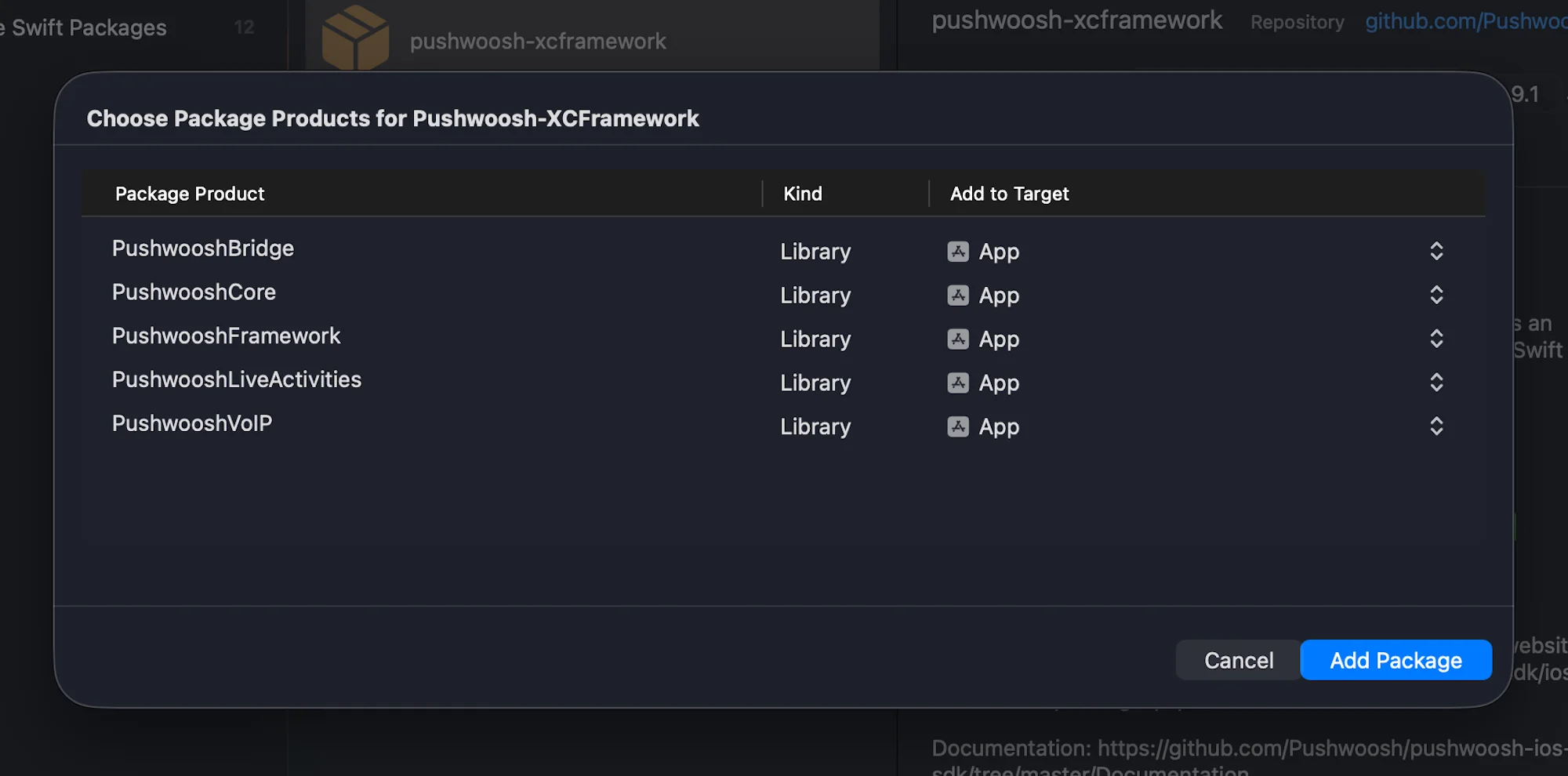
**1.** 将 PushwooshVoIP 模块添加到您的项目中。
**Swift Package Manager**
**Cocoapods**
```bash
# Uncomment the next line to define a global platform for your project
# platform :ios, '9.0'
target 'MyApp' do
# Comment the next line if you don't want to use dynamic frameworks
use_frameworks!
pod 'PushwooshXCFramework'
pod 'PushwooshFramework/PushwooshVoIP'
end
```
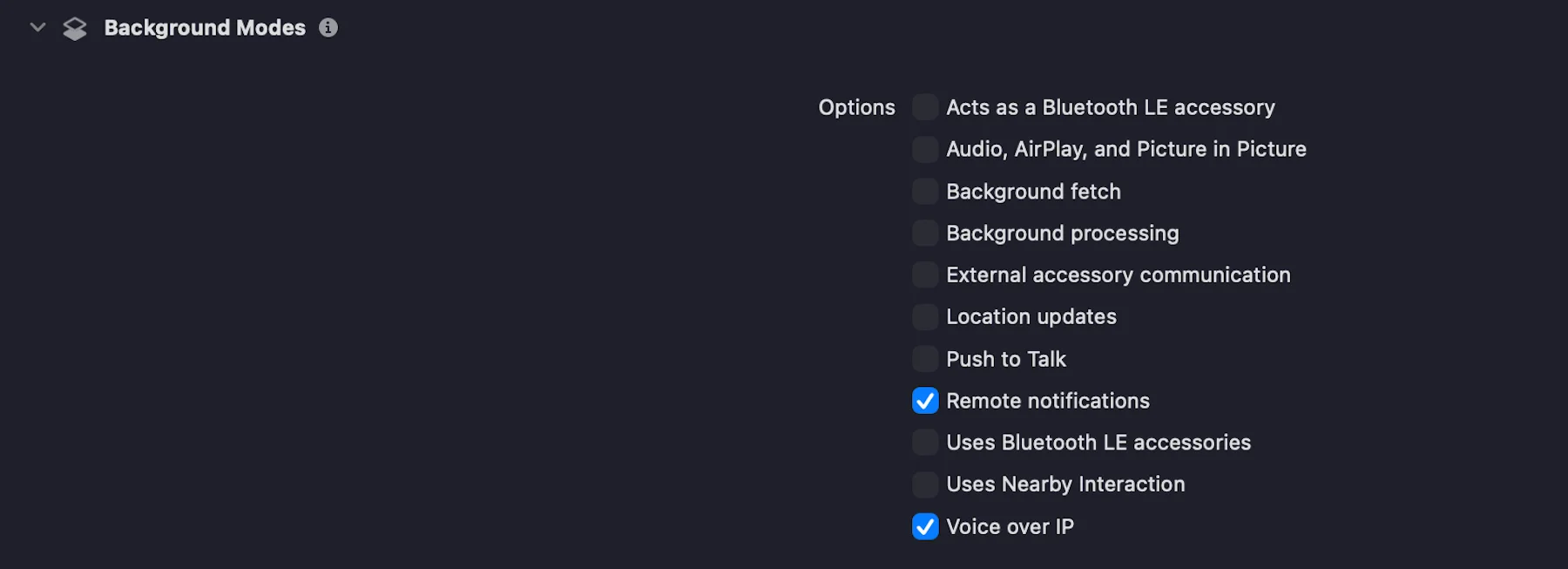
**2.** 在 ```Signing & Capabilities``` 选项卡中,勾选复选框以添加 **Voice over IP** 功能,如下方截图所示:
**3.** 按照以下代码所示,初始化 ```PushwooshVoIP``` 模块。
```swift
import UIKit
import PushwooshFramework
import PushwooshVoIP
import CallKit
import PushKit
@main
class AppDelegate: UIResponder, UIApplicationDelegate, PWVoIPCallDelegate {
func application(_ application: UIApplication,
didFinishLaunchingWithOptions launchOptions: [UIApplication.LaunchOptionsKey: Any]?) -> Bool {
/// Initializes the Pushwoosh VoIP module.
///
/// - Parameters:
/// - supportVideo: A Boolean value indicating whether video calls are supported.
/// - ringtoneSound: The name of the custom ringtone sound file to be used for incoming calls (e.g. `"mySound.caf"`).
/// - handleTypes: The type of call handle to support. Possible values:
/// - `1` – Generic
/// - `2` – Phone number
/// - `3` – Email address
Pushwoosh.VoIP.initializeVoIP(true, ringtoneSound: "mySound.caf", handleTypes: 1)
// Set delegate to receive VoIP call events
Pushwoosh.VoIP.delegate = self
return true
}
// MARK: - Required PWVoIPCallDelegate Callbacks
func voipDidReceiveIncomingCall(payload: PushwooshVoIP.PWVoIPMessage) {
// Handle incoming VoIP push
}
func pwProviderDidReset(_ provider: CXProvider) {
// Handle provider reset
}
func pwProviderDidBegin(_ provider: CXProvider) {
// Handle provider activation
}
}
```
**4.** ```PWVoIPCallDelegate``` 协议定义了处理 VoIP 通话生命周期和 CallKit 交互所需的必需和可选回调。
```swift
@objc public protocol PWVoIPCallDelegate: NSObjectProtocol {
/// Called when an incoming VoIP push is received.
@objc func voipDidReceiveIncomingCall(payload: PushwooshVoIP.PWVoIPMessage)
/// Optional: Called when the incoming call was successfully reported to CallKit.
@objc optional func voipDidReportIncomingCallSuccessfully(voipMessage: PushwooshVoIP.PWVoIPMessage)
/// Optional: Called when reporting the incoming call to CallKit failed.
@objc optional func voipDidFailToReportIncomingCall(error: Error)
/// Optional: Called when a new outgoing call is started.
@objc optional func startCall(_ provider: CXProvider, perform action: CXStartCallAction)
/// Optional: Called when an active call is ended.
@objc optional func endCall(_ provider: CXProvider, perform action: CXEndCallAction, voipMessage: PushwooshVoIP.PWVoIPMessage?)
/// Optional: Called when an incoming call is answered.
@objc optional func answerCall(_ provider: CXProvider, perform action: CXAnswerCallAction, voipMessage: PushwooshVoIP.PWVoIPMessage?)
/// Optional: Called when the call is muted or unmuted.
@objc optional func mutedCall(_ provider: CXProvider, perform action: CXSetMutedCallAction)
/// Optional: Called when the call is held or unheld.
@objc optional func heldCall(_ provider: CXProvider, perform action: CXSetHeldCallAction)
/// Optional: Called when a DTMF tone is played.
@objc optional func playDTMF(_ provider: CXProvider, perform action: CXPlayDTMFCallAction)
/// Called when the CallKit provider is reset.
@objc func pwProviderDidReset(_ provider: CXProvider)
/// Called when the CallKit provider begins.
@objc func pwProviderDidBegin(_ provider: CXProvider)
/// Optional: Provides the CallKit call controller instance.
@objc optional func returnedCallController(_ controller: CXCallController)
/// Optional: Provides the CallKit provider instance.
@objc optional func returnedProvider(_ provider: CXProvider)
/// Optional: Called when the audio session is activated.
@objc optional func activatedAudioSession(_ provider: CXProvider, didActivate audioSession: AVAudioSession)
/// Optional: Called when the audio session is deactivated.
@objc optional func deactivatedAudioSession(_ provider: CXProvider, didDeactivate audioSession: AVAudioSession)
}
```
**5.** 根据 [VoIP 证书配置指南](/zh/developer/first-steps/connect-messaging-services/ios-configuration/ios-voip-certificate-configuration/) 将您的 VoIP 证书上传到 Pushwoosh Control Panel,并选择 **Production** 网关。
就是这样!
## 与我们分享您的反馈
您的反馈有助于我们创造更好的体验,因此如果您在 SDK 集成过程中遇到任何问题,我们非常希望听到您的声音。如果您遇到任何困难,请随时[通过此表单](https://docs.google.com/forms/d/e/1FAIpQLSd_0b8jwn-V_JmoPLIxIFYbHACCQhrzidOZV3ELywoQPXRSxw/viewform)与我们分享您的想法。
 **Cocoapods**
```bash
# Uncomment the next line to define a global platform for your project
# platform :ios, '9.0'
target 'MyApp' do
# Comment the next line if you don't want to use dynamic frameworks
use_frameworks!
pod 'PushwooshXCFramework'
pod 'PushwooshFramework/PushwooshVoIP'
end
```
**2.** 在 ```Signing & Capabilities``` 选项卡中,勾选复选框以添加 **Voice over IP** 功能,如下方截图所示:
**Cocoapods**
```bash
# Uncomment the next line to define a global platform for your project
# platform :ios, '9.0'
target 'MyApp' do
# Comment the next line if you don't want to use dynamic frameworks
use_frameworks!
pod 'PushwooshXCFramework'
pod 'PushwooshFramework/PushwooshVoIP'
end
```
**2.** 在 ```Signing & Capabilities``` 选项卡中,勾选复选框以添加 **Voice over IP** 功能,如下方截图所示:
 **3.** 按照以下代码所示,初始化 ```PushwooshVoIP``` 模块。
```swift
import UIKit
import PushwooshFramework
import PushwooshVoIP
import CallKit
import PushKit
@main
class AppDelegate: UIResponder, UIApplicationDelegate, PWVoIPCallDelegate {
func application(_ application: UIApplication,
didFinishLaunchingWithOptions launchOptions: [UIApplication.LaunchOptionsKey: Any]?) -> Bool {
/// Initializes the Pushwoosh VoIP module.
///
/// - Parameters:
/// - supportVideo: A Boolean value indicating whether video calls are supported.
/// - ringtoneSound: The name of the custom ringtone sound file to be used for incoming calls (e.g. `"mySound.caf"`).
/// - handleTypes: The type of call handle to support. Possible values:
/// - `1` – Generic
/// - `2` – Phone number
/// - `3` – Email address
Pushwoosh.VoIP.initializeVoIP(true, ringtoneSound: "mySound.caf", handleTypes: 1)
// Set delegate to receive VoIP call events
Pushwoosh.VoIP.delegate = self
return true
}
// MARK: - Required PWVoIPCallDelegate Callbacks
func voipDidReceiveIncomingCall(payload: PushwooshVoIP.PWVoIPMessage) {
// Handle incoming VoIP push
}
func pwProviderDidReset(_ provider: CXProvider) {
// Handle provider reset
}
func pwProviderDidBegin(_ provider: CXProvider) {
// Handle provider activation
}
}
```
**4.** ```PWVoIPCallDelegate``` 协议定义了处理 VoIP 通话生命周期和 CallKit 交互所需的必需和可选回调。
```swift
@objc public protocol PWVoIPCallDelegate: NSObjectProtocol {
/// Called when an incoming VoIP push is received.
@objc func voipDidReceiveIncomingCall(payload: PushwooshVoIP.PWVoIPMessage)
/// Optional: Called when the incoming call was successfully reported to CallKit.
@objc optional func voipDidReportIncomingCallSuccessfully(voipMessage: PushwooshVoIP.PWVoIPMessage)
/// Optional: Called when reporting the incoming call to CallKit failed.
@objc optional func voipDidFailToReportIncomingCall(error: Error)
/// Optional: Called when a new outgoing call is started.
@objc optional func startCall(_ provider: CXProvider, perform action: CXStartCallAction)
/// Optional: Called when an active call is ended.
@objc optional func endCall(_ provider: CXProvider, perform action: CXEndCallAction, voipMessage: PushwooshVoIP.PWVoIPMessage?)
/// Optional: Called when an incoming call is answered.
@objc optional func answerCall(_ provider: CXProvider, perform action: CXAnswerCallAction, voipMessage: PushwooshVoIP.PWVoIPMessage?)
/// Optional: Called when the call is muted or unmuted.
@objc optional func mutedCall(_ provider: CXProvider, perform action: CXSetMutedCallAction)
/// Optional: Called when the call is held or unheld.
@objc optional func heldCall(_ provider: CXProvider, perform action: CXSetHeldCallAction)
/// Optional: Called when a DTMF tone is played.
@objc optional func playDTMF(_ provider: CXProvider, perform action: CXPlayDTMFCallAction)
/// Called when the CallKit provider is reset.
@objc func pwProviderDidReset(_ provider: CXProvider)
/// Called when the CallKit provider begins.
@objc func pwProviderDidBegin(_ provider: CXProvider)
/// Optional: Provides the CallKit call controller instance.
@objc optional func returnedCallController(_ controller: CXCallController)
/// Optional: Provides the CallKit provider instance.
@objc optional func returnedProvider(_ provider: CXProvider)
/// Optional: Called when the audio session is activated.
@objc optional func activatedAudioSession(_ provider: CXProvider, didActivate audioSession: AVAudioSession)
/// Optional: Called when the audio session is deactivated.
@objc optional func deactivatedAudioSession(_ provider: CXProvider, didDeactivate audioSession: AVAudioSession)
}
```
**5.** 根据 [VoIP 证书配置指南](/zh/developer/first-steps/connect-messaging-services/ios-configuration/ios-voip-certificate-configuration/) 将您的 VoIP 证书上传到 Pushwoosh Control Panel,并选择 **Production** 网关。
就是这样!
## 与我们分享您的反馈
您的反馈有助于我们创造更好的体验,因此如果您在 SDK 集成过程中遇到任何问题,我们非常希望听到您的声音。如果您遇到任何困难,请随时[通过此表单](https://docs.google.com/forms/d/e/1FAIpQLSd_0b8jwn-V_JmoPLIxIFYbHACCQhrzidOZV3ELywoQPXRSxw/viewform)与我们分享您的想法。
**3.** 按照以下代码所示,初始化 ```PushwooshVoIP``` 模块。
```swift
import UIKit
import PushwooshFramework
import PushwooshVoIP
import CallKit
import PushKit
@main
class AppDelegate: UIResponder, UIApplicationDelegate, PWVoIPCallDelegate {
func application(_ application: UIApplication,
didFinishLaunchingWithOptions launchOptions: [UIApplication.LaunchOptionsKey: Any]?) -> Bool {
/// Initializes the Pushwoosh VoIP module.
///
/// - Parameters:
/// - supportVideo: A Boolean value indicating whether video calls are supported.
/// - ringtoneSound: The name of the custom ringtone sound file to be used for incoming calls (e.g. `"mySound.caf"`).
/// - handleTypes: The type of call handle to support. Possible values:
/// - `1` – Generic
/// - `2` – Phone number
/// - `3` – Email address
Pushwoosh.VoIP.initializeVoIP(true, ringtoneSound: "mySound.caf", handleTypes: 1)
// Set delegate to receive VoIP call events
Pushwoosh.VoIP.delegate = self
return true
}
// MARK: - Required PWVoIPCallDelegate Callbacks
func voipDidReceiveIncomingCall(payload: PushwooshVoIP.PWVoIPMessage) {
// Handle incoming VoIP push
}
func pwProviderDidReset(_ provider: CXProvider) {
// Handle provider reset
}
func pwProviderDidBegin(_ provider: CXProvider) {
// Handle provider activation
}
}
```
**4.** ```PWVoIPCallDelegate``` 协议定义了处理 VoIP 通话生命周期和 CallKit 交互所需的必需和可选回调。
```swift
@objc public protocol PWVoIPCallDelegate: NSObjectProtocol {
/// Called when an incoming VoIP push is received.
@objc func voipDidReceiveIncomingCall(payload: PushwooshVoIP.PWVoIPMessage)
/// Optional: Called when the incoming call was successfully reported to CallKit.
@objc optional func voipDidReportIncomingCallSuccessfully(voipMessage: PushwooshVoIP.PWVoIPMessage)
/// Optional: Called when reporting the incoming call to CallKit failed.
@objc optional func voipDidFailToReportIncomingCall(error: Error)
/// Optional: Called when a new outgoing call is started.
@objc optional func startCall(_ provider: CXProvider, perform action: CXStartCallAction)
/// Optional: Called when an active call is ended.
@objc optional func endCall(_ provider: CXProvider, perform action: CXEndCallAction, voipMessage: PushwooshVoIP.PWVoIPMessage?)
/// Optional: Called when an incoming call is answered.
@objc optional func answerCall(_ provider: CXProvider, perform action: CXAnswerCallAction, voipMessage: PushwooshVoIP.PWVoIPMessage?)
/// Optional: Called when the call is muted or unmuted.
@objc optional func mutedCall(_ provider: CXProvider, perform action: CXSetMutedCallAction)
/// Optional: Called when the call is held or unheld.
@objc optional func heldCall(_ provider: CXProvider, perform action: CXSetHeldCallAction)
/// Optional: Called when a DTMF tone is played.
@objc optional func playDTMF(_ provider: CXProvider, perform action: CXPlayDTMFCallAction)
/// Called when the CallKit provider is reset.
@objc func pwProviderDidReset(_ provider: CXProvider)
/// Called when the CallKit provider begins.
@objc func pwProviderDidBegin(_ provider: CXProvider)
/// Optional: Provides the CallKit call controller instance.
@objc optional func returnedCallController(_ controller: CXCallController)
/// Optional: Provides the CallKit provider instance.
@objc optional func returnedProvider(_ provider: CXProvider)
/// Optional: Called when the audio session is activated.
@objc optional func activatedAudioSession(_ provider: CXProvider, didActivate audioSession: AVAudioSession)
/// Optional: Called when the audio session is deactivated.
@objc optional func deactivatedAudioSession(_ provider: CXProvider, didDeactivate audioSession: AVAudioSession)
}
```
**5.** 根据 [VoIP 证书配置指南](/zh/developer/first-steps/connect-messaging-services/ios-configuration/ios-voip-certificate-configuration/) 将您的 VoIP 证书上传到 Pushwoosh Control Panel,并选择 **Production** 网关。
就是这样!
## 与我们分享您的反馈
您的反馈有助于我们创造更好的体验,因此如果您在 SDK 集成过程中遇到任何问题,我们非常希望听到您的声音。如果您遇到任何困难,请随时[通过此表单](https://docs.google.com/forms/d/e/1FAIpQLSd_0b8jwn-V_JmoPLIxIFYbHACCQhrzidOZV3ELywoQPXRSxw/viewform)与我们分享您的想法。