# iOS SDK 7.0+ 基本集成指南
本节包含有关如何将 Pushwoosh SDK 集成到您的 iOS 应用程序中的信息。
## 先决条件
要将 Pushwoosh iOS SDK 集成到您的应用程序中,您需要满足以下条件:
## 集成步骤
### 1. 安装
您可以使用 **Swift Package Manager** 或 **CocoaPods** 将 Pushwoosh SDK 集成到您的应用程序中。
#### Swift Package Manager
在 **Package Dependencies** 部分,添加以下包:
```
https://github.com/Pushwoosh/Pushwoosh-XCFramework
```
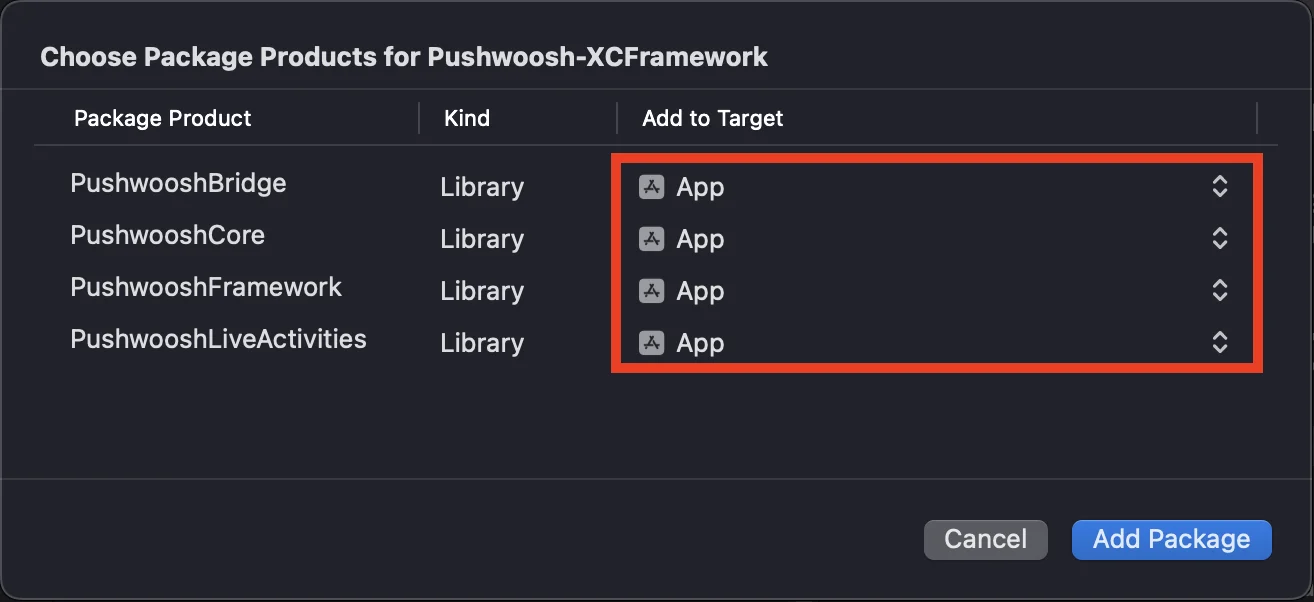
要使用 Pushwoosh iOS SDK,请确保在通过 Swift Package Manager 集成时将以下三个框架添加到您的应用程序目标中:
* ```PushwooshFramework```
* ```PushwooshCore```
* ```PushwooshBridge```
 #### CocoaPods
打开您的 `Podfile` 并添加依赖项:
```bash
# Uncomment the next line to define a global platform for your project
# platform :ios, '9.0'
target 'MyApp' do
# Comment the next line if you don't want to use dynamic frameworks
use_frameworks!
pod 'PushwooshXCFramework'
end
```
然后,在终端中运行以下命令来安装依赖项:
```bash
pod install
```
### 2. 功能
要在您的项目中启用推送通知,您需要添加某些功能。
在 Signing & Capabilities 部分,添加以下功能:
- `Push Notifications`
- `Background Modes`。添加此功能后,请勾选 `Remote notifications` 复选框。
如果您打算使用 Time Sensitive Notifications (iOS 15+),也请添加 `Time Sensitive Notifications` 功能。
### 3. 初始化代码
#### AppDelegate
将以下代码添加到您的 AppDelegate 类中:
```swift
import SwiftUI
import PushwooshFramework
@main
struct MyApp: App {
// Register AppDelegate as UIApplicationDelegate
@UIApplicationDelegateAdaptor(AppDelegate.self) var appDelegate
var body: some Scene {
WindowGroup {
ContentView()
}
}
}
class AppDelegate: NSObject, UIApplicationDelegate, PWMessagingDelegate {
func application(_ application: UIApplication, didFinishLaunchingWithOptions launchOptions: [UIApplication.LaunchOptionsKey: Any]?) -> Bool {
// Initialization code
// Set custom delegate for push handling
Pushwoosh.configure.delegate = self
// Register for push notifications
Pushwoosh.configure.registerForPushNotifications()
return true
}
// Handle token received from APNS
func application(_ application: UIApplication, didRegisterForRemoteNotificationsWithDeviceToken deviceToken: Data) {
Pushwoosh.configure.handlePushRegistration(deviceToken)
}
// Handle token receiving error
func application(_ application: UIApplication, didFailToRegisterForRemoteNotificationsWithError error: Error) {
Pushwoosh.configure.handlePushRegistrationFailure(error)
}
//for silent push notifications
func application(_ application: UIApplication, didReceiveRemoteNotification userInfo: [AnyHashable: Any], fetchCompletionHandler completionHandler: @escaping (UIBackgroundFetchResult) -> Void) {
Pushwoosh.configure.handlePushReceived(userInfo)
completionHandler(.noData)
}
// Fired when a push is received
func pushwoosh(_ pushwoosh: Pushwoosh, onMessageReceived message: PWMessage) {
print("onMessageReceived: ", message.payload!.description)
}
// Fired when a user taps the notification
func pushwoosh(_ pushwoosh: Pushwoosh, onMessageOpened message: PWMessage) {
print("onMessageOpened: ", message.payload!.description)
}
}
struct ContentView: View {
var body: some View {
Text("Pushwoosh with SwiftUI")
.padding()
}
}
```
```swift
import PushwooshFramework
@UIApplicationMain
class AppDelegate: UIResponder, UIApplicationDelegate, PWMessagingDelegate {
var window: UIWindow?
func application(_ application: UIApplication, didFinishLaunchingWithOptions launchOptions: [UIApplication.LaunchOptionsKey: Any]?) -> Bool {
//initialization code
//set custom delegate for push handling, in our case AppDelegate
Pushwoosh.configure.delegate = self;
//register for push notifications
Pushwoosh.configure.registerForPushNotifications()
return true
}
//handle token received from APNS
func application(_ application: UIApplication, didRegisterForRemoteNotificationsWithDeviceToken deviceToken: Data) {
Pushwoosh.configure.handlePushRegistration(deviceToken)
}
//handle token receiving error
func application(_ application: UIApplication, didFailToRegisterForRemoteNotificationsWithError error: Error) {
Pushwoosh.configure.handlePushRegistrationFailure(error);
}
//for silent push notifications
func application(_ application: UIApplication, didReceiveRemoteNotification userInfo: [AnyHashable : Any], fetchCompletionHandler completionHandler: @escaping (UIBackgroundFetchResult) -> Void) {
Pushwoosh.configure.handlePushReceived(userInfo)
completionHandler(.noData)
}
//this event is fired when the push gets received
func pushwoosh(_ pushwoosh: Pushwoosh, onMessageReceived message: PWMessage) {
print("onMessageReceived: ", message.payload!.description)
}
// Fired when a user taps the notification
func pushwoosh(_ pushwoosh: Pushwoosh, onMessageOpened message: PWMessage) {
print("onMessageOpened: ", message.payload!.description)
}
}
```
```objective-c
#import
@implementation AppDelegate
- (BOOL)application:(UIApplication *)application didFinishLaunchingWithOptions:(NSDictionary *)launchOptions {
//-----------PUSHWOOSH PART-----------
// set custom delegate for push handling, in our case AppDelegate
[Pushwoosh configure].delegate = self;
//register for push notifications!
[[Pushwoosh configure] registerForPushNotifications];
return YES;
}
//handle token received from APNS
- (void)application:(UIApplication *)application
didRegisterForRemoteNotificationsWithDeviceToken:(NSData *)deviceToken {
[[Pushwoosh configure] handlePushRegistration:deviceToken];
}
//handle token receiving error
- (void)application:(UIApplication *)application didFailToRegisterForRemoteNotificationsWithError:(NSError *)error {
[[Pushwoosh configure] handlePushRegistrationFailure:error];
}
//for silent push notifications
- (void)application:(UIApplication *)application
didReceiveRemoteNotification:(NSDictionary *)userInfo
fetchCompletionHandler:(void (^)(UIBackgroundFetchResult))completionHandler {
[[Pushwoosh configure] handlePushReceived:userInfo];
completionHandler(UIBackgroundFetchResultNoData);
}
//this event is fired when the push gets received
- (void)pushwoosh:(Pushwoosh *)pushwoosh onMessageReceived:(PWMessage *)message {
NSLog(@"onMessageReceived: %@", message.payload);
}
//this event is fired when user taps the notification
- (void)pushwoosh:(Pushwoosh *)pushwoosh onMessageOpened:(PWMessage *)message {
NSLog(@"onMessageOpened: %@", message.payload);
}
@end
```
#### Info.plist
在您的 `Info.plist` 中:
- 将 `Pushwoosh_APPID` 键设置为 Pushwoosh Application Code。
- 将 `Pushwoosh_API_TOKEN` 键设置为 [Pushwoosh 设备 API 令牌](/zh/developer/api-reference/api-access-token/#device-api-token)
### 4. 消息送达跟踪
Pushwoosh 支持通过 Notification Service Extension 跟踪推送通知的送达事件
#### 添加 Notification Service Extension
1. 在 Xcode 中,选择 **File** > **New** > **Target...**
2. 选择 **Notification Service Extension** 并按 **Next**。
3. 输入目标名称并按 **Finish**。
4. 当提示激活时,按 **Cancel**。
#### Notification Service Extension 的依赖项 (仅限 CocoaPods)
注意:如果您使用 Swift Package Manager 管理依赖项,可以跳过此步骤,因为依赖项会自动添加。
打开您的 `Podfile` 并为目标添加依赖项:
```ruby title="Podfile"
# Uncomment the next line to define a global platform for your project
# platform :ios, '9.0'
target 'MyApp' do
# Comment the next line if you don't want to use dynamic frameworks
use_frameworks!
pod 'PushwooshXCFramework'
end
target 'MyAppNotificationExtension' do
use_frameworks!
pod 'PushwooshXCFramework'
end
```
在终端中运行以下命令以更新依赖项:
```shell
pod update
```
#### 将 Pushwoosh SDK 添加到 Notification Service Extension
将生成的 `NotificationService` 类替换为 `PushwooshNotificationServiceExtension` 的子类。然后,Pushwoosh 会处理推送所需的一切——发送送达事件、角标计数、下载媒体附件以及强制性的 `serviceExtensionTimeWillExpire` 超时回退。不需要其他代码。
```swift
import PushwooshFramework
class NotificationService: PushwooshNotificationServiceExtension {}
```
```objective-c
#import
@interface NotificationService : PushwooshNotificationServiceExtension
@end
@implementation NotificationService
@end
```
注意:您可以完全跳过源文件——在扩展的 Info.plist 中将其 `NSExtensionPrincipalClass` 设置为 `PushwooshNotificationServiceExtension`,完全不需要编写任何代码。
要在通知显示前对其进行修改,请重写 `didReceive(_:withContentHandler:)`,用您自己的内容处理程序调用 `super`,在其中改变内容,然后将其转发给原始处理程序。Pushwoosh 仍会运行送达事件、角标、附件和超时回退。
```swift
import UserNotifications
import PushwooshFramework
class NotificationService: PushwooshNotificationServiceExtension {
override func didReceive(_ request: UNNotificationRequest,
withContentHandler contentHandler: @escaping (UNNotificationContent) -> Void) {
super.didReceive(request) { content in
let mutable = (content.mutableCopy() as? UNMutableNotificationContent) ?? content
// Modify the notification content here...
contentHandler(mutable)
}
}
}
```
```objective-c
#import
@interface NotificationService : PushwooshNotificationServiceExtension
@end
@implementation NotificationService
- (void)didReceiveNotificationRequest:(UNNotificationRequest *)request
withContentHandler:(void (^)(UNNotificationContent * _Nonnull))contentHandler {
[super didReceiveNotificationRequest:request withContentHandler:^(UNNotificationContent *content) {
UNMutableNotificationContent *mutable = [content mutableCopy];
// Modify the notification content here...
contentHandler(mutable);
}];
}
@end
```
#### Info.plist
扩展会从主应用程序继承 `Pushwoosh_APPID`(以及其他 `Pushwoosh_*` 键),因此您无需在扩展的 Info.plist 中重复它们。仅当您想覆盖主应用程序的值时,才在其中添加键。
要将角标计数和反向代理设置与应用程序同步,请在应用程序和扩展之间共享一个 [App Group](/zh/developer/pushwoosh-sdk/ios-sdk/setting-up-badges)。将 App Groups 功能添加到两个目标,然后在**主应用程序**的 Info.plist 中设置 App Group ID:
- `PW_APP_GROUPS_NAME` - 您的 App Group 标识符(例如,`group.com.example.app`)。
扩展会从主应用程序继承此值,因此您无需在扩展的 Info.plist 中重复它——仅在需要覆盖主应用程序的值时才添加。或者,通过重写 `pushwooshAppGroupsName` 在代码中提供它。
### 5. 运行项目
1. 构建并运行项目。
2. 前往 Pushwoosh 控制面板并[发送推送通知](/zh/product/messaging-channels/push-notifications/send-push-notifications/one-time-push)。
3. 您应该会在应用程序中看到该通知。
## 扩展 Pushwoosh iOS 集成
至此,您已经集成了 SDK,可以发送和接收推送通知。现在,让我们来探索核心功能
### 推送通知
在 Pushwoosh SDK 中,有两个用于处理推送通知的回调:
- `onMessageReceived`:当收到推送通知时调用此方法。
- `onMessageOpened`:当用户与通知交互(打开)时调用此方法
这些回调使开发人员能够在其应用程序中管理推送通知的接收和用户交互
```swift
import PushwooshFramework
class AppDelegate: NSObject, UIApplicationDelegate, PWMessagingDelegate {
func application(_ application: UIApplication, didFinishLaunchingWithOptions launchOptions: [UIApplication.LaunchOptionsKey : Any]? = nil) -> Bool {
Pushwoosh.configure.delegate = self;
}
func pushwoosh(_ pushwoosh: Pushwoosh, onMessageOpened message: PWMessage) {
if let payload = message.payload {
print("onMessageOpened: \(payload)")
}
}
func pushwoosh(_ pushwoosh: Pushwoosh, onMessageReceived message: PWMessage) {
if let payload = message.payload {
print("onMessageReceived: \(payload)")
}
}
}
```
```objective-c
#import
@interface AppDelegate ()
@end
@implementation AppDelegate
- (BOOL)application:(UIApplication *)application didFinishLaunchingWithOptions:(NSDictionary *)launchOptions {
[[Pushwoosh configure] setDelegate:self];
return YES;
}
- (void)pushwoosh:(Pushwoosh *)pushwoosh onMessageOpened:(PWMessage *)message {
if (message.payload) {
NSLog(@"onMessageOpened: %@", message.payload);
}
}
- (void)pushwoosh:(Pushwoosh *)pushwoosh onMessageReceived:(PWMessage *)message {
if (message.payload) {
NSLog(@"onMessageReceived: %@", message.payload);
}
}
@end
```
### 用户配置
通过关注个人用户的行为和偏好,您可以提供个性化内容,从而提高用户满意度和忠诚度
```swift
import PushwooshFramework
class Registration {
func afterUserLogin(user: User) {
let pushwoosh = Pushwoosh.configure
// set user ID
if let userId = user.userId {
pushwoosh.setUserId(userId)
}
// set user email
if let userEmail = user.email {
pushwoosh.setEmail(userEmail)
}
// set user SMS number
if let userSmsNumber = user.SmsNumber {
pushwoosh.registerSmsNumber(userSmsNumber)
}
// set user WhatsApp number
if let userWhatsAppNumber = user.WhatsAppNumber {
pushwoosh.registerSmsNumber(userWhatsAppNumber)
}
// setting additional user information as tags for Pushwoosh
if let age = user.userDetails.age,
let name = user.userDetails.userName,
let lastLogin = user.userDetails.lastLoginDate {
pushwoosh.setTags([
"age": age,
"name": name,
"last_login": lastLogin
])
}
}
}
```
```objective-c
#import
@implementation Registration
- (void)afterUserLogin:(User *)user {
Pushwoosh *pushwoosh = [Pushwoosh configure];
// set user ID
if (user.userId) {
[pushwoosh setUserId:user.userId];
}
// set user email
if (user.email) {
[pushwoosh setEmail:user.email];
}
// setting additional user information as tags for Pushwoosh
if (user.userDetails.age && user.userDetails.userName && user.userDetails.lastLoginDate) {
NSDictionary *tags = @{
@"age": user.userDetails.age,
@"name": user.userDetails.userName,
@"last_login": user.userDetails.lastLoginDate
};
[pushwoosh setTags:tags];
}
}
@end
```
### 标签 (Tags)
标签 (Tags) 是分配给用户或设备的键值对,允许根据偏好或行为等属性进行分段,从而实现有针对性的消息传递。
```swift
import PushwooshFramework
class UpdateUser {
func afterUserUpdateProfile(user: User) {
let pushwoosh = Pushwoosh.configure
// set list of favorite categories
pushwoosh.setTags(["favorite_categories" : user.getFavoriteCategories()])
// set payment information
pushwoosh.setTags([
"is_subscribed": user.isSubscribed(),
"payment_status": user.getPaymentStatus(),
"billing_address": user.getBillingAddress()
])
}
}
```
```objective-c
#import
@implementation UpdateUser
- (void)afterUserUpdateProfile:(User *)user {
Pushwoosh *pushwoosh = [Pushwoosh configure];
// set list of favorite categories
[pushwoosh setTags:@{@"favorite_categories" : user.getFavoriteCategories}];
// set payment information
NSDictionary *tags = @{
@"is_subscribed": @(user.isSubscribed),
@"payment_status": user.getPaymentStatus,
@"billing_address": user.getBillingAddress
};
[pushwoosh setTags:tags];
}
@end
```
### 事件 (Events)
事件 (Events) 是应用程序内可以跟踪的特定用户操作或事件,用于分析行为并触发相应的消息或操作
```swift
import PushwooshFramework
class Registration {
func afterUserLogin(user: User) {
if let userName = user.getUserName(), let lastLogin = user.getLastLoginDate() {
PWInAppManager.shared().postEvent("login", withAttributes: [
"name": userName,
"last_login": lastLogin
])
}
}
func afterUserPurchase(user: User, product: Product) {
let pushwoosh = Pushwoosh.configure
// Track purchase event
PWInAppManager.shared().postEvent("purchase", withAttributes: [
"product_id": product.getId(),
"product_name": product.getName(),
"price": product.getPrice(),
"quantity": product.getQuantity()
])
// Set user tags
let lastPurchaseDate = Date().timeIntervalSince1970
let lifetimeSpend = getCurrentLifetimeSpend() + product.getPrice()
pushwoosh.setTags([
"last_purchase_date": lastPurchaseDate,
"lifetime_spend": lifetimeSpend
])
}
}
```
```objective-c
#import
#import
@implementation Registration
- (void)afterUserLogin:(User *)user {
NSString *userName = [user getUserName];
NSDate *lastLogin = [user getLastLoginDate];
if (userName && lastLogin) {
[[PWInAppManager sharedManager] postEvent:@"login" withAttributes:@{
@"name": userName,
@"last_login": lastLogin
}];
}
}
- (void)afterUserPurchase:(User *)user product:(Product *)product {
Pushwoosh *pushwoosh = [Pushwoosh configure];
// Track purchase event
[[PWInAppManager sharedManager] postEvent:@"purchase" withAttributes:@{
@"product_id": [product getId],
@"product_name": [product getName],
@"price": @([product getPrice]),
@"quantity": @([product getQuantity])
}];
// Set user tags
NSTimeInterval lastPurchaseDate = [[NSDate date] timeIntervalSince1970];
double lifetimeSpend = /* fetch current lifetime spend */ + [product getPrice];
NSDictionary *tags = @{
@"last_purchase_date": @(lastPurchaseDate),
@"lifetime_spend": @(lifetimeSpend)
};
[pushwoosh setTags:tags];
}
@end
```
### 富媒体 (Rich Media)
富媒体 (Rich Media) 是指在通知和应用内消息中使用的交互式多媒体内容,如图像、视频或 HTML,以增强用户参与度
```swift
import PushwooshFramework
class ViewController: UIViewController, PWRichMediaPresentingDelegate {
override func viewDidLoad() {
super.viewDidLoad()
let richMediaConfiguration = PWModalWindowConfiguration.shared()
PWRichMediaManager.shared().delegate = self
richMediaConfiguration.configureModalWindow(with: .PWModalWindowPositionBottom,
present: .PWAnimationPresentFromBottom,
dismiss: .PWAnimationDismissDown)
}
func richMediaManager(_ richMediaManager: PWRichMediaManager!, shouldPresent richMedia: PWRichMedia!) -> Bool {
print("Rich media will be presented with: \(richMedia.pushPayload!)")
return true
}
func richMediaManager(_ richMediaManager: PWRichMediaManager!, didPresent richMedia: PWRichMedia!) {
print("Rich media has been presented with: \(richMedia.pushPayload!)")
}
func richMediaManager(_ richMediaManager: PWRichMediaManager!, didClose richMedia: PWRichMedia!) {
print("Rich media has been closed with: \(richMedia.pushPayload!)")
}
func richMediaManager(_ richMediaManager: PWRichMediaManager!, presentingDidFailFor richMedia: PWRichMedia!, withError error: (any Error)!) {
print("Failed to present rich media with: \(richMedia.pushPayload!). Error: \(error.localizedDescription)")
}
}
```
```objective-c
#import "ViewController.h"
#import
#import
#import
@interface ViewController ()
@end
@implementation ViewController
- (void)viewDidLoad {
[super viewDidLoad];
[[PWRichMediaManager sharedManager] setDelegate:self];
[[PWModalWindowConfiguration shared] configureModalWindowWith:PWModalWindowPositionBottom
presentAnimation:PWAnimationPresentFromBottom
dismissAnimation:PWAnimationDismissDown];
}
- (BOOL)richMediaManager:(PWRichMediaManager *)richMediaManager shouldPresentRichMedia:(PWRichMedia *)richMedia {
NSLog(@"Rich media will be presented with: %@", richMedia.pushPayload);
return YES;
}
- (void)richMediaManager:(PWRichMediaManager *)richMediaManager didPresentRichMedia:(PWRichMedia *)richMedia {
NSLog(@"Rich media has been presented with: %@", richMedia.pushPayload);
}
- (void)richMediaManager:(PWRichMediaManager *)richMediaManager didCloseRichMedia:(PWRichMedia *)richMedia {
NSLog(@"Rich media has been closed with:: %@", richMedia.pushPayload);
}
- (void)richMediaManager:(PWRichMediaManager *)richMediaManager presentingDidFailForRichMedia:(PWRichMedia *)richMedia withError:(NSError *)error {
NSLog(@"Failed to present rich media with: %@. Error: %@", richMedia.pushPayload, error.localizedDescription);
}
@end
```
## 故障排除
### 未能构建模块 'PushwooshFramework'
在构建项目时,您可能会遇到类似以下的错误:
```
Failed to build module 'PushwooshFramework'; this SDK is not supported by the compiler
(the SDK is built with 'Apple Swift version 5.10 (swiftlang-5.10.0.13 clang-1500.3.9.4)',
while this compiler is 'Apple Swift version 6.1.2 effective-5.10 (swiftlang-6.1.2.1.2 clang-1700.0.13.5)')
```
**原因:** 此错误与 Swift 编译器版本不兼容无关。从 Pushwoosh iOS SDK 6.8.0 版本开始,SDK 被模块化为多个相互作用的组件。当并非所有必需的框架都已添加到您的项目中时,就会发生此错误。
**解决方案:** 确保在通过 Swift Package Manager 集成时,将所有四个必需的框架都添加到您的应用程序目标中:
* ```PushwooshFramework```
* ```PushwooshCore```
* ```PushwooshBridge```
* ```PushwooshLiveActivities```
要在 Xcode 中验证这一点:
1. 在项目导航器中选择您的项目
2. 选择您的应用程序目标
3. 前往 **General** > **Frameworks, Libraries, and Embedded Content**
4. 确认所有四个框架都已列出
---
如果您在集成过程中遇到任何问题,请参阅[支持和社区](/zh/developer/pushwoosh-sdk/support-and-community)部分。
#### CocoaPods
打开您的 `Podfile` 并添加依赖项:
```bash
# Uncomment the next line to define a global platform for your project
# platform :ios, '9.0'
target 'MyApp' do
# Comment the next line if you don't want to use dynamic frameworks
use_frameworks!
pod 'PushwooshXCFramework'
end
```
然后,在终端中运行以下命令来安装依赖项:
```bash
pod install
```
### 2. 功能
要在您的项目中启用推送通知,您需要添加某些功能。
在 Signing & Capabilities 部分,添加以下功能:
- `Push Notifications`
- `Background Modes`。添加此功能后,请勾选 `Remote notifications` 复选框。
如果您打算使用 Time Sensitive Notifications (iOS 15+),也请添加 `Time Sensitive Notifications` 功能。
### 3. 初始化代码
#### AppDelegate
将以下代码添加到您的 AppDelegate 类中:
```swift
import SwiftUI
import PushwooshFramework
@main
struct MyApp: App {
// Register AppDelegate as UIApplicationDelegate
@UIApplicationDelegateAdaptor(AppDelegate.self) var appDelegate
var body: some Scene {
WindowGroup {
ContentView()
}
}
}
class AppDelegate: NSObject, UIApplicationDelegate, PWMessagingDelegate {
func application(_ application: UIApplication, didFinishLaunchingWithOptions launchOptions: [UIApplication.LaunchOptionsKey: Any]?) -> Bool {
// Initialization code
// Set custom delegate for push handling
Pushwoosh.configure.delegate = self
// Register for push notifications
Pushwoosh.configure.registerForPushNotifications()
return true
}
// Handle token received from APNS
func application(_ application: UIApplication, didRegisterForRemoteNotificationsWithDeviceToken deviceToken: Data) {
Pushwoosh.configure.handlePushRegistration(deviceToken)
}
// Handle token receiving error
func application(_ application: UIApplication, didFailToRegisterForRemoteNotificationsWithError error: Error) {
Pushwoosh.configure.handlePushRegistrationFailure(error)
}
//for silent push notifications
func application(_ application: UIApplication, didReceiveRemoteNotification userInfo: [AnyHashable: Any], fetchCompletionHandler completionHandler: @escaping (UIBackgroundFetchResult) -> Void) {
Pushwoosh.configure.handlePushReceived(userInfo)
completionHandler(.noData)
}
// Fired when a push is received
func pushwoosh(_ pushwoosh: Pushwoosh, onMessageReceived message: PWMessage) {
print("onMessageReceived: ", message.payload!.description)
}
// Fired when a user taps the notification
func pushwoosh(_ pushwoosh: Pushwoosh, onMessageOpened message: PWMessage) {
print("onMessageOpened: ", message.payload!.description)
}
}
struct ContentView: View {
var body: some View {
Text("Pushwoosh with SwiftUI")
.padding()
}
}
```
```swift
import PushwooshFramework
@UIApplicationMain
class AppDelegate: UIResponder, UIApplicationDelegate, PWMessagingDelegate {
var window: UIWindow?
func application(_ application: UIApplication, didFinishLaunchingWithOptions launchOptions: [UIApplication.LaunchOptionsKey: Any]?) -> Bool {
//initialization code
//set custom delegate for push handling, in our case AppDelegate
Pushwoosh.configure.delegate = self;
//register for push notifications
Pushwoosh.configure.registerForPushNotifications()
return true
}
//handle token received from APNS
func application(_ application: UIApplication, didRegisterForRemoteNotificationsWithDeviceToken deviceToken: Data) {
Pushwoosh.configure.handlePushRegistration(deviceToken)
}
//handle token receiving error
func application(_ application: UIApplication, didFailToRegisterForRemoteNotificationsWithError error: Error) {
Pushwoosh.configure.handlePushRegistrationFailure(error);
}
//for silent push notifications
func application(_ application: UIApplication, didReceiveRemoteNotification userInfo: [AnyHashable : Any], fetchCompletionHandler completionHandler: @escaping (UIBackgroundFetchResult) -> Void) {
Pushwoosh.configure.handlePushReceived(userInfo)
completionHandler(.noData)
}
//this event is fired when the push gets received
func pushwoosh(_ pushwoosh: Pushwoosh, onMessageReceived message: PWMessage) {
print("onMessageReceived: ", message.payload!.description)
}
// Fired when a user taps the notification
func pushwoosh(_ pushwoosh: Pushwoosh, onMessageOpened message: PWMessage) {
print("onMessageOpened: ", message.payload!.description)
}
}
```
```objective-c
#import
@implementation AppDelegate
- (BOOL)application:(UIApplication *)application didFinishLaunchingWithOptions:(NSDictionary *)launchOptions {
//-----------PUSHWOOSH PART-----------
// set custom delegate for push handling, in our case AppDelegate
[Pushwoosh configure].delegate = self;
//register for push notifications!
[[Pushwoosh configure] registerForPushNotifications];
return YES;
}
//handle token received from APNS
- (void)application:(UIApplication *)application
didRegisterForRemoteNotificationsWithDeviceToken:(NSData *)deviceToken {
[[Pushwoosh configure] handlePushRegistration:deviceToken];
}
//handle token receiving error
- (void)application:(UIApplication *)application didFailToRegisterForRemoteNotificationsWithError:(NSError *)error {
[[Pushwoosh configure] handlePushRegistrationFailure:error];
}
//for silent push notifications
- (void)application:(UIApplication *)application
didReceiveRemoteNotification:(NSDictionary *)userInfo
fetchCompletionHandler:(void (^)(UIBackgroundFetchResult))completionHandler {
[[Pushwoosh configure] handlePushReceived:userInfo];
completionHandler(UIBackgroundFetchResultNoData);
}
//this event is fired when the push gets received
- (void)pushwoosh:(Pushwoosh *)pushwoosh onMessageReceived:(PWMessage *)message {
NSLog(@"onMessageReceived: %@", message.payload);
}
//this event is fired when user taps the notification
- (void)pushwoosh:(Pushwoosh *)pushwoosh onMessageOpened:(PWMessage *)message {
NSLog(@"onMessageOpened: %@", message.payload);
}
@end
```
#### Info.plist
在您的 `Info.plist` 中:
- 将 `Pushwoosh_APPID` 键设置为 Pushwoosh Application Code。
- 将 `Pushwoosh_API_TOKEN` 键设置为 [Pushwoosh 设备 API 令牌](/zh/developer/api-reference/api-access-token/#device-api-token)
### 4. 消息送达跟踪
Pushwoosh 支持通过 Notification Service Extension 跟踪推送通知的送达事件
#### 添加 Notification Service Extension
1. 在 Xcode 中,选择 **File** > **New** > **Target...**
2. 选择 **Notification Service Extension** 并按 **Next**。
3. 输入目标名称并按 **Finish**。
4. 当提示激活时,按 **Cancel**。
#### Notification Service Extension 的依赖项 (仅限 CocoaPods)
注意:如果您使用 Swift Package Manager 管理依赖项,可以跳过此步骤,因为依赖项会自动添加。
打开您的 `Podfile` 并为目标添加依赖项:
```ruby title="Podfile"
# Uncomment the next line to define a global platform for your project
# platform :ios, '9.0'
target 'MyApp' do
# Comment the next line if you don't want to use dynamic frameworks
use_frameworks!
pod 'PushwooshXCFramework'
end
target 'MyAppNotificationExtension' do
use_frameworks!
pod 'PushwooshXCFramework'
end
```
在终端中运行以下命令以更新依赖项:
```shell
pod update
```
#### 将 Pushwoosh SDK 添加到 Notification Service Extension
将生成的 `NotificationService` 类替换为 `PushwooshNotificationServiceExtension` 的子类。然后,Pushwoosh 会处理推送所需的一切——发送送达事件、角标计数、下载媒体附件以及强制性的 `serviceExtensionTimeWillExpire` 超时回退。不需要其他代码。
```swift
import PushwooshFramework
class NotificationService: PushwooshNotificationServiceExtension {}
```
```objective-c
#import
@interface NotificationService : PushwooshNotificationServiceExtension
@end
@implementation NotificationService
@end
```
注意:您可以完全跳过源文件——在扩展的 Info.plist 中将其 `NSExtensionPrincipalClass` 设置为 `PushwooshNotificationServiceExtension`,完全不需要编写任何代码。
要在通知显示前对其进行修改,请重写 `didReceive(_:withContentHandler:)`,用您自己的内容处理程序调用 `super`,在其中改变内容,然后将其转发给原始处理程序。Pushwoosh 仍会运行送达事件、角标、附件和超时回退。
```swift
import UserNotifications
import PushwooshFramework
class NotificationService: PushwooshNotificationServiceExtension {
override func didReceive(_ request: UNNotificationRequest,
withContentHandler contentHandler: @escaping (UNNotificationContent) -> Void) {
super.didReceive(request) { content in
let mutable = (content.mutableCopy() as? UNMutableNotificationContent) ?? content
// Modify the notification content here...
contentHandler(mutable)
}
}
}
```
```objective-c
#import
@interface NotificationService : PushwooshNotificationServiceExtension
@end
@implementation NotificationService
- (void)didReceiveNotificationRequest:(UNNotificationRequest *)request
withContentHandler:(void (^)(UNNotificationContent * _Nonnull))contentHandler {
[super didReceiveNotificationRequest:request withContentHandler:^(UNNotificationContent *content) {
UNMutableNotificationContent *mutable = [content mutableCopy];
// Modify the notification content here...
contentHandler(mutable);
}];
}
@end
```
#### Info.plist
扩展会从主应用程序继承 `Pushwoosh_APPID`(以及其他 `Pushwoosh_*` 键),因此您无需在扩展的 Info.plist 中重复它们。仅当您想覆盖主应用程序的值时,才在其中添加键。
要将角标计数和反向代理设置与应用程序同步,请在应用程序和扩展之间共享一个 [App Group](/zh/developer/pushwoosh-sdk/ios-sdk/setting-up-badges)。将 App Groups 功能添加到两个目标,然后在**主应用程序**的 Info.plist 中设置 App Group ID:
- `PW_APP_GROUPS_NAME` - 您的 App Group 标识符(例如,`group.com.example.app`)。
扩展会从主应用程序继承此值,因此您无需在扩展的 Info.plist 中重复它——仅在需要覆盖主应用程序的值时才添加。或者,通过重写 `pushwooshAppGroupsName` 在代码中提供它。
### 5. 运行项目
1. 构建并运行项目。
2. 前往 Pushwoosh 控制面板并[发送推送通知](/zh/product/messaging-channels/push-notifications/send-push-notifications/one-time-push)。
3. 您应该会在应用程序中看到该通知。
## 扩展 Pushwoosh iOS 集成
至此,您已经集成了 SDK,可以发送和接收推送通知。现在,让我们来探索核心功能
### 推送通知
在 Pushwoosh SDK 中,有两个用于处理推送通知的回调:
- `onMessageReceived`:当收到推送通知时调用此方法。
- `onMessageOpened`:当用户与通知交互(打开)时调用此方法
这些回调使开发人员能够在其应用程序中管理推送通知的接收和用户交互
```swift
import PushwooshFramework
class AppDelegate: NSObject, UIApplicationDelegate, PWMessagingDelegate {
func application(_ application: UIApplication, didFinishLaunchingWithOptions launchOptions: [UIApplication.LaunchOptionsKey : Any]? = nil) -> Bool {
Pushwoosh.configure.delegate = self;
}
func pushwoosh(_ pushwoosh: Pushwoosh, onMessageOpened message: PWMessage) {
if let payload = message.payload {
print("onMessageOpened: \(payload)")
}
}
func pushwoosh(_ pushwoosh: Pushwoosh, onMessageReceived message: PWMessage) {
if let payload = message.payload {
print("onMessageReceived: \(payload)")
}
}
}
```
```objective-c
#import
@interface AppDelegate ()
@end
@implementation AppDelegate
- (BOOL)application:(UIApplication *)application didFinishLaunchingWithOptions:(NSDictionary *)launchOptions {
[[Pushwoosh configure] setDelegate:self];
return YES;
}
- (void)pushwoosh:(Pushwoosh *)pushwoosh onMessageOpened:(PWMessage *)message {
if (message.payload) {
NSLog(@"onMessageOpened: %@", message.payload);
}
}
- (void)pushwoosh:(Pushwoosh *)pushwoosh onMessageReceived:(PWMessage *)message {
if (message.payload) {
NSLog(@"onMessageReceived: %@", message.payload);
}
}
@end
```
### 用户配置
通过关注个人用户的行为和偏好,您可以提供个性化内容,从而提高用户满意度和忠诚度
```swift
import PushwooshFramework
class Registration {
func afterUserLogin(user: User) {
let pushwoosh = Pushwoosh.configure
// set user ID
if let userId = user.userId {
pushwoosh.setUserId(userId)
}
// set user email
if let userEmail = user.email {
pushwoosh.setEmail(userEmail)
}
// set user SMS number
if let userSmsNumber = user.SmsNumber {
pushwoosh.registerSmsNumber(userSmsNumber)
}
// set user WhatsApp number
if let userWhatsAppNumber = user.WhatsAppNumber {
pushwoosh.registerSmsNumber(userWhatsAppNumber)
}
// setting additional user information as tags for Pushwoosh
if let age = user.userDetails.age,
let name = user.userDetails.userName,
let lastLogin = user.userDetails.lastLoginDate {
pushwoosh.setTags([
"age": age,
"name": name,
"last_login": lastLogin
])
}
}
}
```
```objective-c
#import
@implementation Registration
- (void)afterUserLogin:(User *)user {
Pushwoosh *pushwoosh = [Pushwoosh configure];
// set user ID
if (user.userId) {
[pushwoosh setUserId:user.userId];
}
// set user email
if (user.email) {
[pushwoosh setEmail:user.email];
}
// setting additional user information as tags for Pushwoosh
if (user.userDetails.age && user.userDetails.userName && user.userDetails.lastLoginDate) {
NSDictionary *tags = @{
@"age": user.userDetails.age,
@"name": user.userDetails.userName,
@"last_login": user.userDetails.lastLoginDate
};
[pushwoosh setTags:tags];
}
}
@end
```
### 标签 (Tags)
标签 (Tags) 是分配给用户或设备的键值对,允许根据偏好或行为等属性进行分段,从而实现有针对性的消息传递。
```swift
import PushwooshFramework
class UpdateUser {
func afterUserUpdateProfile(user: User) {
let pushwoosh = Pushwoosh.configure
// set list of favorite categories
pushwoosh.setTags(["favorite_categories" : user.getFavoriteCategories()])
// set payment information
pushwoosh.setTags([
"is_subscribed": user.isSubscribed(),
"payment_status": user.getPaymentStatus(),
"billing_address": user.getBillingAddress()
])
}
}
```
```objective-c
#import
@implementation UpdateUser
- (void)afterUserUpdateProfile:(User *)user {
Pushwoosh *pushwoosh = [Pushwoosh configure];
// set list of favorite categories
[pushwoosh setTags:@{@"favorite_categories" : user.getFavoriteCategories}];
// set payment information
NSDictionary *tags = @{
@"is_subscribed": @(user.isSubscribed),
@"payment_status": user.getPaymentStatus,
@"billing_address": user.getBillingAddress
};
[pushwoosh setTags:tags];
}
@end
```
### 事件 (Events)
事件 (Events) 是应用程序内可以跟踪的特定用户操作或事件,用于分析行为并触发相应的消息或操作
```swift
import PushwooshFramework
class Registration {
func afterUserLogin(user: User) {
if let userName = user.getUserName(), let lastLogin = user.getLastLoginDate() {
PWInAppManager.shared().postEvent("login", withAttributes: [
"name": userName,
"last_login": lastLogin
])
}
}
func afterUserPurchase(user: User, product: Product) {
let pushwoosh = Pushwoosh.configure
// Track purchase event
PWInAppManager.shared().postEvent("purchase", withAttributes: [
"product_id": product.getId(),
"product_name": product.getName(),
"price": product.getPrice(),
"quantity": product.getQuantity()
])
// Set user tags
let lastPurchaseDate = Date().timeIntervalSince1970
let lifetimeSpend = getCurrentLifetimeSpend() + product.getPrice()
pushwoosh.setTags([
"last_purchase_date": lastPurchaseDate,
"lifetime_spend": lifetimeSpend
])
}
}
```
```objective-c
#import
#import
@implementation Registration
- (void)afterUserLogin:(User *)user {
NSString *userName = [user getUserName];
NSDate *lastLogin = [user getLastLoginDate];
if (userName && lastLogin) {
[[PWInAppManager sharedManager] postEvent:@"login" withAttributes:@{
@"name": userName,
@"last_login": lastLogin
}];
}
}
- (void)afterUserPurchase:(User *)user product:(Product *)product {
Pushwoosh *pushwoosh = [Pushwoosh configure];
// Track purchase event
[[PWInAppManager sharedManager] postEvent:@"purchase" withAttributes:@{
@"product_id": [product getId],
@"product_name": [product getName],
@"price": @([product getPrice]),
@"quantity": @([product getQuantity])
}];
// Set user tags
NSTimeInterval lastPurchaseDate = [[NSDate date] timeIntervalSince1970];
double lifetimeSpend = /* fetch current lifetime spend */ + [product getPrice];
NSDictionary *tags = @{
@"last_purchase_date": @(lastPurchaseDate),
@"lifetime_spend": @(lifetimeSpend)
};
[pushwoosh setTags:tags];
}
@end
```
### 富媒体 (Rich Media)
富媒体 (Rich Media) 是指在通知和应用内消息中使用的交互式多媒体内容,如图像、视频或 HTML,以增强用户参与度
```swift
import PushwooshFramework
class ViewController: UIViewController, PWRichMediaPresentingDelegate {
override func viewDidLoad() {
super.viewDidLoad()
let richMediaConfiguration = PWModalWindowConfiguration.shared()
PWRichMediaManager.shared().delegate = self
richMediaConfiguration.configureModalWindow(with: .PWModalWindowPositionBottom,
present: .PWAnimationPresentFromBottom,
dismiss: .PWAnimationDismissDown)
}
func richMediaManager(_ richMediaManager: PWRichMediaManager!, shouldPresent richMedia: PWRichMedia!) -> Bool {
print("Rich media will be presented with: \(richMedia.pushPayload!)")
return true
}
func richMediaManager(_ richMediaManager: PWRichMediaManager!, didPresent richMedia: PWRichMedia!) {
print("Rich media has been presented with: \(richMedia.pushPayload!)")
}
func richMediaManager(_ richMediaManager: PWRichMediaManager!, didClose richMedia: PWRichMedia!) {
print("Rich media has been closed with: \(richMedia.pushPayload!)")
}
func richMediaManager(_ richMediaManager: PWRichMediaManager!, presentingDidFailFor richMedia: PWRichMedia!, withError error: (any Error)!) {
print("Failed to present rich media with: \(richMedia.pushPayload!). Error: \(error.localizedDescription)")
}
}
```
```objective-c
#import "ViewController.h"
#import
#import
#import
@interface ViewController ()
@end
@implementation ViewController
- (void)viewDidLoad {
[super viewDidLoad];
[[PWRichMediaManager sharedManager] setDelegate:self];
[[PWModalWindowConfiguration shared] configureModalWindowWith:PWModalWindowPositionBottom
presentAnimation:PWAnimationPresentFromBottom
dismissAnimation:PWAnimationDismissDown];
}
- (BOOL)richMediaManager:(PWRichMediaManager *)richMediaManager shouldPresentRichMedia:(PWRichMedia *)richMedia {
NSLog(@"Rich media will be presented with: %@", richMedia.pushPayload);
return YES;
}
- (void)richMediaManager:(PWRichMediaManager *)richMediaManager didPresentRichMedia:(PWRichMedia *)richMedia {
NSLog(@"Rich media has been presented with: %@", richMedia.pushPayload);
}
- (void)richMediaManager:(PWRichMediaManager *)richMediaManager didCloseRichMedia:(PWRichMedia *)richMedia {
NSLog(@"Rich media has been closed with:: %@", richMedia.pushPayload);
}
- (void)richMediaManager:(PWRichMediaManager *)richMediaManager presentingDidFailForRichMedia:(PWRichMedia *)richMedia withError:(NSError *)error {
NSLog(@"Failed to present rich media with: %@. Error: %@", richMedia.pushPayload, error.localizedDescription);
}
@end
```
## 故障排除
### 未能构建模块 'PushwooshFramework'
在构建项目时,您可能会遇到类似以下的错误:
```
Failed to build module 'PushwooshFramework'; this SDK is not supported by the compiler
(the SDK is built with 'Apple Swift version 5.10 (swiftlang-5.10.0.13 clang-1500.3.9.4)',
while this compiler is 'Apple Swift version 6.1.2 effective-5.10 (swiftlang-6.1.2.1.2 clang-1700.0.13.5)')
```
**原因:** 此错误与 Swift 编译器版本不兼容无关。从 Pushwoosh iOS SDK 6.8.0 版本开始,SDK 被模块化为多个相互作用的组件。当并非所有必需的框架都已添加到您的项目中时,就会发生此错误。
**解决方案:** 确保在通过 Swift Package Manager 集成时,将所有四个必需的框架都添加到您的应用程序目标中:
* ```PushwooshFramework```
* ```PushwooshCore```
* ```PushwooshBridge```
* ```PushwooshLiveActivities```
要在 Xcode 中验证这一点:
1. 在项目导航器中选择您的项目
2. 选择您的应用程序目标
3. 前往 **General** > **Frameworks, Libraries, and Embedded Content**
4. 确认所有四个框架都已列出
---
如果您在集成过程中遇到任何问题,请参阅[支持和社区](/zh/developer/pushwoosh-sdk/support-and-community)部分。