# 集成华为 React Native 插件
## 集成 React Native 插件
请参阅 React Native 集成指南。
## 通过 AppGallery Connect 配置华为
1. 前往 [AppGallery Connect -> 项目列表](https://developer.huawei.com/consumer/en/service/josp/agc/index.html#/myProject) 并选择要配置的项目。
2. 在“应用信息”部分,点击 **agconnect-services.json** 以下载配置文件。
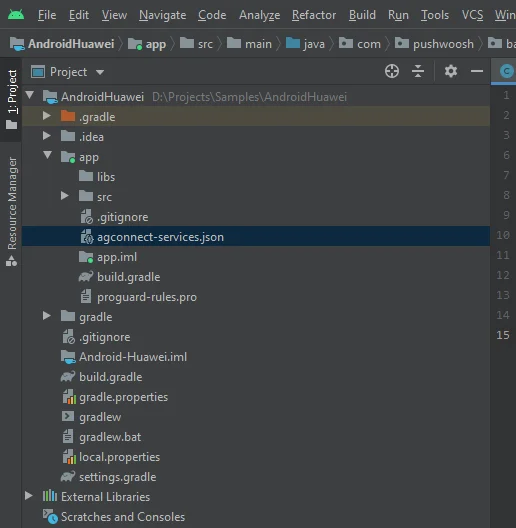
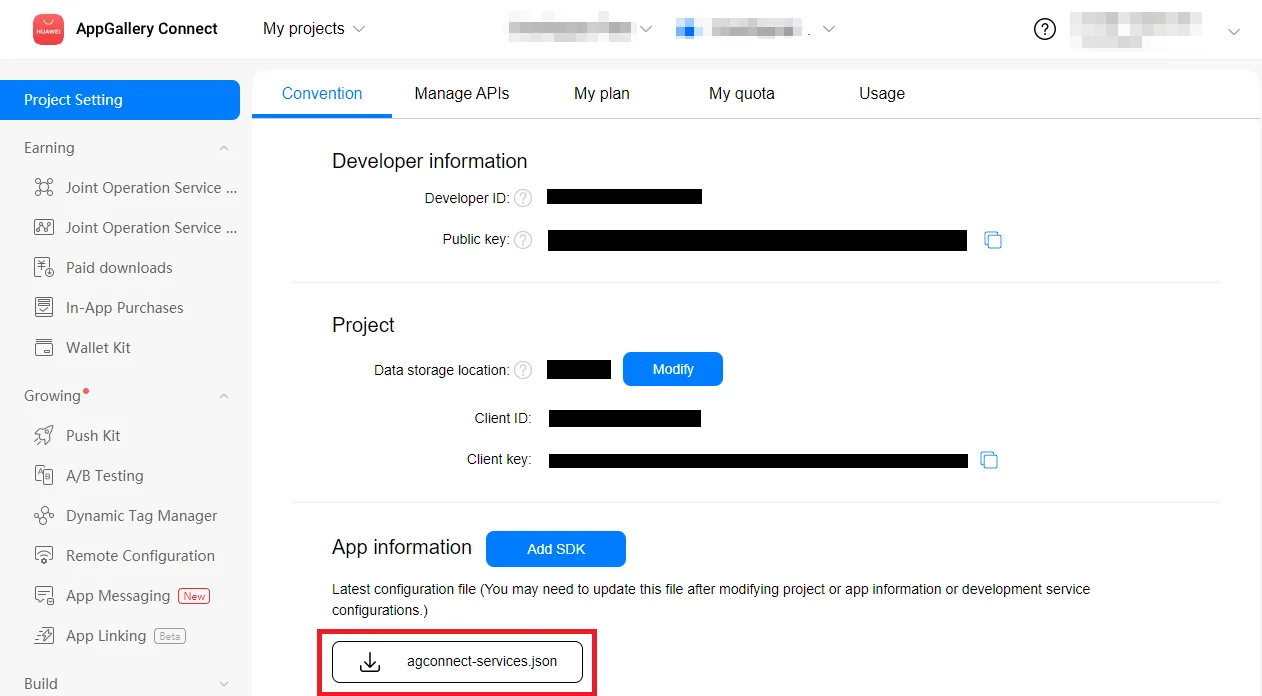 3. 将下载的文件放入您的 Android Studio 项目中 (YOUR\_PROJECT/app/agconnect-services.json)。
 ## 生成签名证书指纹
1. 在 Android Studio 中,前往 View > Tool Windows > Gradle。
## 生成签名证书指纹
1. 在 Android Studio 中,前往 View > Tool Windows > Gradle。
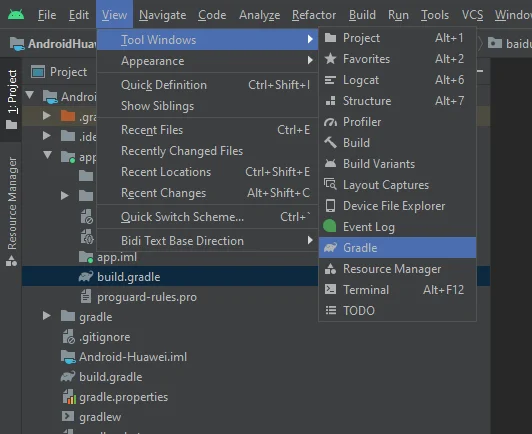 2. 在打开的窗口中,前往 app > Tasks > android > signingReport。
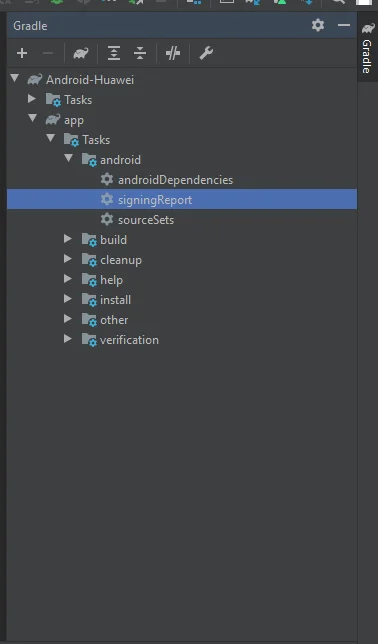 3. 从您的发布密钥库中复制 SHA-256。
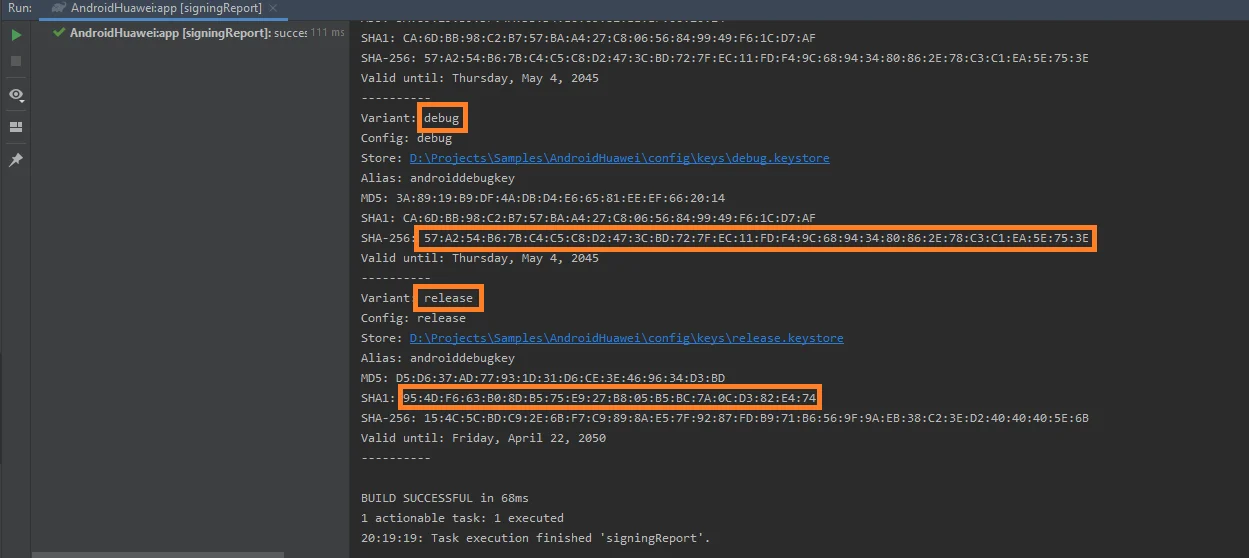 您也可以从调试密钥库中添加 SHA-256 用于测试。
4. 在 [AppGallery Connect 项目列表](https://developer.huawei.com/consumer/en/service/josp/agc/index.html#/myProject) 中选择您的项目。
5. 将 SHA-256 粘贴到 **SHA-256 证书指纹**字段中。
请注意,指纹处理最多可能需要 10 分钟。
## 在 Pushwoosh 中配置华为
请按照指南为您的 Pushwoosh 项目配置华为平台:
## 添加依赖项
将依赖项添加到您的 Android 项目中:
* 到 `android/build.gradle`
```
buildscript {
repositories {
google()
maven { url 'https://developer.huawei.com/repo/' }
}
dependencies {
...
classpath 'com.huawei.agconnect:agcp:1.4.1.300'
}
}
allprojects {
repositories {
google()
maven { url 'https://developer.huawei.com/repo/' }
}
}
```
* 到 `android/app/build.gradle`
```
apply plugin: "com.huawei.agconnect"
...
dependencies {
...
implementation 'com.huawei.hms:push:6.1.0.300'
}
```
## 启用推送通知
在您的 React Native 项目中,在调用 **Pushwoosh.register()** 之前添加 **Pushwoosh.enableHuaweiPushNotification();**。
## 与我们分享您的反馈
您的反馈有助于我们创造更好的体验,因此如果您在 SDK 集成过程中遇到任何问题,我们非常希望听到您的声音。如果您遇到任何困难,请随时[通过此表单](https://docs.google.com/forms/d/e/1FAIpQLSd\_0b8jwn-V\_JmoPLIxIFYbHACCQhrzidOZV3ELywoQPXRSxw/viewform)与我们分享您的想法。
您也可以从调试密钥库中添加 SHA-256 用于测试。
4. 在 [AppGallery Connect 项目列表](https://developer.huawei.com/consumer/en/service/josp/agc/index.html#/myProject) 中选择您的项目。
5. 将 SHA-256 粘贴到 **SHA-256 证书指纹**字段中。
请注意,指纹处理最多可能需要 10 分钟。
## 在 Pushwoosh 中配置华为
请按照指南为您的 Pushwoosh 项目配置华为平台:
## 添加依赖项
将依赖项添加到您的 Android 项目中:
* 到 `android/build.gradle`
```
buildscript {
repositories {
google()
maven { url 'https://developer.huawei.com/repo/' }
}
dependencies {
...
classpath 'com.huawei.agconnect:agcp:1.4.1.300'
}
}
allprojects {
repositories {
google()
maven { url 'https://developer.huawei.com/repo/' }
}
}
```
* 到 `android/app/build.gradle`
```
apply plugin: "com.huawei.agconnect"
...
dependencies {
...
implementation 'com.huawei.hms:push:6.1.0.300'
}
```
## 启用推送通知
在您的 React Native 项目中,在调用 **Pushwoosh.register()** 之前添加 **Pushwoosh.enableHuaweiPushNotification();**。
## 与我们分享您的反馈
您的反馈有助于我们创造更好的体验,因此如果您在 SDK 集成过程中遇到任何问题,我们非常希望听到您的声音。如果您遇到任何困难,请随时[通过此表单](https://docs.google.com/forms/d/e/1FAIpQLSd\_0b8jwn-V\_JmoPLIxIFYbHACCQhrzidOZV3ELywoQPXRSxw/viewform)与我们分享您的想法。