# 为 Flutter 设置角标
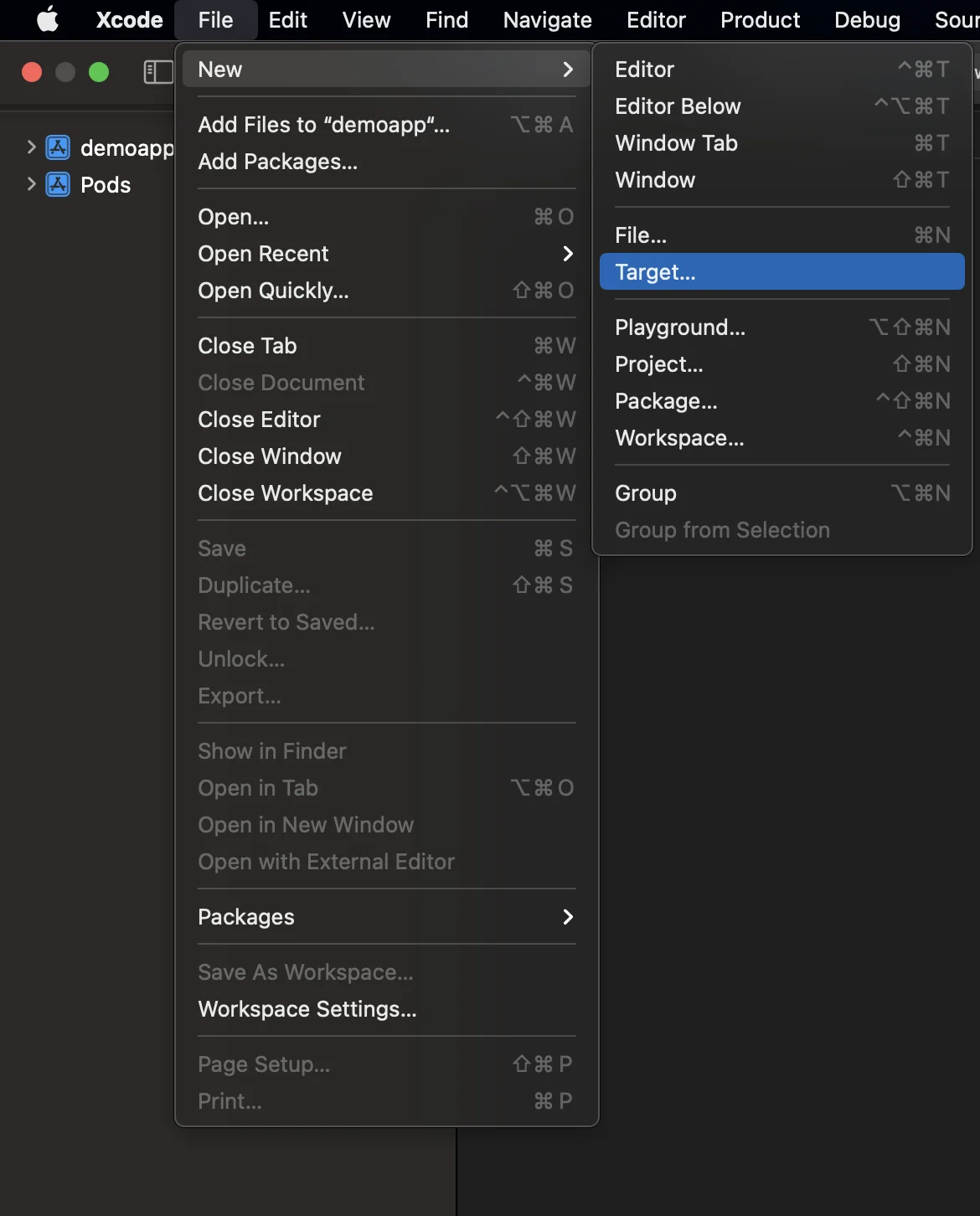
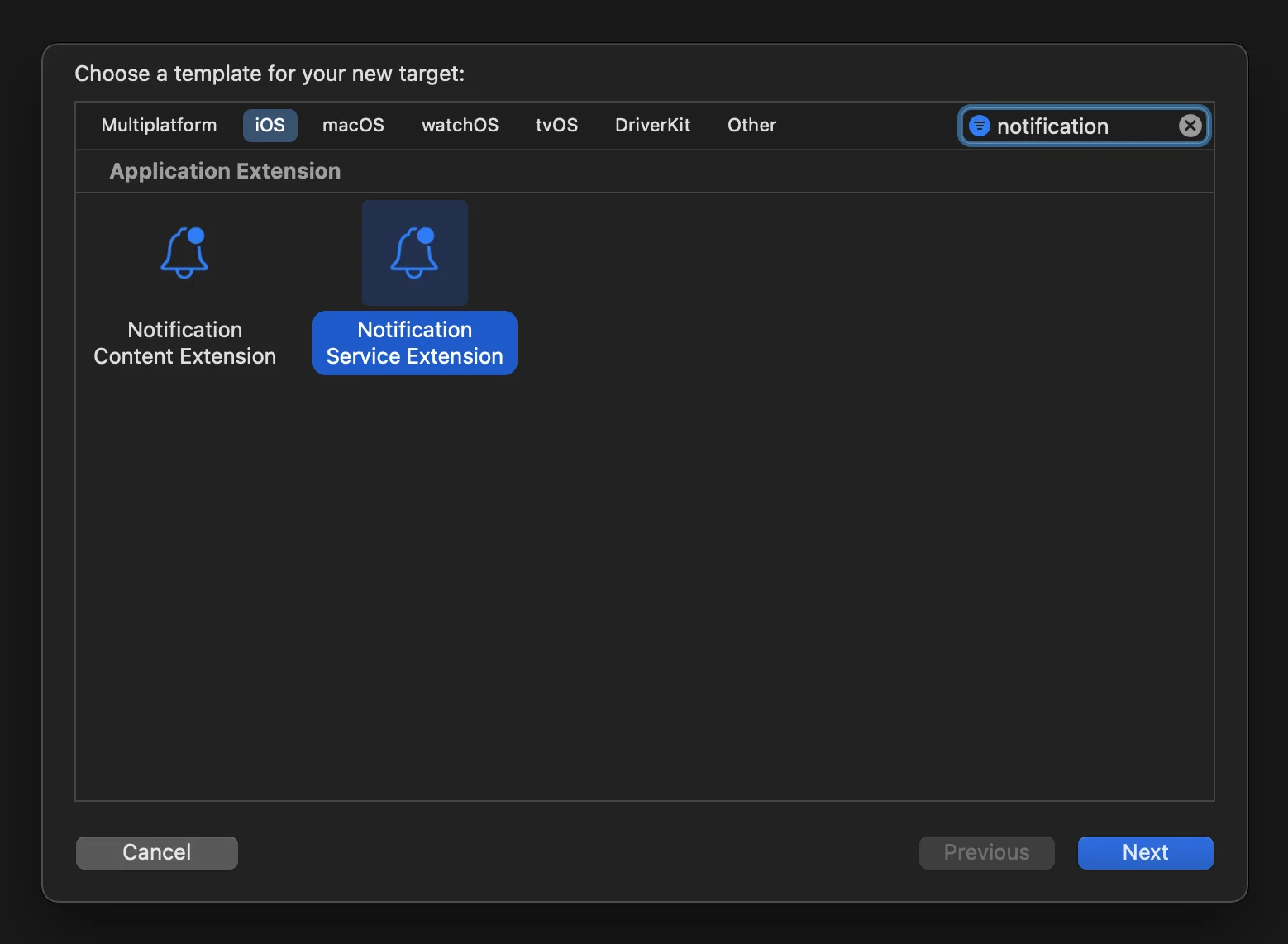
1. 打开位于 **your_project/ios/Runner.xcworkspace** 的 iOS 项目并创建 **NotificationServiceExtension**:
 2. 打开 Podfile(位于 **your_project/ios/Podfile**)并为 NotificationServiceExtensionTarget 添加 **PushwooshXCFramework** 依赖项:
```
target ‘NotificationService’ do
pod ‘PushwooshXCFramework’, ‘>=6.5.0’
end
```
3. 通过终端安装 pods:
```
cd ios && pod install
```
4. 关闭并重新打开您的 Xcode 项目。
5. 请确保您的 **Deployment target** 与 **Runner target** 中的目标相匹配;否则,您在构建应用时可能会遇到问题(例如,如果您在 Runner 中指定 iOS 10.0,而在 NotificationService target 中指定 iOS 15.5)。
6. 将 **App Groups capability** 添加到 Runner 和 NotificationService target,并为这两个 target 添加一个同名的新 group:
2. 打开 Podfile(位于 **your_project/ios/Podfile**)并为 NotificationServiceExtensionTarget 添加 **PushwooshXCFramework** 依赖项:
```
target ‘NotificationService’ do
pod ‘PushwooshXCFramework’, ‘>=6.5.0’
end
```
3. 通过终端安装 pods:
```
cd ios && pod install
```
4. 关闭并重新打开您的 Xcode 项目。
5. 请确保您的 **Deployment target** 与 **Runner target** 中的目标相匹配;否则,您在构建应用时可能会遇到问题(例如,如果您在 Runner 中指定 iOS 10.0,而在 NotificationService target 中指定 iOS 15.5)。
6. 将 **App Groups capability** 添加到 Runner 和 NotificationService target,并为这两个 target 添加一个同名的新 group:
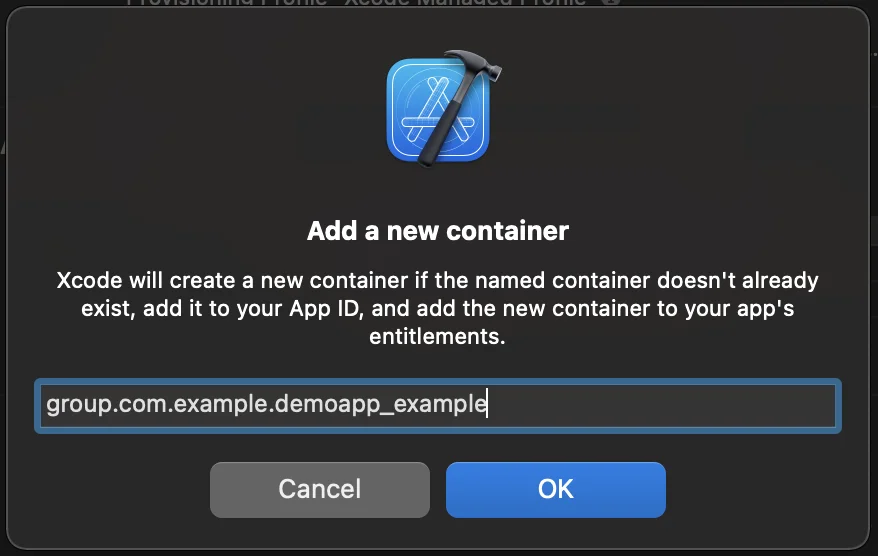
 7. 将 **PW_APP_GROUPS_NAME** info.plist 标志添加到 Runner 和 NotificationService target,并将其 group 名称作为字符串值:
 8. 转到 **NotificationService.m** 并将其代码替换为以下内容:
```objective-c
#import “NotificationService.h”
#import <Pushwoosh/PWNotificationExtensionManager.h>
@interface NotificationService ()
@property (nonatomic, strong) void (^contentHandler)(UNNotificationContent *contentToDeliver);
@property (nonatomic, strong) UNMutableNotificationContent *bestAttemptContent;
@end
@implementation NotificationService
- (void)didReceiveNotificationRequest:(UNNotificationRequest *)request withContentHandler:(void (^)(UNNotificationContent * _Nonnull))contentHandler {
self.contentHandler = contentHandler;
self.bestAttemptContent = [request.content mutableCopy];
[[PWNotificationExtensionManager sharedManager] handleNotificationRequest:request contentHandler:contentHandler];
}
- (void)serviceExtensionTimeWillExpire {
// Called just before the extension will be terminated by the system.
// Use this as an opportunity to deliver your “best attempt” at modified content, otherwise the original push payload will be used.
self.contentHandler(self.bestAttemptContent);
}
@end
```
## 与我们分享您的反馈
您的反馈有助于我们创造更好的体验,因此如果您在 SDK 集成过程中遇到任何问题,我们很乐意听取您的意见。如果您遇到任何困难,请随时[通过此表单](https://docs.google.com/forms/d/e/1FAIpQLSd\_0b8jwn-V\_JmoPLIxIFYbHACCQhrzidOZV3ELywoQPXRSxw/viewform)与我们分享您的想法。
8. 转到 **NotificationService.m** 并将其代码替换为以下内容:
```objective-c
#import “NotificationService.h”
#import <Pushwoosh/PWNotificationExtensionManager.h>
@interface NotificationService ()
@property (nonatomic, strong) void (^contentHandler)(UNNotificationContent *contentToDeliver);
@property (nonatomic, strong) UNMutableNotificationContent *bestAttemptContent;
@end
@implementation NotificationService
- (void)didReceiveNotificationRequest:(UNNotificationRequest *)request withContentHandler:(void (^)(UNNotificationContent * _Nonnull))contentHandler {
self.contentHandler = contentHandler;
self.bestAttemptContent = [request.content mutableCopy];
[[PWNotificationExtensionManager sharedManager] handleNotificationRequest:request contentHandler:contentHandler];
}
- (void)serviceExtensionTimeWillExpire {
// Called just before the extension will be terminated by the system.
// Use this as an opportunity to deliver your “best attempt” at modified content, otherwise the original push payload will be used.
self.contentHandler(self.bestAttemptContent);
}
@end
```
## 与我们分享您的反馈
您的反馈有助于我们创造更好的体验,因此如果您在 SDK 集成过程中遇到任何问题,我们很乐意听取您的意见。如果您遇到任何困难,请随时[通过此表单](https://docs.google.com/forms/d/e/1FAIpQLSd\_0b8jwn-V\_JmoPLIxIFYbHACCQhrzidOZV3ELywoQPXRSxw/viewform)与我们分享您的想法。