# 华为集成
## 要求
* 一个 [Pushwoosh 账户](https://go.pushwoosh.com/)
* 一个 [华为开发者账户](https://developer.huawei.com)
* 一个 [华为 AppGallery Connect 项目](https://developer.huawei.com/consumer/en/service/josp/agc/index.html#/myProject)
* 一个 [Pushwoosh 应用](https://go.pushwoosh.com/cp/applications),已[配置华为平台](/zh/developer/first-steps/connect-messaging-services/huawei-configuration/),其代码格式为 **XXXXX-XXXXX**
* [Android Studio](https://developer.android.com/studio)
* 一台已安装华为移动服务 (Huawei Mobile Services) 的华为设备
## 集成
### 获取 agconnect-services.json
**1.** 前往 [AppGallery Connect -> 项目列表](https://developer.huawei.com/consumer/en/service/josp/agc/index.html#/myProject) 并选择一个要配置的项目。
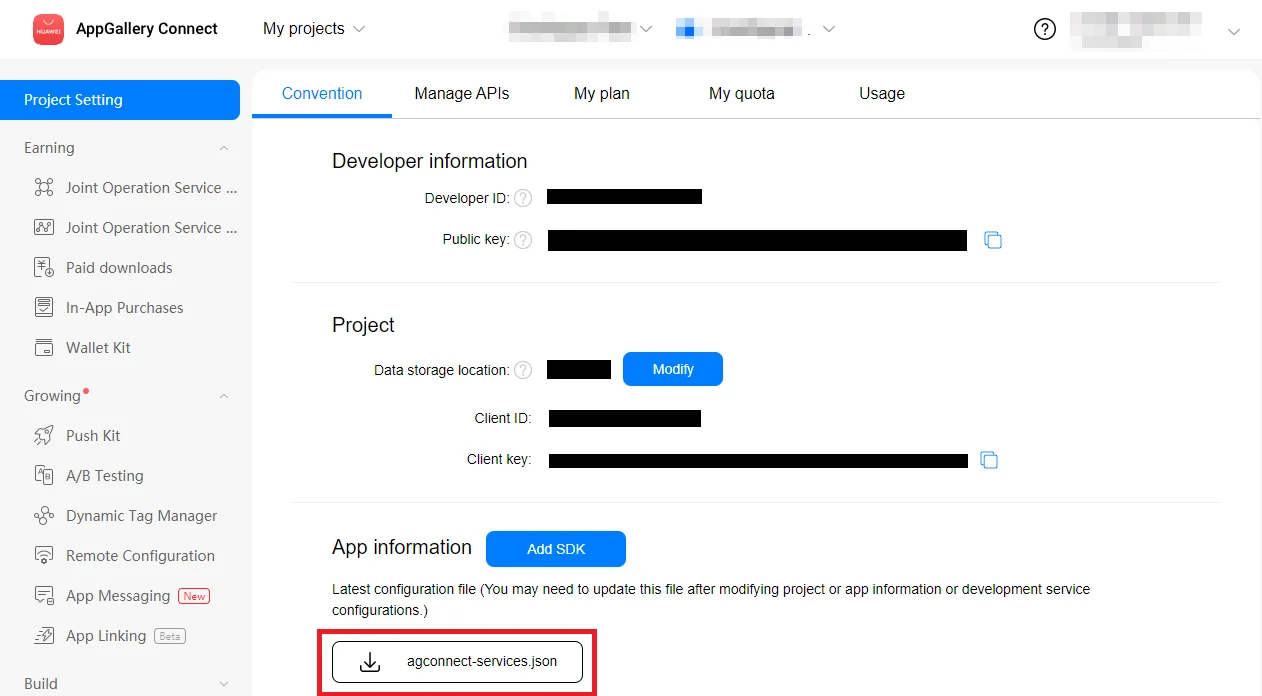
**2.** 在应用信息部分,点击 **agconnect-services.json** 下载配置文件。
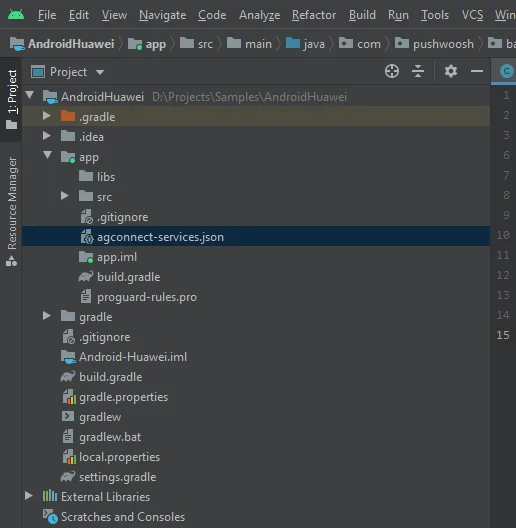
 **3.** 将下载的文件放入您的 Android Studio 项目中 (YOUR\_PROJECT/app/agconnect-services.json)。
 ### 生成签名证书指纹
请遵循[生成签名证书指纹](https://developer.huawei.com/consumer/en/doc/development/HMS-Guides/Preparations#h2-1575707383351)的说明来生成签名证书指纹。
### 添加 `pushwoosh-huawei` 模块
将 `pushwoosh-huawei` 模块添加到您的应用级 `build.gradle` 文件中:
```
implementation 'com.pushwoosh:pushwoosh-huawei:6.+'
```
将 "+" 替换为当前的 Pushwoosh 版本:[https://github.com/Pushwoosh/pushwoosh-android-sdk/releases/latest](https://github.com/Pushwoosh/pushwoosh-android-sdk/releases/latest)
### 添加华为依赖项
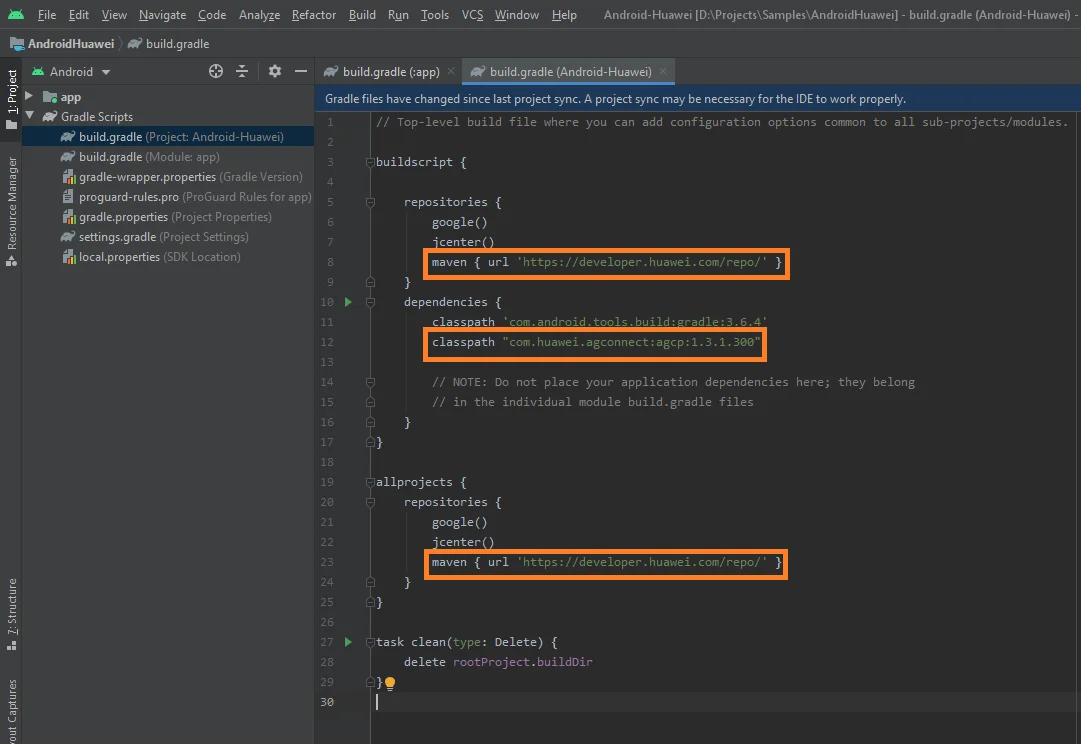
**1.** 在您的**根级** `build.gradle (Project)` 文件的 `buildscript { repositories }` 和 `allprojects { repositories }` 下添加 `maven {url 'https://developer.huawei.com/repo/'}`。
**2.** 在 `buildscript { dependencies }` 下添加 `classpath 'com.huawei.agconnect:agcp:1.3.1.300'`。
确保已将以下三行全部添加到您的**根级** `build.gradle` 文件中:
### 生成签名证书指纹
请遵循[生成签名证书指纹](https://developer.huawei.com/consumer/en/doc/development/HMS-Guides/Preparations#h2-1575707383351)的说明来生成签名证书指纹。
### 添加 `pushwoosh-huawei` 模块
将 `pushwoosh-huawei` 模块添加到您的应用级 `build.gradle` 文件中:
```
implementation 'com.pushwoosh:pushwoosh-huawei:6.+'
```
将 "+" 替换为当前的 Pushwoosh 版本:[https://github.com/Pushwoosh/pushwoosh-android-sdk/releases/latest](https://github.com/Pushwoosh/pushwoosh-android-sdk/releases/latest)
### 添加华为依赖项
**1.** 在您的**根级** `build.gradle (Project)` 文件的 `buildscript { repositories }` 和 `allprojects { repositories }` 下添加 `maven {url 'https://developer.huawei.com/repo/'}`。
**2.** 在 `buildscript { dependencies }` 下添加 `classpath 'com.huawei.agconnect:agcp:1.3.1.300'`。
确保已将以下三行全部添加到您的**根级** `build.gradle` 文件中:
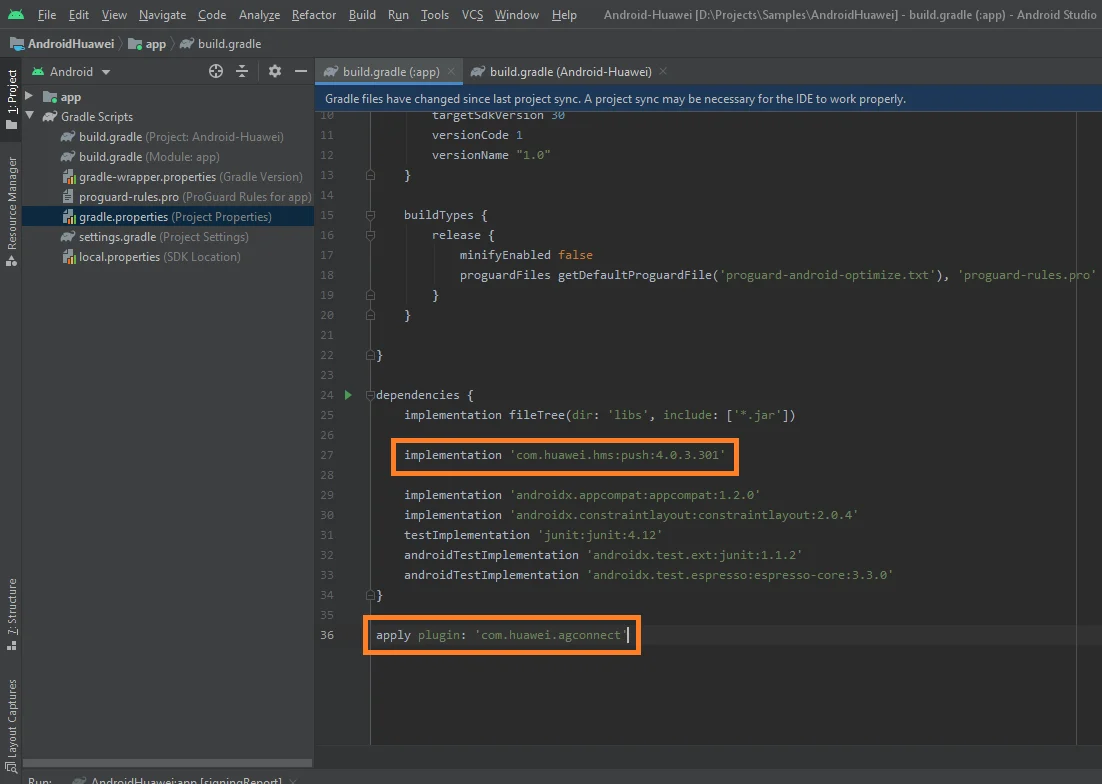
 **3.** 在您的**应用级** `build.gradle` (app/build.gradle) 文件的 `dependencies` 部分下添加 `implementation 'com.huawei.hms:push:6.1.0.300'`。
**4.** 在**应用级** `build.gradle` 文件的最底部添加 `apply plugin: 'com.huawei.agconnect'`。
确保您的**应用级** `build.gradle` 文件中有以下两行:
**3.** 在您的**应用级** `build.gradle` (app/build.gradle) 文件的 `dependencies` 部分下添加 `implementation 'com.huawei.hms:push:6.1.0.300'`。
**4.** 在**应用级** `build.gradle` 文件的最底部添加 `apply plugin: 'com.huawei.agconnect'`。
确保您的**应用级** `build.gradle` 文件中有以下两行:
 ### 订阅推送通知
```
Pushwoosh.getInstance().registerForPushNotifications();
```
## 与我们分享您的反馈
您的反馈有助于我们创造更好的体验,因此如果您在 SDK 集成过程中遇到任何问题,我们非常希望听到您的声音。如果您遇到任何困难,请随时[通过此表单](https://docs.google.com/forms/d/e/1FAIpQLSd\_0b8jwn-V\_JmoPLIxIFYbHACCQhrzidOZV3ELywoQPXRSxw/viewform)与我们分享您的想法。
## 后续步骤
### 订阅推送通知
```
Pushwoosh.getInstance().registerForPushNotifications();
```
## 与我们分享您的反馈
您的反馈有助于我们创造更好的体验,因此如果您在 SDK 集成过程中遇到任何问题,我们非常希望听到您的声音。如果您遇到任何困难,请随时[通过此表单](https://docs.google.com/forms/d/e/1FAIpQLSd\_0b8jwn-V\_JmoPLIxIFYbHACCQhrzidOZV3ELywoQPXRSxw/viewform)与我们分享您的想法。
## 后续步骤