# 自定义富媒体外观
## 概述
自定义富媒体页面的外观,使其与您的应用风格完美契合。您可以更改应用内消息的背景颜色,添加一些动画,或调整加载视图以适应应用布局。通过让应用内消息看起来像应用的原生组件,从而改善用户体验。
## 实现
首先,获取 **RichMediaStyle** 类的一个实例:
#### iOS
```objective-c
PWRichMediaStyle *style = [PWRichMediaManager sharedManager].richMediaStyle;
```
#### Android
```java
RichMediaStyle style = RichMediaManager.getRichMediaStyle();
```
### 背景颜色
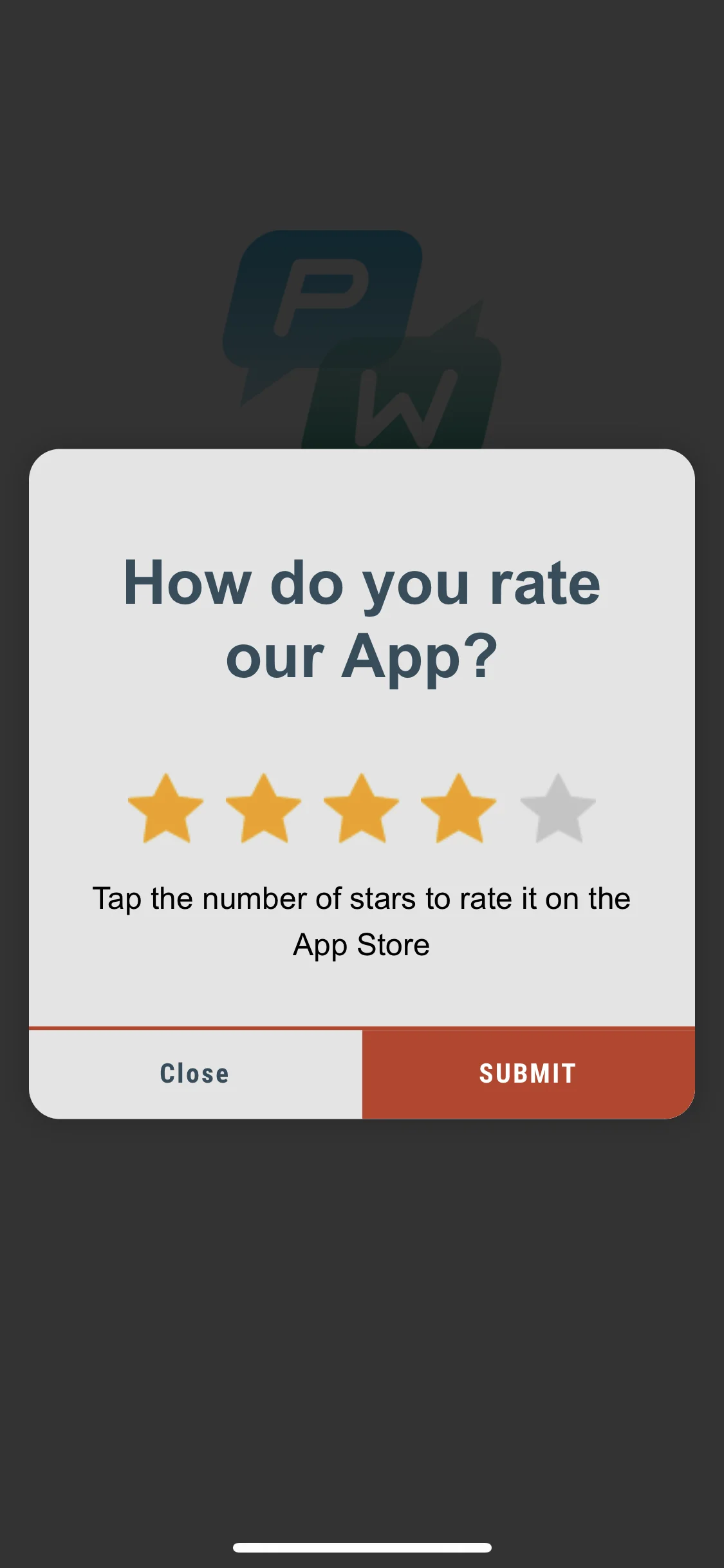
通过**更改**向应用用户显示的富媒体页面的**背景颜色**,让应用内消息看起来像是您应用固有的一部分。
 #### iOS
```objective-c
style.backgroundColor = [[UIColor blackColor] colorWithAlphaComponent:0.2f];
```
#### Android
```java
style.setBackgroundColor(ContextCompat.getColor(getApplication(), R.color.black));
```
就是这样!
### 动画
通过**为富媒体外观添加动画**,增强应用内消息的效果。
#### iOS
将动画委托设置为以下默认类之一:
* `PWRichMediaStyleSlideLeftAnimation`
* `PWRichMediaStyleSlideRightAnimation`
* `PWRichMediaStyleSlideTopAnimation`
* `PWRichMediaStyleSlideBottomAnimation`
* `PWRichMediaStyleCrossFadeAnimation`
```objective-c
style.animationDelegate = [PWRichMediaStyleCrossFadeAnimation new];
```
#### Android
将动画委托设置为以下默认类之一:
* `RichMediaAnimationSlideTop`
* `RichMediaAnimationSlideBottom`
* `RichMediaAnimationSlideRight`
* `RichMediaAnimationSlideLeft`
* `RichMediaAnimationCrossFade`
```java
richMediaStyle.setRichMediaAnimationType(new RichMediaAnimationSlideTop());
```
要设置**自定义动画**,请按如下方式为 iOS 实现 `PWRichMediaStyleAnimationDelegate` 方法,或为 Android 实现 `RichMediaAnimation`:
#### iOS
1. 设置动画委托:
```objective-c
style.animationDelegate = self;
```
2. 实现 `PWRichMediaStyleAnimationDelegate` 方法(不要忘记调用**完成块**):
```objective-c
- (void)runPresentingAnimationWithContentView:(UIView *)contentView parentView:(UIView *)parentView completion:(dispatch_block_t)completion {
contentView.transform = CGAffineTransformMakeTranslation(0, parentView.bounds.size.height);
[UIView animateWithDuration:0.6
delay:0
usingSpringWithDamping:0.4
initialSpringVelocity:0
options:0
animations:^{
contentView.transform = CGAffineTransformIdentity;
} completion:^(BOOL finished) {
completion();
}];
}
- (void)runDismissingAnimationWithContentView:(UIView *)contentView parentView:(UIView *)parentView completion:(dispatch_block_t)completion {
[UIView animateWithDuration:0.3
animations:^{
contentView.alpha = 0.0f;
contentView.transform = CGAffineTransformMakeScale(2, 2);
} completion:^(BOOL finished) {
completion();
}];
}
```
#### Android
实现 `RichMediaAnimation` 接口并将其设置为自定义富媒体的关闭和打开动画:
```java
richMediaStyle.setRichMediaAnimation(new RichMediaAnimation() {
//Allows to set rules and behavior for custom Rich Media open animation
@Override
public void openAnimation(View contentView, View parentView) {
AnimationSet fadeInAnimation = new AnimationSet(true);
fadeInAnimation.addAnimation(new TranslateAnimation(0.15f * parentView.getWidth(), 0, parentView.getHeight() / 2.5f, 0));
fadeInAnimation.addAnimation(new AlphaAnimation(0, 1));
fadeInAnimation.addAnimation(new ScaleAnimation(0.7f, 1.0f, 0.7f, 1.0f));
fadeInAnimation.setDuration(2000);
fadeInAnimation.setInterpolator(new DecelerateInterpolator(1f));
contentView.startAnimation(fadeInAnimation);
}
//Allows to set rules and behavior for custom Rich Media close animation
@Override
public void closeAnimation(View contentView, View parentView, Animation.AnimationListener endAnimationListener) {
// !IMPORTANT!
// endAnimationListener has to be added to your custom animation to let Pushwoosh SDK handle animation end event
AlphaAnimation alphaAnimation = new AlphaAnimation(1, 0);
alphaAnimation.setDuration(2000);
alphaAnimation.setAnimationListener(endAnimationListener);
alphaAnimation.setFillEnabled(true);
alphaAnimation.setFillAfter(true);
contentView.animate().translationY(parentView.getHeight() / 5).setDuration(250).start();
parentView.startAnimation(alphaAnimation);
}
});
```
### 自定义加载视图
通过**自定义加载视图**,从一开始就吸引用户的注意力,让他们关注您的应用内消息。
#### iOS
1. 按如下方式使用 `loadingViewBlock`:
```objective-c
style.loadingViewBlock = ^PWLoadingView *{
return [[[NSBundle mainBundle] loadNibNamed:@"LoadingView" owner:self options:nil] lastObject];
};
```
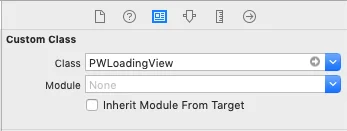
2. 此处的 "LoadingView" 必须继承自 PWLoadingView(在 PWRichMediaStyle.h 中定义):
#### iOS
```objective-c
style.backgroundColor = [[UIColor blackColor] colorWithAlphaComponent:0.2f];
```
#### Android
```java
style.setBackgroundColor(ContextCompat.getColor(getApplication(), R.color.black));
```
就是这样!
### 动画
通过**为富媒体外观添加动画**,增强应用内消息的效果。
#### iOS
将动画委托设置为以下默认类之一:
* `PWRichMediaStyleSlideLeftAnimation`
* `PWRichMediaStyleSlideRightAnimation`
* `PWRichMediaStyleSlideTopAnimation`
* `PWRichMediaStyleSlideBottomAnimation`
* `PWRichMediaStyleCrossFadeAnimation`
```objective-c
style.animationDelegate = [PWRichMediaStyleCrossFadeAnimation new];
```
#### Android
将动画委托设置为以下默认类之一:
* `RichMediaAnimationSlideTop`
* `RichMediaAnimationSlideBottom`
* `RichMediaAnimationSlideRight`
* `RichMediaAnimationSlideLeft`
* `RichMediaAnimationCrossFade`
```java
richMediaStyle.setRichMediaAnimationType(new RichMediaAnimationSlideTop());
```
要设置**自定义动画**,请按如下方式为 iOS 实现 `PWRichMediaStyleAnimationDelegate` 方法,或为 Android 实现 `RichMediaAnimation`:
#### iOS
1. 设置动画委托:
```objective-c
style.animationDelegate = self;
```
2. 实现 `PWRichMediaStyleAnimationDelegate` 方法(不要忘记调用**完成块**):
```objective-c
- (void)runPresentingAnimationWithContentView:(UIView *)contentView parentView:(UIView *)parentView completion:(dispatch_block_t)completion {
contentView.transform = CGAffineTransformMakeTranslation(0, parentView.bounds.size.height);
[UIView animateWithDuration:0.6
delay:0
usingSpringWithDamping:0.4
initialSpringVelocity:0
options:0
animations:^{
contentView.transform = CGAffineTransformIdentity;
} completion:^(BOOL finished) {
completion();
}];
}
- (void)runDismissingAnimationWithContentView:(UIView *)contentView parentView:(UIView *)parentView completion:(dispatch_block_t)completion {
[UIView animateWithDuration:0.3
animations:^{
contentView.alpha = 0.0f;
contentView.transform = CGAffineTransformMakeScale(2, 2);
} completion:^(BOOL finished) {
completion();
}];
}
```
#### Android
实现 `RichMediaAnimation` 接口并将其设置为自定义富媒体的关闭和打开动画:
```java
richMediaStyle.setRichMediaAnimation(new RichMediaAnimation() {
//Allows to set rules and behavior for custom Rich Media open animation
@Override
public void openAnimation(View contentView, View parentView) {
AnimationSet fadeInAnimation = new AnimationSet(true);
fadeInAnimation.addAnimation(new TranslateAnimation(0.15f * parentView.getWidth(), 0, parentView.getHeight() / 2.5f, 0));
fadeInAnimation.addAnimation(new AlphaAnimation(0, 1));
fadeInAnimation.addAnimation(new ScaleAnimation(0.7f, 1.0f, 0.7f, 1.0f));
fadeInAnimation.setDuration(2000);
fadeInAnimation.setInterpolator(new DecelerateInterpolator(1f));
contentView.startAnimation(fadeInAnimation);
}
//Allows to set rules and behavior for custom Rich Media close animation
@Override
public void closeAnimation(View contentView, View parentView, Animation.AnimationListener endAnimationListener) {
// !IMPORTANT!
// endAnimationListener has to be added to your custom animation to let Pushwoosh SDK handle animation end event
AlphaAnimation alphaAnimation = new AlphaAnimation(1, 0);
alphaAnimation.setDuration(2000);
alphaAnimation.setAnimationListener(endAnimationListener);
alphaAnimation.setFillEnabled(true);
alphaAnimation.setFillAfter(true);
contentView.animate().translationY(parentView.getHeight() / 5).setDuration(250).start();
parentView.startAnimation(alphaAnimation);
}
});
```
### 自定义加载视图
通过**自定义加载视图**,从一开始就吸引用户的注意力,让他们关注您的应用内消息。
#### iOS
1. 按如下方式使用 `loadingViewBlock`:
```objective-c
style.loadingViewBlock = ^PWLoadingView *{
return [[[NSBundle mainBundle] loadNibNamed:@"LoadingView" owner:self options:nil] lastObject];
};
```
2. 此处的 "LoadingView" 必须继承自 PWLoadingView(在 PWRichMediaStyle.h 中定义):
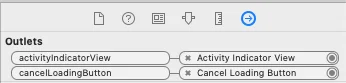
 3. 设置 outlets:
 #### Android
`RichMediaStyle.LoadingViewCreatorInterface` 实现了一个方法,该方法返回一个用作富媒体加载屏幕的视图:
```java
richMediaStyle.setLoadingViewCreator(() -> {
View screenView = createYourScreenView();
return screenView;
});
```
### 延迟启用关闭按钮
通过在富媒体加载完成前**禁用关闭按钮**,确保应用内消息能够展示给用户。
#### iOS
```objective-c
style.closeButtonPresentingDelay = 3;
```
#### Android
```java
// set a value in milliseconds
richMediaStyle.setTimeOutBackButtonEnable(3000);
```
#### Android
`RichMediaStyle.LoadingViewCreatorInterface` 实现了一个方法,该方法返回一个用作富媒体加载屏幕的视图:
```java
richMediaStyle.setLoadingViewCreator(() -> {
View screenView = createYourScreenView();
return screenView;
});
```
### 延迟启用关闭按钮
通过在富媒体加载完成前**禁用关闭按钮**,确保应用内消息能够展示给用户。
#### iOS
```objective-c
style.closeButtonPresentingDelay = 3;
```
#### Android
```java
// set a value in milliseconds
richMediaStyle.setTimeOutBackButtonEnable(3000);
```