# Purchases
These recipes cover the Buying stage: players who are ready to spend or have already paid. Before you build them, read the [best practices for every journey](/tutorials/industry-playbooks/mobile-games/build-the-journeys/#best-practices-for-every-journey).
## First purchase offer for engaged non-payers
* **Use it when:** players are invested in the game but have never paid.
* **Starts when:** a player enters the [Engaged non-payers](/tutorials/industry-playbooks/mobile-games/build-the-segments/#engaged-non-payers) segment. Pushwoosh checks the segment on a schedule you set, for example weekly.
* **What it does:** shows an in-app starter pack offer, then sends a push reminder after 1 day if the player does not buy. The segment requires 10 completed levels in 14 days, so only invested players get the offer and new installs do not.
* **Content to prepare:** an in-app template with the starter pack offer and a push preset with the reminder.
* **Needs:** `PW_InAppPurchase` set up. Without it, the segment also matches players who have paid, and the reminder push goes to buyers too.
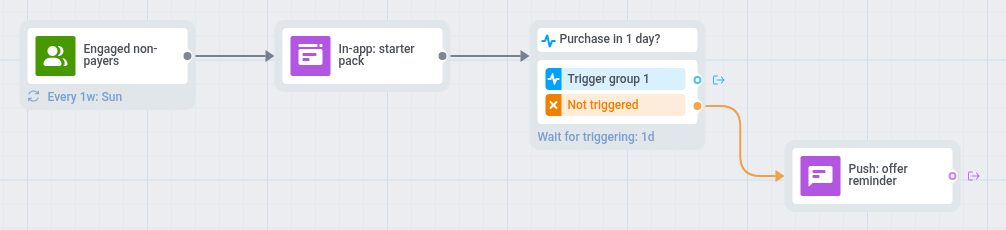 1. On the journey canvas, add an [Audience-based entry](/product/customer-journey/journey-elements/entry-elements/audience-based-entry/) on the [Engaged non-payers](/tutorials/industry-playbooks/mobile-games/build-the-segments/#engaged-non-payers) segment.
2. Set the entry schedule to **Recurring entry** and choose **Periodically**, for example weekly.
3. Open **Settings**, select [**Campaign Entry Limit**](/product/customer-journey/journey-settings/#campaign-entry-limit), and choose once a month, so a player who ignores the offer does not get it every week.
4. Add an [In-app element](/product/customer-journey/journey-elements/channels/in-app/) that offers a starter currency pack, for example: "Starter pack: 500 coins for a special price." The message appears when the player opens the game.
5. Add a [Wait for Trigger](/product/customer-journey/journey-elements/flow-controls/wait-for-trigger/) step on `PW_InAppPurchase` and set the waiting period to 1 day. Leave the **Trigger group 1** branch empty.
6. On the **Not triggered** branch, add a [push](/product/customer-journey/journey-elements/channels/push/) that mentions the offer, for example: "Your starter pack is still available." It reaches both the players who saw the in-app and did not buy, and the players who have not opened the game since.
7. Open **Settings**, select [**Conversion goals**](/product/customer-journey/journey-settings/#conversion-goals), choose `PW_InAppPurchase`, and select **End journey after this event**.
Players without push see only the in-app offer, because a second in-app would repeat it.
## Second purchase offer
* **Use it when:** you want players who paid once to buy again.
* **Starts when:** a player makes a purchase (`PW_InAppPurchase`).
* **What it does:** checks whether this is the player's first purchase. For first-time payers, it sends a thank-you in-app a few minutes after the purchase and a push with a second-purchase offer 3 days later, unless they buy again before that.
* **Content to prepare:** an in-app template with the thank-you and a push preset with the offer.
* **Needs:** `PW_InAppPurchase` set up and the [First-time payers](/tutorials/industry-playbooks/mobile-games/build-the-segments/#first-time-payers) segment.
1. On the journey canvas, add an [Audience-based entry](/product/customer-journey/journey-elements/entry-elements/audience-based-entry/) on the [Engaged non-payers](/tutorials/industry-playbooks/mobile-games/build-the-segments/#engaged-non-payers) segment.
2. Set the entry schedule to **Recurring entry** and choose **Periodically**, for example weekly.
3. Open **Settings**, select [**Campaign Entry Limit**](/product/customer-journey/journey-settings/#campaign-entry-limit), and choose once a month, so a player who ignores the offer does not get it every week.
4. Add an [In-app element](/product/customer-journey/journey-elements/channels/in-app/) that offers a starter currency pack, for example: "Starter pack: 500 coins for a special price." The message appears when the player opens the game.
5. Add a [Wait for Trigger](/product/customer-journey/journey-elements/flow-controls/wait-for-trigger/) step on `PW_InAppPurchase` and set the waiting period to 1 day. Leave the **Trigger group 1** branch empty.
6. On the **Not triggered** branch, add a [push](/product/customer-journey/journey-elements/channels/push/) that mentions the offer, for example: "Your starter pack is still available." It reaches both the players who saw the in-app and did not buy, and the players who have not opened the game since.
7. Open **Settings**, select [**Conversion goals**](/product/customer-journey/journey-settings/#conversion-goals), choose `PW_InAppPurchase`, and select **End journey after this event**.
Players without push see only the in-app offer, because a second in-app would repeat it.
## Second purchase offer
* **Use it when:** you want players who paid once to buy again.
* **Starts when:** a player makes a purchase (`PW_InAppPurchase`).
* **What it does:** checks whether this is the player's first purchase. For first-time payers, it sends a thank-you in-app a few minutes after the purchase and a push with a second-purchase offer 3 days later, unless they buy again before that.
* **Content to prepare:** an in-app template with the thank-you and a push preset with the offer.
* **Needs:** `PW_InAppPurchase` set up and the [First-time payers](/tutorials/industry-playbooks/mobile-games/build-the-segments/#first-time-payers) segment.
 1. On the journey canvas, add a [Trigger-based entry](/product/customer-journey/journey-elements/entry-elements/trigger-based-entry/) on `PW_InAppPurchase`.
2. Add a [Time Delay](/product/customer-journey/journey-elements/flow-controls/time-delay/) with a fixed duration of 5 minutes. Segments count a new event only about a minute after it arrives, so without the delay the split can miss the first purchase.
3. Add a [Condition split](/product/customer-journey/journey-elements/flow-controls/segment-split/), choose **Segment**, and select the [First-time payers](/tutorials/industry-playbooks/mobile-games/build-the-segments/#first-time-payers) segment. Leave the **All other users** branch empty, because repeat payers need no message.
4. On the **Users in a segment** branch, add an [In-app element](/product/customer-journey/journey-elements/channels/in-app/) that thanks the player, for example: "Thanks for your support! Here is a bonus for your next run." Set **In-app expiration** to 1 day.
5. Add a [Wait for Trigger](/product/customer-journey/journey-elements/flow-controls/wait-for-trigger/) step on `PW_InAppPurchase` and set the waiting period to 3 days. Leave its **Trigger group 1** branch empty.
6. On the **Not triggered** branch, add a [Reachability check](/product/customer-journey/journey-elements/flow-controls/reachability-check/), and for players reachable by push, add a [push](/product/customer-journey/journey-elements/channels/push/) with the offer, for example: "A special pack is waiting for you in the store."
7. Open **Settings**, select [**Conversion goals**](/product/customer-journey/journey-settings/#conversion-goals), choose `PW_InAppPurchase`, and select **End journey after this event**.
## Store abandonment reminder
* **Use it when:** players open the in-game store and leave without buying.
* **Starts when:** a player opens the store (`Store opened`).
* **What it does:** waits 1 hour after the player opens the store, then sends a push or in-app reminder if the player has not bought anything. Players who buy do not get the reminder.
* **Content to prepare:** a push preset and an in-app template with the same reminder.
* **Needs:** `PW_InAppPurchase` set up, because the journey checks for a purchase after the visit.
1. On the journey canvas, add a [Trigger-based entry](/product/customer-journey/journey-elements/entry-elements/trigger-based-entry/) on `PW_InAppPurchase`.
2. Add a [Time Delay](/product/customer-journey/journey-elements/flow-controls/time-delay/) with a fixed duration of 5 minutes. Segments count a new event only about a minute after it arrives, so without the delay the split can miss the first purchase.
3. Add a [Condition split](/product/customer-journey/journey-elements/flow-controls/segment-split/), choose **Segment**, and select the [First-time payers](/tutorials/industry-playbooks/mobile-games/build-the-segments/#first-time-payers) segment. Leave the **All other users** branch empty, because repeat payers need no message.
4. On the **Users in a segment** branch, add an [In-app element](/product/customer-journey/journey-elements/channels/in-app/) that thanks the player, for example: "Thanks for your support! Here is a bonus for your next run." Set **In-app expiration** to 1 day.
5. Add a [Wait for Trigger](/product/customer-journey/journey-elements/flow-controls/wait-for-trigger/) step on `PW_InAppPurchase` and set the waiting period to 3 days. Leave its **Trigger group 1** branch empty.
6. On the **Not triggered** branch, add a [Reachability check](/product/customer-journey/journey-elements/flow-controls/reachability-check/), and for players reachable by push, add a [push](/product/customer-journey/journey-elements/channels/push/) with the offer, for example: "A special pack is waiting for you in the store."
7. Open **Settings**, select [**Conversion goals**](/product/customer-journey/journey-settings/#conversion-goals), choose `PW_InAppPurchase`, and select **End journey after this event**.
## Store abandonment reminder
* **Use it when:** players open the in-game store and leave without buying.
* **Starts when:** a player opens the store (`Store opened`).
* **What it does:** waits 1 hour after the player opens the store, then sends a push or in-app reminder if the player has not bought anything. Players who buy do not get the reminder.
* **Content to prepare:** a push preset and an in-app template with the same reminder.
* **Needs:** `PW_InAppPurchase` set up, because the journey checks for a purchase after the visit.
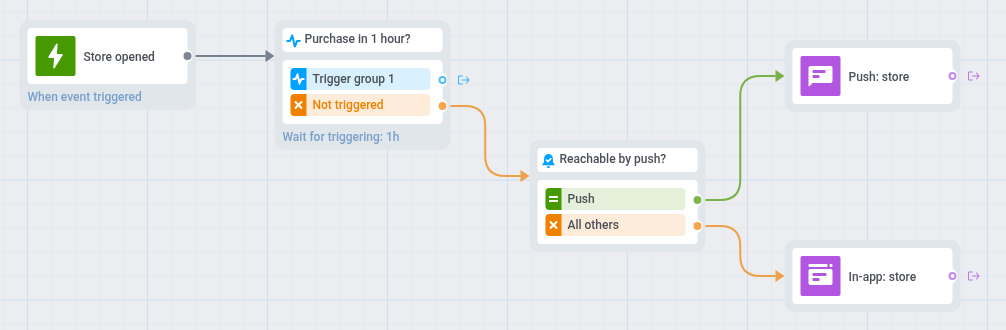 1. On the journey canvas, add a [Trigger-based entry](/product/customer-journey/journey-elements/entry-elements/trigger-based-entry/) on `Store opened`.
2. Add a [Wait for Trigger](/product/customer-journey/journey-elements/flow-controls/wait-for-trigger/) step on `PW_InAppPurchase` and set the waiting period to 1 hour. Leave the **Trigger group 1** branch empty.
3. On the **Not triggered** branch, add a [Reachability check](/product/customer-journey/journey-elements/flow-controls/reachability-check/).
4. For players reachable by push, add a [push](/product/customer-journey/journey-elements/channels/push/) that sets a deep link to the store, for example: "Still thinking it over? Your pack is waiting in the store."
5. For the others, add an [In-app element](/product/customer-journey/journey-elements/channels/in-app/) with the same reminder and set **In-app expiration** to 1 day. The player sees it the next time they open or return to the game.
6. Open **Settings**, select [**Campaign Entry Limit**](/product/customer-journey/journey-settings/#campaign-entry-limit), and choose once a week, so a player who browses the store every day does not get a reminder every day.
7. Open **Settings**, select [**Conversion goals**](/product/customer-journey/journey-settings/#conversion-goals), choose `PW_InAppPurchase`, and select **End journey after this event**.
1. On the journey canvas, add a [Trigger-based entry](/product/customer-journey/journey-elements/entry-elements/trigger-based-entry/) on `Store opened`.
2. Add a [Wait for Trigger](/product/customer-journey/journey-elements/flow-controls/wait-for-trigger/) step on `PW_InAppPurchase` and set the waiting period to 1 hour. Leave the **Trigger group 1** branch empty.
3. On the **Not triggered** branch, add a [Reachability check](/product/customer-journey/journey-elements/flow-controls/reachability-check/).
4. For players reachable by push, add a [push](/product/customer-journey/journey-elements/channels/push/) that sets a deep link to the store, for example: "Still thinking it over? Your pack is waiting in the store."
5. For the others, add an [In-app element](/product/customer-journey/journey-elements/channels/in-app/) with the same reminder and set **In-app expiration** to 1 day. The player sees it the next time they open or return to the game.
6. Open **Settings**, select [**Campaign Entry Limit**](/product/customer-journey/journey-settings/#campaign-entry-limit), and choose once a week, so a player who browses the store every day does not get a reminder every day.
7. Open **Settings**, select [**Conversion goals**](/product/customer-journey/journey-settings/#conversion-goals), choose `PW_InAppPurchase`, and select **End journey after this event**.