# Push Stories สำหรับ iOS
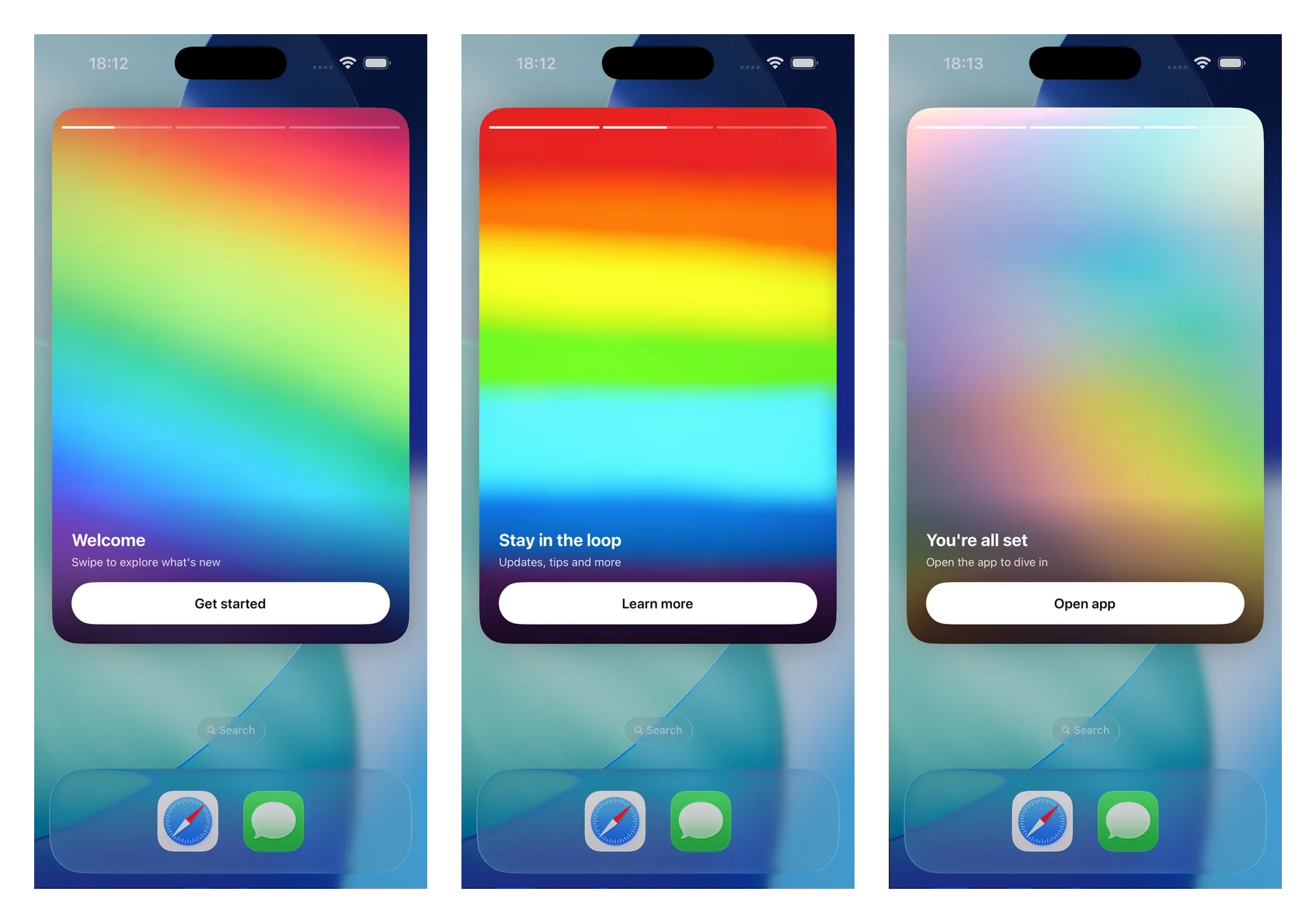
Push stories เปลี่ยน push notification ที่ขยายออกให้เป็นประสบการณ์ stories แบบเต็มหน้าจอ สไตล์ Instagram: รูปภาพเต็มขอบ, แถบความคืบหน้าที่ด้านบน, การเลื่อนหน้าอัตโนมัติ, การแตะเพื่อนำทาง และปุ่มพร้อม deep link โดยจะแสดงผลโดย Notification Content Extension โดยใช้โมดูล `PushwooshNotificationUI` แบบสแตนด์อโลน — คุณเพียงแค่ subclass view controller ตัวเดียว และ SDK จะจัดการเรื่องการแยกวิเคราะห์, การโหลดรูปภาพ, ความคืบหน้า, เวลา, การนำทาง และ deep links
พร้อมใช้งานตั้งแต่เวอร์ชัน 7.0.46
 ## 1. เพิ่ม Notification Content Extension
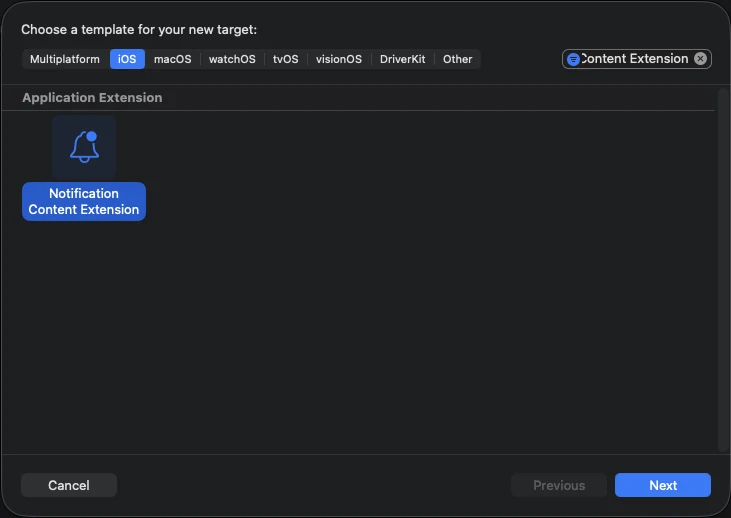
ใน Xcode เลือก **File > New > Target…** เลือก **Notification Content Extension** และตั้งชื่อ (ตัวอย่างเช่น **StoriesContentExtension**)
## 1. เพิ่ม Notification Content Extension
ใน Xcode เลือก **File > New > Target…** เลือก **Notification Content Extension** และตั้งชื่อ (ตัวอย่างเช่น **StoriesContentExtension**)
 ## 2. เพิ่มโมดูล PushwooshNotificationUI
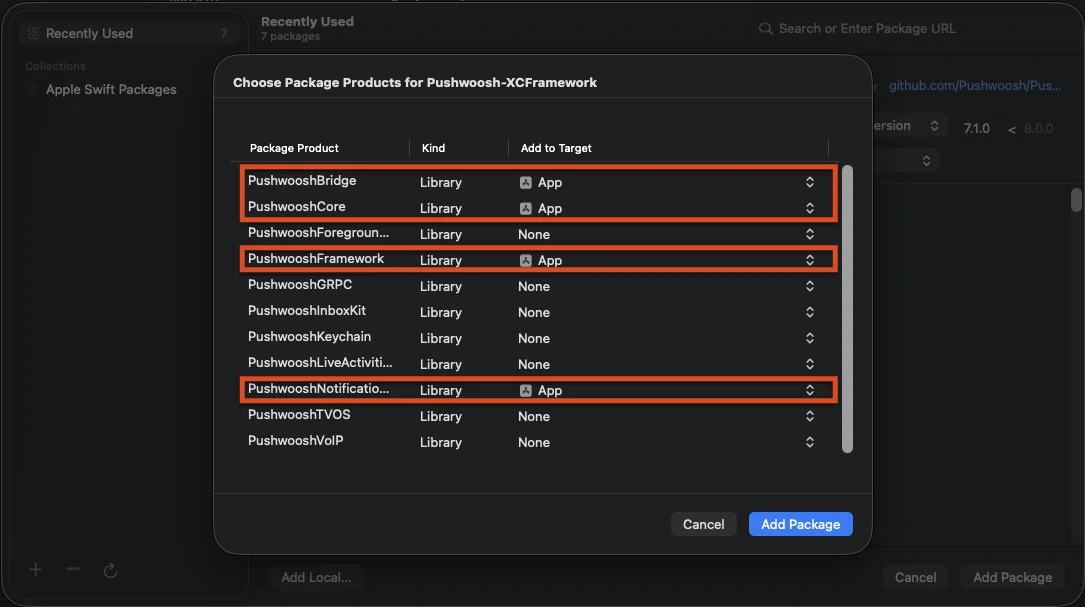
`PushwooshNotificationUI` เป็นโมดูลแบบสแตนด์อโลนที่ไม่มีการพึ่งพา Pushwoosh อื่นๆ ดังนั้นจึงมีขนาดเล็กภายในกระบวนการของ extension เพิ่มโมดูลนี้ไปยัง **content extension target** (ไม่ใช่ app target)
**Swift Package Manager**
## 2. เพิ่มโมดูล PushwooshNotificationUI
`PushwooshNotificationUI` เป็นโมดูลแบบสแตนด์อโลนที่ไม่มีการพึ่งพา Pushwoosh อื่นๆ ดังนั้นจึงมีขนาดเล็กภายในกระบวนการของ extension เพิ่มโมดูลนี้ไปยัง **content extension target** (ไม่ใช่ app target)
**Swift Package Manager**
 **CocoaPods**
```ruby
target 'StoriesContentExtension' do
use_frameworks!
pod 'PushwooshXCFramework/PushwooshNotificationUI'
end
```
## 3. Subclass view controller ของ stories
แทนที่เนื้อหาของ `NotificationViewController` ที่สร้างขึ้นด้วย subclass ของ `PushwooshStoriesViewController` นี่คือการผสานรวมทั้งหมด
```swift
import PushwooshNotificationUI
class NotificationViewController: PushwooshStoriesViewController {}
```
## 4. กำหนดค่า Info.plist ของ extension
ใน **Info.plist** ของ content extension ให้ตั้งค่าคีย์ต่อไปนี้ภายใต้ `NSExtension > NSExtensionAttributes`:
```xml
UNNotificationExtensionCategory
PW_STORIES
UNNotificationExtensionUserInteractionEnabled
UNNotificationExtensionDefaultContentHidden
UNNotificationExtensionInitialContentSizeRatio
1.5
```
## 5. ส่งการแจ้งเตือน push stories
ส่งการแจ้งเตือนที่มี category เป็น `PW_STORIES` และมี custom data ที่มีบล็อก `pw_stories` อยู่ ใช้ฟิลด์ `ios_category_custom` สำหรับ category และฟิลด์ `data` สำหรับ payload ของ stories
```json
{
"request": {
"application": "APPLICATION_CODE",
"auth": "API_ACCESS_TOKEN",
"notifications": [
{
"send_date": "now",
"content": "Tap to explore",
"ios_title": "Push Stories",
"ios_category_custom": "PW_STORIES",
"ios_root_params": {
"aps": {
"mutable-content": 1
}
},
"data": {
"pw_stories": {
"pages": [
{
"image": "https://example.com/story-1.jpg",
"duration": 5.0,
"link": "yourapp://page1",
"button_title": "Get started",
"title": "Welcome",
"subtitle": "Swipe to explore what's new"
},
{
"image": "https://example.com/story-2.jpg",
"duration": 4.0,
"link": "yourapp://page2",
"button_title": "Learn more",
"title": "Stay in the loop",
"subtitle": "Updates, tips and more"
}
]
}
}
}
]
}
}
```
แต่ละหน้ารองรับฟิลด์ต่อไปนี้ เฉพาะ `image` เท่านั้นที่จำเป็น ส่วนที่เหลือเป็นทางเลือก
| ฟิลด์ | คำอธิบาย |
|-------|-------------|
| `image` | URL ของรูปภาพเต็มหน้าจอสำหรับหน้านั้นๆ |
| `duration` | จำนวนวินาทีที่หน้าจะแสดงบนหน้าจอก่อนที่จะเลื่อนไปหน้าถัดไปโดยอัตโนมัติ ค่าเริ่มต้นประมาณ 5 วินาที |
| `link` | Deep link ที่จะเปิดเมื่อแตะปุ่มของหน้านั้นๆ |
| `button_title` | ชื่อของปุ่มบนหน้านั้นๆ |
| `title` | ข้อความชื่อเรื่องที่แสดงทับบนหน้านั้นๆ |
| `subtitle` | ข้อความชื่อเรื่องรองที่แสดงทับบนหน้านั้นๆ |
## การปรับแต่ง
Override คุณสมบัติใน subclass ของคุณเพื่อปรับแต่งประสบการณ์ ทั้งหมดมีค่าเริ่มต้นที่เหมาะสม
```swift
import PushwooshNotificationUI
class NotificationViewController: PushwooshStoriesViewController {
override var storyAspectRatio: CGFloat { 1.5 } // keep in sync with InitialContentSizeRatio
override var hapticsEnabled: Bool { true }
override var longPressToPauseEnabled: Bool { true }
override var crossfadesBetweenPages: Bool { true }
override var loopsAfterLastPage: Bool { false }
}
```
| คุณสมบัติ | ค่าเริ่มต้น | คำอธิบาย |
|----------|---------|-------------|
| `storyAspectRatio` | `1.5` | อัตราส่วนภาพ (สูง ÷ กว้าง) ของพื้นที่ stories ควรรักษาให้สอดคล้องกับ `UNNotificationExtensionInitialContentSizeRatio` |
| `hapticsEnabled` | `false` | เล่นการสั่นเบาๆ เมื่อมีการนำทางด้วยการแตะ |
| `longPressToPauseEnabled` | `false` | กดค้างเพื่อหยุดหน้าปัจจุบัน; ปล่อยเพื่อเล่นต่อ |
| `crossfadesBetweenPages` | `false` | ใช้เอฟเฟกต์ cross-dissolve ระหว่างหน้าแทนการตัดภาพทันที จะกลับไปเป็นการเปลี่ยนภาพทันทีเมื่อเปิดใช้งาน Reduce Motion |
| `loopsAfterLastPage` | `false` | เริ่มต้นใหม่จากหน้าแรกหลังจากหน้าสุดท้ายจบลง |
| `appGroupIdentifier` | `nil` | App Group ที่ใช้ร่วมกับ Notification Service Extension สำหรับการ pre-cache มีเดีย (ดูด้านล่าง) |
คุณยังสามารถ override `showDefaultContent(for:)` เพื่อปรับแต่งเนื้อหาสำรองที่จะแสดงเมื่อ payload หายไปหรือมีรูปแบบไม่ถูกต้อง (โดยค่าเริ่มต้นจะแสดงเนื้อหาของ alert)
### การ pre-cache มีเดีย
เพื่อให้เฟรมแรกแสดงผลทันทีแบบออฟไลน์ ให้แชร์ App Group ระหว่าง Content Extension และ Notification Service Extension ของคุณ Override `appGroupIdentifier` บน stories controller จากนั้นดาวน์โหลดมีเดียล่วงหน้าจาก `didReceive(_:withContentHandler:)` ของ Service Extension ของคุณ:
```swift
import PushwooshNotificationUI
PushwooshStoriesMediaPrefetcher.prefetch(
userInfo: request.content.userInfo,
appGroupIdentifier: "group.com.example.app"
) {
contentHandler(bestAttemptContent)
}
```
เปิดใช้งานความสามารถ **App Groups** บนทั้งสอง extension ด้วย group identifier เดียวกัน และส่ง `mutable-content: 1` เพื่อให้ Service Extension ทำงาน หากไม่มี App Group มีเดียจะถูกแคชในไดเรกทอรี `tmp` ของ extension แทน
### Lifecycle และ analytics callbacks
ตั้งค่า `storiesDelegate` เพื่อสังเกตการณ์เหตุการณ์ของ story — การแสดงผลหน้า, การแตะปุ่ม, การเสร็จสิ้น และการแสดงเนื้อหาสำรอง ปฏิบัติตาม `PushwooshStoriesDelegate`; ทุกเมธอดเป็นทางเลือก ดังนั้นให้ implement เฉพาะเมธอดที่คุณต้องการ
```swift
import PushwooshNotificationUI
class NotificationViewController: PushwooshStoriesViewController, PushwooshStoriesDelegate {
override func viewDidLoad() {
super.viewDidLoad()
storiesDelegate = self
}
func storiesViewController(_ controller: PushwooshStoriesViewController, didStartWithPageCount pageCount: Int) {}
func storiesViewController(_ controller: PushwooshStoriesViewController, didShow page: StoryPage, at index: Int) {}
func storiesViewController(_ controller: PushwooshStoriesViewController, didTapActionFor page: StoryPage, at index: Int) {}
func storiesViewControllerDidFinish(_ controller: PushwooshStoriesViewController) {}
func storiesViewControllerDidShowFallback(_ controller: PushwooshStoriesViewController) {}
}
```
| Callback | ทำงานเมื่อ |
|----------|----------------|
| `didStartWithPageCount:` | payload ของ stories ที่ถูกต้องถูกแยกวิเคราะห์และการเล่นกำลังจะเริ่มขึ้น |
| `didShow:at:` | หน้าหนึ่งปรากฏขึ้น ใช้สำหรับการนับการแสดงผลต่อหน้า |
| `didTapActionFor:at:` | ผู้ใช้แตะปุ่ม call-to-action |
| `storiesViewControllerDidFinish:` | หน้าสุดท้ายเล่นจบแล้ว |
| `storiesViewControllerDidShowFallback:` | payload หายไปหรือมีรูปแบบไม่ถูกต้อง และเนื้อหาสำรองถูกแสดงขึ้น |
`StoryPage` ที่ส่งไปยัง callbacks จะเปิดเผย `imageURL`, `duration`, `link`, `buttonTitle`, `title` และ `subtitle` ของหน้านั้นๆ
### การนำทาง
แตะที่หนึ่งในสามของหน้าจอด้านขวาเพื่อไปยังหน้าถัดไป และหนึ่งในสามด้านซ้ายเพื่อย้อนกลับ การปัดแนวนอนไม่ได้ถูกนำมาใช้โดยเจตนา เนื่องจากขัดแย้งกับท่าทางการปัดเพื่อปิดการแจ้งเตือนของระบบ การแตะปุ่มของหน้าจะเปิด deep link และปิดการแจ้งเตือน
## ข้อมูลอ้างอิง
**CocoaPods**
```ruby
target 'StoriesContentExtension' do
use_frameworks!
pod 'PushwooshXCFramework/PushwooshNotificationUI'
end
```
## 3. Subclass view controller ของ stories
แทนที่เนื้อหาของ `NotificationViewController` ที่สร้างขึ้นด้วย subclass ของ `PushwooshStoriesViewController` นี่คือการผสานรวมทั้งหมด
```swift
import PushwooshNotificationUI
class NotificationViewController: PushwooshStoriesViewController {}
```
## 4. กำหนดค่า Info.plist ของ extension
ใน **Info.plist** ของ content extension ให้ตั้งค่าคีย์ต่อไปนี้ภายใต้ `NSExtension > NSExtensionAttributes`:
```xml
UNNotificationExtensionCategory
PW_STORIES
UNNotificationExtensionUserInteractionEnabled
UNNotificationExtensionDefaultContentHidden
UNNotificationExtensionInitialContentSizeRatio
1.5
```
## 5. ส่งการแจ้งเตือน push stories
ส่งการแจ้งเตือนที่มี category เป็น `PW_STORIES` และมี custom data ที่มีบล็อก `pw_stories` อยู่ ใช้ฟิลด์ `ios_category_custom` สำหรับ category และฟิลด์ `data` สำหรับ payload ของ stories
```json
{
"request": {
"application": "APPLICATION_CODE",
"auth": "API_ACCESS_TOKEN",
"notifications": [
{
"send_date": "now",
"content": "Tap to explore",
"ios_title": "Push Stories",
"ios_category_custom": "PW_STORIES",
"ios_root_params": {
"aps": {
"mutable-content": 1
}
},
"data": {
"pw_stories": {
"pages": [
{
"image": "https://example.com/story-1.jpg",
"duration": 5.0,
"link": "yourapp://page1",
"button_title": "Get started",
"title": "Welcome",
"subtitle": "Swipe to explore what's new"
},
{
"image": "https://example.com/story-2.jpg",
"duration": 4.0,
"link": "yourapp://page2",
"button_title": "Learn more",
"title": "Stay in the loop",
"subtitle": "Updates, tips and more"
}
]
}
}
}
]
}
}
```
แต่ละหน้ารองรับฟิลด์ต่อไปนี้ เฉพาะ `image` เท่านั้นที่จำเป็น ส่วนที่เหลือเป็นทางเลือก
| ฟิลด์ | คำอธิบาย |
|-------|-------------|
| `image` | URL ของรูปภาพเต็มหน้าจอสำหรับหน้านั้นๆ |
| `duration` | จำนวนวินาทีที่หน้าจะแสดงบนหน้าจอก่อนที่จะเลื่อนไปหน้าถัดไปโดยอัตโนมัติ ค่าเริ่มต้นประมาณ 5 วินาที |
| `link` | Deep link ที่จะเปิดเมื่อแตะปุ่มของหน้านั้นๆ |
| `button_title` | ชื่อของปุ่มบนหน้านั้นๆ |
| `title` | ข้อความชื่อเรื่องที่แสดงทับบนหน้านั้นๆ |
| `subtitle` | ข้อความชื่อเรื่องรองที่แสดงทับบนหน้านั้นๆ |
## การปรับแต่ง
Override คุณสมบัติใน subclass ของคุณเพื่อปรับแต่งประสบการณ์ ทั้งหมดมีค่าเริ่มต้นที่เหมาะสม
```swift
import PushwooshNotificationUI
class NotificationViewController: PushwooshStoriesViewController {
override var storyAspectRatio: CGFloat { 1.5 } // keep in sync with InitialContentSizeRatio
override var hapticsEnabled: Bool { true }
override var longPressToPauseEnabled: Bool { true }
override var crossfadesBetweenPages: Bool { true }
override var loopsAfterLastPage: Bool { false }
}
```
| คุณสมบัติ | ค่าเริ่มต้น | คำอธิบาย |
|----------|---------|-------------|
| `storyAspectRatio` | `1.5` | อัตราส่วนภาพ (สูง ÷ กว้าง) ของพื้นที่ stories ควรรักษาให้สอดคล้องกับ `UNNotificationExtensionInitialContentSizeRatio` |
| `hapticsEnabled` | `false` | เล่นการสั่นเบาๆ เมื่อมีการนำทางด้วยการแตะ |
| `longPressToPauseEnabled` | `false` | กดค้างเพื่อหยุดหน้าปัจจุบัน; ปล่อยเพื่อเล่นต่อ |
| `crossfadesBetweenPages` | `false` | ใช้เอฟเฟกต์ cross-dissolve ระหว่างหน้าแทนการตัดภาพทันที จะกลับไปเป็นการเปลี่ยนภาพทันทีเมื่อเปิดใช้งาน Reduce Motion |
| `loopsAfterLastPage` | `false` | เริ่มต้นใหม่จากหน้าแรกหลังจากหน้าสุดท้ายจบลง |
| `appGroupIdentifier` | `nil` | App Group ที่ใช้ร่วมกับ Notification Service Extension สำหรับการ pre-cache มีเดีย (ดูด้านล่าง) |
คุณยังสามารถ override `showDefaultContent(for:)` เพื่อปรับแต่งเนื้อหาสำรองที่จะแสดงเมื่อ payload หายไปหรือมีรูปแบบไม่ถูกต้อง (โดยค่าเริ่มต้นจะแสดงเนื้อหาของ alert)
### การ pre-cache มีเดีย
เพื่อให้เฟรมแรกแสดงผลทันทีแบบออฟไลน์ ให้แชร์ App Group ระหว่าง Content Extension และ Notification Service Extension ของคุณ Override `appGroupIdentifier` บน stories controller จากนั้นดาวน์โหลดมีเดียล่วงหน้าจาก `didReceive(_:withContentHandler:)` ของ Service Extension ของคุณ:
```swift
import PushwooshNotificationUI
PushwooshStoriesMediaPrefetcher.prefetch(
userInfo: request.content.userInfo,
appGroupIdentifier: "group.com.example.app"
) {
contentHandler(bestAttemptContent)
}
```
เปิดใช้งานความสามารถ **App Groups** บนทั้งสอง extension ด้วย group identifier เดียวกัน และส่ง `mutable-content: 1` เพื่อให้ Service Extension ทำงาน หากไม่มี App Group มีเดียจะถูกแคชในไดเรกทอรี `tmp` ของ extension แทน
### Lifecycle และ analytics callbacks
ตั้งค่า `storiesDelegate` เพื่อสังเกตการณ์เหตุการณ์ของ story — การแสดงผลหน้า, การแตะปุ่ม, การเสร็จสิ้น และการแสดงเนื้อหาสำรอง ปฏิบัติตาม `PushwooshStoriesDelegate`; ทุกเมธอดเป็นทางเลือก ดังนั้นให้ implement เฉพาะเมธอดที่คุณต้องการ
```swift
import PushwooshNotificationUI
class NotificationViewController: PushwooshStoriesViewController, PushwooshStoriesDelegate {
override func viewDidLoad() {
super.viewDidLoad()
storiesDelegate = self
}
func storiesViewController(_ controller: PushwooshStoriesViewController, didStartWithPageCount pageCount: Int) {}
func storiesViewController(_ controller: PushwooshStoriesViewController, didShow page: StoryPage, at index: Int) {}
func storiesViewController(_ controller: PushwooshStoriesViewController, didTapActionFor page: StoryPage, at index: Int) {}
func storiesViewControllerDidFinish(_ controller: PushwooshStoriesViewController) {}
func storiesViewControllerDidShowFallback(_ controller: PushwooshStoriesViewController) {}
}
```
| Callback | ทำงานเมื่อ |
|----------|----------------|
| `didStartWithPageCount:` | payload ของ stories ที่ถูกต้องถูกแยกวิเคราะห์และการเล่นกำลังจะเริ่มขึ้น |
| `didShow:at:` | หน้าหนึ่งปรากฏขึ้น ใช้สำหรับการนับการแสดงผลต่อหน้า |
| `didTapActionFor:at:` | ผู้ใช้แตะปุ่ม call-to-action |
| `storiesViewControllerDidFinish:` | หน้าสุดท้ายเล่นจบแล้ว |
| `storiesViewControllerDidShowFallback:` | payload หายไปหรือมีรูปแบบไม่ถูกต้อง และเนื้อหาสำรองถูกแสดงขึ้น |
`StoryPage` ที่ส่งไปยัง callbacks จะเปิดเผย `imageURL`, `duration`, `link`, `buttonTitle`, `title` และ `subtitle` ของหน้านั้นๆ
### การนำทาง
แตะที่หนึ่งในสามของหน้าจอด้านขวาเพื่อไปยังหน้าถัดไป และหนึ่งในสามด้านซ้ายเพื่อย้อนกลับ การปัดแนวนอนไม่ได้ถูกนำมาใช้โดยเจตนา เนื่องจากขัดแย้งกับท่าทางการปัดเพื่อปิดการแจ้งเตือนของระบบ การแตะปุ่มของหน้าจะเปิด deep link และปิดการแจ้งเตือน
## ข้อมูลอ้างอิง