# ผสานการทำงานปลั๊กอิน Huawei React Native
## ผสานการทำงานปลั๊กอิน React Native
อ้างอิงจากคู่มือการผสานการทำงาน React Native
## กำหนดค่า Huawei ผ่าน AppGallery Connect
1. ไปที่ [AppGallery Connect -> Projects List](https://developer.huawei.com/consumer/en/service/josp/agc/index.html#/myProject) และเลือกโปรเจกต์ที่ต้องการกำหนดค่า
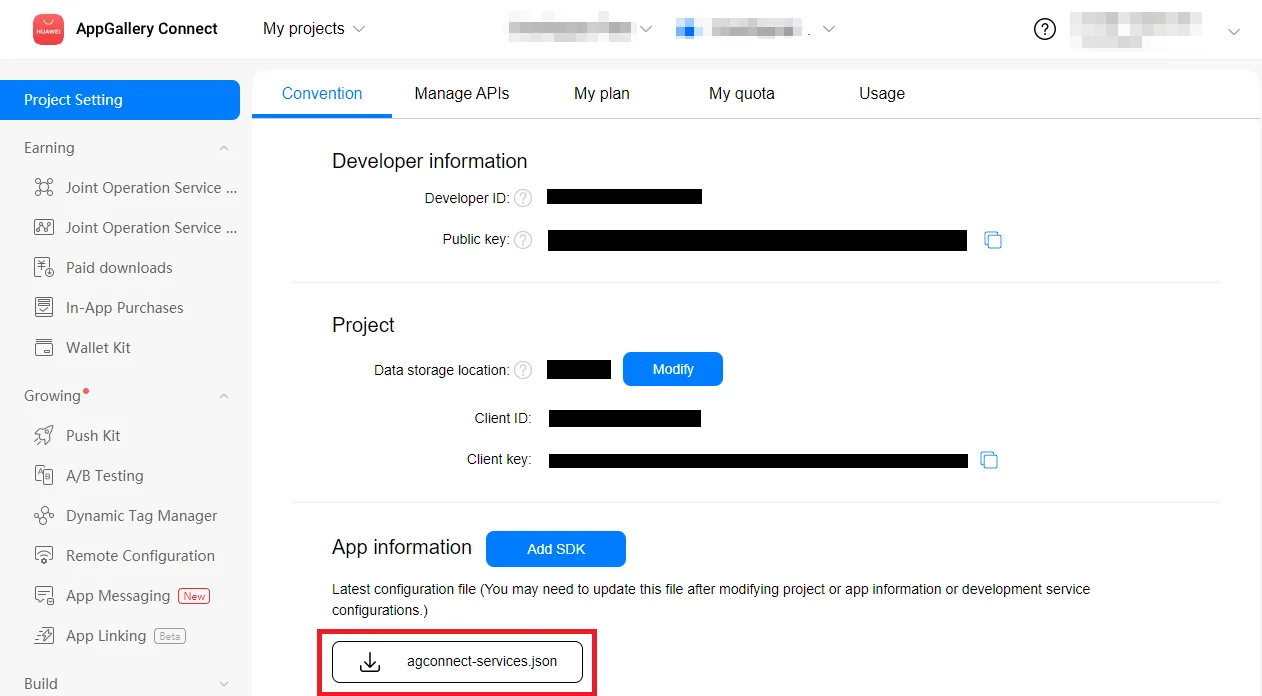
2. กด **agconnect-services.json** ในส่วน App information เพื่อดาวน์โหลดไฟล์การกำหนดค่า
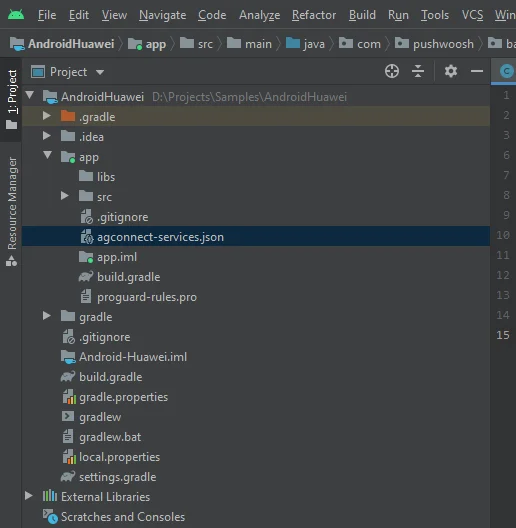
 3. นำไฟล์ที่ดาวน์โหลดไปไว้ในโปรเจกต์ Android Studio ของคุณ (YOUR_PROJECT/app/agconnect-services.json)
 ## สร้าง Signing Certificate Fingerprint
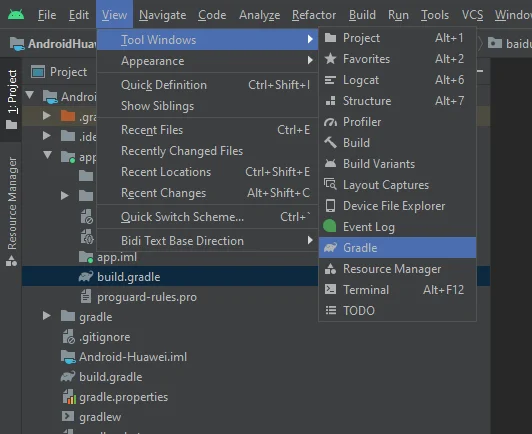
1. ใน Android Studio ไปที่ View > Tool Windows > Gradle
## สร้าง Signing Certificate Fingerprint
1. ใน Android Studio ไปที่ View > Tool Windows > Gradle
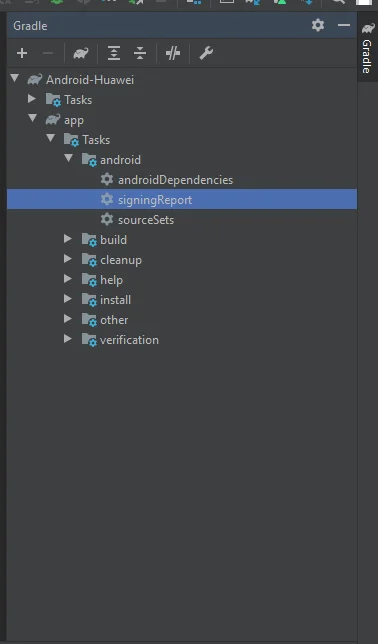
 2. ในหน้าต่างที่เปิดขึ้นมา ไปที่ app > Tasks > android > signingReport
 3. คัดลอก SHA-256 จาก release keystore ของคุณ
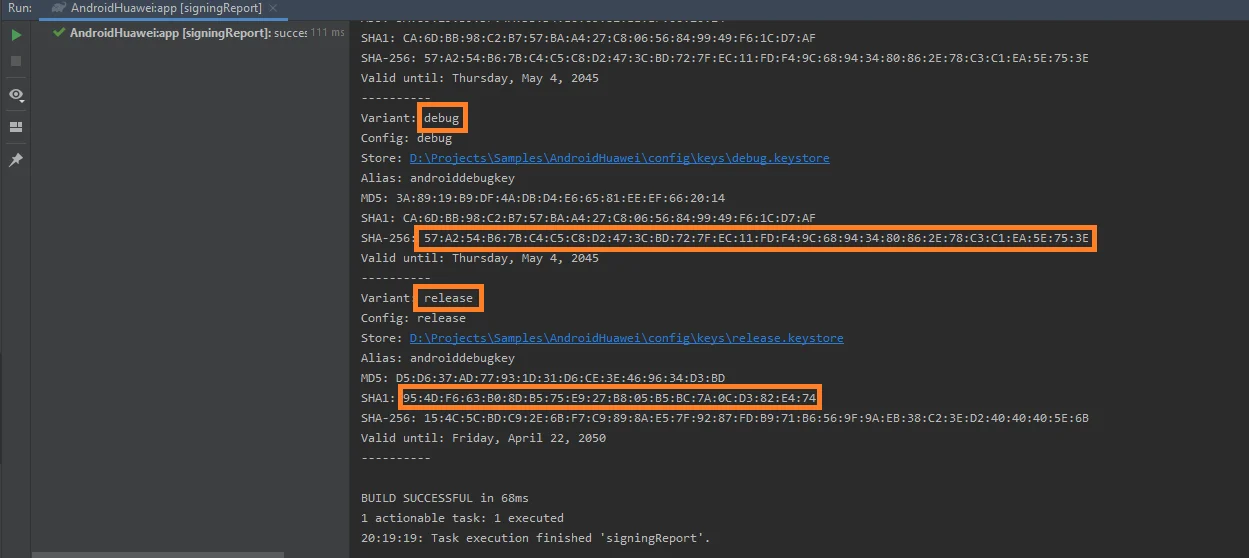 คุณยังสามารถเพิ่ม SHA-256 จาก debug keystore ของคุณเพื่อวัตถุประสงค์ในการทดสอบได้
4. เลือกโปรเจกต์ของคุณใน [AppGallery Connect Project List](https://developer.huawei.com/consumer/en/service/josp/agc/index.html#/myProject)
5. วาง SHA-256 ลงในช่อง **SHA-256 certificate fingerprint**
โปรดทราบว่าการประมวลผล fingerprint อาจใช้เวลาถึง 10 นาที
## กำหนดค่า Huawei ใน Pushwoosh
ทำตามคู่มือเพื่อกำหนดค่าแพลตฟอร์ม Huawei สำหรับโปรเจกต์ Pushwoosh ของคุณ:
## เพิ่ม dependencies
เพิ่ม dependencies ไปยังโปรเจกต์ Android ของคุณ:
* ไปที่ `android/build.gradle`
```
buildscript {
repositories {
google()
maven { url 'https://developer.huawei.com/repo/' }
}
dependencies {
...
classpath 'com.huawei.agconnect:agcp:1.4.1.300'
}
}
allprojects {
repositories {
google()
maven { url 'https://developer.huawei.com/repo/' }
}
}
```
* ไปที่ `android/app/build.gradle`
```
apply plugin: "com.huawei.agconnect"
...
dependencies {
...
implementation 'com.huawei.hms:push:6.1.0.300'
}
```
## เปิดใช้งาน push notifications
เพิ่ม **Pushwoosh.enableHuaweiPushNotification();** ก่อนเรียกใช้ **Pushwoosh.register()** ในโปรเจกต์ React Native ของคุณ
## แบ่งปันความคิดเห็นของคุณกับเรา
ความคิดเห็นของคุณช่วยให้เราสร้างประสบการณ์ที่ดีขึ้น เราจึงยินดีรับฟังหากคุณมีปัญหาใดๆ ในระหว่างขั้นตอนการผสานการทำงาน SDK หากคุณประสบปัญหาใดๆ โปรดอย่าลังเลที่จะแบ่งปันความคิดเห็นของคุณกับเรา [ผ่านแบบฟอร์มนี้](https://docs.google.com/forms/d/e/1FAIpQLSd_0b8jwn-V_JmoPLIxIFYbHACCQhrzidOZV3ELywoQPXRSxw/viewform)
คุณยังสามารถเพิ่ม SHA-256 จาก debug keystore ของคุณเพื่อวัตถุประสงค์ในการทดสอบได้
4. เลือกโปรเจกต์ของคุณใน [AppGallery Connect Project List](https://developer.huawei.com/consumer/en/service/josp/agc/index.html#/myProject)
5. วาง SHA-256 ลงในช่อง **SHA-256 certificate fingerprint**
โปรดทราบว่าการประมวลผล fingerprint อาจใช้เวลาถึง 10 นาที
## กำหนดค่า Huawei ใน Pushwoosh
ทำตามคู่มือเพื่อกำหนดค่าแพลตฟอร์ม Huawei สำหรับโปรเจกต์ Pushwoosh ของคุณ:
## เพิ่ม dependencies
เพิ่ม dependencies ไปยังโปรเจกต์ Android ของคุณ:
* ไปที่ `android/build.gradle`
```
buildscript {
repositories {
google()
maven { url 'https://developer.huawei.com/repo/' }
}
dependencies {
...
classpath 'com.huawei.agconnect:agcp:1.4.1.300'
}
}
allprojects {
repositories {
google()
maven { url 'https://developer.huawei.com/repo/' }
}
}
```
* ไปที่ `android/app/build.gradle`
```
apply plugin: "com.huawei.agconnect"
...
dependencies {
...
implementation 'com.huawei.hms:push:6.1.0.300'
}
```
## เปิดใช้งาน push notifications
เพิ่ม **Pushwoosh.enableHuaweiPushNotification();** ก่อนเรียกใช้ **Pushwoosh.register()** ในโปรเจกต์ React Native ของคุณ
## แบ่งปันความคิดเห็นของคุณกับเรา
ความคิดเห็นของคุณช่วยให้เราสร้างประสบการณ์ที่ดีขึ้น เราจึงยินดีรับฟังหากคุณมีปัญหาใดๆ ในระหว่างขั้นตอนการผสานการทำงาน SDK หากคุณประสบปัญหาใดๆ โปรดอย่าลังเลที่จะแบ่งปันความคิดเห็นของคุณกับเรา [ผ่านแบบฟอร์มนี้](https://docs.google.com/forms/d/e/1FAIpQLSd_0b8jwn-V_JmoPLIxIFYbHACCQhrzidOZV3ELywoQPXRSxw/viewform)