# การตั้งค่า badges สำหรับ Flutter
1. เปิดโปรเจกต์ iOS ของคุณที่อยู่ใน **your_project/ios/Runner.xcworkspace** และสร้าง **NotificationServiceExtension**:
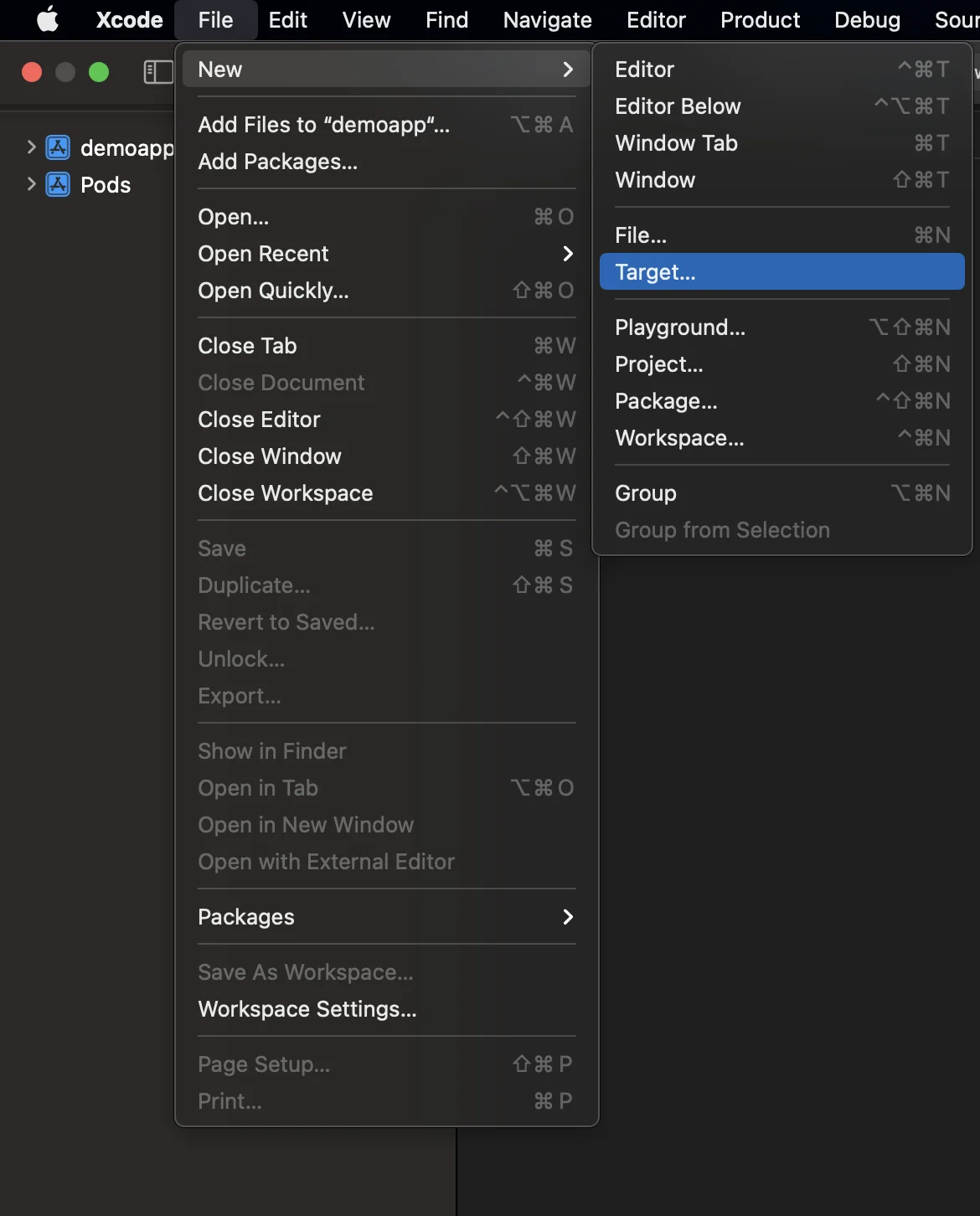
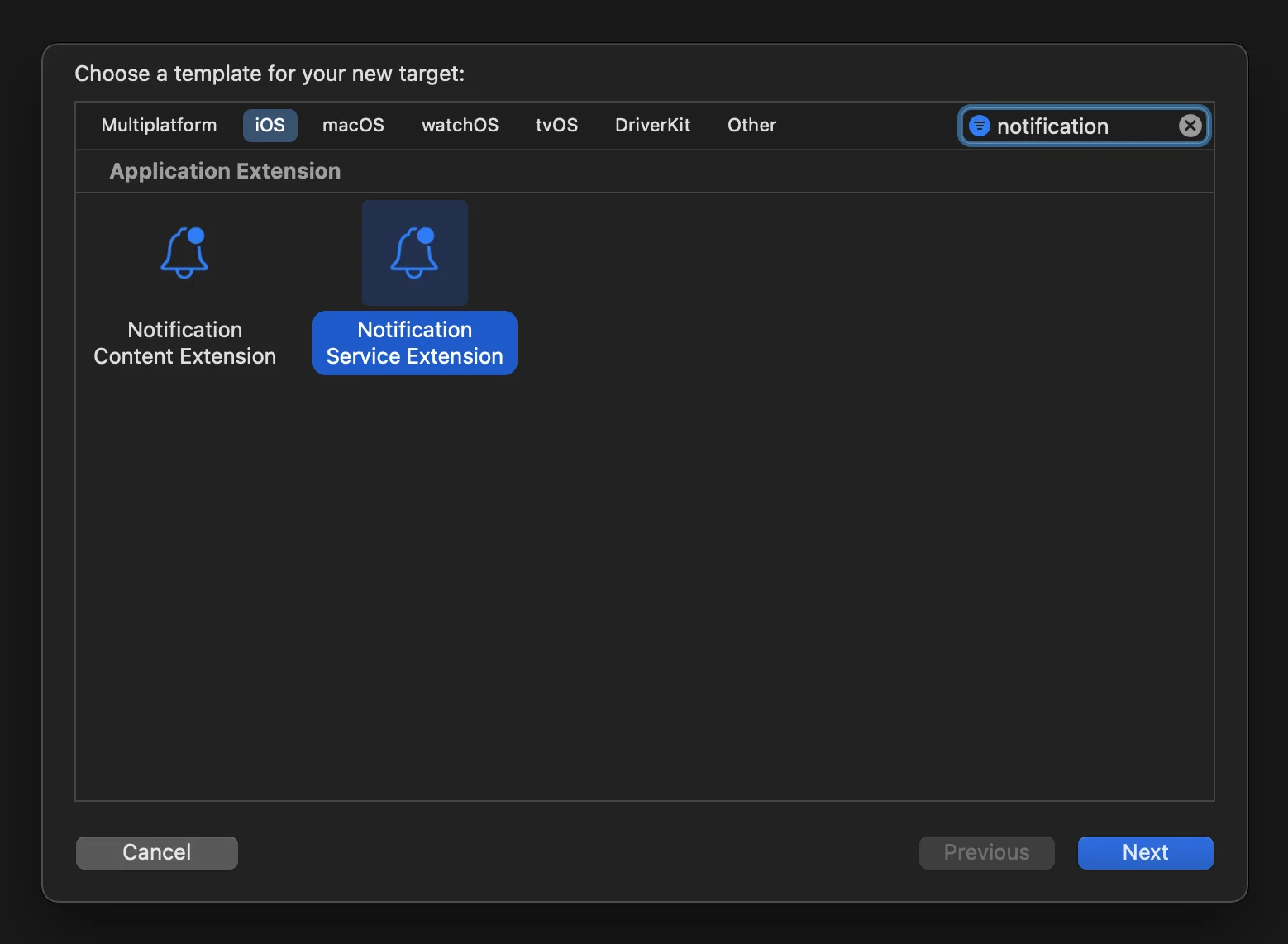 2. เปิด Podfile (ที่อยู่ใน **your_project/ios/Podfile**) และเพิ่ม dependency **PushwooshXCFramework** สำหรับ NotificationServiceExtensionTarget:
```
target ‘NotificationService’ do
pod ‘PushwooshXCFramework’, ‘>=6.5.0’
end
```
3. ติดตั้ง pods ผ่าน Terminal:
```
cd ios && pod install
```
4. ปิดและเปิดโปรเจกต์ Xcode ของคุณอีกครั้ง
5. ตรวจสอบให้แน่ใจว่า **Deployment target ของคุณตรงกับใน Runner target** มิฉะนั้นคุณอาจประสบปัญหาในการ build แอปของคุณ (เช่น หากคุณระบุ iOS 10.0 ใน Runner และ iOS 15.5 ใน NotificationService targets)
6. เพิ่ม **App Groups capability** ไปยังทั้ง Runner และ NotificationService targets และเพิ่ม group ใหม่ที่มีชื่อเดียวกันสำหรับทั้งสอง targets:
2. เปิด Podfile (ที่อยู่ใน **your_project/ios/Podfile**) และเพิ่ม dependency **PushwooshXCFramework** สำหรับ NotificationServiceExtensionTarget:
```
target ‘NotificationService’ do
pod ‘PushwooshXCFramework’, ‘>=6.5.0’
end
```
3. ติดตั้ง pods ผ่าน Terminal:
```
cd ios && pod install
```
4. ปิดและเปิดโปรเจกต์ Xcode ของคุณอีกครั้ง
5. ตรวจสอบให้แน่ใจว่า **Deployment target ของคุณตรงกับใน Runner target** มิฉะนั้นคุณอาจประสบปัญหาในการ build แอปของคุณ (เช่น หากคุณระบุ iOS 10.0 ใน Runner และ iOS 15.5 ใน NotificationService targets)
6. เพิ่ม **App Groups capability** ไปยังทั้ง Runner และ NotificationService targets และเพิ่ม group ใหม่ที่มีชื่อเดียวกันสำหรับทั้งสอง targets:
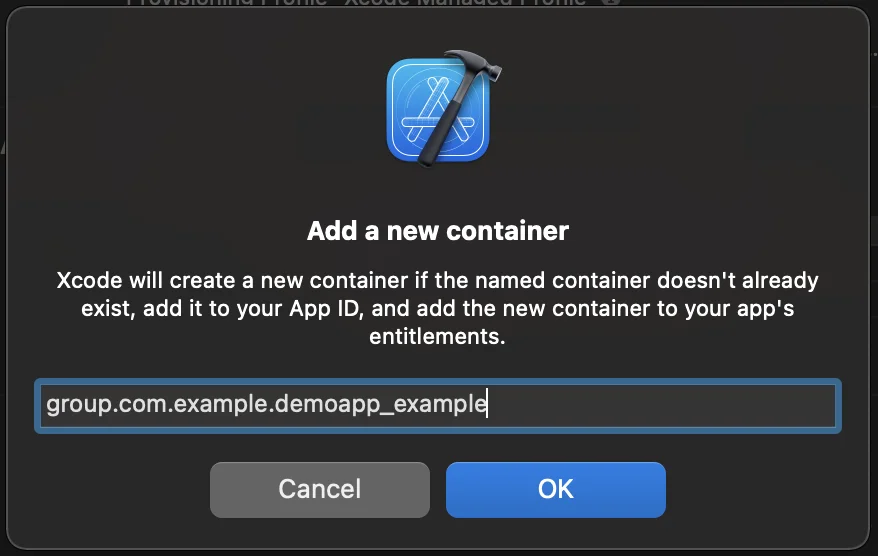
 7. เพิ่มแฟล็ก **PW_APP_GROUPS_NAME** info.plist ไปยังทั้ง Runner และ NotificationService targets โดยมีชื่อ group เป็นค่าสตริง:
 8. ไปที่ **NotificationService.m** และแทนที่โค้ดด้วยโค้ดต่อไปนี้:
```objective-c
#import “NotificationService.h”
#import <Pushwoosh/PWNotificationExtensionManager.h>
@interface NotificationService ()
@property (nonatomic, strong) void (^contentHandler)(UNNotificationContent *contentToDeliver);
@property (nonatomic, strong) UNMutableNotificationContent *bestAttemptContent;
@end
@implementation NotificationService
- (void)didReceiveNotificationRequest:(UNNotificationRequest *)request withContentHandler:(void (^)(UNNotificationContent * _Nonnull))contentHandler {
self.contentHandler = contentHandler;
self.bestAttemptContent = [request.content mutableCopy];
[[PWNotificationExtensionManager sharedManager] handleNotificationRequest:request contentHandler:contentHandler];
}
- (void)serviceExtensionTimeWillExpire {
// Called just before the extension will be terminated by the system.
// Use this as an opportunity to deliver your “best attempt” at modified content, otherwise the original push payload will be used.
self.contentHandler(self.bestAttemptContent);
}
@end
```
## แบ่งปันความคิดเห็นของคุณกับเรา
ความคิดเห็นของคุณช่วยให้เราสร้างประสบการณ์ที่ดีขึ้น เราจึงยินดีรับฟังหากคุณมีปัญหาใดๆ ในระหว่างขั้นตอนการผสานรวม SDK หากคุณประสบปัญหาใดๆ โปรดอย่าลังเลที่จะแบ่งปันความคิดของคุณกับเรา [ผ่านแบบฟอร์มนี้](https://docs.google.com/forms/d/e/1FAIpQLSd\_0b8jwn-V\_JmoPLIxIFYbHACCQhrzidOZV3ELywoQPXRSxw/viewform)
8. ไปที่ **NotificationService.m** และแทนที่โค้ดด้วยโค้ดต่อไปนี้:
```objective-c
#import “NotificationService.h”
#import <Pushwoosh/PWNotificationExtensionManager.h>
@interface NotificationService ()
@property (nonatomic, strong) void (^contentHandler)(UNNotificationContent *contentToDeliver);
@property (nonatomic, strong) UNMutableNotificationContent *bestAttemptContent;
@end
@implementation NotificationService
- (void)didReceiveNotificationRequest:(UNNotificationRequest *)request withContentHandler:(void (^)(UNNotificationContent * _Nonnull))contentHandler {
self.contentHandler = contentHandler;
self.bestAttemptContent = [request.content mutableCopy];
[[PWNotificationExtensionManager sharedManager] handleNotificationRequest:request contentHandler:contentHandler];
}
- (void)serviceExtensionTimeWillExpire {
// Called just before the extension will be terminated by the system.
// Use this as an opportunity to deliver your “best attempt” at modified content, otherwise the original push payload will be used.
self.contentHandler(self.bestAttemptContent);
}
@end
```
## แบ่งปันความคิดเห็นของคุณกับเรา
ความคิดเห็นของคุณช่วยให้เราสร้างประสบการณ์ที่ดีขึ้น เราจึงยินดีรับฟังหากคุณมีปัญหาใดๆ ในระหว่างขั้นตอนการผสานรวม SDK หากคุณประสบปัญหาใดๆ โปรดอย่าลังเลที่จะแบ่งปันความคิดของคุณกับเรา [ผ่านแบบฟอร์มนี้](https://docs.google.com/forms/d/e/1FAIpQLSd\_0b8jwn-V\_JmoPLIxIFYbHACCQhrzidOZV3ELywoQPXRSxw/viewform)