# การตั้งค่า Badges สำหรับ Cordova
เนื่องจากปลั๊กอิน Cordova ไม่มีเฮดเดอร์ PWNotificationExtensionManager คุณจึงต้องทำขั้นตอนเพิ่มเติมหลายอย่างเพื่อใช้งาน Badges สำหรับโปรเจกต์ Cordova ของคุณ
ในการตั้งค่า Badges ให้ทำตามขั้นตอนต่อไปนี้:
1. สร้าง Notification Service Extension
2. เพิ่ม Pushwoosh framework
3. เพิ่มความสามารถ App Groups
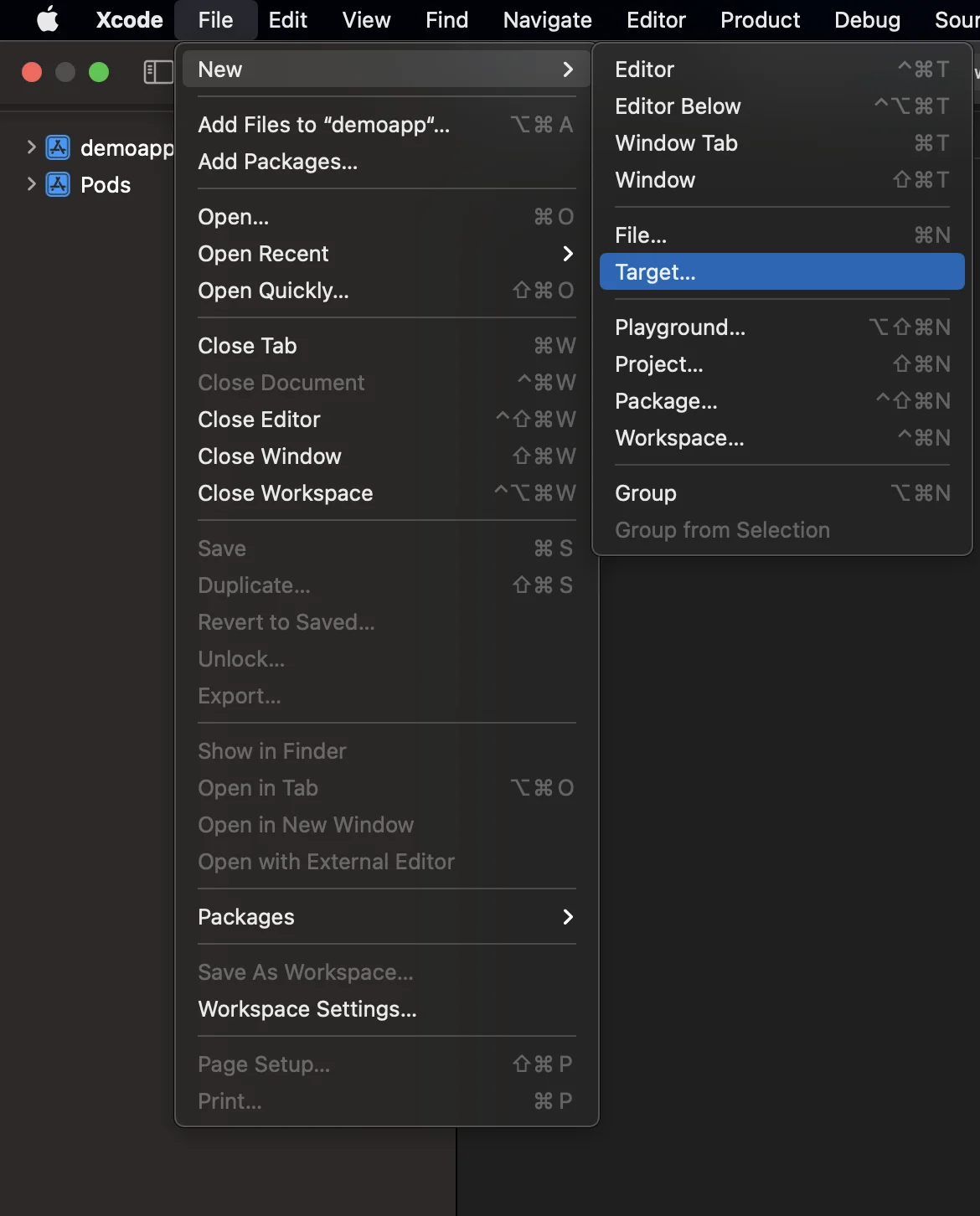
### 1. เพิ่ม Notification Service Extension (File -> New -> Target...)
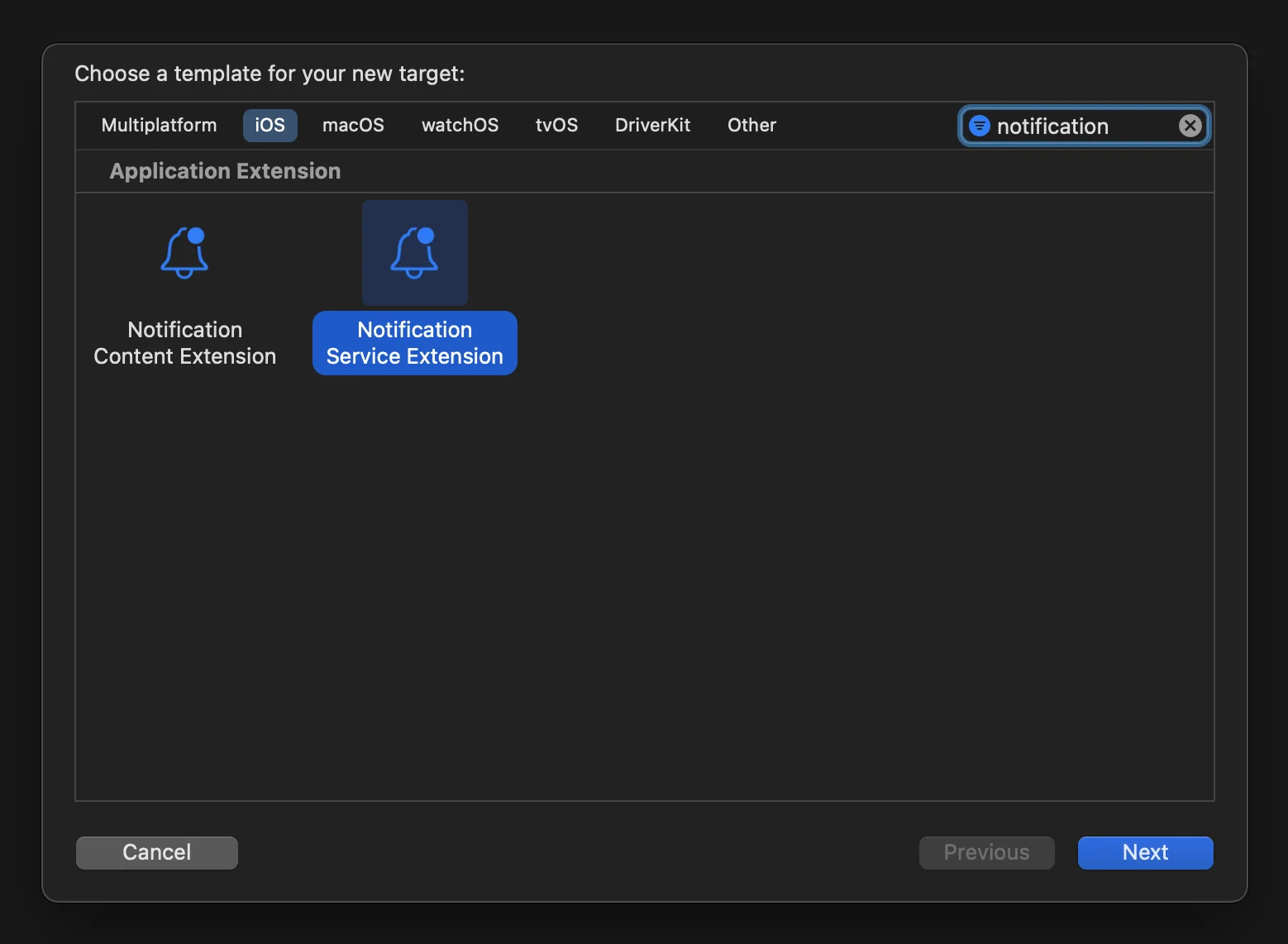
 ### 2. เลือก "Notification Service Extension"
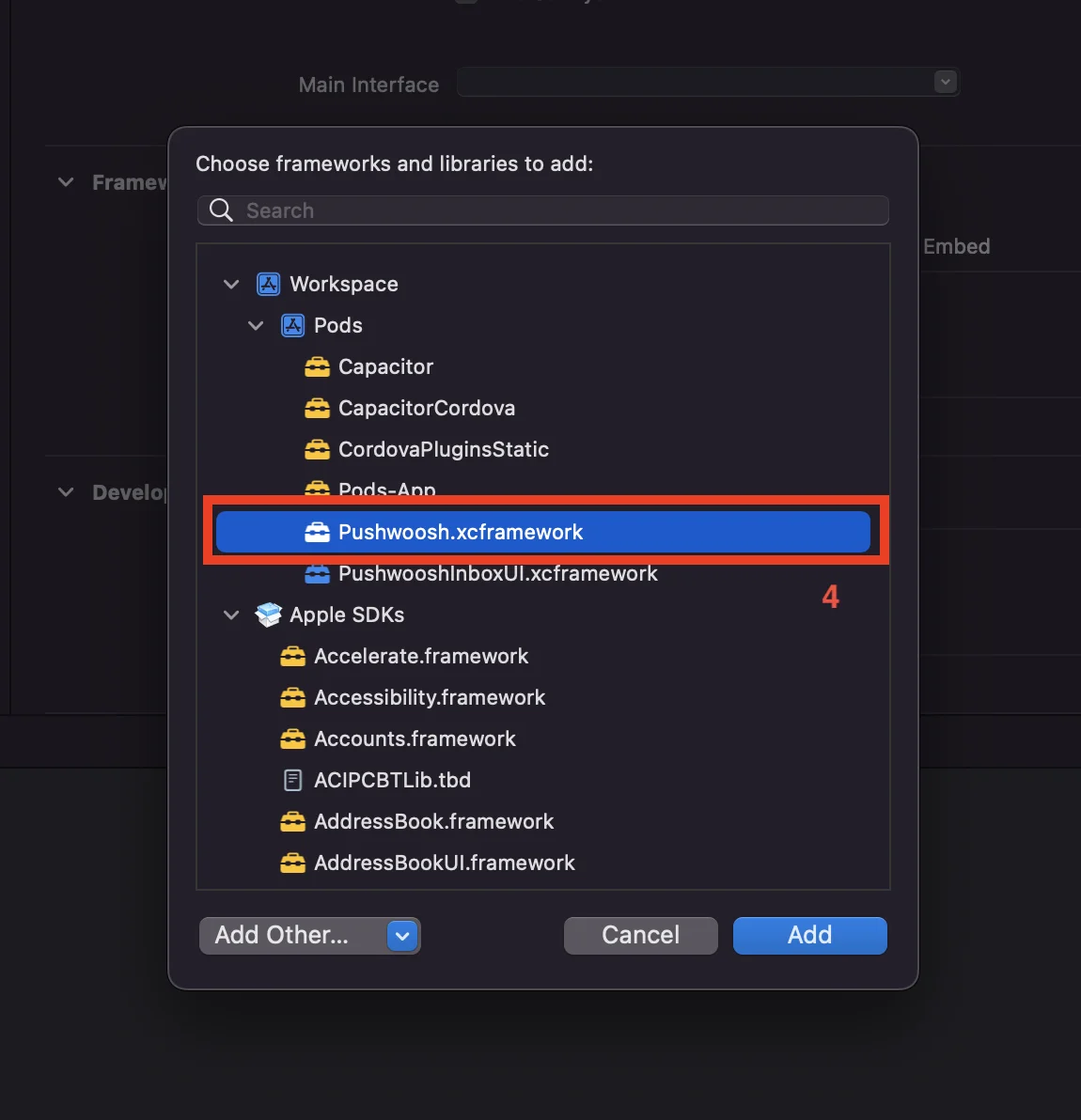
 ### 3. เพิ่ม Pushwoosh.xcframework ไปยัง target ของ NotificationService extension ดังนี้:
1. เลือก target ของ **NotificationService** extension
2. ไปที่แท็บ "**General**"
3. ค้นหา '**Framework and Libraries**' และกดปุ่ม '**+**'
4. เลือก **Pushwoosh.xcframework**
### 3. เพิ่ม Pushwoosh.xcframework ไปยัง target ของ NotificationService extension ดังนี้:
1. เลือก target ของ **NotificationService** extension
2. ไปที่แท็บ "**General**"
3. ค้นหา '**Framework and Libraries**' และกดปุ่ม '**+**'
4. เลือก **Pushwoosh.xcframework**
 ### 4. อัปเดตโค้ด Notification Service Extension ดังนี้:
```
#import "NotificationService.h"
#import "PWNotificationExtensionManager.h"
@interface NotificationService ()
@property (nonatomic, strong) void (^contentHandler)(UNNotificationContent *contentToDeliver);
@property (nonatomic, strong) UNMutableNotificationContent *bestAttemptContent;
@end
@implementation NotificationService
- (void)didReceiveNotificationRequest:(UNNotificationRequest *)request withContentHandler:(void (^)(UNNotificationContent * _Nonnull))contentHandler {
self.contentHandler = contentHandler;
self.bestAttemptContent = [request.content mutableCopy];
[[PWNotificationExtensionManager sharedManager] handleNotificationRequest:request contentHandler:contentHandler];
}
- (void)serviceExtensionTimeWillExpire {
// Called just before the extension will be terminated by the system.
// Use this as an opportunity to deliver your "best attempt" at modified content, otherwise the original push payload will be used.
self.contentHandler(self.bestAttemptContent);
}
@end
```
### 5. เพิ่ม "App Groups Capability" สำหรับแต่ละ target ของแอปพลิเคชันของคุณ
### 4. อัปเดตโค้ด Notification Service Extension ดังนี้:
```
#import "NotificationService.h"
#import "PWNotificationExtensionManager.h"
@interface NotificationService ()
@property (nonatomic, strong) void (^contentHandler)(UNNotificationContent *contentToDeliver);
@property (nonatomic, strong) UNMutableNotificationContent *bestAttemptContent;
@end
@implementation NotificationService
- (void)didReceiveNotificationRequest:(UNNotificationRequest *)request withContentHandler:(void (^)(UNNotificationContent * _Nonnull))contentHandler {
self.contentHandler = contentHandler;
self.bestAttemptContent = [request.content mutableCopy];
[[PWNotificationExtensionManager sharedManager] handleNotificationRequest:request contentHandler:contentHandler];
}
- (void)serviceExtensionTimeWillExpire {
// Called just before the extension will be terminated by the system.
// Use this as an opportunity to deliver your "best attempt" at modified content, otherwise the original push payload will be used.
self.contentHandler(self.bestAttemptContent);
}
@end
```
### 5. เพิ่ม "App Groups Capability" สำหรับแต่ละ target ของแอปพลิเคชันของคุณ
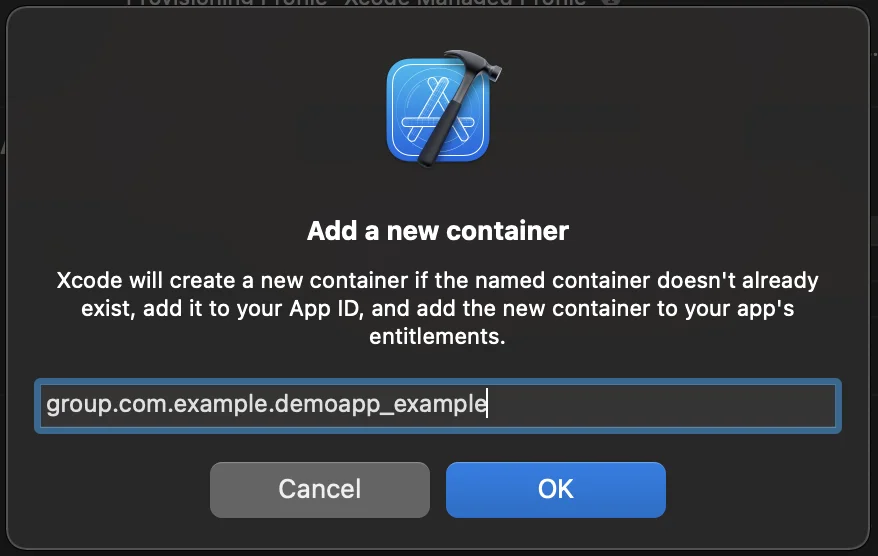

 ### 6. เพิ่ม App Groups ID ไปยัง info.plist ของคุณสำหรับแต่ละ target ของแอปพลิเคชันของคุณ
```
PW_APP_GROUPS_NAME
group.com.example.demoapp_example
```
## แบ่งปันความคิดเห็นของคุณกับเรา
ความคิดเห็นของคุณช่วยให้เราสร้างประสบการณ์ที่ดีขึ้น เราจึงยินดีรับฟังหากคุณมีปัญหาใดๆ ในระหว่างขั้นตอนการผสาน SDK หากคุณประสบปัญหาใดๆ โปรดอย่าลังเลที่จะแบ่งปันความคิดของคุณกับเรา [ผ่านแบบฟอร์มนี้](https://docs.google.com/forms/d/e/1FAIpQLSd\_0b8jwn-V\_JmoPLIxIFYbHACCQhrzidOZV3ELywoQPXRSxw/viewform)
### 6. เพิ่ม App Groups ID ไปยัง info.plist ของคุณสำหรับแต่ละ target ของแอปพลิเคชันของคุณ
```
PW_APP_GROUPS_NAME
group.com.example.demoapp_example
```
## แบ่งปันความคิดเห็นของคุณกับเรา
ความคิดเห็นของคุณช่วยให้เราสร้างประสบการณ์ที่ดีขึ้น เราจึงยินดีรับฟังหากคุณมีปัญหาใดๆ ในระหว่างขั้นตอนการผสาน SDK หากคุณประสบปัญหาใดๆ โปรดอย่าลังเลที่จะแบ่งปันความคิดของคุณกับเรา [ผ่านแบบฟอร์มนี้](https://docs.google.com/forms/d/e/1FAIpQLSd\_0b8jwn-V\_JmoPLIxIFYbHACCQhrzidOZV3ELywoQPXRSxw/viewform)