# การผสานรวมกับ Huawei
## ข้อกำหนด
* [บัญชี Pushwoosh](https://go.pushwoosh.com/)
* [บัญชีนักพัฒนา Huawei](https://developer.huawei.com)
* [โปรเจกต์ Huawei AppGallery Connect](https://developer.huawei.com/consumer/en/service/josp/agc/index.html#/myProject)
* [แอปพลิเคชัน Pushwoosh](https://go.pushwoosh.com/cp/applications) ที่[กำหนดค่าแพลตฟอร์ม Huawei แล้ว](/th/developer/first-steps/connect-messaging-services/huawei-configuration/) พร้อมรหัสในรูปแบบ **XXXXX-XXXXX**
* [Android Studio](https://developer.android.com/studio)
* อุปกรณ์ Huawei ที่ติดตั้ง Huawei Mobile Services
## การผสานรวม
### รับไฟล์ agconnect-services.json
**1.** ไปที่ [AppGallery Connect -> Projects List](https://developer.huawei.com/consumer/en/service/josp/agc/index.html#/myProject) และเลือกโปรเจกต์ที่ต้องการกำหนดค่า
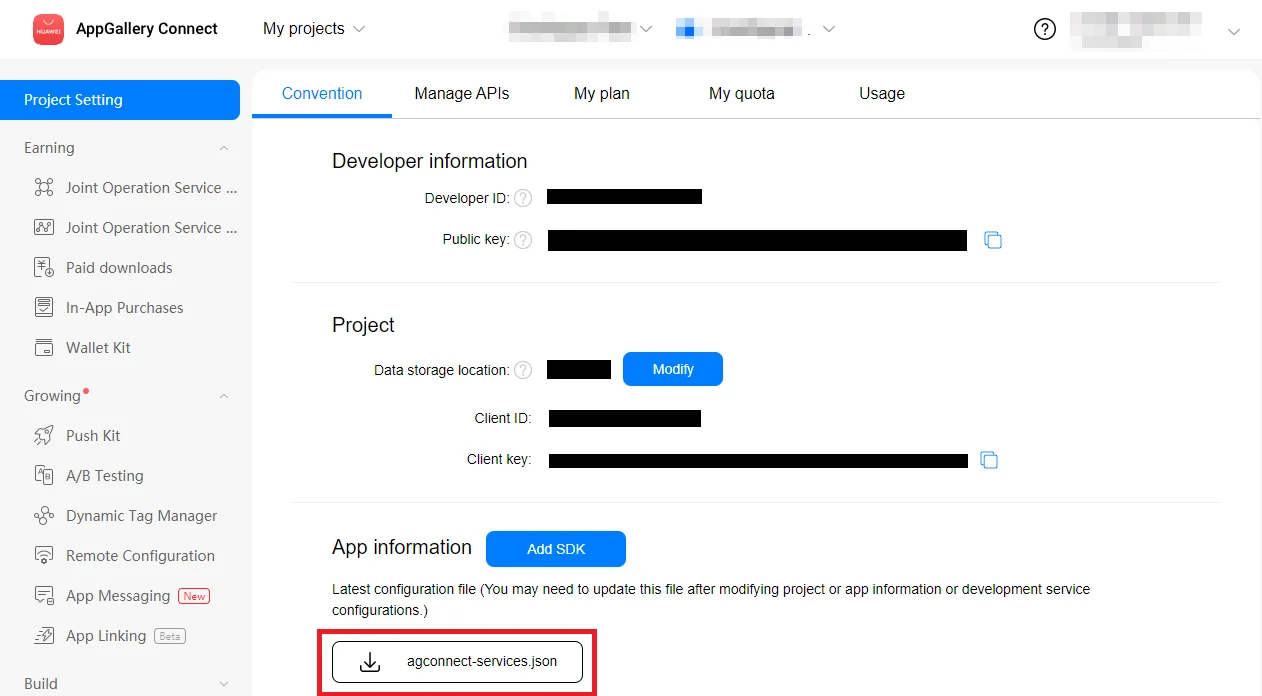
**2.** กดที่ **agconnect-services.json** ในส่วน App information เพื่อดาวน์โหลดไฟล์กำหนดค่า
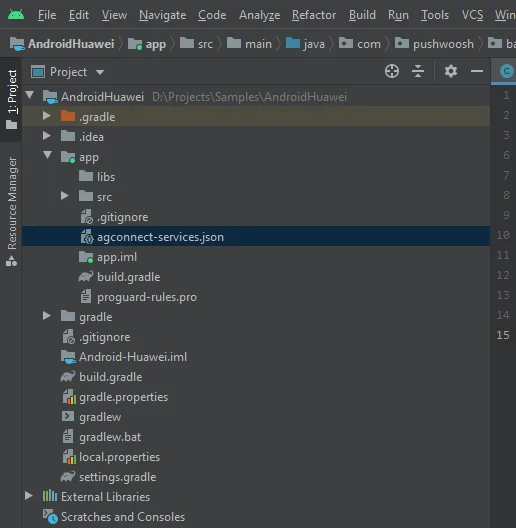
 **3.** นำไฟล์ที่ดาวน์โหลดไปไว้ในโปรเจกต์ Android Studio ของคุณ (YOUR\_PROJECT/app/agconnect-services.json)
 ### สร้าง Signing Certificate Fingerprint
ทำตามขั้นตอนใน [Generating a Signing Certificate Fingerprint](https://developer.huawei.com/consumer/en/doc/development/HMS-Guides/Preparations#h2-1575707383351) เพื่อสร้าง signing certificate fingerprint
### เพิ่มโมดูล `pushwoosh-huawei`
เพิ่มโมดูล `pushwoosh-huawei` ไปยังไฟล์ `build.gradle` ระดับแอปของคุณ:
```
implementation 'com.pushwoosh:pushwoosh-huawei:6.+'
```
แทนที่ "+" ด้วยเวอร์ชันปัจจุบันของ Pushwoosh: [https://github.com/Pushwoosh/pushwoosh-android-sdk/releases/latest](https://github.com/Pushwoosh/pushwoosh-android-sdk/releases/latest)
### เพิ่ม Dependencies ของ Huawei
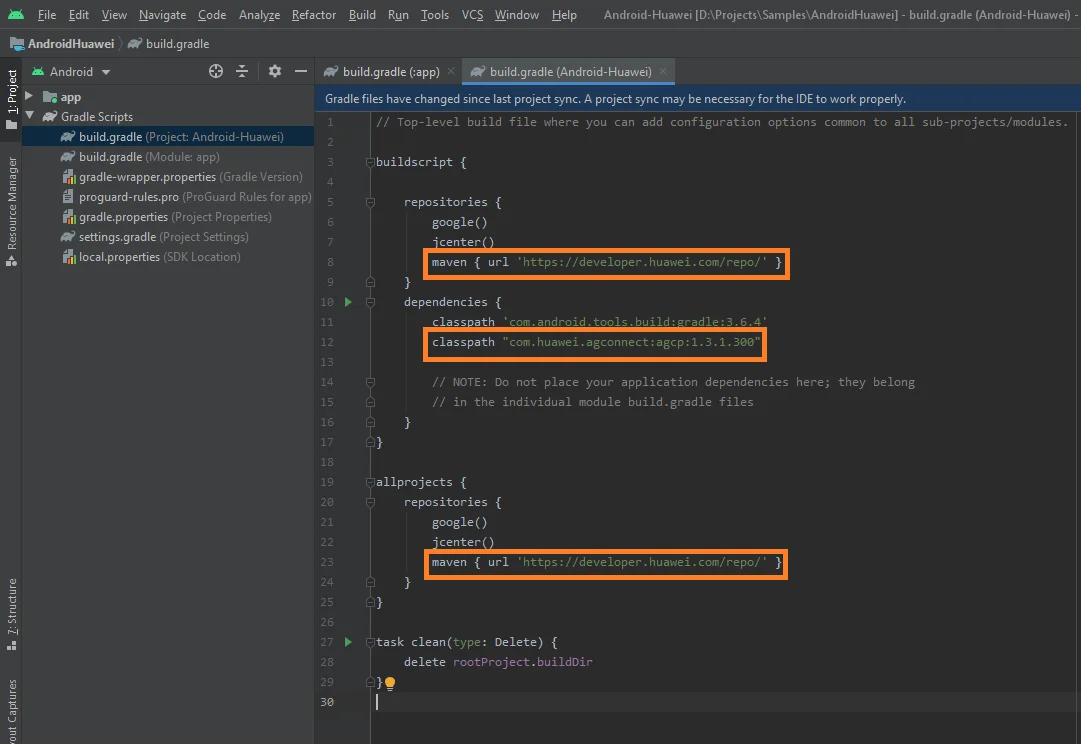
**1.** เพิ่ม `maven {url 'https://developer.huawei.com/repo/'}` ไปยังไฟล์ **`build.gradle` ระดับราก** (Project) ของคุณภายใต้ `buildscript { repositories }` และ `allprojects { repositories }`
**2.** เพิ่ม `classpath 'com.huawei.agconnect:agcp:1.3.1.300'` ภายใต้ `buildscript { dependencies }`
ตรวจสอบให้แน่ใจว่าได้เพิ่มสามบรรทัดต่อไปนี้ลงในไฟล์ `build.gradle` **ระดับราก**ของคุณแล้ว:
### สร้าง Signing Certificate Fingerprint
ทำตามขั้นตอนใน [Generating a Signing Certificate Fingerprint](https://developer.huawei.com/consumer/en/doc/development/HMS-Guides/Preparations#h2-1575707383351) เพื่อสร้าง signing certificate fingerprint
### เพิ่มโมดูล `pushwoosh-huawei`
เพิ่มโมดูล `pushwoosh-huawei` ไปยังไฟล์ `build.gradle` ระดับแอปของคุณ:
```
implementation 'com.pushwoosh:pushwoosh-huawei:6.+'
```
แทนที่ "+" ด้วยเวอร์ชันปัจจุบันของ Pushwoosh: [https://github.com/Pushwoosh/pushwoosh-android-sdk/releases/latest](https://github.com/Pushwoosh/pushwoosh-android-sdk/releases/latest)
### เพิ่ม Dependencies ของ Huawei
**1.** เพิ่ม `maven {url 'https://developer.huawei.com/repo/'}` ไปยังไฟล์ **`build.gradle` ระดับราก** (Project) ของคุณภายใต้ `buildscript { repositories }` และ `allprojects { repositories }`
**2.** เพิ่ม `classpath 'com.huawei.agconnect:agcp:1.3.1.300'` ภายใต้ `buildscript { dependencies }`
ตรวจสอบให้แน่ใจว่าได้เพิ่มสามบรรทัดต่อไปนี้ลงในไฟล์ `build.gradle` **ระดับราก**ของคุณแล้ว:
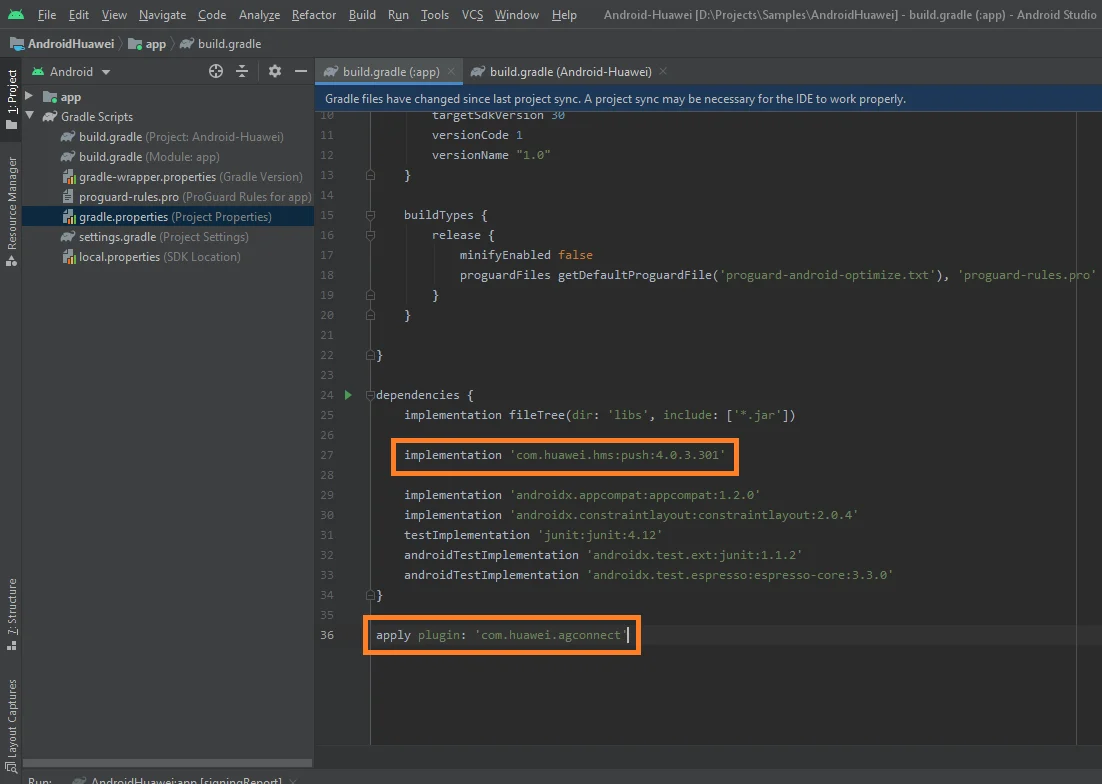
 **3.** เพิ่ม `implementation 'com.huawei.hms:push:6.1.0.300'` ไปยังไฟล์ **`build.gradle` ระดับแอป**ของคุณ (app/build.gradle) ภายใต้ส่วน `dependencies`
**4.** เพิ่ม `apply plugin: 'com.huawei.agconnect'` ที่ด้านล่างสุดของไฟล์ **`build.gradle` ระดับแอป**
ตรวจสอบให้แน่ใจว่ามีสองบรรทัดต่อไปนี้ในไฟล์ **`build.gradle` ระดับแอป**ของคุณ:
**3.** เพิ่ม `implementation 'com.huawei.hms:push:6.1.0.300'` ไปยังไฟล์ **`build.gradle` ระดับแอป**ของคุณ (app/build.gradle) ภายใต้ส่วน `dependencies`
**4.** เพิ่ม `apply plugin: 'com.huawei.agconnect'` ที่ด้านล่างสุดของไฟล์ **`build.gradle` ระดับแอป**
ตรวจสอบให้แน่ใจว่ามีสองบรรทัดต่อไปนี้ในไฟล์ **`build.gradle` ระดับแอป**ของคุณ:
 ### สมัครรับ push notifications
```
Pushwoosh.getInstance().registerForPushNotifications();
```
## แบ่งปันความคิดเห็นของคุณกับเรา
ความคิดเห็นของคุณช่วยให้เราสร้างประสบการณ์ที่ดียิ่งขึ้น เราจึงยินดีรับฟังหากคุณมีปัญหาใดๆ ในระหว่างขั้นตอนการผสานรวม SDK หากคุณประสบปัญหาใดๆ โปรดอย่าลังเลที่จะแบ่งปันความคิดเห็นของคุณกับเรา [ผ่านแบบฟอร์มนี้](https://docs.google.com/forms/d/e/1FAIpQLSd\_0b8jwn-V\_JmoPLIxIFYbHACCQhrzidOZV3ELywoQPXRSxw/viewform)
## ขั้นตอนถัดไป
### สมัครรับ push notifications
```
Pushwoosh.getInstance().registerForPushNotifications();
```
## แบ่งปันความคิดเห็นของคุณกับเรา
ความคิดเห็นของคุณช่วยให้เราสร้างประสบการณ์ที่ดียิ่งขึ้น เราจึงยินดีรับฟังหากคุณมีปัญหาใดๆ ในระหว่างขั้นตอนการผสานรวม SDK หากคุณประสบปัญหาใดๆ โปรดอย่าลังเลที่จะแบ่งปันความคิดเห็นของคุณกับเรา [ผ่านแบบฟอร์มนี้](https://docs.google.com/forms/d/e/1FAIpQLSd\_0b8jwn-V\_JmoPLIxIFYbHACCQhrzidOZV3ELywoQPXRSxw/viewform)
## ขั้นตอนถัดไป