# การกำหนดค่าใบรับรอง VoIP สำหรับ iOS
อัปโหลดใบรับรอง VoIP ของคุณใน Control Panel เพื่อให้ Pushwoosh สามารถส่ง VoIP push notifications ไปยังแอป iOS ของคุณได้ หลังจากที่คุณทำตามขั้นตอนด้านล่างนี้แล้ว คุณสามารถส่งการแจ้งเตือนสายเรียกเข้าและ VoIP events อื่นๆ ผ่าน Pushwoosh ไปยังอุปกรณ์ที่ติดตั้งแอปของคุณได้
## การสร้างใบรับรอง
ทำตามขั้นตอนเดียวกับการสร้างใบรับรอง APNs มาตรฐาน:
1. [สร้างไฟล์คำขอใบรับรอง](/th/developer/first-steps/connect-messaging-services/ios-configuration/ios-platform-configuration/#generating-a-certificate-request-file) ใน Keychain Access
2. สร้างใบรับรองใน Apple Developer Portal ใต้หัวข้อ **Services** ให้เลือก **VoIP Services Certificate** ดู [สร้างใบรับรองบริการ VoIP](https://developer.apple.com/help/account/certificates/create-voip-services-certificates) ใน Apple Help
3. [ส่งออก private key เป็น .p12](/th/developer/first-steps/connect-messaging-services/ios-configuration/ios-platform-configuration/#exporting-the-private-key-p12) จาก Keychain Access
คุณจะต้องใช้ไฟล์ .p12 และรหัสผ่าน private key เมื่อกรอกแบบฟอร์มด้านล่าง
## การกำหนดค่าใบรับรองใน Control Panel
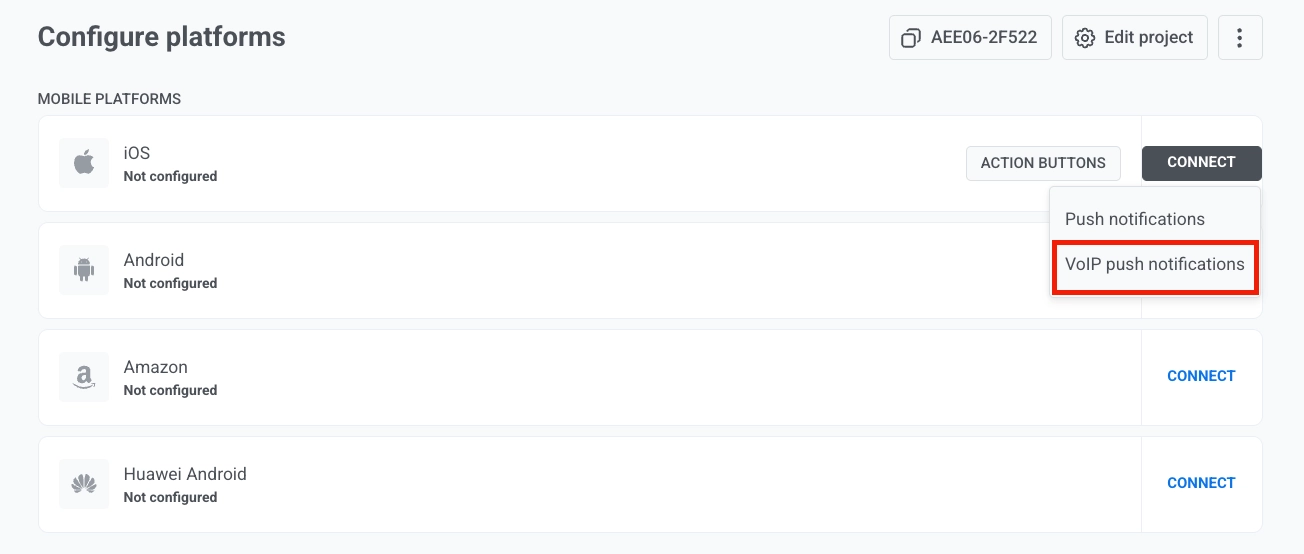
1. ไปที่ **Settings → Configure platforms** ใน Control Panel
2. ค้นหา **iOS** ในรายการ **Mobile platforms** และคลิก **Connect** ที่อยู่ถัดไป
3. ในเมนูดรอปดาวน์ เลือก **VoIP push notifications**
 4. ถัดจาก **VoIP certificate file (.p12)** คลิกไอคอนรูปคลิปหนีบกระดาษและเลือกไฟล์ .p12 ที่คุณส่งออกจาก Keychain Access
5. ในช่อง **Private key password** ให้ป้อนรหัสผ่านที่คุณตั้งไว้เมื่อส่งออกไฟล์ .p12
6. ใต้ **Gateway** เลือก **Sandbox** สำหรับการพัฒนาและทดสอบ หรือ **Production** สำหรับแอปที่ใช้งานจริง
4. ถัดจาก **VoIP certificate file (.p12)** คลิกไอคอนรูปคลิปหนีบกระดาษและเลือกไฟล์ .p12 ที่คุณส่งออกจาก Keychain Access
5. ในช่อง **Private key password** ให้ป้อนรหัสผ่านที่คุณตั้งไว้เมื่อส่งออกไฟล์ .p12
6. ใต้ **Gateway** เลือก **Sandbox** สำหรับการพัฒนาและทดสอบ หรือ **Production** สำหรับแอปที่ใช้งานจริง
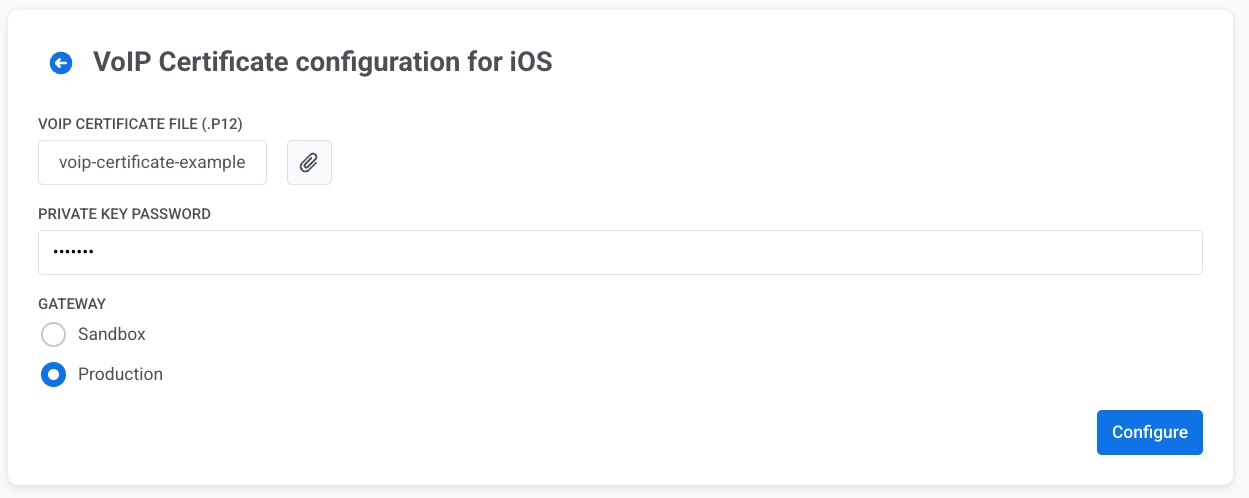 7. คลิก **Configure** เพื่อบันทึกการกำหนดค่า
เมื่อบันทึกการกำหนดค่าแล้ว Pushwoosh จะสามารถส่ง VoIP push notifications ไปยังแอป iOS ของคุณได้ หากต้องการใช้งานการรับและจัดการ VoIP pushes ในแอป ให้ใช้ [Pushwoosh VoIP module](/th/developer/pushwoosh-sdk/ios-sdk/voip-pushes/) และ [Messages API](/th/developer/api-reference/messages-api/) สำหรับการส่ง
7. คลิก **Configure** เพื่อบันทึกการกำหนดค่า
เมื่อบันทึกการกำหนดค่าแล้ว Pushwoosh จะสามารถส่ง VoIP push notifications ไปยังแอป iOS ของคุณได้ หากต้องการใช้งานการรับและจัดการ VoIP pushes ในแอป ให้ใช้ [Pushwoosh VoIP module](/th/developer/pushwoosh-sdk/ios-sdk/voip-pushes/) และ [Messages API](/th/developer/api-reference/messages-api/) สำหรับการส่ง