# Getting started with in-apps
In-app messages appear directly within your app's interface while a user is actively using it. This makes them a less disruptive way to communicate compared to push notifications, emails, or SMS messages.
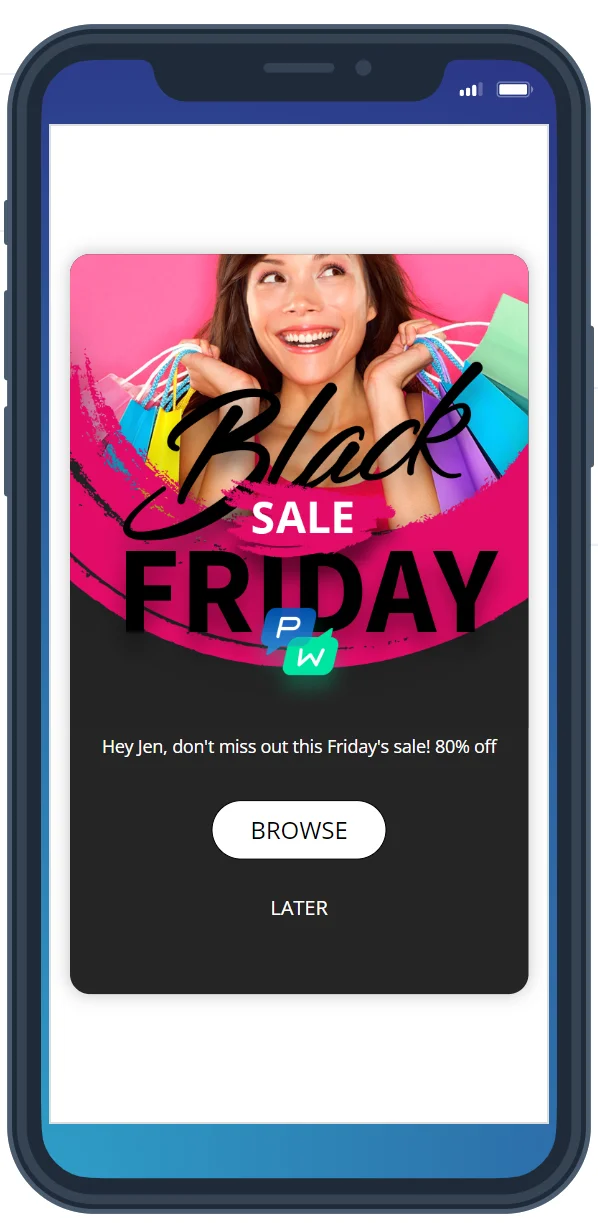
These messages always feature Rich Media elements like images and videos, along with formatted text, interactive links, and CTA buttons. This allows you to deliver visually engaging, action-driven messages that enhance user experience and boost engagement.
## What can you do with in-apps?
- **Onboard new users**: guide users through app features with welcome messages and tutorials. [Learn more](/product/how-to-guides/lifecycle-marketing-campaigns/how-to-onboard-users-with-pushwoosh/#2-welcome-in-app)
- **Deliver personalized promotions**: show targeted offers and discounts based on user behavior. [Learn more](/product/how-to-guides/how-to-send-a-personalized-message/how-to-send-a-personalized-in-app-message/)
- **Send timely reminders**: nudge users about abandoned carts, subscription renewals, or expiring deals.
- **Announce new features and updates**: keep users informed about app improvements and enhancements.
- **Automate messaging**: use **Pushwoosh Customer Journey** to trigger in-app messages based on user behavior and engagement. [Learn more](/product/customer-journey/journey-elements/#in-app)
## Prerequisites for sending in-app messages
Before you can send in-app messages, you must complete the following steps:
1. **Configure your project platform**
Ensure your project platform is configured in Pushwoosh. [Learn more](/product/first-steps/start-with-your-project/configure-platforms/)
2. **Integrate the Pushwoosh SDK**
Add the Pushwoosh SDK to your app for in-app messaging functionality. [Learn more](/developer/pushwoosh-sdk/pushwoosh-sdk-overview/)
3. **Start subscribing users**
[Learn more](/product/first-steps/start-with-your-project/subscribe-users)
## Create and customize in-app messages
- **In-app builder**: Design in-app messages using the built-in editor.
- **Upload existing templates**: Incorporate pre-designed templates by uploading them as ZIP files.
- **Use pre-built in-app templates**: Streamline your workflow with ready-to-use templates.
### Choose the right in-app message format
Pushwoosh supports different in-app message formats to match your campaign goals:
- **Full-screen in-apps**: best for onboarding, paywalls, and promotions. [Learn more](/product/content/in-apps/create-rich-media-in-the-built-in-editor/#configure-how-the-in-app-looks-on-device)
- **Part-screen in-apps**: compact overlay messages shown as center cards or at the top or bottom of the screen. Often used for opt-in prompts, announcements, and promo content. [Learn more](/product/content/in-apps/create-rich-media-in-the-built-in-editor/#configure-how-the-in-app-looks-on-device)
- **Modal Rich Media in-apps**: A part-screen message that appears in the center, top, or bottom of the screen without covering the entire app. It can disappear automatically or be closed with a swipe—ideal for subtle offers, updates, or key actions.
### Personalize in-app messages for better engagement
Personalization enhances user experience by dynamically inserting user-specific details.
## Send in-app messages to your audience
Once your in-app template is ready, you can send in-app messages to your users.
## Enhance in-app messages with JavaScript
Pushwoosh offers **JavaScript-enabled in-apps**, allowing advanced dynamic and interactive content.
- Track user interactions in real time.
- Update user tags dynamically.
- Create highly personalized experiences.
## Track and analyze in-app message performance
Pushwoosh provides detailed analytics to help you measure in-app engagement and optimize your messaging strategy.
- **Per in-app statistics**
Track impressions, user interactions, and audience insights.
- **Campaign-level insights**
Analyze in-app performance in Customer Journeys alongside push notifications, emails, and SMS interactions.
- **Monitor custom rich media performance**
Track button clicks, form submissions, and other interactive elements in your custom in-app messages.
 ## What can you do with in-apps?
- **Onboard new users**: guide users through app features with welcome messages and tutorials. [Learn more](/product/how-to-guides/lifecycle-marketing-campaigns/how-to-onboard-users-with-pushwoosh/#2-welcome-in-app)
- **Deliver personalized promotions**: show targeted offers and discounts based on user behavior. [Learn more](/product/how-to-guides/how-to-send-a-personalized-message/how-to-send-a-personalized-in-app-message/)
- **Send timely reminders**: nudge users about abandoned carts, subscription renewals, or expiring deals.
- **Announce new features and updates**: keep users informed about app improvements and enhancements.
- **Automate messaging**: use **Pushwoosh Customer Journey** to trigger in-app messages based on user behavior and engagement. [Learn more](/product/customer-journey/journey-elements/#in-app)
## Prerequisites for sending in-app messages
Before you can send in-app messages, you must complete the following steps:
## What can you do with in-apps?
- **Onboard new users**: guide users through app features with welcome messages and tutorials. [Learn more](/product/how-to-guides/lifecycle-marketing-campaigns/how-to-onboard-users-with-pushwoosh/#2-welcome-in-app)
- **Deliver personalized promotions**: show targeted offers and discounts based on user behavior. [Learn more](/product/how-to-guides/how-to-send-a-personalized-message/how-to-send-a-personalized-in-app-message/)
- **Send timely reminders**: nudge users about abandoned carts, subscription renewals, or expiring deals.
- **Announce new features and updates**: keep users informed about app improvements and enhancements.
- **Automate messaging**: use **Pushwoosh Customer Journey** to trigger in-app messages based on user behavior and engagement. [Learn more](/product/customer-journey/journey-elements/#in-app)
## Prerequisites for sending in-app messages
Before you can send in-app messages, you must complete the following steps: