# RevenueCat integration
[RevenueCat](https://www.revenuecat.com/) is a subscription management platform that simplifies in-app purchases and subscriptions for businesses across iOS, Android, and web platforms. It provides comprehensive tools for building, analyzing, and enhancing in-app subscriptions.
By integrating Pushwoosh with [RevenueCat](https://www.revenuecat.com/), businesses can send targeted push notifications, in-app prompts, and other messages to users based on subscription events sent by RevenueCat to Pushwoosh. This can encourage users to renew subscriptions, upgrade to higher tiers, or take advantage of special offers, enhancing engagement, maximizing revenue, and simplifying subscription management.
## Use cases
#### Personalized communication
Businesses can use the integration to personalize communication with clients. For example, an e-learning platform can boost user engagement by sending personalized push notifications when detecting a subscription plan change. These notifications offer transition guidance, recommend relevant courses based on the new plan, and provide exclusive benefits aligned with the update.
#### Billing issue notifications
When a user's subscription faces a billing issue, businesses can use the RevenueCat integration with Pushwoosh to promptly send targeted notifications. For instance, a streaming service can notify the user about the billing problem and provide instructions for resolving it, such as updating payment information.
#### Non-renewing purchase notifications
Businesses can leverage the RevenueCat integration with Pushwoosh to turn one-time purchases into lasting customer relationships. For example, a meal delivery service can send a post-purchase push notification thanking the customer and recommending relevant products or promoting a subscription plan for continued convenience. This will foster customer loyalty, drive upsell opportunities, and potentially convert one-time buyers into subscribers.
#### Tier upgrade promotions
Apps with multiple subscription tiers can use the integration to monitor user subscriptions and send tailored upgrade prompts. For instance, a gaming app could use push notifications to underline the benefits of premium levels, like exclusive content or discounts, encouraging users to elevate their subscriptions.
## Events
The integration enables tracking of various events, automatically creating them in Pushwoosh once the first event is sent from RevenueCat. These events include:
| Event | Event Name | Description | Attributes |
|---------------------- |--------------------------- |------------------------------------------------------------------------------------------------------------------------------ |--------------------------------------------------------------------------------------------------------------- |
| Initial purchase | `RC_INITIAL_PURCHASE` | A new subscription has been purchased. |
price
price_in_purchased_currency
currency
|
| Non-renewing purchase | `RC_NON_RENEWING_PURCHASE` | A customer has made a purchase that will not auto-renew. |
price
price_in_purchased_currency
currency
|
| Renewal | `RC_RENEWAL` | An existing subscription has been renewed or a lapsed user has resubscribed. |
price
price_in_purchased_currency
currency
|
| Product change | `RC_PRODUCT_CHANGE` | A subscriber has changed the product of their subscription. | |
| Cancellation | `RC_CANCELLATION` | A subscription or non-renewing purchase has been canceled. | |
| Billing issues | `RC_BILLING_ISSUE` | An issue has occurred while attempting to charge the subscriber. | |
| Subscription alias | `RC_SUBSCRIBER_ALIAS` | Occurs whenever a new `app_user_id` has been registered for an existing subscriber. | |
| Subscription paused | `RC_SUBSCRIPTION_PAUSED` | The subscription has been set to be paused at the end of the period. | |
| Uncancellation | `RC_UNCANCELLATION` | A non-expired canceled subscription has been re-enabled. | |
| Transfer | `RC_TRANSFER` | A transfer of transactions and entitlements was initiated between one App User ID(s) to another. | |
| Subscription extended | `RC_SUBSCRIPTION_EXTENDED` | An existing subscription has been extended (the expiration date of the current subscription period has been pushed forward). | |
| Expiration | `RC_EXPIRATION` | The subscription of a customer expires. |
price
price_in_purchased_currency
currency
expiration_at
purchased_at
|
You can use all these events in your [customer journeys](/product/customer-journey/pushwoosh-journey-overview). Events with the attribute price can be used with [RFM segmentation](/product/audience-data-and-segmentation/segmentation/rfm-segmentation).
## Setting up the integration
### Synchronize User IDs and HWIDs across Pushwoosh and RevenueCat
To sync events between RevenueCat and Pushwoosh to the same user, you need to set the Pushwoosh UserID to match the RevenueCat App User Id. For this, set the appUserID from the RevenueCat SDK in the Pushwoosh SDK. [Learn more about RevenueCat appUserID ](https://www.revenuecat.com/docs/customers/user-ids#provide-app-user-id-on-configuration)
#### For Android
Set the appUserID obtained from RevenueCat SDK in the Pushwoosh SDK by using the `Pushwoosh.getInstance().setUserId(appUserIDFromRC);` method.
#### For iOS
Set the appUserID obtained from RevenueCat SDK in the Pushwoosh SDK by using the `[[Pushwoosh sharedInstance] setUserId: appUserIDFromRC];` method.
### Send RevenueCat events to Pushwoosh
After you've synchronized the User IDs and HWIDs in Pushwoosh and RevenueCat, enable the Pushwoosh integration in your RevenueCat dashboard.
1. Navigate to your project in the RevenueCat dashboard and find the Integrations card in the left menu. Click **+ New** or **Add integration**
2. Select **Webhooks** from the **Integrations** menu
3. Give the integration a straightforward name, such as _Pushwoosh_, for easy identification.
4. Enter the following URL in the **Webhook URL** field:
`https://integration-revenuecat.svc-nue.pushwoosh.com/integration-revenuecat/v1/post-event?pwapp=APP_CODE"`
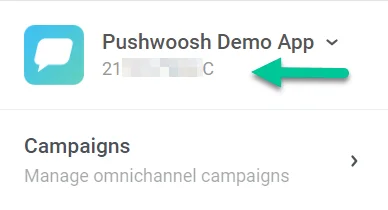
In the URL, replace **APP_CODE** with your existing Pushwoosh application code which is located below the name of your application in your Pushwoosh account.
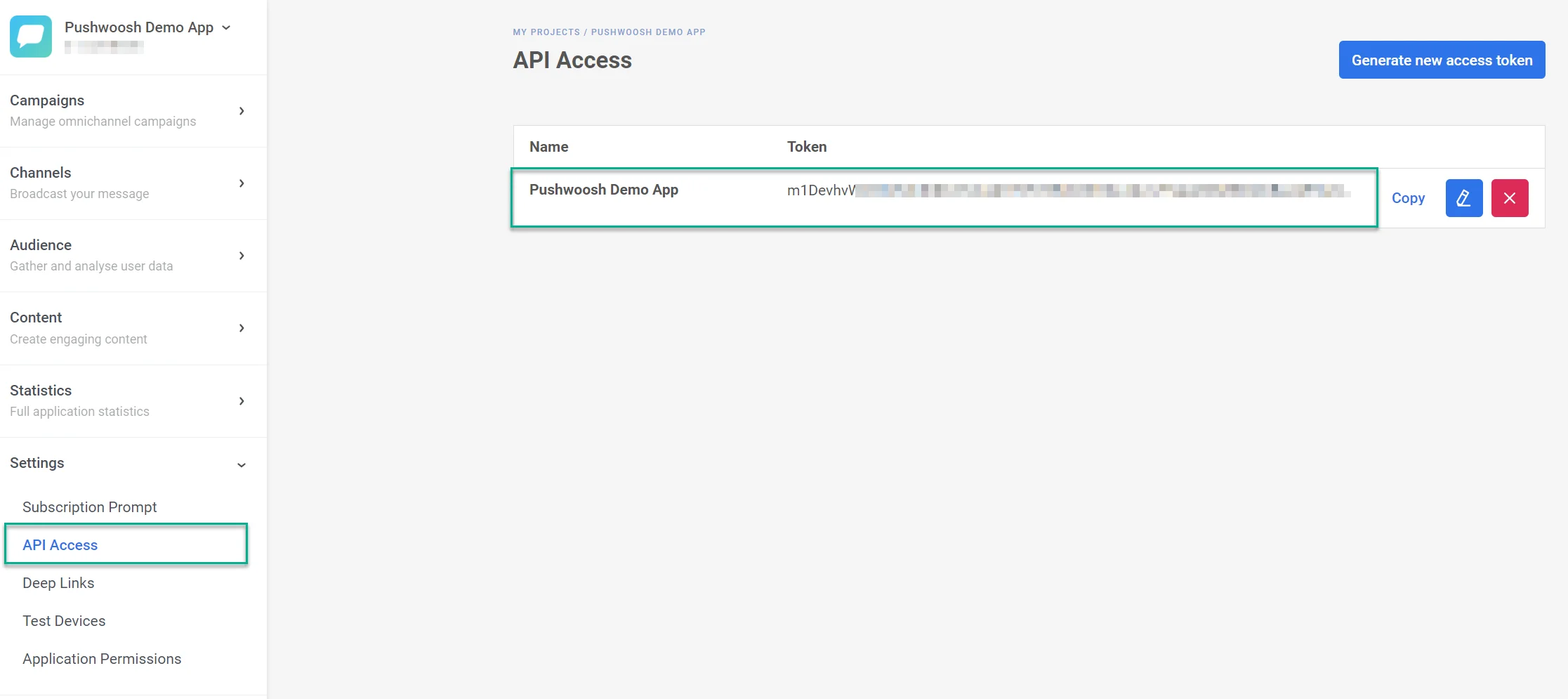
5. In the **Authorization header value** field, insert your **Pushwoosh API token.** You can find this token under **Settings > API Access** in Pushwoosh.
6. Decide if you want to transmit events for production (live) purchases, sandbox (test) purchases, or both.
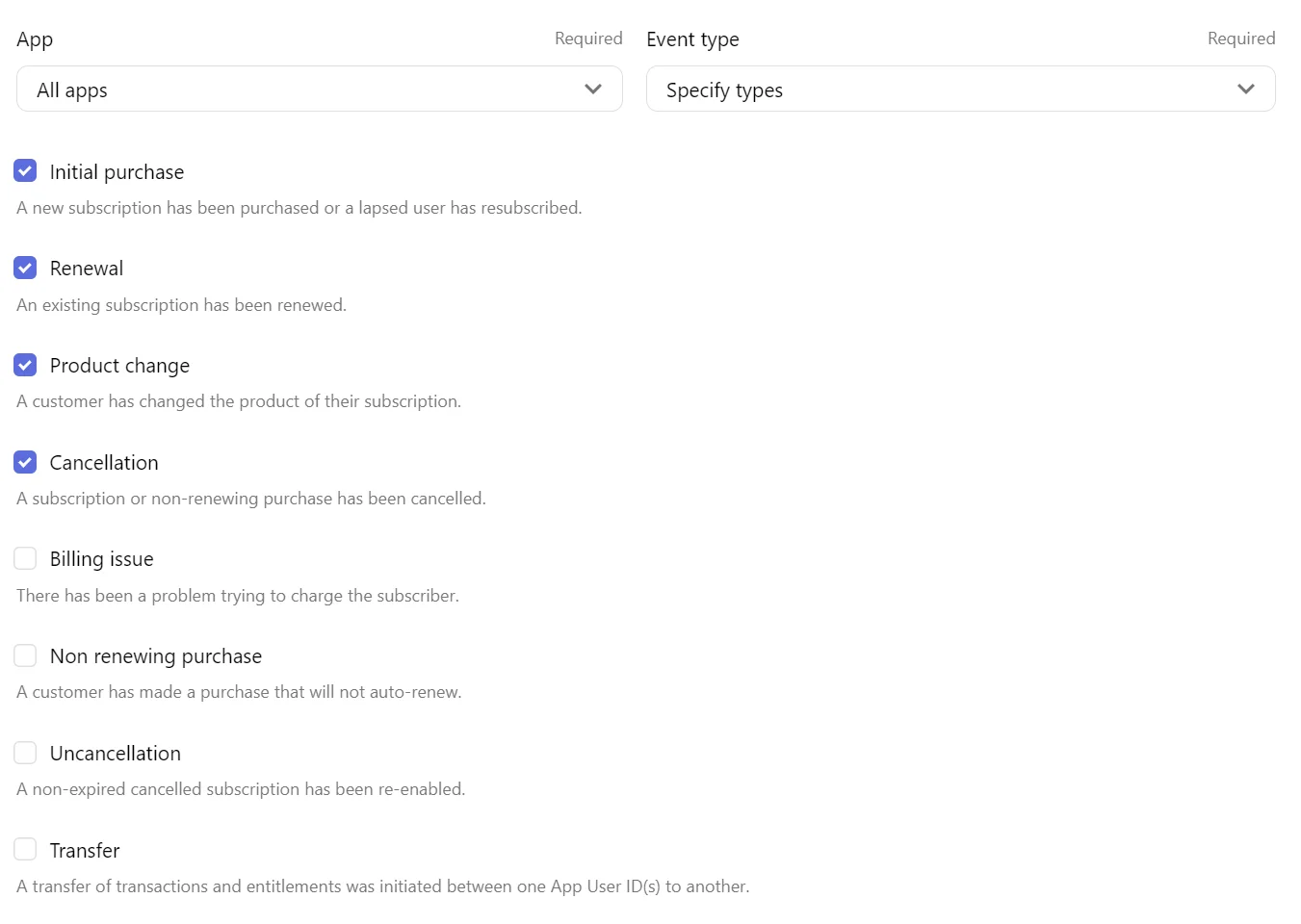
7. In the **App** dropdown, specify whether webhook events should be dispatched for a single app or all apps within the project.
8. In the **Event Type** dropdown, select whether to send all events or specify which events to send to Pushwoosh.
9. Choose to show all events, only succeeded events, or only failed events.
Additionally, you have the option to send a test Webhook.
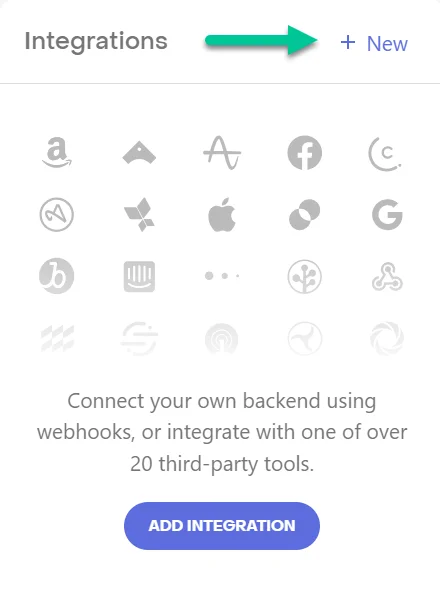 2. Select **Webhooks** from the **Integrations** menu
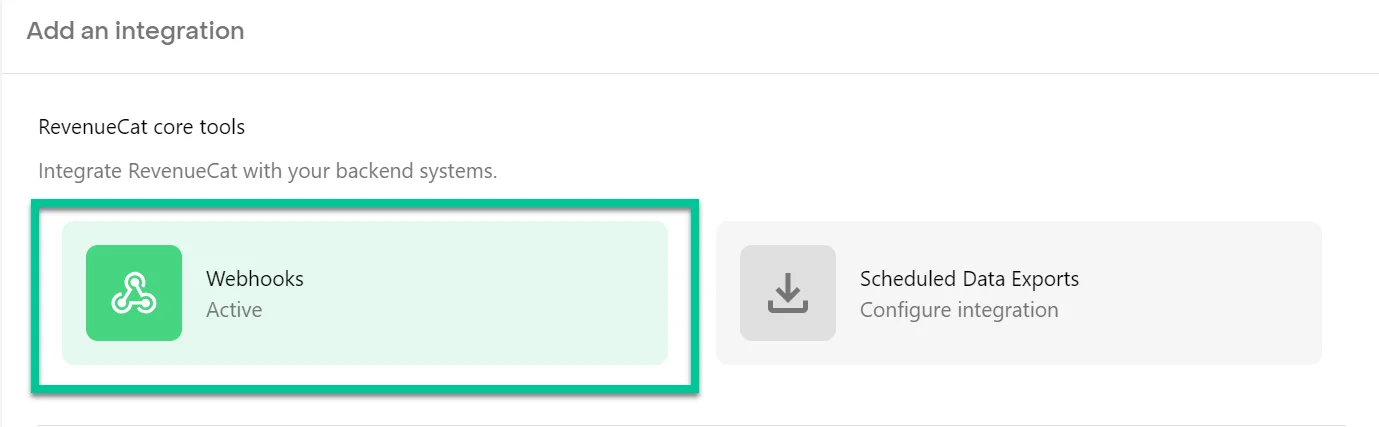 3. Give the integration a straightforward name, such as _Pushwoosh_, for easy identification.
4. Enter the following URL in the **Webhook URL** field:
`https://integration-revenuecat.svc-nue.pushwoosh.com/integration-revenuecat/v1/post-event?pwapp=APP_CODE"`
3. Give the integration a straightforward name, such as _Pushwoosh_, for easy identification.
4. Enter the following URL in the **Webhook URL** field:
`https://integration-revenuecat.svc-nue.pushwoosh.com/integration-revenuecat/v1/post-event?pwapp=APP_CODE"`
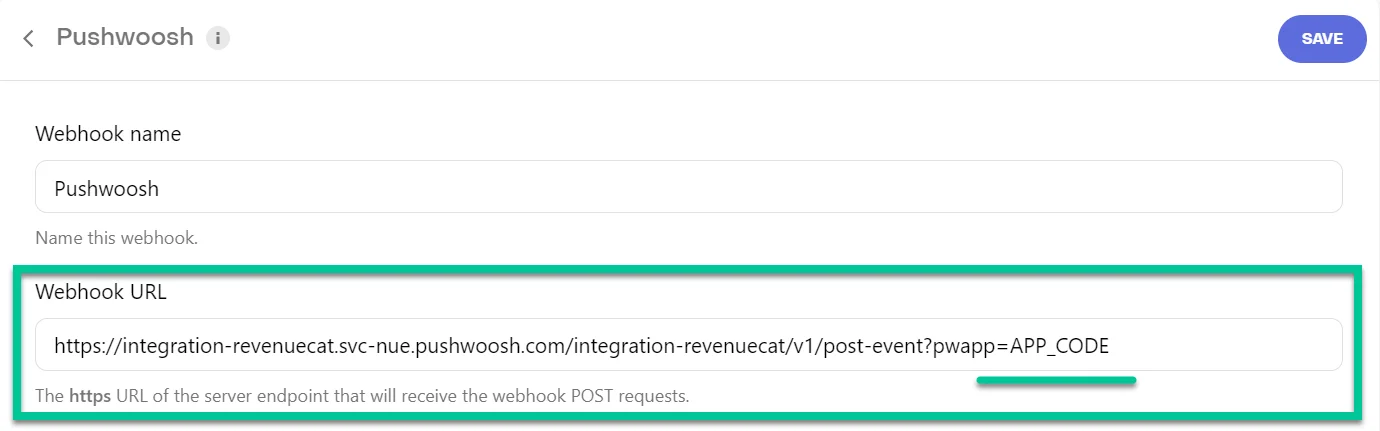 In the URL, replace **APP_CODE** with your existing Pushwoosh application code which is located below the name of your application in your Pushwoosh account.
 5. In the **Authorization header value** field, insert your **Pushwoosh API token.** You can find this token under **Settings > API Access** in Pushwoosh.
 6. Decide if you want to transmit events for production (live) purchases, sandbox (test) purchases, or both.
7. In the **App** dropdown, specify whether webhook events should be dispatched for a single app or all apps within the project.
8. In the **Event Type** dropdown, select whether to send all events or specify which events to send to Pushwoosh.
6. Decide if you want to transmit events for production (live) purchases, sandbox (test) purchases, or both.
7. In the **App** dropdown, specify whether webhook events should be dispatched for a single app or all apps within the project.
8. In the **Event Type** dropdown, select whether to send all events or specify which events to send to Pushwoosh.
 9. Choose to show all events, only succeeded events, or only failed events.
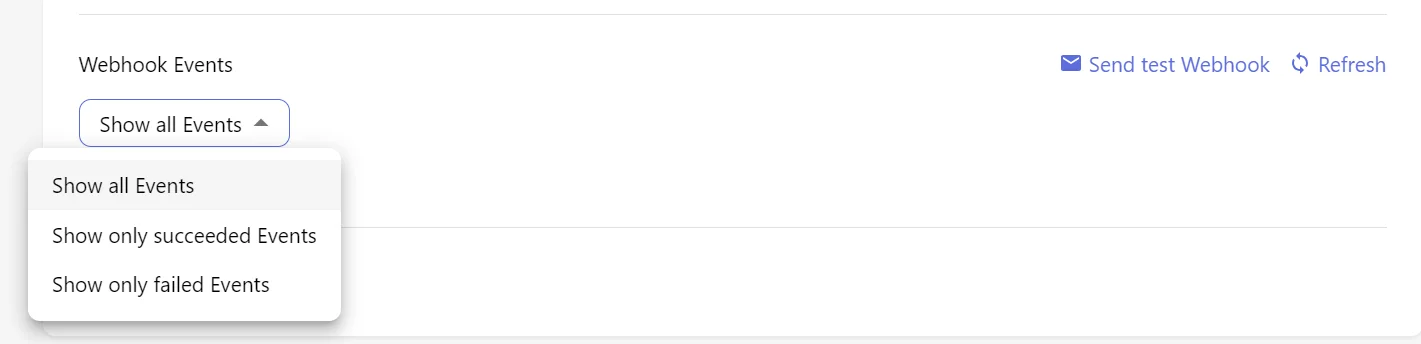 Additionally, you have the option to send a test Webhook.